You are using an out of date browser. It may not display this or other websites correctly.
You should upgrade or use an
alternative browser.
-
-
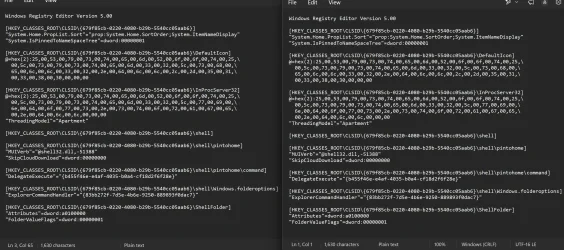
[HKEY_CLASSES_ROOT\CLSID\{679f85cb-0220-4080-b29b-5540cc05aab6}\shell\pintohome\command]...
-
Okay, I think I did what you suggested: I exported HKEY_CLASSES_ROOT\CLSID\{679f85cb-0220-4080-b29b-5540cc05aab6} while logged in as...
-
Plot twist: While I cannot drag/drop a folder to Quick Access and have it appear there, the folder *does* then appear on the jumplist...
-
Back to square one: Did an in-place upgrade, but still cannot pin anything to Quick Access in File Explorer.
Any other ideas, other...
-
Yes, I did these:
I just now backed up all my data files – just in case – and now am going to see if doing an in-place upgrade helps...
-
@dalchina :
My experience regarding the Quick Access issue is parallel to @Antonio Herrera 's experience in Post #5. Here's a summary...
-
I'll tag on here. I have a nice list of folders pinned in the Quick Access area of File Explorer. I just tried to add a new folder...
-
Loading…
-
Loading…
-
Loading…
-
Loading…
-
Loading…