esebm's latest activity
-
esebm replied to the thread Solved Printer problems.OK, I have turned off Wi-Fi on the printer, removed the printer from my PC, reinstalled it, installed the driver, no test page. Sorry...
-
esebm replied to the thread Solved Printer problems.MisterEd: Are you saying my wife's laptop (via Wi-Fi) could print with Wi-Fi on the printer turned off? I did not know that.
-
esebm replied to the thread Solved Printer problems.It looks like it but I'm not really sure, how can I find out? The reason why I have the printer under 192.168.1.7 is because it is on...
-
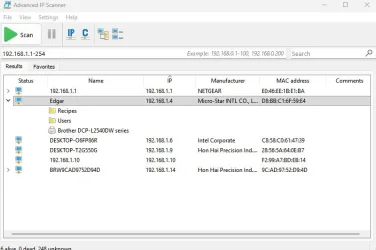
esebm replied to the thread Solved Printer problems.OK, ran the IP scanner, here's the result: The printer is listed under the mobo, it doesn't even show a separate IP address. I don't...
-
-
esebm replied to the thread Solved Printer problems.Just noticed a strange thing: when I ping 192.168.1.7 (printer) the return says Pinging 192.168.1.7 with 32 bytes of data: Reply from...
-
esebm replied to the thread Solved Printer problems.I've ordered new ethernet cables, just in case. This printer drives me nuts and the wife is breathing down my neck, her laptop stopped...
-
esebm replied to the thread Solved Printer problems.Guys, I seem to have been premature with my praise. Just tried to print a page from LibreOffice, did not print, ping did not go through...
-
esebm replied to the thread Solved Printer problems.Just pinged the printer again, it worked and the test page printed. Go figure, I have not the foggiest idea why. Looks like this issue...
-
esebm replied to the thread Solved Printer problems.Have done that numerous times, no luck.
-
esebm replied to the thread Solved Printer problems.Ok, got into router config, printer is listed there with the correct IP address, No ping, destination host is unreachable. And, btw, I...
-
esebm replied to the thread Solved Printer problems.I'll have to figure out how to access the router config page. No clue at this moment, sorry.
-
esebm replied to the thread Solved Printer problems.Glasscuter: I went through your list as far as I could get. 1. Printed the network config. IP 192.168.1.7 2. Opened cmd as admin...
-
esebm replied to the thread Solved Printer problems.Wow, that is quite a list. I will work through it first thing tomorrow morning and report back. Thanks for the effort, it's much...
-
esebm replied to the thread Solved Printer problems.If that is correct, why has the printer worked on all 3 machines for years? The Wi-Fi connection as well as the ethernet connection come...
-
esebm replied to the thread Solved Printer problems.As I have mentioned in post #1, my PC (does not print) is connected via Router/Ethernet, my wife's PC (prints fine) is connected via...