⚠ Keep Safe From Ransomware Outbreak ⚠


blacxarea

Active member
Member
VIP
Local time
9:52 AM
Posts
207
Location
Indonesia
OS
Windows 11
When I write this thread, It's been day 3 I tried to help a friend to save his files because of ransomware attack.
Now his US$ 5,000 machine is just a pile of useless junk because his data from 5 years of work are encrypted.
I contacted about 10 antivirus companies too seek for help, but the new variant of the ransomware that attacked
the machine still doesn't have a decrypter yet. I've managed to safe some data from drive C with Shadow Copy,
but the other drives (D-G) just shortly locked.

Please be more careful, everyone. KEEP SAFE when you're online.
The machine that I tried to save attacked by GUJD variant of STOP DJVU ransomware.
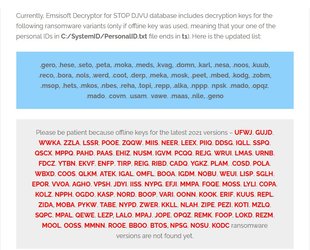
012.jpg
 
Windows Build/Version
All

My Computer My Computer

At a glance

Windows 11AMD Phenom(tm) II X2 555 Processor 3.20 GHzKingston 16GB DDR3NVidia GeForce GTX 650
OS
Windows 11
Computer type
PC/Desktop
Manufacturer/Model
Unbranded
CPU
AMD Phenom(tm) II X2 555 Processor 3.20 GHz
Motherboard
Asus M4A785T-M
Memory
Kingston 16GB DDR3
Graphics Card(s)
NVidia GeForce GTX 650
Sound Card
VIA HD Audio
Monitor(s) Displays
2x LG 20" Display
Screen Resolution
1600 x 900 60MHz
Hard Drives
WD Blue 1TB HDD
ADATA 500GB SSD
Midas Force 500GB SSD
PSU
Enermax 500W
Case
Unbranded
Cooling
Unbranded
Keyboard
Logitech Wired K120
Mouse
Logitech Wired B100
Internet Speed
20MB Download 1,5MB Upload
Browser
Firefox
Antivirus
McAffee, Malwarebytes, Windows Defender
Other Info
Are you sneaking?
Hi folks

@blacxarea

Paranoia again probably from the A/V industry who are pushing their products. For most people on HOME computers Windows Defender is more than adequate - scamming is more likely than virus attacks or even ransomware which is very unlikely to happen on HOME / domestic computers.

If you take regular clean backups -- all you have to do on any Ransomware attack simply is :

1) Shutdown machine IMMEDIATELY -- disconnect power -- hard power off - don't use Windows shutdown or anything like that.

2) disconnect computer immediately from Internet -- if it's on Wifi switch off router / cable box as well.

3) disconnect all peripherals.

4) now insert bootable "bare metal restore" medium - Macrium free is good, and your last known good system image.

5) restore system.

6) boot restored system

7) test if OK -- if ok THEN re-enable Internet from router and re-connect computer to Internet.


Job simply and easily done probably withn 15 - 20 mins at most. -- no need to panic or employ loads of expensive I.T contractors or those hideous help desks at the other side of the planet.

So again "AD NAUSEAM -- in caps intended ALWAYS TAKE REGULAR BACKUPS.

I remember someone calling out of the blue with some type of I suspect "Indian" type accent saying there's something wrong with your windows -- (even though I was - and usally am) on a Linux system at the time !!

So all I said was -- My windows are triple glazed , have excellent security locks and am using those that have been passed and recommended by the Police so I think you must have the wrong number !!!!!.

Cheers
jimbo
 
Last edited:

My Computer My Computer

At a glance

Windows XP,11 Linux Fedora Rawhide pre-releas...2 X Intel i7
OS
Windows XP,11 Linux Fedora Rawhide pre-release 45
Computer type
PC/Desktop
CPU
2 X Intel i7
Screen Resolution
4KUHD X 2
What just happened to my friend's PC now makes me more careful and doing those backup regularly.
In case some unknown file trying to lock my data, I will always have a safe backup to restore.
 

My Computer My Computer

At a glance

Windows 11AMD Phenom(tm) II X2 555 Processor 3.20 GHzKingston 16GB DDR3NVidia GeForce GTX 650
OS
Windows 11
Computer type
PC/Desktop
Manufacturer/Model
Unbranded
CPU
AMD Phenom(tm) II X2 555 Processor 3.20 GHz
Motherboard
Asus M4A785T-M
Memory
Kingston 16GB DDR3
Graphics Card(s)
NVidia GeForce GTX 650
Sound Card
VIA HD Audio
Monitor(s) Displays
2x LG 20" Display
Screen Resolution
1600 x 900 60MHz
Hard Drives
WD Blue 1TB HDD
ADATA 500GB SSD
Midas Force 500GB SSD
PSU
Enermax 500W
Case
Unbranded
Cooling
Unbranded
Keyboard
Logitech Wired K120
Mouse
Logitech Wired B100
Internet Speed
20MB Download 1,5MB Upload
Browser
Firefox
Antivirus
McAffee, Malwarebytes, Windows Defender
Other Info
Are you sneaking?
What just happened to my friend's PC now makes me more careful and doing those backup regularly.
In case some unknown file trying to lock my data, I will always have a safe backup to restore.
Hi there
always better safe than sorry -- can't help with friend s computer but I really can't understand how that much research (5 years) wasn't backed up somewhere !!!!.

Anyway glad you are going to have backups available -- these days often user data is more valuable than the hardware !!! - just be aware of scams, don't give out too much info on social media sites, watch out for fake websites, email especially with attachments from unknown sources and obvious scams like "Tax refunds etc" or "get rich quick" stuff and if you use torrents always download the actual file e.g mp4 / mkv/mp3 etc - never use the .rar, .zip or compressed files as those might well have nasty payloads in them.

Cheers
jimbo
 

My Computer My Computer

At a glance

Windows XP,11 Linux Fedora Rawhide pre-releas...2 X Intel i7
OS
Windows XP,11 Linux Fedora Rawhide pre-release 45
Computer type
PC/Desktop
CPU
2 X Intel i7
Screen Resolution
4KUHD X 2
He never created any backup because he just don't know how. Could be my other homework to teach him, he's quite new about internet and online things, and he was too excited to see FREE DOWNLOAD almost everywhere, and the lack of language (He's not speak English) made him simply CLICK on any download button from websites.
 

My Computer My Computer

At a glance

Windows 11AMD Phenom(tm) II X2 555 Processor 3.20 GHzKingston 16GB DDR3NVidia GeForce GTX 650
OS
Windows 11
Computer type
PC/Desktop
Manufacturer/Model
Unbranded
CPU
AMD Phenom(tm) II X2 555 Processor 3.20 GHz
Motherboard
Asus M4A785T-M
Memory
Kingston 16GB DDR3
Graphics Card(s)
NVidia GeForce GTX 650
Sound Card
VIA HD Audio
Monitor(s) Displays
2x LG 20" Display
Screen Resolution
1600 x 900 60MHz
Hard Drives
WD Blue 1TB HDD
ADATA 500GB SSD
Midas Force 500GB SSD
PSU
Enermax 500W
Case
Unbranded
Cooling
Unbranded
Keyboard
Logitech Wired K120
Mouse
Logitech Wired B100
Internet Speed
20MB Download 1,5MB Upload
Browser
Firefox
Antivirus
McAffee, Malwarebytes, Windows Defender
Other Info
Are you sneaking?
I think a simple solution is to have 2 backups that are normally disconnected, e.g. 2 external drives that are normally powered down or normally unplugged from the computer. Use backup software that can only do one backup at a time, so that the 2 external drives are never connected to the computer at the same time.

The human has become the weakest link since long. The above is a simple way to protect the human from himself, so to speak, although this protection method has of course its own limits.

In the OP, it is unfortunate (and unusual) that all drives C to G were apparently connected to the CPU all the time. In the 5 years, did the friend never felt the urge to consolidate his 5 drives? Just like you would consolidate 5 filing cabinets in the olden days, not even thinking security, just plain organization, so you can find your own data that you created a month ago.
 

My Computer My Computer

At a glance

Windows 10 Pro
OS
Windows 10 Pro
I think a simple solution is to have 2 backups that are normally disconnected, e.g. 2 external drives that are normally powered down or normally unplugged from the computer. Use backup software that can only do one backup at a time, so that the 2 external drives are never connected to the computer at the same time.

The human has become the weakest link since long. The above is a simple way to protect the human from himself, so to speak, although this protection method has of course its own limits.

In the OP, it is unfortunate (and unusual) that all drives C to G were apparently connected to the CPU all the time. In the 5 years, did the friend never felt the urge to consolidate his 5 drives? Just like you would consolidate 5 filing cabinets in the olden days, not even thinking security, just plain organization, so you can find your own data that you created a month ago.
Hard to say about how he managed his computer if it's compared to us in this case. He's an old painter that uses 3 HDDs. 1 as C drive, and the other 2 have partitions where he puts his files. The one labeled OK must be his finished works. And yes, all the hard drives are connected inside the casing for years, they are even covered by thick dust when I tried to remove. Now he bought 1 fresh HDD in much bigger capacity and an external drive like I suggested. The old 2 that are encrypted by the virus are now in possession, waiting for a good decrypter.

And yes I agree, what happened here is simply human error that leads to an unimagined disaster. A lesson to everyone to be much more careful in the future.
 

My Computer My Computer

At a glance

Windows 11AMD Phenom(tm) II X2 555 Processor 3.20 GHzKingston 16GB DDR3NVidia GeForce GTX 650
OS
Windows 11
Computer type
PC/Desktop
Manufacturer/Model
Unbranded
CPU
AMD Phenom(tm) II X2 555 Processor 3.20 GHz
Motherboard
Asus M4A785T-M
Memory
Kingston 16GB DDR3
Graphics Card(s)
NVidia GeForce GTX 650
Sound Card
VIA HD Audio
Monitor(s) Displays
2x LG 20" Display
Screen Resolution
1600 x 900 60MHz
Hard Drives
WD Blue 1TB HDD
ADATA 500GB SSD
Midas Force 500GB SSD
PSU
Enermax 500W
Case
Unbranded
Cooling
Unbranded
Keyboard
Logitech Wired K120
Mouse
Logitech Wired B100
Internet Speed
20MB Download 1,5MB Upload
Browser
Firefox
Antivirus
McAffee, Malwarebytes, Windows Defender
Other Info
Are you sneaking?
I'm not an IT pro.

I have been told stories from people who are IT pros about ransomware attacks on businesses. The malware may reside in the system for a long time before being activated. That means that frequent backups don't guarantee safety.

Most of us may not see ransomware because we aren't being targeted individually.

I still occasionally am taken to bogus sites from legitimate ones I visit. (Some times, they claim to supply a necessary update to Adobe Flash.) Fortunately, MS Edge now allows such windows to be closed without drama. (Originally, that wasn't true. I don't recall whether that idiocy was fixed with Edge Chrome or before.)
 

My Computers My Computers

  • At a glance

    Windows 11 26200.8728Amd Threadripper 7970X128GB (4 X 32) G.Skill DDR5 6400 (RDIMM)Gigabyte RTX 4090 OC
    OS
    Windows 11 26200.8728
    Computer type
    PC/Desktop
    Manufacturer/Model
    homebuilt
    CPU
    Amd Threadripper 7970X
    Motherboard
    Gigabyte TRX50 Aero D Rev. 1.0
    Memory
    128GB (4 X 32) G.Skill DDR5 6400 (RDIMM)
    Graphics Card(s)
    Gigabyte RTX 4090 OC
    Sound Card
    none (USB to speakers), Realtek
    Monitor(s) Displays
    Innocn 32" OLED
    Screen Resolution
    3840 X 2160 @ 60Hz
    Hard Drives
    Crucial T700 2TB M.2 NVME SSD
    WD 4TB Blue SATA SSD
    Seagate 18TB IronWolf Pro
    PSU
    BeQuiet! Straight Power 12 1500W
    Case
    Lian Li 011 Dynamic Evo XL
    Cooling
    SilverStone Technology XE360-TR5, with 3 Phanteks T30 fans
    Keyboard
    Cherry KC 500 MX LP (mechanical)
    Mouse
    Logitech M500s (wired)
    Internet Speed
    2000/250 Mbps (down/up)
    Other Info
    xFinity gateway
  • At a glance

    windows 11 26200.8728Intel I9-13900K64GB G.Skill DDR5-6000Gigabyte RTX 3090 ti
    Operating System
    windows 11 26200.8728
    Computer type
    PC/Desktop
    Manufacturer/Model
    homebuilt
    CPU
    Intel I9-13900K
    Motherboard
    Asus RoG Strix Z690-E
    Memory
    64GB G.Skill DDR5-6000
    Graphics card(s)
    Gigabyte RTX 3090 ti
    Sound Card
    built in Realtek
    Monitor(s) Displays
    Philips 27E1N8900 27" OLED
    Screen Resolution
    3840 X 2160 @60Hz
    Hard Drives
    WDC SN850 1TB
    8TB Seagate Ironwolf
    4TB Seagate Ironwolf
    PSU
    eVGA SuperNOVA 1300 GT
    Case
    Lian Li 011 Dynamic Evo
    Cooling
    Corsair iCUE H150i ELITE CAPELLIX Liquid CPU Cooler
    Keyboard
    Cherry Streaming (wired)
    Mouse
    Logitech M500s (wired)
I'm not an IT pro.

I have been told stories from people who are IT pros about ransomware attacks on businesses. The malware may reside in the system for a long time before being activated. That means that frequent backups don't guarantee safety.

Most of us may not see ransomware because we aren't being targeted individually.

I still occasionally am taken to bogus sites from legitimate ones I visit. (Some times, they claim to supply a necessary update to Adobe Flash.) Fortunately, MS Edge now allows such windows to be closed without drama. (Originally, that wasn't true. I don't recall whether that idiocy was fixed with Edge Chrome or before.)
Hi there

Backing up DATA drives / directories to a Linux type NAS (or QNAP etc) before "staging" to external drive(s) is unlikely to cause Ransomware problems even if the ransomware is released into the system some time in advance before it gets activated - a Windows executable won't run on the NAS !!.

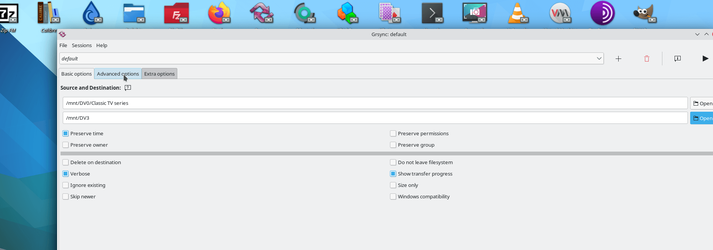
I backup data via rsync (there's a GUI called GRSYNC for those who don't like using the CLI) which is a brilliant job -- just mount the Windows data drive you want to back up on to the NAS -- connect via SAMBA. LAN, USB, or however your NAS accesses Windows .
Note you need to run the RSYNC FROM the NAS so files are retrieved FROM WINDOWS -- don't run on the Windows system !!!.

Perfectly safe --- note here we are just talking about DATA backups -- for the OS system (Windows) use your usual backup -- e.g Macrium Free or whatever to image the system and ensure that you use just 1 disk / partition - better a whole disk if you can do it - only for the OS. Then if necessary this can be clean re-formatted and Windows re-installed if one is worried about "Long Ransomware" !!.

For this tool to work perfectly though you will need to install the openssh-server on Windows --available in add optional features and of course SAMBA on the NAS. Required as you are RECEIVING filers from WINDOWS and running the program ON THE NAS.

Then offline scan the Windows data drives with Windows defender to make sure there's no nasty payloads lurking in your data disks. Windows defender is as good as anything else (or even better than most these days) . This method to those that have NAS type systems should keep your data and OS ransomware free.

grsync -- there's a whole slew of options !!

Screenshot_20210718_090739.png

Cheers
jimbo
 

My Computer My Computer

At a glance

Windows XP,11 Linux Fedora Rawhide pre-releas...2 X Intel i7
OS
Windows XP,11 Linux Fedora Rawhide pre-release 45
Computer type
PC/Desktop
CPU
2 X Intel i7
Screen Resolution
4KUHD X 2
Hi there

Backing up DATA drives / directories to a Linux type NAS (or QNAP etc) before "staging" to external drive(s) is unlikely to cause Ransomware problems even if the ransomware is released into the system some time in advance before it gets activated - a Windows executable won't run on the NAS !!.

I backup data via rsync (there's a GUI called GRSYNC for those who don't like using the CLI) which is a brilliant job -- just mount the Windows data drive you want to back up on to the NAS -- connect via SAMBA. LAN, USB, or however your NAS accesses Windows .
Note you need to run the RSYNC FROM the NAS so files are retrieved FROM WINDOWS -- don't run on the Windows system !!!.

Perfectly safe --- note here we are just talking about DATA backups -- for the OS system (Windows) use your usual backup -- e.g Macrium Free or whatever to image the system and ensure that you use just 1 disk / partition - better a whole disk if you can do it - only for the OS. Then if necessary this can be clean re-formatted and Windows re-installed if one is worried about "Long Ransomware" !!.

For this tool to work perfectly though you will need to install the openssh-server on Windows --available in add optional features and of course SAMBA on the NAS. Required as you are RECEIVING filers from WINDOWS and running the program ON THE NAS.

Then offline scan the Windows data drives with Windows defender to make sure there's no nasty payloads lurking in your data disks. Windows defender is as good as anything else (or even better than most these days) . This method to those that have NAS type systems should keep your data and OS ransomware free.

grsync -- there's a whole slew of options !!

View attachment 3398

Cheers
jimbo
Thank you for this. Really appreciate it..
 

My Computer My Computer

At a glance

Windows 11AMD Phenom(tm) II X2 555 Processor 3.20 GHzKingston 16GB DDR3NVidia GeForce GTX 650
OS
Windows 11
Computer type
PC/Desktop
Manufacturer/Model
Unbranded
CPU
AMD Phenom(tm) II X2 555 Processor 3.20 GHz
Motherboard
Asus M4A785T-M
Memory
Kingston 16GB DDR3
Graphics Card(s)
NVidia GeForce GTX 650
Sound Card
VIA HD Audio
Monitor(s) Displays
2x LG 20" Display
Screen Resolution
1600 x 900 60MHz
Hard Drives
WD Blue 1TB HDD
ADATA 500GB SSD
Midas Force 500GB SSD
PSU
Enermax 500W
Case
Unbranded
Cooling
Unbranded
Keyboard
Logitech Wired K120
Mouse
Logitech Wired B100
Internet Speed
20MB Download 1,5MB Upload
Browser
Firefox
Antivirus
McAffee, Malwarebytes, Windows Defender
Other Info
Are you sneaking?

Latest Support Threads

Back
Top Bottom