
Solved 25H2 Wacom Tablet Driver Very Iffy


TraceyW

Well-known member
Local time
11:37 AM
Posts
16
OS
Windows 10/11 (dual boot)
Hi

Over the past few days I've been installing Windows 11 25H2 on a spare PC we have upstairs (it was a clean install since I had no prior installation of Windows 11 already installed). Overall everything has gone well although I do have a problem that so far I've not been able to find a solution to. This involves the installation of a Wacom tablet, a CTL-4100 (small). The PC is a dual boot machine with Windows 10 on which the tablet works fine.

On trying to install the tablet driver everything appears to be going well until I reboot. Once the PC has rebooted the tablet does NOT have the light indicating it has power. In addition the Wacom applet in the Control panel tells me I have no tablet connected. I tried this process four times when finally, in desparation, I unplugged the tablet and replugged it. At this point the driver showed everything was working fine and I could set up the tablet to my liking and carry on using it. However, this only lasted until I had to reboot and once again it would not work until I unplugged and replugged the tablet. Now whilst I am happy to know can get it working, in the long term its not going to do a lot for the connectors(!!!) to say nothing of the inconvenience, I've tried restarting the driver but that has no effect. I've also had need to sign out and back in again and as far as I can tell this DOES work.

Does anyone have any idea what may be going on here or how I can fix this? If any further info is required please ask away and I will do what I can to help. Any help would be very much appreciated.

Tracey

PS If I've posted this message in the wrong place I apologise
 

My Computer

System One

  • OS
    Windows 10/11 (dual boot)
    Computer type
    PC/Desktop
    Manufacturer/Model
    Self-Built
    CPU
    Ryzen 5 3600
    Motherboard
    MSI MPG B550 Gaming Plus ATX
    Memory
    Corsair Vengeance LPX Black 2x16GB 2400MHz`
    Graphics Card(s)
    Nvidia GTX1050Ti Mini
    Sound Card
    RTL ALC892/897
    Monitor(s) Displays
    Philips273V7QDAB 27" + AOCE2470SWH 24"
    Screen Resolution
    1920 x 1080 (x2)
    Hard Drives
    WD Blue HD 1TB NVMe
    Crucial 2TB SSD
    PSU
    Corsair CX650M
    Case
    Corsair Carbide 275R
    Cooling
    Corsair Hydro H60 AIO
    Keyboard
    Logitech K270 (wireless)
    Mouse
    Logitech M185 (wireless) & M100 (wired)
    Internet Speed
    Approx 500Mbs
    Browser
    Librewolf (main) Firefox (reserve)
    Antivirus
    Malwarebytes Premium & MS Defender
    Other Info
    Printers: CutePDF
    Wacom Tablet CTL-4100 (small)
Hi

Over the past few days I've been installing Windows 11 25H2 on a spare PC we have upstairs (it was a clean install since I had no prior installation of Windows 11 already installed). Overall everything has gone well although I do have a problem that so far I've not been able to find a solution to. This involves the installation of a Wacom tablet, a CTL-4100 (small). The PC is a dual boot machine with Windows 10 on which the tablet works fine.

On trying to install the tablet driver everything appears to be going well until I reboot. Once the PC has rebooted the tablet does NOT have the light indicating it has power. In addition the Wacom applet in the Control panel tells me I have no tablet connected. I tried this process four times when finally, in desparation, I unplugged the tablet and replugged it. At this point the driver showed everything was working fine and I could set up the tablet to my liking and carry on using it. However, this only lasted until I had to reboot and once again it would not work until I unplugged and replugged the tablet. Now whilst I am happy to know can get it working, in the long term its not going to do a lot for the connectors(!!!) to say nothing of the inconvenience, I've tried restarting the driver but that has no effect. I've also had need to sign out and back in again and as far as I can tell this DOES work.

Does anyone have any idea what may be going on here or how I can fix this? If any further info is required please ask away and I will do what I can to help. Any help would be very much appreciated.

Tracey

PS If I've posted this message in the wrong place I apologise
Thank you for clearly posting the issue you are having.
I will start with the obvious since that is not mentioned;
Is the driver version 6.4.11-1 ? (Dated Sept 15,2025)
 

My Computers

System One System Two

  • OS
    All Branches but Release
    Computer type
    Laptop
    Manufacturer/Model
    Acer Nitro ANV15-51
    CPU
    AMD Ryzen 7 7735HS 3200-4500 Mhz 8 cores x 2
    Motherboard
    Sportage_RBH
    Memory
    32 GB DDR5
    Graphics Card(s)
    Radeon Graphic / NVIDIA GeForce RTX 4060 8 GB GDDR6
    Sound Card
    AMD/Realtek(R) Audio
    Monitor(s) Displays
    Integrated Monitor (15.3"vis)
    Screen Resolution
    FHD 1920X1080 16:9 144Hz
    Hard Drives
    KINGSTON OM8SEP4512Q-AA 1TB
    Western Digital 256GB
    PSU
    19V DC 6.32 A 120 W
    Cooling
    Dual Fans
    Mouse
    MS Bluetooth
    Internet Speed
    Fiber 1GB Cox -us & 1GB Orange-fr
    Browser
    Edge Canary- Firefox Nightly-Chrome Dev-Chrome Dev
    Antivirus
    Windows Defender
  • Operating System
    Windows 11 Beta
    Computer type
    Laptop
    Manufacturer/Model
    Asus X751BP
    CPU
    AMD A9-9420
    Memory
    8 GB of DDR4
    Graphics card(s)
    AMD Radeon R5
    Screen Resolution
    1600x900
    Hard Drives
    Seagate 1 TB
OAT
Thanks for getting back to me so quickly. In a word "YES". So sorry. I didn't say did I!
 

My Computer

System One

  • OS
    Windows 10/11 (dual boot)
    Computer type
    PC/Desktop
    Manufacturer/Model
    Self-Built
    CPU
    Ryzen 5 3600
    Motherboard
    MSI MPG B550 Gaming Plus ATX
    Memory
    Corsair Vengeance LPX Black 2x16GB 2400MHz`
    Graphics Card(s)
    Nvidia GTX1050Ti Mini
    Sound Card
    RTL ALC892/897
    Monitor(s) Displays
    Philips273V7QDAB 27" + AOCE2470SWH 24"
    Screen Resolution
    1920 x 1080 (x2)
    Hard Drives
    WD Blue HD 1TB NVMe
    Crucial 2TB SSD
    PSU
    Corsair CX650M
    Case
    Corsair Carbide 275R
    Cooling
    Corsair Hydro H60 AIO
    Keyboard
    Logitech K270 (wireless)
    Mouse
    Logitech M185 (wireless) & M100 (wired)
    Internet Speed
    Approx 500Mbs
    Browser
    Librewolf (main) Firefox (reserve)
    Antivirus
    Malwarebytes Premium & MS Defender
    Other Info
    Printers: CutePDF
    Wacom Tablet CTL-4100 (small)
OAT
Thanks for getting back to me so quickly. In a word "YES". So sorry. I didn't say did I!
Have you tried another USB port?
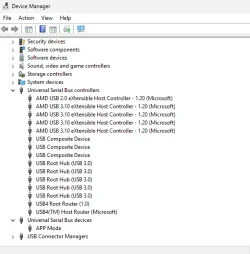
Under Devices, do you see any issues?

devices.webp

Any luck with support on Wacom site?
 

My Computers

System One System Two

  • OS
    All Branches but Release
    Computer type
    Laptop
    Manufacturer/Model
    Acer Nitro ANV15-51
    CPU
    AMD Ryzen 7 7735HS 3200-4500 Mhz 8 cores x 2
    Motherboard
    Sportage_RBH
    Memory
    32 GB DDR5
    Graphics Card(s)
    Radeon Graphic / NVIDIA GeForce RTX 4060 8 GB GDDR6
    Sound Card
    AMD/Realtek(R) Audio
    Monitor(s) Displays
    Integrated Monitor (15.3"vis)
    Screen Resolution
    FHD 1920X1080 16:9 144Hz
    Hard Drives
    KINGSTON OM8SEP4512Q-AA 1TB
    Western Digital 256GB
    PSU
    19V DC 6.32 A 120 W
    Cooling
    Dual Fans
    Mouse
    MS Bluetooth
    Internet Speed
    Fiber 1GB Cox -us & 1GB Orange-fr
    Browser
    Edge Canary- Firefox Nightly-Chrome Dev-Chrome Dev
    Antivirus
    Windows Defender
  • Operating System
    Windows 11 Beta
    Computer type
    Laptop
    Manufacturer/Model
    Asus X751BP
    CPU
    AMD A9-9420
    Memory
    8 GB of DDR4
    Graphics card(s)
    AMD Radeon R5
    Screen Resolution
    1600x900
    Hard Drives
    Seagate 1 TB
OAT
When I submitted my request for help I hadn't done any of those things. I have now put the same message on the Wacom Forum only to try a different USB port and find it works fine. Its strange isn't it this would make a difference. However, I would say that the only USB port available was a USB3.2 port but it appears to have been enough to get the tablet working again. So sorry to have bothered you and once again, thanks very much for your help. I've now got to eat humble pie on the Wacom Forum. Still, I suppose that is life isn't it. Thanks again.

Tracey
 

My Computer

System One

  • OS
    Windows 10/11 (dual boot)
    Computer type
    PC/Desktop
    Manufacturer/Model
    Self-Built
    CPU
    Ryzen 5 3600
    Motherboard
    MSI MPG B550 Gaming Plus ATX
    Memory
    Corsair Vengeance LPX Black 2x16GB 2400MHz`
    Graphics Card(s)
    Nvidia GTX1050Ti Mini
    Sound Card
    RTL ALC892/897
    Monitor(s) Displays
    Philips273V7QDAB 27" + AOCE2470SWH 24"
    Screen Resolution
    1920 x 1080 (x2)
    Hard Drives
    WD Blue HD 1TB NVMe
    Crucial 2TB SSD
    PSU
    Corsair CX650M
    Case
    Corsair Carbide 275R
    Cooling
    Corsair Hydro H60 AIO
    Keyboard
    Logitech K270 (wireless)
    Mouse
    Logitech M185 (wireless) & M100 (wired)
    Internet Speed
    Approx 500Mbs
    Browser
    Librewolf (main) Firefox (reserve)
    Antivirus
    Malwarebytes Premium & MS Defender
    Other Info
    Printers: CutePDF
    Wacom Tablet CTL-4100 (small)
  • Love
Reactions: OAT
Back
Top Bottom




