About device security settings


Bonzo

Active member
Local time
2:21 AM
Posts
41
OS
Windows 11
Hello, yesterday I was checking my Windows Security settings, and came across this:
1774722342691.webp

I have done everything I can so I can either enable this option or remove the "This setting is managed by your administrator". That includes:

1. Using Group Policy, by enabling "Turn on Virtualization Based Security (Computer Configuration" > Administrative Templates > System > Device Guard) and "Secure Launch" inside of this policy and rebooting. Didn't work.

2. By using regedit, going to "Computer\HKEY_LOCAL_MACHINE\SYSTEM\CurrentControlSet\Control\DeviceGuard\Scenarios\SystemGuard" and changing the value of the "Enabled" key to 1. Didn't work.

3. By using regedit, going to "Computer\HKEY_LOCAL_MACHINE\SYSTEM\CurrentControlSet\Control\DeviceGuard\Scenarios\SystemGuard" and changing the value of the "Managed" key to 0. This makes the "Firmware protection" option disappear entirely.

Full disclosure, I did follow the Privacy Guides' Group Policy guide and enabled "Turn on Virtualization Based Security", "Secure Boot and DMA Protection" and "Secure Launch" inside of it a few months ago, but I don't think I've checked the Windows Security settings after doing it. Leaving it as "Not configured" didn't change anything either.

Is there anything else (other than a clean install) I can do in order to turn this on, and is it even needed in the first place?

That leads me to another topic:

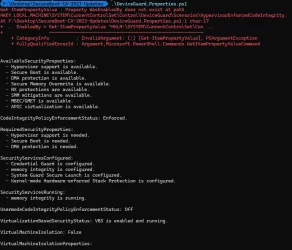
I checked the Virtualization Based Security status by going into msinfo32, and it displays this:
1774722008714.webp
As you can see, there are 3 services configured, but only one is running (Secure Launch was among the configured services yesterday, but it isn't anymore, probably because I currently have the "Turn on Virtualization Based Security" option set as "Not configured" in Group Policy), and I was wondering what can I do to enable both "Credential Guard" and "Kernel-mode Hardware-enforced Stack Protection", and if it is even needed.

Some observations:
1. I'm using an Intel i5-10400F CPU and VT-D is enabled in the BIOS.
2. My Secure Boot certificates seem to be out of date, and I'll try to solve this issue as soon as possible.

I have no idea if these are dumb questions, I consider myself somewhat knowledgeable when it comes to computers, but when it comes to the topic of security, I only know the bare minimum (enable Windows Defender, use uBlock Origin, don't download and run sketchy programs, etc).

So I'd really appreciate if anyone could clear up my doubts.

Thanks in advance.
 
Windows Build/Version
Windows 11 25H2 (OS Build 26200.8037)

My Computer

System One

  • OS
    Windows 11
    Computer type
    PC/Desktop
    CPU
    i5-10400F
    Motherboard
    Gigabyte H510M H
    Memory
    16GB DDR4
    Graphics Card(s)
    GTX 1660 Super
    Hard Drives
    WD Green SN350 1TB
    KINGSTON SA400S37120G 120GB
    SAMSUNG HD502HJ 500GB
    ST2000DM008-2UB102 2TB
    Browser
    Firefox Developer Edition
    Antivirus
    Windows Defender
Hello, yesterday I was checking my Windows Security settings, and came across this:
View attachment 167051

I have done everything I can so I can either enable this option or remove the "This setting is managed by your administrator". That includes:

1. Using Group Policy, by enabling "Turn on Virtualization Based Security (Computer Configuration" > Administrative Templates > System > Device Guard) and "Secure Launch" inside of this policy and rebooting. Didn't work.

2. By using regedit, going to "Computer\HKEY_LOCAL_MACHINE\SYSTEM\CurrentControlSet\Control\DeviceGuard\Scenarios\SystemGuard" and changing the value of the "Enabled" key to 1. Didn't work.

3. By using regedit, going to "Computer\HKEY_LOCAL_MACHINE\SYSTEM\CurrentControlSet\Control\DeviceGuard\Scenarios\SystemGuard" and changing the value of the "Managed" key to 0. This makes the "Firmware protection" option disappear entirely.

Full disclosure, I did follow the Privacy Guides' Group Policy guide and enabled "Turn on Virtualization Based Security", "Secure Boot and DMA Protection" and "Secure Launch" inside of it a few months ago, but I don't think I've checked the Windows Security settings after doing it. Leaving it as "Not configured" didn't change anything either.

Is there anything else (other than a clean install) I can do in order to turn this on, and is it even needed in the first place?

That leads me to another topic:

I checked the Virtualization Based Security status by going into msinfo32, and it displays this:
View attachment 167050
As you can see, there are 3 services configured, but only one is running (Secure Launch was among the configured services yesterday, but it isn't anymore, probably because I currently have the "Turn on Virtualization Based Security" option set as "Not configured" in Group Policy), and I was wondering what can I do to enable both "Credential Guard" and "Kernel-mode Hardware-enforced Stack Protection", and if it is even needed.

Some observations:
1. I'm using an Intel i5-10400F CPU and VT-D is enabled in the BIOS.
2. My Secure Boot certificates seem to be out of date, and I'll try to solve this issue as soon as possible.

I have no idea if these are dumb questions, I consider myself somewhat knowledgeable when it comes to computers, but when it comes to the topic of security, I only know the bare minimum (enable Windows Defender, use uBlock Origin, don't download and run sketchy programs, etc).

So I'd really appreciate if anyone could clear up my doubts.

Thanks in advance.
The link below should help with your issue. You can ignore the suggestions you have already tried.
 

My Computer

System One

  • OS
    Windows 11 Professional
    Computer type
    PC/Desktop
    Manufacturer/Model
    Microcenter B677
    CPU
    Intel Core i5-9400
    Motherboard
    ASRock H310CM-HDV/M.2
    Memory
    32GB
    Graphics Card(s)
    Integrated Intel UHD Graphics 630
    Sound Card
    Intel Kaby Lake - High Definition Audio / cAVS (Audio, Voice, Speech) [A0]
    Monitor(s) Displays
    LG Model: GSM59F1
    Screen Resolution
    2560x1080
    Case
    Lian Li 205M
    Antivirus
    Kaspersky AV
That message appears when System Guard Secure Launch / Firmware Protection is not eligible, not supported, or has been explicitly configured by policy in the past.Even if you undo the policies now, Windows may keep the setting locked because:

  • Secure Boot keys are outdated
  • Hardware/firmware doesn’t meet the Secure Launch requirements
  • A previous Group Policy or registry setting left the feature in a “managed” state
  • VBS components are partially enabled/disabled, causing Windows Security to hide or lock the toggle
This is not harmful, and for most home systems, Secure Launch is not required.
 

My Computers

System One System Two

  • OS
    Windows 11 Pro 25H2
    Computer type
    PC/Desktop
    Manufacturer/Model
    Dell Optiplex 7080
    CPU
    i9-10900 10 core 20 threads
    Motherboard
    DELL 0J37VM
    Memory
    32 gb
    Graphics Card(s)
    none-Intel UHD Graphics 630
    Sound Card
    Integrated Realtek
    Monitor(s) Displays
    Benq 27
    Screen Resolution
    2560x1440
    Hard Drives
    2x1tb Solidigm m.2 nvme /External drives 512gb Samsung m.2 sata+2tb Kingston m2.nvme
    PSU
    500w
    Case
    MT
    Cooling
    Dell Premium
    Keyboard
    Logitech wired
    Mouse
    Logitech wireless
    Internet Speed
    so slow I'm too embarrassed to tell
    Browser
    #1 Edge #2 Firefox
    Antivirus
    Defender+MWB Premium
  • Operating System
    Windows 11 Pro 24H2 26200.8457
    Computer type
    PC/Desktop
    Manufacturer/Model
    Beelink Mini PC SER5
    CPU
    AMD Ryzen 7 6800U
    Memory
    32 gb
    Graphics card(s)
    integrated
    Sound Card
    integrated
    Monitor(s) Displays
    Benq 27
    Screen Resolution
    2560x1440
    Hard Drives
    1TB Crucial nvme
    Keyboard
    Logitech wired
    Mouse
    Logitech wireless
    Internet Speed
    still too embarrassed to tell
    Browser
    Firefox
    Antivirus
    Defender
    Other Info
    System 3 is non compliant Dell 9020 i7-4770/24gb ram Win11 PRO 26200.8457
Please open administrative command prompt and type or copy and paste:

fltmc

Post a share link.


Run the V2 log collector > post a share link


My Computer

System One

  • OS
    Windows 10
    Computer type
    Laptop
    Manufacturer/Model
    HP
    CPU
    Intel(R) Core(TM) i7-4800MQ CPU @ 2.70GHz
    Motherboard
    Product : 190A Version : KBC Version 94.56
    Memory
    16 GB Total: Manufacturer : Samsung MemoryType : DDR3 FormFactor : SODIMM Capacity : 8GB Speed : 1600
    Graphics Card(s)
    NVIDIA Quadro K3100M; Intel(R) HD Graphics 4600
    Sound Card
    IDT High Definition Audio CODEC; PNP Device ID HDAUDIO\FUNC_01&VEN_111D&DEV_76E0
    Hard Drives
    Model Hitachi HTS727575A9E364
    Antivirus
    Microsoft Defender
    Other Info
    Mobile Workstation
The link below should help with your issue. You can ignore the suggestions you have already tried.
Thank you, but I'm unable to access the content. It redirects me to an empty ChatGPT chat.

That message appears when System Guard Secure Launch / Firmware Protection is not eligible, not supported, or has been explicitly configured by policy in the past.Even if you undo the policies now, Windows may keep the setting locked because:

  • Secure Boot keys are outdated
  • Hardware/firmware doesn’t meet the Secure Launch requirements
  • A previous Group Policy or registry setting left the feature in a “managed” state
  • VBS components are partially enabled/disabled, causing Windows Security to hide or lock the toggle
This is not harmful, and for most home systems, Secure Launch is not required.
Oh, got it, thanks. What about the Credential Guard, though? Shouldn't it be enabled?

Please open administrative command prompt and type or copy and paste:

fltmc

Post a share link.


Run the V2 log collector > post a share link

Thanks for replying, both files are attached bellow.
 

Attachments

My Computer

System One

  • OS
    Windows 11
    Computer type
    PC/Desktop
    CPU
    i5-10400F
    Motherboard
    Gigabyte H510M H
    Memory
    16GB DDR4
    Graphics Card(s)
    GTX 1660 Super
    Hard Drives
    WD Green SN350 1TB
    KINGSTON SA400S37120G 120GB
    SAMSUNG HD502HJ 500GB
    ST2000DM008-2UB102 2TB
    Browser
    Firefox Developer Edition
    Antivirus
    Windows Defender
1) Please reset the hosts file:


2) The logs were in a foreign language.

Please temporarily use English as the default language so that files can be scanned and read > post a new V2 share link into the newest post


My Computer

System One

  • OS
    Windows 10
    Computer type
    Laptop
    Manufacturer/Model
    HP
    CPU
    Intel(R) Core(TM) i7-4800MQ CPU @ 2.70GHz
    Motherboard
    Product : 190A Version : KBC Version 94.56
    Memory
    16 GB Total: Manufacturer : Samsung MemoryType : DDR3 FormFactor : SODIMM Capacity : 8GB Speed : 1600
    Graphics Card(s)
    NVIDIA Quadro K3100M; Intel(R) HD Graphics 4600
    Sound Card
    IDT High Definition Audio CODEC; PNP Device ID HDAUDIO\FUNC_01&VEN_111D&DEV_76E0
    Hard Drives
    Model Hitachi HTS727575A9E364
    Antivirus
    Microsoft Defender
    Other Info
    Mobile Workstation
1) Please reset the hosts file:


2) The logs were in a foreign language.

Please temporarily use English as the default language so that files can be scanned and read > post a new V2 share link into the newest post


Done. My language is set to English, but my regional format was set to my country's, I've changed that and ran the script again, the output seems to be in English.
 

Attachments

My Computer

System One

  • OS
    Windows 11
    Computer type
    PC/Desktop
    CPU
    i5-10400F
    Motherboard
    Gigabyte H510M H
    Memory
    16GB DDR4
    Graphics Card(s)
    GTX 1660 Super
    Hard Drives
    WD Green SN350 1TB
    KINGSTON SA400S37120G 120GB
    SAMSUNG HD502HJ 500GB
    ST2000DM008-2UB102 2TB
    Browser
    Firefox Developer Edition
    Antivirus
    Windows Defender
The error message or problems related to defender problems were not seen in the collected files.

The other log findings were problems related to:

a) unexpected shutdowns and restarts
b) BSOD
c) recurrent drive corruptions
d) secure boot not up to date


Please perform the following steps:


1) Add WMIC:

DISM /Online /Add-Capability /CapabilityName:WMIC~~~~


2) Run Tuneup plus > post a share link


3) Run gather_additional_dump_files.bat > post a share link


4) Run diskparinfo.bat > post a share link


5) Enable regback:


6) Create a new restore point:


7) Run Sea Tools Long generic test (all drives) > post images or share links


8) Open administrative command prompt and copy and paste:

chkdsk /b /v

Run these chkdsk switches on all drives using the syntax: chkdsk /b /v C: or chkdsk /b /v D: or chkdsk /b /v E: etc.

Make sure that the windows drive runs overnight while sleeping.

C:\WINDOWS\system32>chkdsk /b /v
The type of the file system is NTFS.
Cannot lock current drive.
Chkdsk cannot run because the volume is in use by another
process. Would you like to schedule this volume to be
checked the next time the system restarts? (Y/N)

Type: Y

Reboot as needed.


9) After completing all chkdsk /b /v run:

https://www.tenforums.com/attachmen...-files-use-bsod-debugging-chkdskfromevent.bat

Batch files for use in BSOD debugging - Windows 10 Help Forums

Batch files for use in BSOD debugging - Windows 10 Help Forums


10) Run administrative command prompt: > post share links

wevtutil epl Application "%userprofile%\Desktop\application.evtx"

wevtutil epl System "%userprofile%\Desktop\system.evtx"


11) More steps after viewing the above results


Code:
Event[1514]
  Log Name: System
  Source: Microsoft-Windows-Kernel-Power
  Date: 2026-03-09T05:51:02.8930000Z
  Event ID: 41
  Task: N/A
  Level: Critical
  Opcode: Info 
  Keyword: N/A
  User: S-1-5-18
  User Name: NT AUTHORITY\SYSTEM
  Computer: FURQUIM
  Description:
The system has rebooted without cleanly shutting down first. This error could be caused if the system stopped responding, crashed, or lost power unexpectedly.

Code:
Event[3308]
  Log Name: System
  Source: Microsoft-Windows-Kernel-Power
  Date: 2026-03-14T17:18:37.7880000Z
  Event ID: 41
  Task: N/A
  Level: Critical
  Opcode: Info 
  Keyword: N/A
  User: S-1-5-18
  User Name: NT AUTHORITY\SYSTEM
  Computer: FURQUIM
  Description:
The system has rebooted without cleanly shutting down first. This error could be caused if the system stopped responding, crashed, or lost power unexpectedly.
0

Code:
Event[4014]
  Log Name: System
  Source: Microsoft-Windows-Kernel-Power
  Date: 2026-03-14T22:20:49.1100000Z
  Event ID: 41
  Task: N/A
  Level: Critical
  Opcode: Info 
  Keyword: N/A
  User: S-1-5-18
  User Name: NT AUTHORITY\SYSTEM
  Computer: FURQUIM
  Description:
The system has rebooted without cleanly shutting down first. This error could be caused if the system stopped responding, crashed, or lost power unexpectedly.

Code:
Event[4430]
  Log Name: System
  Source: Microsoft-Windows-Kernel-Power
  Date: 2026-03-16T17:24:40.4650000Z
  Event ID: 41
  Task: N/A
  Level: Critical
  Opcode: Info 
  Keyword: N/A
  User: S-1-5-18
  User Name: NT AUTHORITY\SYSTEM
  Computer: FURQUIM
  Description:
The system has rebooted without cleanly shutting down first. This error could be caused if the system stopped responding, crashed, or lost power unexpectedly.

Code:
Event[7728]
  Log Name: System
  Source: Microsoft-Windows-TPM-WMI
  Date: 2026-03-28T15:46:44.5580000Z
  Event ID: 1801
  Task: N/A
  Level: Error
  Opcode: Info 
  Keyword: N/A
  User: S-1-5-18
  User Name: NT AUTHORITY\SYSTEM
  Computer: FURQUIM
  Description:
Updated Secure Boot certificates are available on this device but have not yet been applied to the firmware. Review the published guidance to complete the update and maintain full protection. This device signature information is included here.
DeviceAttributes: BaseBoardManufacturer:Gigabyte Technology Co., Ltd.;FirmwareManufacturer:American Megatrends International, LLC.;FirmwareVersion:F20c;OEMModelNumber:H510M H;OEMModelBaseBoard:H510M H;OEMModelSystemFamily:H510 MB;OEMManufacturerName:Gigabyte Technology Co., Ltd.;OEMModelSKU:Default string;OSArchitecture:amd64;
BucketId: 259b6fa74e9a19d98211f1a309c8ea5386e6a56fc01fc4ba8e55a07f4f6ef7e9
BucketConfidenceLevel: Under Observation - More Data Needed
UpdateType:
For more information, please see https://go.microsoft.com/fwlink/?linkid=2301018.


Code:
Event[1507]
  Log Name: System
  Source: volmgr
  Date: 2026-03-09T05:51:02.4000000Z
  Event ID: 46
  Task: None
  Level: Error
  Opcode: N/A
  Keyword: Classic,
  User: N/A
  User Name: N/A
  Computer: FURQUIM
  Description:
Crash dump initialization failed!


Code:
Event[3567]
  Log Name: System
  Source: Ntfs
  Date: 2026-03-14T17:25:34.6840000Z
  Event ID: 55
  Task: N/A
  Level: Error
  Opcode: Info 
  Keyword: N/A
  User: S-1-5-18
  User Name: NT AUTHORITY\SYSTEM
  Computer: FURQUIM
  Description:
A corruption was discovered in the file system structure on volume F:.

A corruption was found in a file system index structure.  The file reference number is 0xc00000000bfcd.  The name of the file is "\Videos\Animes\The Slime Diaries - That Time I Got Reincarnated as a Slime (2021) [tvdbid-385374]\Season 1".  The corrupted index attribute is ":$I30:$INDEX_ALLOCATION".


Code:
Event[3554]
  Log Name: System
  Source: Ntfs
  Date: 2026-03-14T17:24:48.9460000Z
  Event ID: 55
  Task: N/A
  Level: Error
  Opcode: Info 
  Keyword: N/A
  User: S-1-5-18
  User Name: NT AUTHORITY\SYSTEM
  Computer: FURQUIM
  Description:
A corruption was discovered in the file system structure on volume F:.

A corruption was found in a file system index structure.  The file reference number is 0xd0000000049a7.  The name of the file is "\Videos\Animes\Please Put Them On, Takamine-san (2025) [tvdbid-452826]\Season 1".  The corrupted index attribute is ":$I30:$INDEX_ALLOCATION".
 

Event[3555]
  Log Name: System
  Source: Ntfs
  Date: 2026-03-14T17:24:48.9460000Z
  Event ID: 55
  Task: N/A
  Level: Error
  Opcode: Info 
  Keyword: N/A
  User: S-1-5-18
  User Name: NT AUTHORITY\SYSTEM
  Computer: FURQUIM
  Description:
A corruption was discovered in the file system structure on volume F:.

A corruption was found in a file system index structure.  The file reference number is 0xd0000000049a7.  The name of the file is "\Videos\Animes\Please Put Them On, Takamine-san (2025) [tvdbid-452826]\Season 1".  The corrupted index attribute is ":$I30:$INDEX_ALLOCATION".
 

Event[3556]
  Log Name: System
  Source: Ntfs
  Date: 2026-03-14T17:24:48.9460000Z
  Event ID: 55
  Task: N/A
  Level: Error
  Opcode: Info 
  Keyword: N/A
  User: S-1-5-18
  User Name: NT AUTHORITY\SYSTEM
  Computer: FURQUIM
  Description:
A corruption was discovered in the file system structure on volume F:.

A corruption was found in a file system index structure.  The file reference number is 0xd0000000049a7.  The name of the file is "\Videos\Animes\Please Put Them On, Takamine-san (2025) [tvdbid-452826]\Season 1".  The corrupted index attribute is ":$I30:$INDEX_ALLOCATION".
 

Event[3557]
  Log Name: System
  Source: Ntfs
  Date: 2026-03-14T17:24:48.9460000Z
  Event ID: 55
  Task: N/A
  Level: Error
  Opcode: Info 
  Keyword: N/A
  User: S-1-5-18
  User Name: NT AUTHORITY\SYSTEM
  Computer: FURQUIM
  Description:
A corruption was discovered in the file system structure on volume F:.

A corruption was found in a file system index structure.  The file reference number is 0xd0000000049a7.  The name of the file is "\Videos\Animes\Please Put Them On, Takamine-san (2025) [tvdbid-452826]\Season 1".  The corrupted index attribute is ":$I30:$INDEX_ALLOCATION".
 

Event[3558]
  Log Name: System
  Source: Ntfs
  Date: 2026-03-14T17:24:48.9460000Z
  Event ID: 55
  Task: N/A
  Level: Error
  Opcode: Info 
  Keyword: N/A
  User: S-1-5-18
  User Name: NT AUTHORITY\SYSTEM
  Computer: FURQUIM
  Description:
A corruption was discovered in the file system structure on volume F:.

A corruption was found in a file system index structure.  The file reference number is 0xd0000000049a7.  The name of the file is "\Videos\Animes\Please Put Them On, Takamine-san (2025) [tvdbid-452826]\Season 1".  The corrupted index attribute is ":$I30:$INDEX_ALLOCATION".
 

Event[3559]
  Log Name: System
  Source: Ntfs
  Date: 2026-03-14T17:24:48.9470000Z
  Event ID: 55
  Task: N/A
  Level: Error
  Opcode: Info 
  Keyword: N/A
  User: S-1-5-18
  User Name: NT AUTHORITY\SYSTEM
  Computer: FURQUIM
  Description:
A corruption was discovered in the file system structure on volume F:.

A corruption was found in a file system index structure.  The file reference number is 0xd0000000049a7.  The name of the file is "\Videos\Animes\Please Put Them On, Takamine-san (2025) [tvdbid-452826]\Season 1".  The corrupted index attribute is ":$I30:$INDEX_ALLOCATION".
 

Event[3560]
  Log Name: System
  Source: Ntfs
  Date: 2026-03-14T17:24:56.0880000Z
  Event ID: 55
  Task: N/A
  Level: Error
  Opcode: Info 
  Keyword: N/A
  User: S-1-5-18
  User Name: NT AUTHORITY\SYSTEM
  Computer: FURQUIM
  Description:
A corruption was discovered in the file system structure on volume F:.

A corruption was found in a file system index structure.  The file reference number is 0x90000000026bf.  The name of the file is "\Videos\Animes\Ranking of Kings (2021) [tvdbid-391625]\Specials".  The corrupted index attribute is ":$I30:$INDEX_ALLOCATION".
 

Event[3561]
  Log Name: System
  Source: Ntfs
  Date: 2026-03-14T17:24:56.0940000Z
  Event ID: 55
  Task: N/A
  Level: Error
  Opcode: Info 
  Keyword: N/A
  User: S-1-5-18
  User Name: NT AUTHORITY\SYSTEM
  Computer: FURQUIM
  Description:
A corruption was discovered in the file system structure on volume F:.

A corruption was found in a file system index structure.  The file reference number is 0x90000000026bf.  The name of the file is "\Videos\Animes\Ranking of Kings (2021) [tvdbid-391625]\Specials".  The corrupted index attribute is ":$I30:$INDEX_ALLOCATION".
 

Event[3562]
  Log Name: System
  Source: Ntfs
  Date: 2026-03-14T17:25:01.4400000Z
  Event ID: 55
  Task: N/A
  Level: Error
  Opcode: Info 
  Keyword: N/A
  User: S-1-5-18
  User Name: NT AUTHORITY\SYSTEM
  Computer: FURQUIM
  Description:
A corruption was discovered in the file system structure on volume F:.

A corruption was found in a file system index structure.  The file reference number is 0x400000000f446.  The name of the file is "\Videos\Animes\Re - ZERO (2016) [tvdbid-305089]\Specials".  The corrupted index attribute is ":$I30:$INDEX_ALLOCATION".
 

Event[3563]
  Log Name: System
  Source: Ntfs
  Date: 2026-03-14T17:25:01.4420000Z
  Event ID: 55
  Task: N/A
  Level: Error
  Opcode: Info 
  Keyword: N/A
  User: S-1-5-18
  User Name: NT AUTHORITY\SYSTEM
  Computer: FURQUIM
  Description:
A corruption was discovered in the file system structure on volume F:.

A corruption was found in a file system index structure.  The file reference number is 0x400000000f446.  The name of the file is "\Videos\Animes\Re - ZERO (2016) [tvdbid-305089]\Specials".  The corrupted index attribute is ":$I30:$INDEX_ALLOCATION".
 

My Computer

System One

  • OS
    Windows 10
    Computer type
    Laptop
    Manufacturer/Model
    HP
    CPU
    Intel(R) Core(TM) i7-4800MQ CPU @ 2.70GHz
    Motherboard
    Product : 190A Version : KBC Version 94.56
    Memory
    16 GB Total: Manufacturer : Samsung MemoryType : DDR3 FormFactor : SODIMM Capacity : 8GB Speed : 1600
    Graphics Card(s)
    NVIDIA Quadro K3100M; Intel(R) HD Graphics 4600
    Sound Card
    IDT High Definition Audio CODEC; PNP Device ID HDAUDIO\FUNC_01&VEN_111D&DEV_76E0
    Hard Drives
    Model Hitachi HTS727575A9E364
    Antivirus
    Microsoft Defender
    Other Info
    Mobile Workstation
The error message or problems related to defender problems were not seen in the collected files.

The other log findings were problems related to:

a) unexpected shutdowns and restarts
b) BSOD
c) recurrent drive corruptions
d) secure boot not up to date


Please perform the following steps:


1) Add WMIC:

DISM /Online /Add-Capability /CapabilityName:WMIC~~~~


2) Run Tuneup plus > post a share link


3) Run gather_additional_dump_files.bat > post a share link


4) Run diskparinfo.bat > post a share link


5) Enable regback:


6) Create a new restore point:


7) Run Sea Tools Long generic test (all drives) > post images or share links


8) Open administrative command prompt and copy and paste:

chkdsk /b /v

Run these chkdsk switches on all drives using the syntax: chkdsk /b /v C: or chkdsk /b /v D: or chkdsk /b /v E: etc.

Make sure that the windows drive runs overnight while sleeping.

C:\WINDOWS\system32>chkdsk /b /v
The type of the file system is NTFS.
Cannot lock current drive.
Chkdsk cannot run because the volume is in use by another
process. Would you like to schedule this volume to be
checked the next time the system restarts? (Y/N)

Type: Y

Reboot as needed.


9) After completing all chkdsk /b /v run:

https://www.tenforums.com/attachmen...-files-use-bsod-debugging-chkdskfromevent.bat

Batch files for use in BSOD debugging - Windows 10 Help Forums

Batch files for use in BSOD debugging - Windows 10 Help Forums


10) Run administrative command prompt: > post share links

wevtutil epl Application "%userprofile%\Desktop\application.evtx"

wevtutil epl System "%userprofile%\Desktop\system.evtx"


11) More steps after viewing the above results


Code:
Event[1514]
  Log Name: System
  Source: Microsoft-Windows-Kernel-Power
  Date: 2026-03-09T05:51:02.8930000Z
  Event ID: 41
  Task: N/A
  Level: Critical
  Opcode: Info
  Keyword: N/A
  User: S-1-5-18
  User Name: NT AUTHORITY\SYSTEM
  Computer: FURQUIM
  Description:
The system has rebooted without cleanly shutting down first. This error could be caused if the system stopped responding, crashed, or lost power unexpectedly.

Code:
Event[3308]
  Log Name: System
  Source: Microsoft-Windows-Kernel-Power
  Date: 2026-03-14T17:18:37.7880000Z
  Event ID: 41
  Task: N/A
  Level: Critical
  Opcode: Info
  Keyword: N/A
  User: S-1-5-18
  User Name: NT AUTHORITY\SYSTEM
  Computer: FURQUIM
  Description:
The system has rebooted without cleanly shutting down first. This error could be caused if the system stopped responding, crashed, or lost power unexpectedly.
0

Code:
Event[4014]
  Log Name: System
  Source: Microsoft-Windows-Kernel-Power
  Date: 2026-03-14T22:20:49.1100000Z
  Event ID: 41
  Task: N/A
  Level: Critical
  Opcode: Info
  Keyword: N/A
  User: S-1-5-18
  User Name: NT AUTHORITY\SYSTEM
  Computer: FURQUIM
  Description:
The system has rebooted without cleanly shutting down first. This error could be caused if the system stopped responding, crashed, or lost power unexpectedly.

Code:
Event[4430]
  Log Name: System
  Source: Microsoft-Windows-Kernel-Power
  Date: 2026-03-16T17:24:40.4650000Z
  Event ID: 41
  Task: N/A
  Level: Critical
  Opcode: Info
  Keyword: N/A
  User: S-1-5-18
  User Name: NT AUTHORITY\SYSTEM
  Computer: FURQUIM
  Description:
The system has rebooted without cleanly shutting down first. This error could be caused if the system stopped responding, crashed, or lost power unexpectedly.

Code:
Event[7728]
  Log Name: System
  Source: Microsoft-Windows-TPM-WMI
  Date: 2026-03-28T15:46:44.5580000Z
  Event ID: 1801
  Task: N/A
  Level: Error
  Opcode: Info
  Keyword: N/A
  User: S-1-5-18
  User Name: NT AUTHORITY\SYSTEM
  Computer: FURQUIM
  Description:
Updated Secure Boot certificates are available on this device but have not yet been applied to the firmware. Review the published guidance to complete the update and maintain full protection. This device signature information is included here.
DeviceAttributes: BaseBoardManufacturer:Gigabyte Technology Co., Ltd.;FirmwareManufacturer:American Megatrends International, LLC.;FirmwareVersion:F20c;OEMModelNumber:H510M H;OEMModelBaseBoard:H510M H;OEMModelSystemFamily:H510 MB;OEMManufacturerName:Gigabyte Technology Co., Ltd.;OEMModelSKU:Default string;OSArchitecture:amd64;
BucketId: 259b6fa74e9a19d98211f1a309c8ea5386e6a56fc01fc4ba8e55a07f4f6ef7e9
BucketConfidenceLevel: Under Observation - More Data Needed
UpdateType:
For more information, please see https://go.microsoft.com/fwlink/?linkid=2301018.


Code:
Event[1507]
  Log Name: System
  Source: volmgr
  Date: 2026-03-09T05:51:02.4000000Z
  Event ID: 46
  Task: None
  Level: Error
  Opcode: N/A
  Keyword: Classic,
  User: N/A
  User Name: N/A
  Computer: FURQUIM
  Description:
Crash dump initialization failed!


Code:
Event[3567]
  Log Name: System
  Source: Ntfs
  Date: 2026-03-14T17:25:34.6840000Z
  Event ID: 55
  Task: N/A
  Level: Error
  Opcode: Info
  Keyword: N/A
  User: S-1-5-18
  User Name: NT AUTHORITY\SYSTEM
  Computer: FURQUIM
  Description:
A corruption was discovered in the file system structure on volume F:.

A corruption was found in a file system index structure.  The file reference number is 0xc00000000bfcd.  The name of the file is "\Videos\Animes\The Slime Diaries - That Time I Got Reincarnated as a Slime (2021) [tvdbid-385374]\Season 1".  The corrupted index attribute is ":$I30:$INDEX_ALLOCATION".


Code:
Event[3554]
  Log Name: System
  Source: Ntfs
  Date: 2026-03-14T17:24:48.9460000Z
  Event ID: 55
  Task: N/A
  Level: Error
  Opcode: Info
  Keyword: N/A
  User: S-1-5-18
  User Name: NT AUTHORITY\SYSTEM
  Computer: FURQUIM
  Description:
A corruption was discovered in the file system structure on volume F:.

A corruption was found in a file system index structure.  The file reference number is 0xd0000000049a7.  The name of the file is "\Videos\Animes\Please Put Them On, Takamine-san (2025) [tvdbid-452826]\Season 1".  The corrupted index attribute is ":$I30:$INDEX_ALLOCATION".
 

Event[3555]
  Log Name: System
  Source: Ntfs
  Date: 2026-03-14T17:24:48.9460000Z
  Event ID: 55
  Task: N/A
  Level: Error
  Opcode: Info
  Keyword: N/A
  User: S-1-5-18
  User Name: NT AUTHORITY\SYSTEM
  Computer: FURQUIM
  Description:
A corruption was discovered in the file system structure on volume F:.

A corruption was found in a file system index structure.  The file reference number is 0xd0000000049a7.  The name of the file is "\Videos\Animes\Please Put Them On, Takamine-san (2025) [tvdbid-452826]\Season 1".  The corrupted index attribute is ":$I30:$INDEX_ALLOCATION".
 

Event[3556]
  Log Name: System
  Source: Ntfs
  Date: 2026-03-14T17:24:48.9460000Z
  Event ID: 55
  Task: N/A
  Level: Error
  Opcode: Info
  Keyword: N/A
  User: S-1-5-18
  User Name: NT AUTHORITY\SYSTEM
  Computer: FURQUIM
  Description:
A corruption was discovered in the file system structure on volume F:.

A corruption was found in a file system index structure.  The file reference number is 0xd0000000049a7.  The name of the file is "\Videos\Animes\Please Put Them On, Takamine-san (2025) [tvdbid-452826]\Season 1".  The corrupted index attribute is ":$I30:$INDEX_ALLOCATION".
 

Event[3557]
  Log Name: System
  Source: Ntfs
  Date: 2026-03-14T17:24:48.9460000Z
  Event ID: 55
  Task: N/A
  Level: Error
  Opcode: Info
  Keyword: N/A
  User: S-1-5-18
  User Name: NT AUTHORITY\SYSTEM
  Computer: FURQUIM
  Description:
A corruption was discovered in the file system structure on volume F:.

A corruption was found in a file system index structure.  The file reference number is 0xd0000000049a7.  The name of the file is "\Videos\Animes\Please Put Them On, Takamine-san (2025) [tvdbid-452826]\Season 1".  The corrupted index attribute is ":$I30:$INDEX_ALLOCATION".
 

Event[3558]
  Log Name: System
  Source: Ntfs
  Date: 2026-03-14T17:24:48.9460000Z
  Event ID: 55
  Task: N/A
  Level: Error
  Opcode: Info
  Keyword: N/A
  User: S-1-5-18
  User Name: NT AUTHORITY\SYSTEM
  Computer: FURQUIM
  Description:
A corruption was discovered in the file system structure on volume F:.

A corruption was found in a file system index structure.  The file reference number is 0xd0000000049a7.  The name of the file is "\Videos\Animes\Please Put Them On, Takamine-san (2025) [tvdbid-452826]\Season 1".  The corrupted index attribute is ":$I30:$INDEX_ALLOCATION".
 

Event[3559]
  Log Name: System
  Source: Ntfs
  Date: 2026-03-14T17:24:48.9470000Z
  Event ID: 55
  Task: N/A
  Level: Error
  Opcode: Info
  Keyword: N/A
  User: S-1-5-18
  User Name: NT AUTHORITY\SYSTEM
  Computer: FURQUIM
  Description:
A corruption was discovered in the file system structure on volume F:.

A corruption was found in a file system index structure.  The file reference number is 0xd0000000049a7.  The name of the file is "\Videos\Animes\Please Put Them On, Takamine-san (2025) [tvdbid-452826]\Season 1".  The corrupted index attribute is ":$I30:$INDEX_ALLOCATION".
 

Event[3560]
  Log Name: System
  Source: Ntfs
  Date: 2026-03-14T17:24:56.0880000Z
  Event ID: 55
  Task: N/A
  Level: Error
  Opcode: Info
  Keyword: N/A
  User: S-1-5-18
  User Name: NT AUTHORITY\SYSTEM
  Computer: FURQUIM
  Description:
A corruption was discovered in the file system structure on volume F:.

A corruption was found in a file system index structure.  The file reference number is 0x90000000026bf.  The name of the file is "\Videos\Animes\Ranking of Kings (2021) [tvdbid-391625]\Specials".  The corrupted index attribute is ":$I30:$INDEX_ALLOCATION".
 

Event[3561]
  Log Name: System
  Source: Ntfs
  Date: 2026-03-14T17:24:56.0940000Z
  Event ID: 55
  Task: N/A
  Level: Error
  Opcode: Info
  Keyword: N/A
  User: S-1-5-18
  User Name: NT AUTHORITY\SYSTEM
  Computer: FURQUIM
  Description:
A corruption was discovered in the file system structure on volume F:.

A corruption was found in a file system index structure.  The file reference number is 0x90000000026bf.  The name of the file is "\Videos\Animes\Ranking of Kings (2021) [tvdbid-391625]\Specials".  The corrupted index attribute is ":$I30:$INDEX_ALLOCATION".
 

Event[3562]
  Log Name: System
  Source: Ntfs
  Date: 2026-03-14T17:25:01.4400000Z
  Event ID: 55
  Task: N/A
  Level: Error
  Opcode: Info
  Keyword: N/A
  User: S-1-5-18
  User Name: NT AUTHORITY\SYSTEM
  Computer: FURQUIM
  Description:
A corruption was discovered in the file system structure on volume F:.

A corruption was found in a file system index structure.  The file reference number is 0x400000000f446.  The name of the file is "\Videos\Animes\Re - ZERO (2016) [tvdbid-305089]\Specials".  The corrupted index attribute is ":$I30:$INDEX_ALLOCATION".
 

Event[3563]
  Log Name: System
  Source: Ntfs
  Date: 2026-03-14T17:25:01.4420000Z
  Event ID: 55
  Task: N/A
  Level: Error
  Opcode: Info
  Keyword: N/A
  User: S-1-5-18
  User Name: NT AUTHORITY\SYSTEM
  Computer: FURQUIM
  Description:
A corruption was discovered in the file system structure on volume F:.

A corruption was found in a file system index structure.  The file reference number is 0x400000000f446.  The name of the file is "\Videos\Animes\Re - ZERO (2016) [tvdbid-305089]\Specials".  The corrupted index attribute is ":$I30:$INDEX_ALLOCATION".
Thank you. I'll follow your instructions, but concerning the disk related events, it happened after a power outage, Windows asked me to reboot to fix the issues with my HDD and it repaired itself during boot, my file system seem to be working correctly now, is it still necessary to run chkdsk?

EDIT: Updating my post to include the logs I got so far.
EDIT 2: Seeing as DISM failed, I uploaded it's log file to Google Drive.
 

Attachments

Last edited:

My Computer

System One

  • OS
    Windows 11
    Computer type
    PC/Desktop
    CPU
    i5-10400F
    Motherboard
    Gigabyte H510M H
    Memory
    16GB DDR4
    Graphics Card(s)
    GTX 1660 Super
    Hard Drives
    WD Green SN350 1TB
    KINGSTON SA400S37120G 120GB
    SAMSUNG HD502HJ 500GB
    ST2000DM008-2UB102 2TB
    Browser
    Firefox Developer Edition
    Antivirus
    Windows Defender
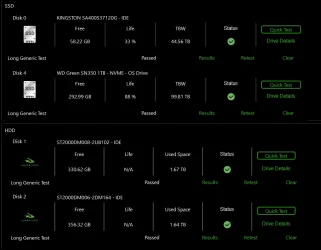
All drives passed the SeaTools Long Generic Test.
I'll run the chkdsk after rebooting my PC.
 

Attachments

  • 1774912170613.webp
    1774912170613.webp
    45.3 KB · Views: 1
  • 1774912185060.webp
    1774912185060.webp
    12.5 KB · Views: 2

My Computer

System One

  • OS
    Windows 11
    Computer type
    PC/Desktop
    CPU
    i5-10400F
    Motherboard
    Gigabyte H510M H
    Memory
    16GB DDR4
    Graphics Card(s)
    GTX 1660 Super
    Hard Drives
    WD Green SN350 1TB
    KINGSTON SA400S37120G 120GB
    SAMSUNG HD502HJ 500GB
    ST2000DM008-2UB102 2TB
    Browser
    Firefox Developer Edition
    Antivirus
    Windows Defender
1) Please reboot > rerun tuneup plus > post a share link


2) Create a new restore point


First SFC /ScanNow

Code:
Windows Resource Protection found corrupt files and successfully repaired them.


DISM /online /cleanup-image /RestoreHealth

Code:
Error: 3017
The requested operation failed. A system reboot is required to roll back changes made.


Second SFC /ScanNow

Code:
There is a system repair pending which requires reboot to complete.  Restart
Windows and run sfc again.


Code:
2026-03-30 16:26:44, Info                  CSI    000003f2 [SR] Unable to complete Verify and Repair transaction because some of the files that need to be repaired are in use. A reboot is required to complete this operation.
2026-03-30 16:26:44, Info                  CSI    000003f3 [SR] Repairing 7 components
 

My Computer

System One

  • OS
    Windows 10
    Computer type
    Laptop
    Manufacturer/Model
    HP
    CPU
    Intel(R) Core(TM) i7-4800MQ CPU @ 2.70GHz
    Motherboard
    Product : 190A Version : KBC Version 94.56
    Memory
    16 GB Total: Manufacturer : Samsung MemoryType : DDR3 FormFactor : SODIMM Capacity : 8GB Speed : 1600
    Graphics Card(s)
    NVIDIA Quadro K3100M; Intel(R) HD Graphics 4600
    Sound Card
    IDT High Definition Audio CODEC; PNP Device ID HDAUDIO\FUNC_01&VEN_111D&DEV_76E0
    Hard Drives
    Model Hitachi HTS727575A9E364
    Antivirus
    Microsoft Defender
    Other Info
    Mobile Workstation
1) Please reboot > rerun tuneup plus > post a share link


2) Create a new restore point


First SFC /ScanNow

Code:
Windows Resource Protection found corrupt files and successfully repaired them.


DISM /online /cleanup-image /RestoreHealth

Code:
Error: 3017
The requested operation failed. A system reboot is required to roll back changes made.


Second SFC /ScanNow

Code:
There is a system repair pending which requires reboot to complete.  Restart
Windows and run sfc again.


Code:
2026-03-30 16:26:44, Info                  CSI    000003f2 [SR] Unable to complete Verify and Repair transaction because some of the files that need to be repaired are in use. A reboot is required to complete this operation.
2026-03-30 16:26:44, Info                  CSI    000003f3 [SR] Repairing 7 components
Yeah, I ran Tuneup Plus again, and apparently DISM failed once again.
I tried to run SFC /ScanNow, then DISM /Online /Cleanup-Image /ScanHealth, then the same command but with /RestoreHealth instead of /ScanHealth, it didn't work. Then I downloaded the official Windows 11 ISO from the Microsoft website, mounted it and ran DISM /Online /Cleanup-Image /RestoreHealth /source:E:\sources\install.wim:6 /limitaccess, but it didn't work as well.


Code:
Error: 0x800f0915

The repair content could not be found anywhere.
Check the internet connectivity or use the "Source" option to specify the location of the files that are required to restore the image. For more information on specifying a source location, see https://go.microsoft.com/fwlink/?LinkId=243077.

EDIT: I don't know if this has anything to do with it but it seems that Windows is reporting itself as a Windows 10 installation:
1774918930143.webp
 

Attachments

My Computer

System One

  • OS
    Windows 11
    Computer type
    PC/Desktop
    CPU
    i5-10400F
    Motherboard
    Gigabyte H510M H
    Memory
    16GB DDR4
    Graphics Card(s)
    GTX 1660 Super
    Hard Drives
    WD Green SN350 1TB
    KINGSTON SA400S37120G 120GB
    SAMSUNG HD502HJ 500GB
    ST2000DM008-2UB102 2TB
    Browser
    Firefox Developer Edition
    Antivirus
    Windows Defender
In my book [Event ID: 41] is related to memory overclock. I had to take mine down to 5600 and never seen another Event ID: 41
after that.
 

My Computer

System One

  • OS
    Win11 24H2 IOT LTSC / Win11 Pro 25H2
    Computer type
    PC/Desktop
    Manufacturer/Model
    Gigabyte / Asus Home build
    CPU
    AMD Ryzen 7 8700G / AMD Ryzen 7 8700G
    Motherboard
    Gigabyte B650 AORUS ELITE AX V2 / ASUS TUF GAMING B650-PLUS
    Memory
    F5-6000J3636F16GX2-FX5 32GB / Lexar Ares RGB LD5BU016G-R6000GDLA 32GB
    Graphics Card(s)
    internal
    Sound Card
    Realtec
    Monitor(s) Displays
    BenQ 27 L EW2780
    Screen Resolution
    1920x1080
    Hard Drives
    Many M.2's
    Internet Speed
    400 mbs
    Browser
    Vivaldi
    Antivirus
    Eset
In my book [Event ID: 41] is related to memory overclock. I had to take mine down to 5600 and never seen another Event ID: 41
after that.
That's weird, I don't have any overclocking applied to my RAM. It's in it's stock configuration, the stick doesn't even support XMP.
 

My Computer

System One

  • OS
    Windows 11
    Computer type
    PC/Desktop
    CPU
    i5-10400F
    Motherboard
    Gigabyte H510M H
    Memory
    16GB DDR4
    Graphics Card(s)
    GTX 1660 Super
    Hard Drives
    WD Green SN350 1TB
    KINGSTON SA400S37120G 120GB
    SAMSUNG HD502HJ 500GB
    ST2000DM008-2UB102 2TB
    Browser
    Firefox Developer Edition
    Antivirus
    Windows Defender
1) Please post results for post #8 step #10.


2) Search for > zip > post share links

C:\Windows\Logs\CBS\CBS.log

C:\Windows\Logs\CBS\CbsPersist

C:\Windows\inf\setupapi.offline.log


3) Run upgrade_failure_info.bat > post a share link


4) Download to a new desktop folder:


My Computer

System One

  • OS
    Windows 10
    Computer type
    Laptop
    Manufacturer/Model
    HP
    CPU
    Intel(R) Core(TM) i7-4800MQ CPU @ 2.70GHz
    Motherboard
    Product : 190A Version : KBC Version 94.56
    Memory
    16 GB Total: Manufacturer : Samsung MemoryType : DDR3 FormFactor : SODIMM Capacity : 8GB Speed : 1600
    Graphics Card(s)
    NVIDIA Quadro K3100M; Intel(R) HD Graphics 4600
    Sound Card
    IDT High Definition Audio CODEC; PNP Device ID HDAUDIO\FUNC_01&VEN_111D&DEV_76E0
    Hard Drives
    Model Hitachi HTS727575A9E364
    Antivirus
    Microsoft Defender
    Other Info
    Mobile Workstation
1) Please post results for post #8 step #10.


2) Search for > zip > post share links

C:\Windows\Logs\CBS\CBS.log

C:\Windows\Logs\CBS\CbsPersist

C:\Windows\inf\setupapi.offline.log


3) Run upgrade_failure_info.bat > post a share link


4) Download to a new desktop folder:


1. system.evtx

2. I have a bunch of CbsPersist files, I didn't know which one to pick so I uploaded all of them.

3. Attached it bellow.

4. Will download it again.
 

Attachments

My Computer

System One

  • OS
    Windows 11
    Computer type
    PC/Desktop
    CPU
    i5-10400F
    Motherboard
    Gigabyte H510M H
    Memory
    16GB DDR4
    Graphics Card(s)
    GTX 1660 Super
    Hard Drives
    WD Green SN350 1TB
    KINGSTON SA400S37120G 120GB
    SAMSUNG HD502HJ 500GB
    ST2000DM008-2UB102 2TB
    Browser
    Firefox Developer Edition
    Antivirus
    Windows Defender
1) After completing post #8 step#8 and #9 run: HD Sentinel > post share links for each disk drive


a) Overview
b) Temperature
c) SMART


2) Read this link on Windows Driver Verifier (WDV):

Enable and Disable Driver Verifier in Windows 10


3) Create a new restore point


4) Learn the methods to recover from BSOD caused by WDV by booting into safe mode and running one or more of these commands:

verifier /reset

verifier /bootmode resetonbootfail


(option nine and seven)


5) Plan to run the tool with various customized test settings.

a) Test all non-Microsoft drivers

b) Test no Microsoft drivers

c) For the first run of WDV select the 3 customized tests displayed in the TF tutorial


6) Whenever the WDV tool is started if there is no immediate BSOD then open administrative command prompt and copy and paste:

verifier /querysettings

Post a share link.


Customized tests will then be posted for the next run of WDV.


WDV can run continuously during the testing.


For any BSOD post a new V2 share link into the newest post.


Code:
2026-03-30 22:14:21, Info                  CBS    (p)    CSI Payload Corrupt    (n)            amd64_userexperience-desktop_31bf3856ad364e35_10.0.26100.7705_none_c7f6f5511a69ae1e\CBS\VisualAssist\VisualAssistActions.json
2026-03-30 22:14:21, Info                  CBS    (w)    CBS Package Index Package Missing    0x80070490    ZoicwareRemoveWindowsAI~31bf3856ad364e35~amd64~~0.0.0.0    ZoicwareRemoveWindowsAI~31bf3856ad364e35~amd64~~1.0.0.0
 

My Computer

System One

  • OS
    Windows 10
    Computer type
    Laptop
    Manufacturer/Model
    HP
    CPU
    Intel(R) Core(TM) i7-4800MQ CPU @ 2.70GHz
    Motherboard
    Product : 190A Version : KBC Version 94.56
    Memory
    16 GB Total: Manufacturer : Samsung MemoryType : DDR3 FormFactor : SODIMM Capacity : 8GB Speed : 1600
    Graphics Card(s)
    NVIDIA Quadro K3100M; Intel(R) HD Graphics 4600
    Sound Card
    IDT High Definition Audio CODEC; PNP Device ID HDAUDIO\FUNC_01&VEN_111D&DEV_76E0
    Hard Drives
    Model Hitachi HTS727575A9E364
    Antivirus
    Microsoft Defender
    Other Info
    Mobile Workstation
From 03/14

ST2000DM008-2UB102

Code:
Log Name:      Application
Source:        Microsoft-Windows-Wininit
Date:          3/14/2026 3:28:24 PM
Event ID:      1001
Task Category: None
Level:         Information
Keywords:      Classic
User:          N/A
Computer:      FURQUIM
Description:


Checking file system on F:
The type of the file system is NTFS.
Volume label is Fagner (temporário).

The volume is dirty.

Stage 1: Examining basic file system structure ...
Deleted corrupt attribute list entry
with type code 80 in file 374A.
Unable to find child frs 0x9b8f with sequence number 0x6.
The attributes with same type code 0x80 but different instance tags
0x0 and 0x0 have non-contiguous VCN numbers 0x15050 and 0x19df0
respectively in file 0x374a.
Deleted corrupt attribute list entry
with type code 80 in file 374A.
Unable to locate attribute with instance tag 0x0 and segment
reference 0xd0000000049d6.  The expected attribute type is 0x80.
Deleting corrupt attribute record (0x80, "")
from file record segment 0x49D6.
Unable to locate attribute with instance tag 0x0 and segment
reference 0x5000000007b34.  The expected attribute type is 0x80.
Deleting corrupt attribute record (0x80, "")
from file record segment 0x7B34.
Unable to locate attribute with instance tag 0x0 and segment
reference 0x30000000083b7.  The expected attribute type is 0x80.
Deleting corrupt attribute record (0x80, "")
from file record segment 0x83B7.
Unable to locate attribute with instance tag 0x0 and segment
reference 0x4000000008bef.  The expected attribute type is 0x80.
Deleting corrupt attribute record (0x80, "")
from file record segment 0x8BEF.
Unable to locate attribute with instance tag 0x0 and segment
reference 0xc00000000c79e.  The expected attribute type is 0x80.
Deleting corrupt attribute record (0x80, "")
from file record segment 0xC79E.
Unable to locate attribute with instance tag 0x0 and segment
reference 0xc00000000c8e1.  The expected attribute type is 0x80.
Deleting corrupt attribute record (0x80, "")
from file record segment 0xC8E1.
Unable to locate attribute with instance tag 0x0 and segment
reference 0xa00000000c985.  The expected attribute type is 0x80.
Deleting corrupt attribute record (0x80, "")
from file record segment 0xC985.
Unable to locate attribute with instance tag 0x0 and segment
reference 0xb00000000ca72.  The expected attribute type is 0x80.
Deleting corrupt attribute record (0x80, "")
from file record segment 0xCA72.
Unable to locate attribute with instance tag 0x0 and segment
reference 0xb00000000cbad.  The expected attribute type is 0x80.
Deleting corrupt attribute record (0x80, "")
from file record segment 0xCBAD.
Unable to locate attribute with instance tag 0x0 and segment
reference 0xb00000000cc22.  The expected attribute type is 0x80.
Deleting corrupt attribute record (0x80, "")
from file record segment 0xCC22.
Unable to locate attribute with instance tag 0x0 and segment
reference 0xb00000000ccad.  The expected attribute type is 0x80.
Deleting corrupt attribute record (0x80, "")
from file record segment 0xCCAD.
Unable to locate attribute with instance tag 0x0 and segment
reference 0xa00000000cdc9.  The expected attribute type is 0x80.
Deleting corrupt attribute record (0x80, "")
from file record segment 0xCDC9.
Unable to locate attribute with instance tag 0x0 and segment
reference 0x300000000e182.  The expected attribute type is 0x80.
Deleting corrupt attribute record (0x80, "")
from file record segment 0xE182.
Unable to locate attribute with instance tag 0x0 and segment
reference 0x300000000e42d.  The expected attribute type is 0x80.
Deleting corrupt attribute record (0x80, "")
from file record segment 0xE42D.
Unable to locate attribute with instance tag 0x0 and segment
reference 0x500000000ec0e.  The expected attribute type is 0x80.
Deleting corrupt attribute record (0x80, "")
from file record segment 0xEC0E.
Unable to locate attribute with instance tag 0x0 and segment
reference 0x500000000ed28.  The expected attribute type is 0x80.
Deleting corrupt attribute record (0x80, "")
from file record segment 0xED28.
Unable to locate attribute with instance tag 0x0 and segment
reference 0x700000000f0e6.  The expected attribute type is 0x80.
Deleting corrupt attribute record (0x80, "")
from file record segment 0xF0E6.
Unable to locate attribute with instance tag 0x0 and segment
reference 0x600000000f242.  The expected attribute type is 0x80.
Deleting corrupt attribute record (0x80, "")
from file record segment 0xF242.
Unable to locate attribute with instance tag 0x0 and segment
reference 0x500000000f2fc.  The expected attribute type is 0x80.
Deleting corrupt attribute record (0x80, "")
from file record segment 0xF2FC.
Unable to locate attribute with instance tag 0x0 and segment
reference 0x500000000f309.  The expected attribute type is 0x80.
Deleting corrupt attribute record (0x80, "")
from file record segment 0xF309.
Unable to locate attribute with instance tag 0x0 and segment
reference 0x500000000f4d6.  The expected attribute type is 0x80.
Deleting corrupt attribute record (0x80, "")
from file record segment 0xF4D6.
Unable to locate attribute with instance tag 0x0 and segment
reference 0x500000000f4f0.  The expected attribute type is 0x80.
Deleting corrupt attribute record (0x80, "")
from file record segment 0xF4F0.
Unable to locate attribute with instance tag 0x0 and segment
reference 0x500000000f501.  The expected attribute type is 0x80.
Deleting corrupt attribute record (0x80, "")
from file record segment 0xF501.
Unable to locate attribute with instance tag 0x0 and segment
reference 0x500000000f52e.  The expected attribute type is 0x80.
Deleting corrupt attribute record (0x80, "")
from file record segment 0xF52E.
Unable to locate attribute with instance tag 0x0 and segment
reference 0x500000000f57a.  The expected attribute type is 0x80.
Deleting corrupt attribute record (0x80, "")
from file record segment 0xF57A.
Unable to locate attribute with instance tag 0x0 and segment
reference 0x800000000f5bd.  The expected attribute type is 0x80.
Deleting corrupt attribute record (0x80, "")
from file record segment 0xF5BD.
Unable to locate attribute with instance tag 0x0 and segment
reference 0x700000000f74f.  The expected attribute type is 0x80.
Deleting corrupt attribute record (0x80, "")
from file record segment 0xF74F.
Deleted corrupt attribute list entry
with type code 80 in file 3759.
Unable to find child frs 0x9e6b with sequence number 0x6.
The attributes with same type code 0x80 but different instance tags
0x0 and 0x0 have non-contiguous VCN numbers 0xd200 and 0x129d0
respectively in file 0x3759.
Deleted corrupt attribute list entry
with type code 80 in file 3759.
Unable to locate attribute with instance tag 0x0 and segment
reference 0xe00000000491c.  The expected attribute type is 0x80.
Deleting corrupt attribute record (0x80, "")
from file record segment 0x491C.
Unable to locate attribute with instance tag 0x0 and segment
reference 0x5000000008fee.  The expected attribute type is 0x80.
Deleting corrupt attribute record (0x80, "")
from file record segment 0x8FEE.
Unable to locate attribute with instance tag 0x0 and segment
reference 0x5000000009c01.  The expected attribute type is 0x80.
Deleting corrupt attribute record (0x80, "")
from file record segment 0x9C01.
Unable to locate attribute with instance tag 0x0 and segment
reference 0xd00000000c89d.  The expected attribute type is 0x80.
Deleting corrupt attribute record (0x80, "")
from file record segment 0xC89D.
Unable to locate attribute with instance tag 0x0 and segment
reference 0xb00000000c90d.  The expected attribute type is 0x80.
Deleting corrupt attribute record (0x80, "")
from file record segment 0xC90D.
Unable to locate attribute with instance tag 0x0 and segment
reference 0xb00000000ca64.  The expected attribute type is 0x80.
Deleting corrupt attribute record (0x80, "")
from file record segment 0xCA64.
Unable to locate attribute with instance tag 0x0 and segment
reference 0xb00000000cacf.  The expected attribute type is 0x80.
Deleting corrupt attribute record (0x80, "")
from file record segment 0xCACF.
Unable to locate attribute with instance tag 0x0 and segment
reference 0xa00000000cb5d.  The expected attribute type is 0x80.
Deleting corrupt attribute record (0x80, "")
from file record segment 0xCB5D.
Unable to locate attribute with instance tag 0x0 and segment
reference 0xb00000000cc02.  The expected attribute type is 0x80.
Deleting corrupt attribute record (0x80, "")
from file record segment 0xCC02.
Unable to locate attribute with instance tag 0x0 and segment
reference 0x800000000ccb5.  The expected attribute type is 0x80.
Deleting corrupt attribute record (0x80, "")
from file record segment 0xCCB5.
Unable to locate attribute with instance tag 0x0 and segment
reference 0xb00000000cd37.  The expected attribute type is 0x80.
Deleting corrupt attribute record (0x80, "")
from file record segment 0xCD37.
Unable to locate attribute with instance tag 0x0 and segment
reference 0xb00000000cd82.  The expected attribute type is 0x80.
Deleting corrupt attribute record (0x80, "")
from file record segment 0xCD82.
Unable to locate attribute with instance tag 0x0 and segment
reference 0xa00000000cdb3.  The expected attribute type is 0x80.
Deleting corrupt attribute record (0x80, "")
from file record segment 0xCDB3.
Unable to locate attribute with instance tag 0x0 and segment
reference 0x500000000e1a7.  The expected attribute type is 0x80.
Deleting corrupt attribute record (0x80, "")
from file record segment 0xE1A7.
Unable to locate attribute with instance tag 0x0 and segment
reference 0x300000000e4a3.  The expected attribute type is 0x80.
Deleting corrupt attribute record (0x80, "")
from file record segment 0xE4A3.
Unable to locate attribute with instance tag 0x0 and segment
reference 0x600000000ebdd.  The expected attribute type is 0x80.
Deleting corrupt attribute record (0x80, "")
from file record segment 0xEBDD.
Unable to locate attribute with instance tag 0x0 and segment
reference 0x500000000ec2a.  The expected attribute type is 0x80.
Deleting corrupt attribute record (0x80, "")
from file record segment 0xEC2A.
Unable to locate attribute with instance tag 0x0 and segment
reference 0x600000000edfb.  The expected attribute type is 0x80.
Deleting corrupt attribute record (0x80, "")
from file record segment 0xEDFB.
Unable to locate attribute with instance tag 0x0 and segment
reference 0x300000000ee7a.  The expected attribute type is 0x80.
Deleting corrupt attribute record (0x80, "")
from file record segment 0xEE7A.
Unable to locate attribute with instance tag 0x0 and segment
reference 0x700000000f1a0.  The expected attribute type is 0x80.
Deleting corrupt attribute record (0x80, "")
from file record segment 0xF1A0.
Unable to locate attribute with instance tag 0x0 and segment
reference 0x500000000f28d.  The expected attribute type is 0x80.
Deleting corrupt attribute record (0x80, "")
from file record segment 0xF28D.
Unable to locate attribute with instance tag 0x0 and segment
reference 0x500000000f2fd.  The expected attribute type is 0x80.
Deleting corrupt attribute record (0x80, "")
from file record segment 0xF2FD.
Unable to locate attribute with instance tag 0x0 and segment
reference 0x500000000f4db.  The expected attribute type is 0x80.
Deleting corrupt attribute record (0x80, "")
from file record segment 0xF4DB.
Unable to locate attribute with instance tag 0x0 and segment
reference 0x500000000f4e6.  The expected attribute type is 0x80.
Deleting corrupt attribute record (0x80, "")
from file record segment 0xF4E6.
Unable to locate attribute with instance tag 0x0 and segment
reference 0x600000000f4fc.  The expected attribute type is 0x80.
Deleting corrupt attribute record (0x80, "")
from file record segment 0xF4FC.
Unable to locate attribute with instance tag 0x0 and segment
reference 0x500000000f51e.  The expected attribute type is 0x80.
Deleting corrupt attribute record (0x80, "")
from file record segment 0xF51E.
Unable to locate attribute with instance tag 0x0 and segment
reference 0x500000000f559.  The expected attribute type is 0x80.
Deleting corrupt attribute record (0x80, "")
from file record segment 0xF559.
Unable to locate attribute with instance tag 0x0 and segment
reference 0x500000000f577.  The expected attribute type is 0x80.
Deleting corrupt attribute record (0x80, "")
from file record segment 0xF577.
Unable to locate attribute with instance tag 0x0 and segment
reference 0x500000000f59e.  The expected attribute type is 0x80.
Deleting corrupt attribute record (0x80, "")
from file record segment 0xF59E.
Unable to locate attribute with instance tag 0x0 and segment
reference 0x500000000f5b4.  The expected attribute type is 0x80.
Deleting corrupt attribute record (0x80, "")
from file record segment 0xF5B4.
Deleted corrupt attribute list entry
with type code 80 in file 427E.
Unable to find child frs 0xc6f0 with sequence number 0x12.
The attributes with same type code 0x80 but different instance tags
0x0 and 0x0 have non-contiguous VCN numbers 0x9d60 and 0xe4a0
respectively in file 0x427e.
Deleted corrupt attribute list entry
with type code 80 in file 427E.
Unable to locate attribute with instance tag 0x0 and segment
reference 0x3000000007e69.  The expected attribute type is 0x80.
Deleting corrupt attribute record (0x80, "")
from file record segment 0x7E69.
Unable to locate attribute with instance tag 0x0 and segment
reference 0xb00000000c8ef.  The expected attribute type is 0x80.
Deleting corrupt attribute record (0x80, "")
from file record segment 0xC8EF.
Unable to locate attribute with instance tag 0x0 and segment
reference 0xe00000000c8f2.  The expected attribute type is 0x80.
Deleting corrupt attribute record (0x80, "")
from file record segment 0xC8F2.
Deleted corrupt attribute list entry
with type code 80 in file 43F5.
Unable to find child frs 0xae74 with sequence number 0x8.
The attribute of type 0x80 and instance tag 0x0 in file 0x43f5
has allocated length of 0xae45000 instead of 0x59b0000.
Deleted corrupt attribute list entry
with type code 80 in file 43F5.
Unable to locate attribute with instance tag 0x0 and segment
reference 0x800000000ad57.  The expected attribute type is 0x80.
Deleting corrupt attribute record (0x80, "")
from file record segment 0xAD57.
Deleted corrupt attribute list entry
with type code 80 in file 7F22.
Unable to find child frs 0xc953 with sequence number 0x8.
The attributes with same type code 0x80 but different instance tags
0x0 and 0x0 have non-contiguous VCN numbers 0x4af0 and 0xb900
respectively in file 0x7f22.
Deleted corrupt attribute list entry
with type code 80 in file 7F22.
Unable to locate attribute with instance tag 0x0 and segment
reference 0xe000000004918.  The expected attribute type is 0x80.
Deleting corrupt attribute record (0x80, "")
from file record segment 0x4918.
Unable to locate attribute with instance tag 0x0 and segment
reference 0xd000000004921.  The expected attribute type is 0x80.
Deleting corrupt attribute record (0x80, "")
from file record segment 0x4921.
Unable to locate attribute with instance tag 0x0 and segment
reference 0xe0000000049aa.  The expected attribute type is 0x80.
Deleting corrupt attribute record (0x80, "")
from file record segment 0x49AA.
Unable to locate attribute with instance tag 0x0 and segment
reference 0x900000000c8c2.  The expected attribute type is 0x80.
Deleting corrupt attribute record (0x80, "")
from file record segment 0xC8C2.
Unable to locate attribute with instance tag 0x0 and segment
reference 0x800000000ca89.  The expected attribute type is 0x80.
Deleting corrupt attribute record (0x80, "")
from file record segment 0xCA89.
Unable to locate attribute with instance tag 0x0 and segment
reference 0xb00000000cb0b.  The expected attribute type is 0x80.
Deleting corrupt attribute record (0x80, "")
from file record segment 0xCB0B.
Unable to locate attribute with instance tag 0x0 and segment
reference 0xb00000000cb31.  The expected attribute type is 0x80.
Deleting corrupt attribute record (0x80, "")
from file record segment 0xCB31.
Unable to locate attribute with instance tag 0x0 and segment
reference 0xb00000000cc0f.  The expected attribute type is 0x80.
Deleting corrupt attribute record (0x80, "")
from file record segment 0xCC0F.
Unable to locate attribute with instance tag 0x0 and segment
refer
Event Xml:
<Event xmlns="http://schemas.microsoft.com/win/2004/08/events/event">
  <System>
    <Provider Name="Microsoft-Windows-Wininit" Guid="{206f6dea-d3c5-4d10-bc72-989f03c8b84b}" EventSourceName="Wininit" />
    <EventID Qualifiers="16384">1001</EventID>
    <Version>0</Version>
    <Level>4</Level>
    <Task>0</Task>
    <Opcode>0</Opcode>
    <Keywords>0x80000000000000</Keywords>
    <TimeCreated SystemTime="2026-03-14T20:28:24.7447438Z" />
    <EventRecordID>15216</EventRecordID>
    <Correlation />
    <Execution ProcessID="1208" ThreadID="0" />
    <Channel>Application</Channel>
    <Computer>FURQUIM</Computer>
    <Security />
  </System>
  <EventData>
    <Data>

Checking file system on F:
The type of the file system is NTFS.
Volume label is Fagner (temporário).

The volume is dirty.

Stage 1: Examining basic file system structure ...
Deleted corrupt attribute list entry
with type code 80 in file 374A.
Unable to find child frs 0x9b8f with sequence number 0x6.
The attributes with same type code 0x80 but different instance tags
0x0 and 0x0 have non-contiguous VCN numbers 0x15050 and 0x19df0
respectively in file 0x374a.
Deleted corrupt attribute list entry
with type code 80 in file 374A.
Unable to locate attribute with instance tag 0x0 and segment
reference 0xd0000000049d6.  The expected attribute type is 0x80.
Deleting corrupt attribute record (0x80, "")
from file record segment 0x49D6.
Unable to locate attribute with instance tag 0x0 and segment
reference 0x5000000007b34.  The expected attribute type is 0x80.
Deleting corrupt attribute record (0x80, "")
from file record segment 0x7B34.
Unable to locate attribute with instance tag 0x0 and segment
reference 0x30000000083b7.  The expected attribute type is 0x80.
Deleting corrupt attribute record (0x80, "")
from file record segment 0x83B7.
Unable to locate attribute with instance tag 0x0 and segment
reference 0x4000000008bef.  The expected attribute type is 0x80.
Deleting corrupt attribute record (0x80, "")
from file record segment 0x8BEF.
Unable to locate attribute with instance tag 0x0 and segment
reference 0xc00000000c79e.  The expected attribute type is 0x80.
Deleting corrupt attribute record (0x80, "")
from file record segment 0xC79E.
Unable to locate attribute with instance tag 0x0 and segment
reference 0xc00000000c8e1.  The expected attribute type is 0x80.
Deleting corrupt attribute record (0x80, "")
from file record segment 0xC8E1.
Unable to locate attribute with instance tag 0x0 and segment
reference 0xa00000000c985.  The expected attribute type is 0x80.
Deleting corrupt attribute record (0x80, "")
from file record segment 0xC985.
Unable to locate attribute with instance tag 0x0 and segment
reference 0xb00000000ca72.  The expected attribute type is 0x80.
Deleting corrupt attribute record (0x80, "")
from file record segment 0xCA72.
Unable to locate attribute with instance tag 0x0 and segment
reference 0xb00000000cbad.  The expected attribute type is 0x80.
Deleting corrupt attribute record (0x80, "")
from file record segment 0xCBAD.
Unable to locate attribute with instance tag 0x0 and segment
reference 0xb00000000cc22.  The expected attribute type is 0x80.
Deleting corrupt attribute record (0x80, "")
from file record segment 0xCC22.
Unable to locate attribute with instance tag 0x0 and segment
reference 0xb00000000ccad.  The expected attribute type is 0x80.
Deleting corrupt attribute record (0x80, "")
from file record segment 0xCCAD.
Unable to locate attribute with instance tag 0x0 and segment
reference 0xa00000000cdc9.  The expected attribute type is 0x80.
Deleting corrupt attribute record (0x80, "")
from file record segment 0xCDC9.
Unable to locate attribute with instance tag 0x0 and segment
reference 0x300000000e182.  The expected attribute type is 0x80.
Deleting corrupt attribute record (0x80, "")
from file record segment 0xE182.
Unable to locate attribute with instance tag 0x0 and segment
reference 0x300000000e42d.  The expected attribute type is 0x80.
Deleting corrupt attribute record (0x80, "")
from file record segment 0xE42D.
Unable to locate attribute with instance tag 0x0 and segment
reference 0x500000000ec0e.  The expected attribute type is 0x80.
Deleting corrupt attribute record (0x80, "")
from file record segment 0xEC0E.
Unable to locate attribute with instance tag 0x0 and segment
reference 0x500000000ed28.  The expected attribute type is 0x80.
Deleting corrupt attribute record (0x80, "")
from file record segment 0xED28.
Unable to locate attribute with instance tag 0x0 and segment
reference 0x700000000f0e6.  The expected attribute type is 0x80.
Deleting corrupt attribute record (0x80, "")
from file record segment 0xF0E6.
Unable to locate attribute with instance tag 0x0 and segment
reference 0x600000000f242.  The expected attribute type is 0x80.
Deleting corrupt attribute record (0x80, "")
from file record segment 0xF242.
Unable to locate attribute with instance tag 0x0 and segment
reference 0x500000000f2fc.  The expected attribute type is 0x80.
Deleting corrupt attribute record (0x80, "")
from file record segment 0xF2FC.
Unable to locate attribute with instance tag 0x0 and segment
reference 0x500000000f309.  The expected attribute type is 0x80.
Deleting corrupt attribute record (0x80, "")
from file record segment 0xF309.
Unable to locate attribute with instance tag 0x0 and segment
reference 0x500000000f4d6.  The expected attribute type is 0x80.
Deleting corrupt attribute record (0x80, "")
from file record segment 0xF4D6.
Unable to locate attribute with instance tag 0x0 and segment
reference 0x500000000f4f0.  The expected attribute type is 0x80.
Deleting corrupt attribute record (0x80, "")
from file record segment 0xF4F0.
Unable to locate attribute with instance tag 0x0 and segment
reference 0x500000000f501.  The expected attribute type is 0x80.
Deleting corrupt attribute record (0x80, "")
from file record segment 0xF501.
Unable to locate attribute with instance tag 0x0 and segment
reference 0x500000000f52e.  The expected attribute type is 0x80.
Deleting corrupt attribute record (0x80, "")
from file record segment 0xF52E.
Unable to locate attribute with instance tag 0x0 and segment
reference 0x500000000f57a.  The expected attribute type is 0x80.
Deleting corrupt attribute record (0x80, "")
from file record segment 0xF57A.
Unable to locate attribute with instance tag 0x0 and segment
reference 0x800000000f5bd.  The expected attribute type is 0x80.
Deleting corrupt attribute record (0x80, "")
from file record segment 0xF5BD.
Unable to locate attribute with instance tag 0x0 and segment
reference 0x700000000f74f.  The expected attribute type is 0x80.
Deleting corrupt attribute record (0x80, "")
from file record segment 0xF74F.
Deleted corrupt attribute list entry
with type code 80 in file 3759.
Unable to find child frs 0x9e6b with sequence number 0x6.
The attributes with same type code 0x80 but different instance tags
0x0 and 0x0 have non-contiguous VCN numbers 0xd200 and 0x129d0
respectively in file 0x3759.
Deleted corrupt attribute list entry
with type code 80 in file 3759.
Unable to locate attribute with instance tag 0x0 and segment
reference 0xe00000000491c.  The expected attribute type is 0x80.
Deleting corrupt attribute record (0x80, "")
from file record segment 0x491C.
Unable to locate attribute with instance tag 0x0 and segment
reference 0x5000000008fee.  The expected attribute type is 0x80.
Deleting corrupt attribute record (0x80, "")
from file record segment 0x8FEE.
Unable to locate attribute with instance tag 0x0 and segment
reference 0x5000000009c01.  The expected attribute type is 0x80.
Deleting corrupt attribute record (0x80, "")
from file record segment 0x9C01.
Unable to locate attribute with instance tag 0x0 and segment
reference 0xd00000000c89d.  The expected attribute type is 0x80.
Deleting corrupt attribute record (0x80, "")
from file record segment 0xC89D.
Unable to locate attribute with instance tag 0x0 and segment
reference 0xb00000000c90d.  The expected attribute type is 0x80.
Deleting corrupt attribute record (0x80, "")
from file record segment 0xC90D.
Unable to locate attribute with instance tag 0x0 and segment
reference 0xb00000000ca64.  The expected attribute type is 0x80.
Deleting corrupt attribute record (0x80, "")
from file record segment 0xCA64.
Unable to locate attribute with instance tag 0x0 and segment
reference 0xb00000000cacf.  The expected attribute type is 0x80.
Deleting corrupt attribute record (0x80, "")
from file record segment 0xCACF.
Unable to locate attribute with instance tag 0x0 and segment
reference 0xa00000000cb5d.  The expected attribute type is 0x80.
Deleting corrupt attribute record (0x80, "")
from file record segment 0xCB5D.
Unable to locate attribute with instance tag 0x0 and segment
reference 0xb00000000cc02.  The expected attribute type is 0x80.
Deleting corrupt attribute record (0x80, "")
from file record segment 0xCC02.
Unable to locate attribute with instance tag 0x0 and segment
reference 0x800000000ccb5.  The expected attribute type is 0x80.
Deleting corrupt attribute record (0x80, "")
from file record segment 0xCCB5.
Unable to locate attribute with instance tag 0x0 and segment
reference 0xb00000000cd37.  The expected attribute type is 0x80.
Deleting corrupt attribute record (0x80, "")
from file record segment 0xCD37.
Unable to locate attribute with instance tag 0x0 and segment
reference 0xb00000000cd82.  The expected attribute type is 0x80.
Deleting corrupt attribute record (0x80, "")
from file record segment 0xCD82.
Unable to locate attribute with instance tag 0x0 and segment
reference 0xa00000000cdb3.  The expected attribute type is 0x80.
Deleting corrupt attribute record (0x80, "")
from file record segment 0xCDB3.
Unable to locate attribute with instance tag 0x0 and segment
reference 0x500000000e1a7.  The expected attribute type is 0x80.
Deleting corrupt attribute record (0x80, "")
from file record segment 0xE1A7.
Unable to locate attribute with instance tag 0x0 and segment
reference 0x300000000e4a3.  The expected attribute type is 0x80.
Deleting corrupt attribute record (0x80, "")
from file record segment 0xE4A3.
Unable to locate attribute with instance tag 0x0 and segment
reference 0x600000000ebdd.  The expected attribute type is 0x80.
Deleting corrupt attribute record (0x80, "")
from file record segment 0xEBDD.
Unable to locate attribute with instance tag 0x0 and segment
reference 0x500000000ec2a.  The expected attribute type is 0x80.
Deleting corrupt attribute record (0x80, "")
from file record segment 0xEC2A.
Unable to locate attribute with instance tag 0x0 and segment
reference 0x600000000edfb.  The expected attribute type is 0x80.
Deleting corrupt attribute record (0x80, "")
from file record segment 0xEDFB.
Unable to locate attribute with instance tag 0x0 and segment
reference 0x300000000ee7a.  The expected attribute type is 0x80.
Deleting corrupt attribute record (0x80, "")
from file record segment 0xEE7A.
Unable to locate attribute with instance tag 0x0 and segment
reference 0x700000000f1a0.  The expected attribute type is 0x80.
Deleting corrupt attribute record (0x80, "")
from file record segment 0xF1A0.
Unable to locate attribute with instance tag 0x0 and segment
reference 0x500000000f28d.  The expected attribute type is 0x80.
Deleting corrupt attribute record (0x80, "")
from file record segment 0xF28D.
Unable to locate attribute with instance tag 0x0 and segment
reference 0x500000000f2fd.  The expected attribute type is 0x80.
Deleting corrupt attribute record (0x80, "")
from file record segment 0xF2FD.
Unable to locate attribute with instance tag 0x0 and segment
reference 0x500000000f4db.  The expected attribute type is 0x80.
Deleting corrupt attribute record (0x80, "")
from file record segment 0xF4DB.
Unable to locate attribute with instance tag 0x0 and segment
reference 0x500000000f4e6.  The expected attribute type is 0x80.
Deleting corrupt attribute record (0x80, "")
from file record segment 0xF4E6.
Unable to locate attribute with instance tag 0x0 and segment
reference 0x600000000f4fc.  The expected attribute type is 0x80.
Deleting corrupt attribute record (0x80, "")
from file record segment 0xF4FC.
Unable to locate attribute with instance tag 0x0 and segment
reference 0x500000000f51e.  The expected attribute type is 0x80.
Deleting corrupt attribute record (0x80, "")
from file record segment 0xF51E.
Unable to locate attribute with instance tag 0x0 and segment
reference 0x500000000f559.  The expected attribute type is 0x80.
Deleting corrupt attribute record (0x80, "")
from file record segment 0xF559.
Unable to locate attribute with instance tag 0x0 and segment
reference 0x500000000f577.  The expected attribute type is 0x80.
Deleting corrupt attribute record (0x80, "")
from file record segment 0xF577.
Unable to locate attribute with instance tag 0x0 and segment
reference 0x500000000f59e.  The expected attribute type is 0x80.
Deleting corrupt attribute record (0x80, "")
from file record segment 0xF59E.
Unable to locate attribute with instance tag 0x0 and segment
reference 0x500000000f5b4.  The expected attribute type is 0x80.
Deleting corrupt attribute record (0x80, "")
from file record segment 0xF5B4.
Deleted corrupt attribute list entry
with type code 80 in file 427E.
Unable to find child frs 0xc6f0 with sequence number 0x12.
The attributes with same type code 0x80 but different instance tags
0x0 and 0x0 have non-contiguous VCN numbers 0x9d60 and 0xe4a0
respectively in file 0x427e.
Deleted corrupt attribute list entry
with type code 80 in file 427E.
Unable to locate attribute with instance tag 0x0 and segment
reference 0x3000000007e69.  The expected attribute type is 0x80.
Deleting corrupt attribute record (0x80, "")
from file record segment 0x7E69.
Unable to locate attribute with instance tag 0x0 and segment
reference 0xb00000000c8ef.  The expected attribute type is 0x80.
Deleting corrupt attribute record (0x80, "")
from file record segment 0xC8EF.
Unable to locate attribute with instance tag 0x0 and segment
reference 0xe00000000c8f2.  The expected attribute type is 0x80.
Deleting corrupt attribute record (0x80, "")
from file record segment 0xC8F2.
Deleted corrupt attribute list entry
with type code 80 in file 43F5.
Unable to find child frs 0xae74 with sequence number 0x8.
The attribute of type 0x80 and instance tag 0x0 in file 0x43f5
has allocated length of 0xae45000 instead of 0x59b0000.
Deleted corrupt attribute list entry
with type code 80 in file 43F5.
Unable to locate attribute with instance tag 0x0 and segment
reference 0x800000000ad57.  The expected attribute type is 0x80.
Deleting corrupt attribute record (0x80, "")
from file record segment 0xAD57.
Deleted corrupt attribute list entry
with type code 80 in file 7F22.
Unable to find child frs 0xc953 with sequence number 0x8.
The attributes with same type code 0x80 but different instance tags
0x0 and 0x0 have non-contiguous VCN numbers 0x4af0 and 0xb900
respectively in file 0x7f22.
Deleted corrupt attribute list entry
with type code 80 in file 7F22.
Unable to locate attribute with instance tag 0x0 and segment
reference 0xe000000004918.  The expected attribute type is 0x80.
Deleting corrupt attribute record (0x80, "")
from file record segment 0x4918.
Unable to locate attribute with instance tag 0x0 and segment
reference 0xd000000004921.  The expected attribute type is 0x80.
Deleting corrupt attribute record (0x80, "")
from file record segment 0x4921.
Unable to locate attribute with instance tag 0x0 and segment
reference 0xe0000000049aa.  The expected attribute type is 0x80.
Deleting corrupt attribute record (0x80, "")
from file record segment 0x49AA.
Unable to locate attribute with instance tag 0x0 and segment
reference 0x900000000c8c2.  The expected attribute type is 0x80.
Deleting corrupt attribute record (0x80, "")
from file record segment 0xC8C2.
Unable to locate attribute with instance tag 0x0 and segment
reference 0x800000000ca89.  The expected attribute type is 0x80.
Deleting corrupt attribute record (0x80, "")
from file record segment 0xCA89.
Unable to locate attribute with instance tag 0x0 and segment
reference 0xb00000000cb0b.  The expected attribute type is 0x80.
Deleting corrupt attribute record (0x80, "")
from file record segment 0xCB0B.
Unable to locate attribute with instance tag 0x0 and segment
reference 0xb00000000cb31.  The expected attribute type is 0x80.
Deleting corrupt attribute record (0x80, "")
from file record segment 0xCB31.
Unable to locate attribute with instance tag 0x0 and segment
reference 0xb00000000cc0f.  The expected attribute type is 0x80.
Deleting corrupt attribute record (0x80, "")
from file record segment 0xCC0F.
Unable to locate attribute with instance tag 0x0 and segment
refer</Data>
  </EventData>
</Event>

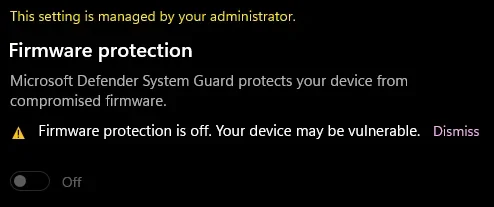

Code:
    Disk 0 : SSD. It has 1 partition(s). Model: KINGSTON SA400S37120G   
    Disk 1 : HDD. It has 2 partition(s). Model: ST2000DM008-2UB102   
    Disk 2 : HDD. It has 2 partition(s). Model: ST2000DM006-2DM164   
    Disk 3 : HDD. It has 2 partition(s). Model: WDC WD10EZEX-00WN4A0   
    Disk 4 : SSD. It has 4 partition(s). Model: WD Green SN350 1TB

    The script has found the above 5 storage device(s) in total.
=======================================================================

Microsoft DiskPart version 10.0.26100.1150

Copyright (C) Microsoft Corporation.
On computer: FURQUIM

  Disk ###  Status         Size     Free     Dyn  Gpt
  --------  -------------  -------  -------  ---  ---
  Disk 0    Online          111 GB      0 B        *
  Disk 1    Online         1863 GB  1024 KB        *
  Disk 2    Online         1863 GB  1024 KB        *
  Disk 3    Online          931 GB  1024 KB        *
  Disk 4    Online          931 GB  1024 KB        *

  Volume ###  Ltr  Label        Fs     Type        Size     Status     Info
  ----------  ---  -----------  -----  ----------  -------  ---------  --------
  Volume 0     D                NTFS   Partition    111 GB  Healthy           
  Volume 1     F                NTFS   Partition   1863 GB  Healthy           
  Volume 2     Y                NTFS   Partition   1863 GB  Healthy           
  Volume 3     G                NTFS   Partition    931 GB  Healthy           
  Volume 4     C                NTFS   Partition    930 GB  Healthy    Boot   
  Volume 5                      FAT32  Partition    100 MB  Healthy    System 
  Volume 6                      NTFS   Partition    730 MB  Healthy    Hidden 

Disk 0 is now the selected disk.

KINGSTON SA400S37120G
Disk ID: {A73172B7-DA99-46BB-85E5-74DB0C335BEF}
Type   : SATA
Status : Online
Path   : 0
Target : 0
LUN ID : 0
Location Path : PCIROOT(0)#PCI(1700)#ATA(C00T00L00)
Current Read-only State : No
Read-only  : No
Boot Disk  : No
Pagefile Disk  : No
Hibernation File Disk  : No
Crashdump Disk  : No
Clustered Disk  : No

  Volume ###  Ltr  Label        Fs     Type        Size     Status     Info
  ----------  ---  -----------  -----  ----------  -------  ---------  --------
  Volume 0     D                NTFS   Partition    111 GB  Healthy           

  Partition ###  Type              Size     Offset
  -------------  ----------------  -------  -------
  Partition 1    Primary            111 GB  1024 KB

Partition 1 is now the selected partition.

Partition 1
Type    : ebd0a0a2-b9e5-4433-87c0-68b6b72699c7
Hidden  : No
Required: No
Attrib  : 0000000000000000
Offset in Bytes: 1048576

  Volume ###  Ltr  Label        Fs     Type        Size     Status     Info
  ----------  ---  -----------  -----  ----------  -------  ---------  --------
* Volume 0     D                NTFS   Partition    111 GB  Healthy           

Disk 1 is now the selected disk.

ST2000DM008-2UB102
Disk ID: {9CF7DC3A-C0BF-4E06-A5D9-207AD0731648}
Type   : SATA
Status : Online
Path   : 1
Target : 0
LUN ID : 0
Location Path : PCIROOT(0)#PCI(1700)#ATA(C01T00L00)
Current Read-only State : No
Read-only  : No
Boot Disk  : No
Pagefile Disk  : No
Hibernation File Disk  : No
Crashdump Disk  : No
Clustered Disk  : No

  Volume ###  Ltr  Label        Fs     Type        Size     Status     Info
  ----------  ---  -----------  -----  ----------  -------  ---------  --------
  Volume 1     F                NTFS   Partition   1863 GB  Healthy           

  Partition ###  Type              Size     Offset
  -------------  ----------------  -------  -------
  Partition 1    Reserved            15 MB    17 KB
  Partition 2    Primary           1863 GB    16 MB

Partition 1 is now the selected partition.

Partition 1
Type    : e3c9e316-0b5c-4db8-817d-f92df00215ae
Hidden  : Yes
Required: No
Attrib  : 0000000000000000
Offset in Bytes: 17408

There is no volume associated with this partition.

Partition 2 is now the selected partition.

Partition 2
Type    : ebd0a0a2-b9e5-4433-87c0-68b6b72699c7
Hidden  : No
Required: No
Attrib  : 0000000000000000
Offset in Bytes: 16777216

  Volume ###  Ltr  Label        Fs     Type        Size     Status     Info
  ----------  ---  -----------  -----  ----------  -------  ---------  --------
* Volume 1     F                NTFS   Partition   1863 GB  Healthy           

Disk 2 is now the selected disk.

ST2000DM006-2DM164
Disk ID: {3FA12C96-7DA1-483A-980D-2FCE5DA5AF5B}
Type   : SATA
Status : Online
Path   : 2
Target : 0
LUN ID : 0
Location Path : PCIROOT(0)#PCI(1700)#ATA(C02T00L00)
Current Read-only State : No
Read-only  : No
Boot Disk  : No
Pagefile Disk  : No
Hibernation File Disk  : No
Crashdump Disk  : No
Clustered Disk  : No

  Volume ###  Ltr  Label        Fs     Type        Size     Status     Info
  ----------  ---  -----------  -----  ----------  -------  ---------  --------
  Volume 2     Y                NTFS   Partition   1863 GB  Healthy           

  Partition ###  Type              Size     Offset
  -------------  ----------------  -------  -------
  Partition 1    Reserved            15 MB    17 KB
  Partition 2    Primary           1863 GB    16 MB

Partition 1 is now the selected partition.

Partition 1
Type    : e3c9e316-0b5c-4db8-817d-f92df00215ae
Hidden  : Yes
Required: No
Attrib  : 0000000000000000
Offset in Bytes: 17408

There is no volume associated with this partition.

Partition 2 is now the selected partition.

Partition 2
Type    : ebd0a0a2-b9e5-4433-87c0-68b6b72699c7
Hidden  : No
Required: No
Attrib  : 0000000000000000
Offset in Bytes: 16777216

  Volume ###  Ltr  Label        Fs     Type        Size     Status     Info
  ----------  ---  -----------  -----  ----------  -------  ---------  --------
* Volume 2     Y                NTFS   Partition   1863 GB  Healthy           

Disk 3 is now the selected disk.

WDC WD10EZEX-00WN4A0
Disk ID: {826A9CDB-6712-4C47-B4F4-ABDCD29FE244}
Type   : SATA
Status : Online
Path   : 3
Target : 0
LUN ID : 0
Location Path : PCIROOT(0)#PCI(1700)#ATA(C03T00L00)
Current Read-only State : No
Read-only  : No
Boot Disk  : No
Pagefile Disk  : No
Hibernation File Disk  : No
Crashdump Disk  : No
Clustered Disk  : No

  Volume ###  Ltr  Label        Fs     Type        Size     Status     Info
  ----------  ---  -----------  -----  ----------  -------  ---------  --------
  Volume 3     G                NTFS   Partition    931 GB  Healthy           

  Partition ###  Type              Size     Offset
  -------------  ----------------  -------  -------
  Partition 1    Reserved            15 MB    17 KB
  Partition 2    Primary            931 GB    16 MB

Partition 1 is now the selected partition.

Partition 1
Type    : e3c9e316-0b5c-4db8-817d-f92df00215ae
Hidden  : Yes
Required: No
Attrib  : 0000000000000000
Offset in Bytes: 17408

There is no volume associated with this partition.

Partition 2 is now the selected partition.

Partition 2
Type    : ebd0a0a2-b9e5-4433-87c0-68b6b72699c7
Hidden  : No
Required: No
Attrib  : 0000000000000000
Offset in Bytes: 16777216

  Volume ###  Ltr  Label        Fs     Type        Size     Status     Info
  ----------  ---  -----------  -----  ----------  -------  ---------  --------
* Volume 3     G                NTFS   Partition    931 GB  Healthy           

Disk 4 is now the selected disk.

WD Green SN350 1TB
Disk ID: {10E83675-2240-4E74-8652-C08A6DED09D1}
Type   : NVMe
Status : Online
Path   : 0
Target : 0
LUN ID : 0
Location Path : PCIROOT(0)#PCI(1C00)#PCI(0000)#NVME(P00T00L00)
Current Read-only State : No
Read-only  : No
Boot Disk  : Yes
Pagefile Disk  : Yes
Hibernation File Disk  : No
Crashdump Disk  : Yes
Clustered Disk  : No

  Volume ###  Ltr  Label        Fs     Type        Size     Status     Info
  ----------  ---  -----------  -----  ----------  -------  ---------  --------
  Volume 4     C                NTFS   Partition    930 GB  Healthy    Boot   
  Volume 5                      FAT32  Partition    100 MB  Healthy    System 
  Volume 6                      NTFS   Partition    730 MB  Healthy    Hidden 

  Partition ###  Type              Size     Offset
  -------------  ----------------  -------  -------
  Partition 1    System             100 MB  1024 KB
  Partition 2    Reserved            16 MB   101 MB
  Partition 3    Primary            930 GB   117 MB
  Partition 4    Recovery           730 MB   930 GB

Partition 1 is now the selected partition.

Partition 1
Type    : c12a7328-f81f-11d2-ba4b-00a0c93ec93b
Hidden  : Yes
Required: No
Attrib  : 0X8000000000000000
Offset in Bytes: 1048576

  Volume ###  Ltr  Label        Fs     Type        Size     Status     Info
  ----------  ---  -----------  -----  ----------  -------  ---------  --------
* Volume 5                      FAT32  Partition    100 MB  Healthy    System 

Partition 2 is now the selected partition.

Partition 2
Type    : e3c9e316-0b5c-4db8-817d-f92df00215ae
Hidden  : Yes
Required: No
Attrib  : 0X8000000000000000
Offset in Bytes: 105906176

There is no volume associated with this partition.

Partition 3 is now the selected partition.

Partition 3
Type    : ebd0a0a2-b9e5-4433-87c0-68b6b72699c7
Hidden  : No
Required: No
Attrib  : 0000000000000000
Offset in Bytes: 122683392

  Volume ###  Ltr  Label        Fs     Type        Size     Status     Info
  ----------  ---  -----------  -----  ----------  -------  ---------  --------
* Volume 4     C                NTFS   Partition    930 GB  Healthy    Boot   

Partition 4 is now the selected partition.

Partition 4
Type    : de94bba4-06d1-4d40-a16a-bfd50179d6ac
Hidden  : Yes
Required: Yes
Attrib  : 0X8000000000000001
Offset in Bytes: 999437631488

  Volume ###  Ltr  Label        Fs     Type        Size     Status     Info
  ----------  ---  -----------  -----  ----------  -------  ---------  --------
* Volume 6                      NTFS   Partition    730 MB  Healthy    Hidden 

===============================================================================
 

My Computer

System One

  • OS
    Windows 10
    Computer type
    Laptop
    Manufacturer/Model
    HP
    CPU
    Intel(R) Core(TM) i7-4800MQ CPU @ 2.70GHz
    Motherboard
    Product : 190A Version : KBC Version 94.56
    Memory
    16 GB Total: Manufacturer : Samsung MemoryType : DDR3 FormFactor : SODIMM Capacity : 8GB Speed : 1600
    Graphics Card(s)
    NVIDIA Quadro K3100M; Intel(R) HD Graphics 4600
    Sound Card
    IDT High Definition Audio CODEC; PNP Device ID HDAUDIO\FUNC_01&VEN_111D&DEV_76E0
    Hard Drives
    Model Hitachi HTS727575A9E364
    Antivirus
    Microsoft Defender
    Other Info
    Mobile Workstation
1) After completing post #8 step#8 and #9 run: HD Sentinel > post share links for each disk drive


a) Overview
b) Temperature
c) SMART


2) Read this link on Windows Driver Verifier (WDV):

Enable and Disable Driver Verifier in Windows 10


3) Create a new restore point


4) Learn the methods to recover from BSOD caused by WDV by booting into safe mode and running one or more of these commands:

verifier /reset

verifier /bootmode resetonbootfail


(option nine and seven)


5) Plan to run the tool with various customized test settings.

a) Test all non-Microsoft drivers

b) Test no Microsoft drivers

c) For the first run of WDV select the 3 customized tests displayed in the TF tutorial


6) Whenever the WDV tool is started if there is no immediate BSOD then open administrative command prompt and copy and paste:

verifier /querysettings

Post a share link.


Customized tests will then be posted for the next run of WDV.


WDV can run continuously during the testing.


For any BSOD post a new V2 share link into the newest post.


Code:
2026-03-30 22:14:21, Info                  CBS    (p)    CSI Payload Corrupt    (n)            amd64_userexperience-desktop_31bf3856ad364e35_10.0.26100.7705_none_c7f6f5511a69ae1e\CBS\VisualAssist\VisualAssistActions.json
2026-03-30 22:14:21, Info                  CBS    (w)    CBS Package Index Package Missing    0x80070490    ZoicwareRemoveWindowsAI~31bf3856ad364e35~amd64~~0.0.0.0    ZoicwareRemoveWindowsAI~31bf3856ad364e35~amd64~~1.0.0.0
Ok, I'll be running the chkdsk tonight. It's already set to start after I restart my PC.

From 03/14

ST2000DM008-2UB102

Code:
Log Name:      Application
Source:        Microsoft-Windows-Wininit
Date:          3/14/2026 3:28:24 PM
Event ID:      1001
Task Category: None
Level:         Information
Keywords:      Classic
User:          N/A
Computer:      FURQUIM
Description:


Checking file system on F:
The type of the file system is NTFS.
Volume label is Fagner (temporário).

The volume is dirty.

Stage 1: Examining basic file system structure ...
Deleted corrupt attribute list entry
with type code 80 in file 374A.
Unable to find child frs 0x9b8f with sequence number 0x6.
The attributes with same type code 0x80 but different instance tags
0x0 and 0x0 have non-contiguous VCN numbers 0x15050 and 0x19df0
respectively in file 0x374a.
Deleted corrupt attribute list entry
with type code 80 in file 374A.
Unable to locate attribute with instance tag 0x0 and segment
reference 0xd0000000049d6.  The expected attribute type is 0x80.
Deleting corrupt attribute record (0x80, "")
from file record segment 0x49D6.
Unable to locate attribute with instance tag 0x0 and segment
reference 0x5000000007b34.  The expected attribute type is 0x80.
Deleting corrupt attribute record (0x80, "")
from file record segment 0x7B34.
Unable to locate attribute with instance tag 0x0 and segment
reference 0x30000000083b7.  The expected attribute type is 0x80.
Deleting corrupt attribute record (0x80, "")
from file record segment 0x83B7.
Unable to locate attribute with instance tag 0x0 and segment
reference 0x4000000008bef.  The expected attribute type is 0x80.
Deleting corrupt attribute record (0x80, "")
from file record segment 0x8BEF.
Unable to locate attribute with instance tag 0x0 and segment
reference 0xc00000000c79e.  The expected attribute type is 0x80.
Deleting corrupt attribute record (0x80, "")
from file record segment 0xC79E.
Unable to locate attribute with instance tag 0x0 and segment
reference 0xc00000000c8e1.  The expected attribute type is 0x80.
Deleting corrupt attribute record (0x80, "")
from file record segment 0xC8E1.
Unable to locate attribute with instance tag 0x0 and segment
reference 0xa00000000c985.  The expected attribute type is 0x80.
Deleting corrupt attribute record (0x80, "")
from file record segment 0xC985.
Unable to locate attribute with instance tag 0x0 and segment
reference 0xb00000000ca72.  The expected attribute type is 0x80.
Deleting corrupt attribute record (0x80, "")
from file record segment 0xCA72.
Unable to locate attribute with instance tag 0x0 and segment
reference 0xb00000000cbad.  The expected attribute type is 0x80.
Deleting corrupt attribute record (0x80, "")
from file record segment 0xCBAD.
Unable to locate attribute with instance tag 0x0 and segment
reference 0xb00000000cc22.  The expected attribute type is 0x80.
Deleting corrupt attribute record (0x80, "")
from file record segment 0xCC22.
Unable to locate attribute with instance tag 0x0 and segment
reference 0xb00000000ccad.  The expected attribute type is 0x80.
Deleting corrupt attribute record (0x80, "")
from file record segment 0xCCAD.
Unable to locate attribute with instance tag 0x0 and segment
reference 0xa00000000cdc9.  The expected attribute type is 0x80.
Deleting corrupt attribute record (0x80, "")
from file record segment 0xCDC9.
Unable to locate attribute with instance tag 0x0 and segment
reference 0x300000000e182.  The expected attribute type is 0x80.
Deleting corrupt attribute record (0x80, "")
from file record segment 0xE182.
Unable to locate attribute with instance tag 0x0 and segment
reference 0x300000000e42d.  The expected attribute type is 0x80.
Deleting corrupt attribute record (0x80, "")
from file record segment 0xE42D.
Unable to locate attribute with instance tag 0x0 and segment
reference 0x500000000ec0e.  The expected attribute type is 0x80.
Deleting corrupt attribute record (0x80, "")
from file record segment 0xEC0E.
Unable to locate attribute with instance tag 0x0 and segment
reference 0x500000000ed28.  The expected attribute type is 0x80.
Deleting corrupt attribute record (0x80, "")
from file record segment 0xED28.
Unable to locate attribute with instance tag 0x0 and segment
reference 0x700000000f0e6.  The expected attribute type is 0x80.
Deleting corrupt attribute record (0x80, "")
from file record segment 0xF0E6.
Unable to locate attribute with instance tag 0x0 and segment
reference 0x600000000f242.  The expected attribute type is 0x80.
Deleting corrupt attribute record (0x80, "")
from file record segment 0xF242.
Unable to locate attribute with instance tag 0x0 and segment
reference 0x500000000f2fc.  The expected attribute type is 0x80.
Deleting corrupt attribute record (0x80, "")
from file record segment 0xF2FC.
Unable to locate attribute with instance tag 0x0 and segment
reference 0x500000000f309.  The expected attribute type is 0x80.
Deleting corrupt attribute record (0x80, "")
from file record segment 0xF309.
Unable to locate attribute with instance tag 0x0 and segment
reference 0x500000000f4d6.  The expected attribute type is 0x80.
Deleting corrupt attribute record (0x80, "")
from file record segment 0xF4D6.
Unable to locate attribute with instance tag 0x0 and segment
reference 0x500000000f4f0.  The expected attribute type is 0x80.
Deleting corrupt attribute record (0x80, "")
from file record segment 0xF4F0.
Unable to locate attribute with instance tag 0x0 and segment
reference 0x500000000f501.  The expected attribute type is 0x80.
Deleting corrupt attribute record (0x80, "")
from file record segment 0xF501.
Unable to locate attribute with instance tag 0x0 and segment
reference 0x500000000f52e.  The expected attribute type is 0x80.
Deleting corrupt attribute record (0x80, "")
from file record segment 0xF52E.
Unable to locate attribute with instance tag 0x0 and segment
reference 0x500000000f57a.  The expected attribute type is 0x80.
Deleting corrupt attribute record (0x80, "")
from file record segment 0xF57A.
Unable to locate attribute with instance tag 0x0 and segment
reference 0x800000000f5bd.  The expected attribute type is 0x80.
Deleting corrupt attribute record (0x80, "")
from file record segment 0xF5BD.
Unable to locate attribute with instance tag 0x0 and segment
reference 0x700000000f74f.  The expected attribute type is 0x80.
Deleting corrupt attribute record (0x80, "")
from file record segment 0xF74F.
Deleted corrupt attribute list entry
with type code 80 in file 3759.
Unable to find child frs 0x9e6b with sequence number 0x6.
The attributes with same type code 0x80 but different instance tags
0x0 and 0x0 have non-contiguous VCN numbers 0xd200 and 0x129d0
respectively in file 0x3759.
Deleted corrupt attribute list entry
with type code 80 in file 3759.
Unable to locate attribute with instance tag 0x0 and segment
reference 0xe00000000491c.  The expected attribute type is 0x80.
Deleting corrupt attribute record (0x80, "")
from file record segment 0x491C.
Unable to locate attribute with instance tag 0x0 and segment
reference 0x5000000008fee.  The expected attribute type is 0x80.
Deleting corrupt attribute record (0x80, "")
from file record segment 0x8FEE.
Unable to locate attribute with instance tag 0x0 and segment
reference 0x5000000009c01.  The expected attribute type is 0x80.
Deleting corrupt attribute record (0x80, "")
from file record segment 0x9C01.
Unable to locate attribute with instance tag 0x0 and segment
reference 0xd00000000c89d.  The expected attribute type is 0x80.
Deleting corrupt attribute record (0x80, "")
from file record segment 0xC89D.
Unable to locate attribute with instance tag 0x0 and segment
reference 0xb00000000c90d.  The expected attribute type is 0x80.
Deleting corrupt attribute record (0x80, "")
from file record segment 0xC90D.
Unable to locate attribute with instance tag 0x0 and segment
reference 0xb00000000ca64.  The expected attribute type is 0x80.
Deleting corrupt attribute record (0x80, "")
from file record segment 0xCA64.
Unable to locate attribute with instance tag 0x0 and segment
reference 0xb00000000cacf.  The expected attribute type is 0x80.
Deleting corrupt attribute record (0x80, "")
from file record segment 0xCACF.
Unable to locate attribute with instance tag 0x0 and segment
reference 0xa00000000cb5d.  The expected attribute type is 0x80.
Deleting corrupt attribute record (0x80, "")
from file record segment 0xCB5D.
Unable to locate attribute with instance tag 0x0 and segment
reference 0xb00000000cc02.  The expected attribute type is 0x80.
Deleting corrupt attribute record (0x80, "")
from file record segment 0xCC02.
Unable to locate attribute with instance tag 0x0 and segment
reference 0x800000000ccb5.  The expected attribute type is 0x80.
Deleting corrupt attribute record (0x80, "")
from file record segment 0xCCB5.
Unable to locate attribute with instance tag 0x0 and segment
reference 0xb00000000cd37.  The expected attribute type is 0x80.
Deleting corrupt attribute record (0x80, "")
from file record segment 0xCD37.
Unable to locate attribute with instance tag 0x0 and segment
reference 0xb00000000cd82.  The expected attribute type is 0x80.
Deleting corrupt attribute record (0x80, "")
from file record segment 0xCD82.
Unable to locate attribute with instance tag 0x0 and segment
reference 0xa00000000cdb3.  The expected attribute type is 0x80.
Deleting corrupt attribute record (0x80, "")
from file record segment 0xCDB3.
Unable to locate attribute with instance tag 0x0 and segment
reference 0x500000000e1a7.  The expected attribute type is 0x80.
Deleting corrupt attribute record (0x80, "")
from file record segment 0xE1A7.
Unable to locate attribute with instance tag 0x0 and segment
reference 0x300000000e4a3.  The expected attribute type is 0x80.
Deleting corrupt attribute record (0x80, "")
from file record segment 0xE4A3.
Unable to locate attribute with instance tag 0x0 and segment
reference 0x600000000ebdd.  The expected attribute type is 0x80.
Deleting corrupt attribute record (0x80, "")
from file record segment 0xEBDD.
Unable to locate attribute with instance tag 0x0 and segment
reference 0x500000000ec2a.  The expected attribute type is 0x80.
Deleting corrupt attribute record (0x80, "")
from file record segment 0xEC2A.
Unable to locate attribute with instance tag 0x0 and segment
reference 0x600000000edfb.  The expected attribute type is 0x80.
Deleting corrupt attribute record (0x80, "")
from file record segment 0xEDFB.
Unable to locate attribute with instance tag 0x0 and segment
reference 0x300000000ee7a.  The expected attribute type is 0x80.
Deleting corrupt attribute record (0x80, "")
from file record segment 0xEE7A.
Unable to locate attribute with instance tag 0x0 and segment
reference 0x700000000f1a0.  The expected attribute type is 0x80.
Deleting corrupt attribute record (0x80, "")
from file record segment 0xF1A0.
Unable to locate attribute with instance tag 0x0 and segment
reference 0x500000000f28d.  The expected attribute type is 0x80.
Deleting corrupt attribute record (0x80, "")
from file record segment 0xF28D.
Unable to locate attribute with instance tag 0x0 and segment
reference 0x500000000f2fd.  The expected attribute type is 0x80.
Deleting corrupt attribute record (0x80, "")
from file record segment 0xF2FD.
Unable to locate attribute with instance tag 0x0 and segment
reference 0x500000000f4db.  The expected attribute type is 0x80.
Deleting corrupt attribute record (0x80, "")
from file record segment 0xF4DB.
Unable to locate attribute with instance tag 0x0 and segment
reference 0x500000000f4e6.  The expected attribute type is 0x80.
Deleting corrupt attribute record (0x80, "")
from file record segment 0xF4E6.
Unable to locate attribute with instance tag 0x0 and segment
reference 0x600000000f4fc.  The expected attribute type is 0x80.
Deleting corrupt attribute record (0x80, "")
from file record segment 0xF4FC.
Unable to locate attribute with instance tag 0x0 and segment
reference 0x500000000f51e.  The expected attribute type is 0x80.
Deleting corrupt attribute record (0x80, "")
from file record segment 0xF51E.
Unable to locate attribute with instance tag 0x0 and segment
reference 0x500000000f559.  The expected attribute type is 0x80.
Deleting corrupt attribute record (0x80, "")
from file record segment 0xF559.
Unable to locate attribute with instance tag 0x0 and segment
reference 0x500000000f577.  The expected attribute type is 0x80.
Deleting corrupt attribute record (0x80, "")
from file record segment 0xF577.
Unable to locate attribute with instance tag 0x0 and segment
reference 0x500000000f59e.  The expected attribute type is 0x80.
Deleting corrupt attribute record (0x80, "")
from file record segment 0xF59E.
Unable to locate attribute with instance tag 0x0 and segment
reference 0x500000000f5b4.  The expected attribute type is 0x80.
Deleting corrupt attribute record (0x80, "")
from file record segment 0xF5B4.
Deleted corrupt attribute list entry
with type code 80 in file 427E.
Unable to find child frs 0xc6f0 with sequence number 0x12.
The attributes with same type code 0x80 but different instance tags
0x0 and 0x0 have non-contiguous VCN numbers 0x9d60 and 0xe4a0
respectively in file 0x427e.
Deleted corrupt attribute list entry
with type code 80 in file 427E.
Unable to locate attribute with instance tag 0x0 and segment
reference 0x3000000007e69.  The expected attribute type is 0x80.
Deleting corrupt attribute record (0x80, "")
from file record segment 0x7E69.
Unable to locate attribute with instance tag 0x0 and segment
reference 0xb00000000c8ef.  The expected attribute type is 0x80.
Deleting corrupt attribute record (0x80, "")
from file record segment 0xC8EF.
Unable to locate attribute with instance tag 0x0 and segment
reference 0xe00000000c8f2.  The expected attribute type is 0x80.
Deleting corrupt attribute record (0x80, "")
from file record segment 0xC8F2.
Deleted corrupt attribute list entry
with type code 80 in file 43F5.
Unable to find child frs 0xae74 with sequence number 0x8.
The attribute of type 0x80 and instance tag 0x0 in file 0x43f5
has allocated length of 0xae45000 instead of 0x59b0000.
Deleted corrupt attribute list entry
with type code 80 in file 43F5.
Unable to locate attribute with instance tag 0x0 and segment
reference 0x800000000ad57.  The expected attribute type is 0x80.
Deleting corrupt attribute record (0x80, "")
from file record segment 0xAD57.
Deleted corrupt attribute list entry
with type code 80 in file 7F22.
Unable to find child frs 0xc953 with sequence number 0x8.
The attributes with same type code 0x80 but different instance tags
0x0 and 0x0 have non-contiguous VCN numbers 0x4af0 and 0xb900
respectively in file 0x7f22.
Deleted corrupt attribute list entry
with type code 80 in file 7F22.
Unable to locate attribute with instance tag 0x0 and segment
reference 0xe000000004918.  The expected attribute type is 0x80.
Deleting corrupt attribute record (0x80, "")
from file record segment 0x4918.
Unable to locate attribute with instance tag 0x0 and segment
reference 0xd000000004921.  The expected attribute type is 0x80.
Deleting corrupt attribute record (0x80, "")
from file record segment 0x4921.
Unable to locate attribute with instance tag 0x0 and segment
reference 0xe0000000049aa.  The expected attribute type is 0x80.
Deleting corrupt attribute record (0x80, "")
from file record segment 0x49AA.
Unable to locate attribute with instance tag 0x0 and segment
reference 0x900000000c8c2.  The expected attribute type is 0x80.
Deleting corrupt attribute record (0x80, "")
from file record segment 0xC8C2.
Unable to locate attribute with instance tag 0x0 and segment
reference 0x800000000ca89.  The expected attribute type is 0x80.
Deleting corrupt attribute record (0x80, "")
from file record segment 0xCA89.
Unable to locate attribute with instance tag 0x0 and segment
reference 0xb00000000cb0b.  The expected attribute type is 0x80.
Deleting corrupt attribute record (0x80, "")
from file record segment 0xCB0B.
Unable to locate attribute with instance tag 0x0 and segment
reference 0xb00000000cb31.  The expected attribute type is 0x80.
Deleting corrupt attribute record (0x80, "")
from file record segment 0xCB31.
Unable to locate attribute with instance tag 0x0 and segment
reference 0xb00000000cc0f.  The expected attribute type is 0x80.
Deleting corrupt attribute record (0x80, "")
from file record segment 0xCC0F.
Unable to locate attribute with instance tag 0x0 and segment
refer
Event Xml:
<Event xmlns="http://schemas.microsoft.com/win/2004/08/events/event">
  <System>
    <Provider Name="Microsoft-Windows-Wininit" Guid="{206f6dea-d3c5-4d10-bc72-989f03c8b84b}" EventSourceName="Wininit" />
    <EventID Qualifiers="16384">1001</EventID>
    <Version>0</Version>
    <Level>4</Level>
    <Task>0</Task>
    <Opcode>0</Opcode>
    <Keywords>0x80000000000000</Keywords>
    <TimeCreated SystemTime="2026-03-14T20:28:24.7447438Z" />
    <EventRecordID>15216</EventRecordID>
    <Correlation />
    <Execution ProcessID="1208" ThreadID="0" />
    <Channel>Application</Channel>
    <Computer>FURQUIM</Computer>
    <Security />
  </System>
  <EventData>
    <Data>

Checking file system on F:
The type of the file system is NTFS.
Volume label is Fagner (temporário).

The volume is dirty.

Stage 1: Examining basic file system structure ...
Deleted corrupt attribute list entry
with type code 80 in file 374A.
Unable to find child frs 0x9b8f with sequence number 0x6.
The attributes with same type code 0x80 but different instance tags
0x0 and 0x0 have non-contiguous VCN numbers 0x15050 and 0x19df0
respectively in file 0x374a.
Deleted corrupt attribute list entry
with type code 80 in file 374A.
Unable to locate attribute with instance tag 0x0 and segment
reference 0xd0000000049d6.  The expected attribute type is 0x80.
Deleting corrupt attribute record (0x80, "")
from file record segment 0x49D6.
Unable to locate attribute with instance tag 0x0 and segment
reference 0x5000000007b34.  The expected attribute type is 0x80.
Deleting corrupt attribute record (0x80, "")
from file record segment 0x7B34.
Unable to locate attribute with instance tag 0x0 and segment
reference 0x30000000083b7.  The expected attribute type is 0x80.
Deleting corrupt attribute record (0x80, "")
from file record segment 0x83B7.
Unable to locate attribute with instance tag 0x0 and segment
reference 0x4000000008bef.  The expected attribute type is 0x80.
Deleting corrupt attribute record (0x80, "")
from file record segment 0x8BEF.
Unable to locate attribute with instance tag 0x0 and segment
reference 0xc00000000c79e.  The expected attribute type is 0x80.
Deleting corrupt attribute record (0x80, "")
from file record segment 0xC79E.
Unable to locate attribute with instance tag 0x0 and segment
reference 0xc00000000c8e1.  The expected attribute type is 0x80.
Deleting corrupt attribute record (0x80, "")
from file record segment 0xC8E1.
Unable to locate attribute with instance tag 0x0 and segment
reference 0xa00000000c985.  The expected attribute type is 0x80.
Deleting corrupt attribute record (0x80, "")
from file record segment 0xC985.
Unable to locate attribute with instance tag 0x0 and segment
reference 0xb00000000ca72.  The expected attribute type is 0x80.
Deleting corrupt attribute record (0x80, "")
from file record segment 0xCA72.
Unable to locate attribute with instance tag 0x0 and segment
reference 0xb00000000cbad.  The expected attribute type is 0x80.
Deleting corrupt attribute record (0x80, "")
from file record segment 0xCBAD.
Unable to locate attribute with instance tag 0x0 and segment
reference 0xb00000000cc22.  The expected attribute type is 0x80.
Deleting corrupt attribute record (0x80, "")
from file record segment 0xCC22.
Unable to locate attribute with instance tag 0x0 and segment
reference 0xb00000000ccad.  The expected attribute type is 0x80.
Deleting corrupt attribute record (0x80, "")
from file record segment 0xCCAD.
Unable to locate attribute with instance tag 0x0 and segment
reference 0xa00000000cdc9.  The expected attribute type is 0x80.
Deleting corrupt attribute record (0x80, "")
from file record segment 0xCDC9.
Unable to locate attribute with instance tag 0x0 and segment
reference 0x300000000e182.  The expected attribute type is 0x80.
Deleting corrupt attribute record (0x80, "")
from file record segment 0xE182.
Unable to locate attribute with instance tag 0x0 and segment
reference 0x300000000e42d.  The expected attribute type is 0x80.
Deleting corrupt attribute record (0x80, "")
from file record segment 0xE42D.
Unable to locate attribute with instance tag 0x0 and segment
reference 0x500000000ec0e.  The expected attribute type is 0x80.
Deleting corrupt attribute record (0x80, "")
from file record segment 0xEC0E.
Unable to locate attribute with instance tag 0x0 and segment
reference 0x500000000ed28.  The expected attribute type is 0x80.
Deleting corrupt attribute record (0x80, "")
from file record segment 0xED28.
Unable to locate attribute with instance tag 0x0 and segment
reference 0x700000000f0e6.  The expected attribute type is 0x80.
Deleting corrupt attribute record (0x80, "")
from file record segment 0xF0E6.
Unable to locate attribute with instance tag 0x0 and segment
reference 0x600000000f242.  The expected attribute type is 0x80.
Deleting corrupt attribute record (0x80, "")
from file record segment 0xF242.
Unable to locate attribute with instance tag 0x0 and segment
reference 0x500000000f2fc.  The expected attribute type is 0x80.
Deleting corrupt attribute record (0x80, "")
from file record segment 0xF2FC.
Unable to locate attribute with instance tag 0x0 and segment
reference 0x500000000f309.  The expected attribute type is 0x80.
Deleting corrupt attribute record (0x80, "")
from file record segment 0xF309.
Unable to locate attribute with instance tag 0x0 and segment
reference 0x500000000f4d6.  The expected attribute type is 0x80.
Deleting corrupt attribute record (0x80, "")
from file record segment 0xF4D6.
Unable to locate attribute with instance tag 0x0 and segment
reference 0x500000000f4f0.  The expected attribute type is 0x80.
Deleting corrupt attribute record (0x80, "")
from file record segment 0xF4F0.
Unable to locate attribute with instance tag 0x0 and segment
reference 0x500000000f501.  The expected attribute type is 0x80.
Deleting corrupt attribute record (0x80, "")
from file record segment 0xF501.
Unable to locate attribute with instance tag 0x0 and segment
reference 0x500000000f52e.  The expected attribute type is 0x80.
Deleting corrupt attribute record (0x80, "")
from file record segment 0xF52E.
Unable to locate attribute with instance tag 0x0 and segment
reference 0x500000000f57a.  The expected attribute type is 0x80.
Deleting corrupt attribute record (0x80, "")
from file record segment 0xF57A.
Unable to locate attribute with instance tag 0x0 and segment
reference 0x800000000f5bd.  The expected attribute type is 0x80.
Deleting corrupt attribute record (0x80, "")
from file record segment 0xF5BD.
Unable to locate attribute with instance tag 0x0 and segment
reference 0x700000000f74f.  The expected attribute type is 0x80.
Deleting corrupt attribute record (0x80, "")
from file record segment 0xF74F.
Deleted corrupt attribute list entry
with type code 80 in file 3759.
Unable to find child frs 0x9e6b with sequence number 0x6.
The attributes with same type code 0x80 but different instance tags
0x0 and 0x0 have non-contiguous VCN numbers 0xd200 and 0x129d0
respectively in file 0x3759.
Deleted corrupt attribute list entry
with type code 80 in file 3759.
Unable to locate attribute with instance tag 0x0 and segment
reference 0xe00000000491c.  The expected attribute type is 0x80.
Deleting corrupt attribute record (0x80, "")
from file record segment 0x491C.
Unable to locate attribute with instance tag 0x0 and segment
reference 0x5000000008fee.  The expected attribute type is 0x80.
Deleting corrupt attribute record (0x80, "")
from file record segment 0x8FEE.
Unable to locate attribute with instance tag 0x0 and segment
reference 0x5000000009c01.  The expected attribute type is 0x80.
Deleting corrupt attribute record (0x80, "")
from file record segment 0x9C01.
Unable to locate attribute with instance tag 0x0 and segment
reference 0xd00000000c89d.  The expected attribute type is 0x80.
Deleting corrupt attribute record (0x80, "")
from file record segment 0xC89D.
Unable to locate attribute with instance tag 0x0 and segment
reference 0xb00000000c90d.  The expected attribute type is 0x80.
Deleting corrupt attribute record (0x80, "")
from file record segment 0xC90D.
Unable to locate attribute with instance tag 0x0 and segment
reference 0xb00000000ca64.  The expected attribute type is 0x80.
Deleting corrupt attribute record (0x80, "")
from file record segment 0xCA64.
Unable to locate attribute with instance tag 0x0 and segment
reference 0xb00000000cacf.  The expected attribute type is 0x80.
Deleting corrupt attribute record (0x80, "")
from file record segment 0xCACF.
Unable to locate attribute with instance tag 0x0 and segment
reference 0xa00000000cb5d.  The expected attribute type is 0x80.
Deleting corrupt attribute record (0x80, "")
from file record segment 0xCB5D.
Unable to locate attribute with instance tag 0x0 and segment
reference 0xb00000000cc02.  The expected attribute type is 0x80.
Deleting corrupt attribute record (0x80, "")
from file record segment 0xCC02.
Unable to locate attribute with instance tag 0x0 and segment
reference 0x800000000ccb5.  The expected attribute type is 0x80.
Deleting corrupt attribute record (0x80, "")
from file record segment 0xCCB5.
Unable to locate attribute with instance tag 0x0 and segment
reference 0xb00000000cd37.  The expected attribute type is 0x80.
Deleting corrupt attribute record (0x80, "")
from file record segment 0xCD37.
Unable to locate attribute with instance tag 0x0 and segment
reference 0xb00000000cd82.  The expected attribute type is 0x80.
Deleting corrupt attribute record (0x80, "")
from file record segment 0xCD82.
Unable to locate attribute with instance tag 0x0 and segment
reference 0xa00000000cdb3.  The expected attribute type is 0x80.
Deleting corrupt attribute record (0x80, "")
from file record segment 0xCDB3.
Unable to locate attribute with instance tag 0x0 and segment
reference 0x500000000e1a7.  The expected attribute type is 0x80.
Deleting corrupt attribute record (0x80, "")
from file record segment 0xE1A7.
Unable to locate attribute with instance tag 0x0 and segment
reference 0x300000000e4a3.  The expected attribute type is 0x80.
Deleting corrupt attribute record (0x80, "")
from file record segment 0xE4A3.
Unable to locate attribute with instance tag 0x0 and segment
reference 0x600000000ebdd.  The expected attribute type is 0x80.
Deleting corrupt attribute record (0x80, "")
from file record segment 0xEBDD.
Unable to locate attribute with instance tag 0x0 and segment
reference 0x500000000ec2a.  The expected attribute type is 0x80.
Deleting corrupt attribute record (0x80, "")
from file record segment 0xEC2A.
Unable to locate attribute with instance tag 0x0 and segment
reference 0x600000000edfb.  The expected attribute type is 0x80.
Deleting corrupt attribute record (0x80, "")
from file record segment 0xEDFB.
Unable to locate attribute with instance tag 0x0 and segment
reference 0x300000000ee7a.  The expected attribute type is 0x80.
Deleting corrupt attribute record (0x80, "")
from file record segment 0xEE7A.
Unable to locate attribute with instance tag 0x0 and segment
reference 0x700000000f1a0.  The expected attribute type is 0x80.
Deleting corrupt attribute record (0x80, "")
from file record segment 0xF1A0.
Unable to locate attribute with instance tag 0x0 and segment
reference 0x500000000f28d.  The expected attribute type is 0x80.
Deleting corrupt attribute record (0x80, "")
from file record segment 0xF28D.
Unable to locate attribute with instance tag 0x0 and segment
reference 0x500000000f2fd.  The expected attribute type is 0x80.
Deleting corrupt attribute record (0x80, "")
from file record segment 0xF2FD.
Unable to locate attribute with instance tag 0x0 and segment
reference 0x500000000f4db.  The expected attribute type is 0x80.
Deleting corrupt attribute record (0x80, "")
from file record segment 0xF4DB.
Unable to locate attribute with instance tag 0x0 and segment
reference 0x500000000f4e6.  The expected attribute type is 0x80.
Deleting corrupt attribute record (0x80, "")
from file record segment 0xF4E6.
Unable to locate attribute with instance tag 0x0 and segment
reference 0x600000000f4fc.  The expected attribute type is 0x80.
Deleting corrupt attribute record (0x80, "")
from file record segment 0xF4FC.
Unable to locate attribute with instance tag 0x0 and segment
reference 0x500000000f51e.  The expected attribute type is 0x80.
Deleting corrupt attribute record (0x80, "")
from file record segment 0xF51E.
Unable to locate attribute with instance tag 0x0 and segment
reference 0x500000000f559.  The expected attribute type is 0x80.
Deleting corrupt attribute record (0x80, "")
from file record segment 0xF559.
Unable to locate attribute with instance tag 0x0 and segment
reference 0x500000000f577.  The expected attribute type is 0x80.
Deleting corrupt attribute record (0x80, "")
from file record segment 0xF577.
Unable to locate attribute with instance tag 0x0 and segment
reference 0x500000000f59e.  The expected attribute type is 0x80.
Deleting corrupt attribute record (0x80, "")
from file record segment 0xF59E.
Unable to locate attribute with instance tag 0x0 and segment
reference 0x500000000f5b4.  The expected attribute type is 0x80.
Deleting corrupt attribute record (0x80, "")
from file record segment 0xF5B4.
Deleted corrupt attribute list entry
with type code 80 in file 427E.
Unable to find child frs 0xc6f0 with sequence number 0x12.
The attributes with same type code 0x80 but different instance tags
0x0 and 0x0 have non-contiguous VCN numbers 0x9d60 and 0xe4a0
respectively in file 0x427e.
Deleted corrupt attribute list entry
with type code 80 in file 427E.
Unable to locate attribute with instance tag 0x0 and segment
reference 0x3000000007e69.  The expected attribute type is 0x80.
Deleting corrupt attribute record (0x80, "")
from file record segment 0x7E69.
Unable to locate attribute with instance tag 0x0 and segment
reference 0xb00000000c8ef.  The expected attribute type is 0x80.
Deleting corrupt attribute record (0x80, "")
from file record segment 0xC8EF.
Unable to locate attribute with instance tag 0x0 and segment
reference 0xe00000000c8f2.  The expected attribute type is 0x80.
Deleting corrupt attribute record (0x80, "")
from file record segment 0xC8F2.
Deleted corrupt attribute list entry
with type code 80 in file 43F5.
Unable to find child frs 0xae74 with sequence number 0x8.
The attribute of type 0x80 and instance tag 0x0 in file 0x43f5
has allocated length of 0xae45000 instead of 0x59b0000.
Deleted corrupt attribute list entry
with type code 80 in file 43F5.
Unable to locate attribute with instance tag 0x0 and segment
reference 0x800000000ad57.  The expected attribute type is 0x80.
Deleting corrupt attribute record (0x80, "")
from file record segment 0xAD57.
Deleted corrupt attribute list entry
with type code 80 in file 7F22.
Unable to find child frs 0xc953 with sequence number 0x8.
The attributes with same type code 0x80 but different instance tags
0x0 and 0x0 have non-contiguous VCN numbers 0x4af0 and 0xb900
respectively in file 0x7f22.
Deleted corrupt attribute list entry
with type code 80 in file 7F22.
Unable to locate attribute with instance tag 0x0 and segment
reference 0xe000000004918.  The expected attribute type is 0x80.
Deleting corrupt attribute record (0x80, "")
from file record segment 0x4918.
Unable to locate attribute with instance tag 0x0 and segment
reference 0xd000000004921.  The expected attribute type is 0x80.
Deleting corrupt attribute record (0x80, "")
from file record segment 0x4921.
Unable to locate attribute with instance tag 0x0 and segment
reference 0xe0000000049aa.  The expected attribute type is 0x80.
Deleting corrupt attribute record (0x80, "")
from file record segment 0x49AA.
Unable to locate attribute with instance tag 0x0 and segment
reference 0x900000000c8c2.  The expected attribute type is 0x80.
Deleting corrupt attribute record (0x80, "")
from file record segment 0xC8C2.
Unable to locate attribute with instance tag 0x0 and segment
reference 0x800000000ca89.  The expected attribute type is 0x80.
Deleting corrupt attribute record (0x80, "")
from file record segment 0xCA89.
Unable to locate attribute with instance tag 0x0 and segment
reference 0xb00000000cb0b.  The expected attribute type is 0x80.
Deleting corrupt attribute record (0x80, "")
from file record segment 0xCB0B.
Unable to locate attribute with instance tag 0x0 and segment
reference 0xb00000000cb31.  The expected attribute type is 0x80.
Deleting corrupt attribute record (0x80, "")
from file record segment 0xCB31.
Unable to locate attribute with instance tag 0x0 and segment
reference 0xb00000000cc0f.  The expected attribute type is 0x80.
Deleting corrupt attribute record (0x80, "")
from file record segment 0xCC0F.
Unable to locate attribute with instance tag 0x0 and segment
refer</Data>
  </EventData>
</Event>


Code:
    Disk 0 : SSD. It has 1 partition(s). Model: KINGSTON SA400S37120G  
    Disk 1 : HDD. It has 2 partition(s). Model: ST2000DM008-2UB102  
    Disk 2 : HDD. It has 2 partition(s). Model: ST2000DM006-2DM164  
    Disk 3 : HDD. It has 2 partition(s). Model: WDC WD10EZEX-00WN4A0  
    Disk 4 : SSD. It has 4 partition(s). Model: WD Green SN350 1TB

    The script has found the above 5 storage device(s) in total.
=======================================================================

Microsoft DiskPart version 10.0.26100.1150

Copyright (C) Microsoft Corporation.
On computer: FURQUIM

  Disk ###  Status         Size     Free     Dyn  Gpt
  --------  -------------  -------  -------  ---  ---
  Disk 0    Online          111 GB      0 B        *
  Disk 1    Online         1863 GB  1024 KB        *
  Disk 2    Online         1863 GB  1024 KB        *
  Disk 3    Online          931 GB  1024 KB        *
  Disk 4    Online          931 GB  1024 KB        *

  Volume ###  Ltr  Label        Fs     Type        Size     Status     Info
  ----------  ---  -----------  -----  ----------  -------  ---------  --------
  Volume 0     D                NTFS   Partition    111 GB  Healthy          
  Volume 1     F                NTFS   Partition   1863 GB  Healthy          
  Volume 2     Y                NTFS   Partition   1863 GB  Healthy          
  Volume 3     G                NTFS   Partition    931 GB  Healthy          
  Volume 4     C                NTFS   Partition    930 GB  Healthy    Boot  
  Volume 5                      FAT32  Partition    100 MB  Healthy    System
  Volume 6                      NTFS   Partition    730 MB  Healthy    Hidden

Disk 0 is now the selected disk.

KINGSTON SA400S37120G
Disk ID: {A73172B7-DA99-46BB-85E5-74DB0C335BEF}
Type   : SATA
Status : Online
Path   : 0
Target : 0
LUN ID : 0
Location Path : PCIROOT(0)#PCI(1700)#ATA(C00T00L00)
Current Read-only State : No
Read-only  : No
Boot Disk  : No
Pagefile Disk  : No
Hibernation File Disk  : No
Crashdump Disk  : No
Clustered Disk  : No

  Volume ###  Ltr  Label        Fs     Type        Size     Status     Info
  ----------  ---  -----------  -----  ----------  -------  ---------  --------
  Volume 0     D                NTFS   Partition    111 GB  Healthy          

  Partition ###  Type              Size     Offset
  -------------  ----------------  -------  -------
  Partition 1    Primary            111 GB  1024 KB

Partition 1 is now the selected partition.

Partition 1
Type    : ebd0a0a2-b9e5-4433-87c0-68b6b72699c7
Hidden  : No
Required: No
Attrib  : 0000000000000000
Offset in Bytes: 1048576

  Volume ###  Ltr  Label        Fs     Type        Size     Status     Info
  ----------  ---  -----------  -----  ----------  -------  ---------  --------
* Volume 0     D                NTFS   Partition    111 GB  Healthy          

Disk 1 is now the selected disk.

ST2000DM008-2UB102
Disk ID: {9CF7DC3A-C0BF-4E06-A5D9-207AD0731648}
Type   : SATA
Status : Online
Path   : 1
Target : 0
LUN ID : 0
Location Path : PCIROOT(0)#PCI(1700)#ATA(C01T00L00)
Current Read-only State : No
Read-only  : No
Boot Disk  : No
Pagefile Disk  : No
Hibernation File Disk  : No
Crashdump Disk  : No
Clustered Disk  : No

  Volume ###  Ltr  Label        Fs     Type        Size     Status     Info
  ----------  ---  -----------  -----  ----------  -------  ---------  --------
  Volume 1     F                NTFS   Partition   1863 GB  Healthy          

  Partition ###  Type              Size     Offset
  -------------  ----------------  -------  -------
  Partition 1    Reserved            15 MB    17 KB
  Partition 2    Primary           1863 GB    16 MB

Partition 1 is now the selected partition.

Partition 1
Type    : e3c9e316-0b5c-4db8-817d-f92df00215ae
Hidden  : Yes
Required: No
Attrib  : 0000000000000000
Offset in Bytes: 17408

There is no volume associated with this partition.

Partition 2 is now the selected partition.

Partition 2
Type    : ebd0a0a2-b9e5-4433-87c0-68b6b72699c7
Hidden  : No
Required: No
Attrib  : 0000000000000000
Offset in Bytes: 16777216

  Volume ###  Ltr  Label        Fs     Type        Size     Status     Info
  ----------  ---  -----------  -----  ----------  -------  ---------  --------
* Volume 1     F                NTFS   Partition   1863 GB  Healthy          

Disk 2 is now the selected disk.

ST2000DM006-2DM164
Disk ID: {3FA12C96-7DA1-483A-980D-2FCE5DA5AF5B}
Type   : SATA
Status : Online
Path   : 2
Target : 0
LUN ID : 0
Location Path : PCIROOT(0)#PCI(1700)#ATA(C02T00L00)
Current Read-only State : No
Read-only  : No
Boot Disk  : No
Pagefile Disk  : No
Hibernation File Disk  : No
Crashdump Disk  : No
Clustered Disk  : No

  Volume ###  Ltr  Label        Fs     Type        Size     Status     Info
  ----------  ---  -----------  -----  ----------  -------  ---------  --------
  Volume 2     Y                NTFS   Partition   1863 GB  Healthy          

  Partition ###  Type              Size     Offset
  -------------  ----------------  -------  -------
  Partition 1    Reserved            15 MB    17 KB
  Partition 2    Primary           1863 GB    16 MB

Partition 1 is now the selected partition.

Partition 1
Type    : e3c9e316-0b5c-4db8-817d-f92df00215ae
Hidden  : Yes
Required: No
Attrib  : 0000000000000000
Offset in Bytes: 17408

There is no volume associated with this partition.

Partition 2 is now the selected partition.

Partition 2
Type    : ebd0a0a2-b9e5-4433-87c0-68b6b72699c7
Hidden  : No
Required: No
Attrib  : 0000000000000000
Offset in Bytes: 16777216

  Volume ###  Ltr  Label        Fs     Type        Size     Status     Info
  ----------  ---  -----------  -----  ----------  -------  ---------  --------
* Volume 2     Y                NTFS   Partition   1863 GB  Healthy          

Disk 3 is now the selected disk.

WDC WD10EZEX-00WN4A0
Disk ID: {826A9CDB-6712-4C47-B4F4-ABDCD29FE244}
Type   : SATA
Status : Online
Path   : 3
Target : 0
LUN ID : 0
Location Path : PCIROOT(0)#PCI(1700)#ATA(C03T00L00)
Current Read-only State : No
Read-only  : No
Boot Disk  : No
Pagefile Disk  : No
Hibernation File Disk  : No
Crashdump Disk  : No
Clustered Disk  : No

  Volume ###  Ltr  Label        Fs     Type        Size     Status     Info
  ----------  ---  -----------  -----  ----------  -------  ---------  --------
  Volume 3     G                NTFS   Partition    931 GB  Healthy          

  Partition ###  Type              Size     Offset
  -------------  ----------------  -------  -------
  Partition 1    Reserved            15 MB    17 KB
  Partition 2    Primary            931 GB    16 MB

Partition 1 is now the selected partition.

Partition 1
Type    : e3c9e316-0b5c-4db8-817d-f92df00215ae
Hidden  : Yes
Required: No
Attrib  : 0000000000000000
Offset in Bytes: 17408

There is no volume associated with this partition.

Partition 2 is now the selected partition.

Partition 2
Type    : ebd0a0a2-b9e5-4433-87c0-68b6b72699c7
Hidden  : No
Required: No
Attrib  : 0000000000000000
Offset in Bytes: 16777216

  Volume ###  Ltr  Label        Fs     Type        Size     Status     Info
  ----------  ---  -----------  -----  ----------  -------  ---------  --------
* Volume 3     G                NTFS   Partition    931 GB  Healthy          

Disk 4 is now the selected disk.

WD Green SN350 1TB
Disk ID: {10E83675-2240-4E74-8652-C08A6DED09D1}
Type   : NVMe
Status : Online
Path   : 0
Target : 0
LUN ID : 0
Location Path : PCIROOT(0)#PCI(1C00)#PCI(0000)#NVME(P00T00L00)
Current Read-only State : No
Read-only  : No
Boot Disk  : Yes
Pagefile Disk  : Yes
Hibernation File Disk  : No
Crashdump Disk  : Yes
Clustered Disk  : No

  Volume ###  Ltr  Label        Fs     Type        Size     Status     Info
  ----------  ---  -----------  -----  ----------  -------  ---------  --------
  Volume 4     C                NTFS   Partition    930 GB  Healthy    Boot  
  Volume 5                      FAT32  Partition    100 MB  Healthy    System
  Volume 6                      NTFS   Partition    730 MB  Healthy    Hidden

  Partition ###  Type              Size     Offset
  -------------  ----------------  -------  -------
  Partition 1    System             100 MB  1024 KB
  Partition 2    Reserved            16 MB   101 MB
  Partition 3    Primary            930 GB   117 MB
  Partition 4    Recovery           730 MB   930 GB

Partition 1 is now the selected partition.

Partition 1
Type    : c12a7328-f81f-11d2-ba4b-00a0c93ec93b
Hidden  : Yes
Required: No
Attrib  : 0X8000000000000000
Offset in Bytes: 1048576

  Volume ###  Ltr  Label        Fs     Type        Size     Status     Info
  ----------  ---  -----------  -----  ----------  -------  ---------  --------
* Volume 5                      FAT32  Partition    100 MB  Healthy    System

Partition 2 is now the selected partition.

Partition 2
Type    : e3c9e316-0b5c-4db8-817d-f92df00215ae
Hidden  : Yes
Required: No
Attrib  : 0X8000000000000000
Offset in Bytes: 105906176

There is no volume associated with this partition.

Partition 3 is now the selected partition.

Partition 3
Type    : ebd0a0a2-b9e5-4433-87c0-68b6b72699c7
Hidden  : No
Required: No
Attrib  : 0000000000000000
Offset in Bytes: 122683392

  Volume ###  Ltr  Label        Fs     Type        Size     Status     Info
  ----------  ---  -----------  -----  ----------  -------  ---------  --------
* Volume 4     C                NTFS   Partition    930 GB  Healthy    Boot  

Partition 4 is now the selected partition.

Partition 4
Type    : de94bba4-06d1-4d40-a16a-bfd50179d6ac
Hidden  : Yes
Required: Yes
Attrib  : 0X8000000000000001
Offset in Bytes: 999437631488

  Volume ###  Ltr  Label        Fs     Type        Size     Status     Info
  ----------  ---  -----------  -----  ----------  -------  ---------  --------
* Volume 6                      NTFS   Partition    730 MB  Healthy    Hidden

===============================================================================
Yeah, this was probably the day I had a power outage and some files were corrupted. I know for a fact that my 1TB HDD is having some issues, though. Let's see if anything comes up after I run the chkdsk.
Do you mind running this PowerShell script as Admin?
Sure.
1774931926149.webp
 

My Computer

System One

  • OS
    Windows 11
    Computer type
    PC/Desktop
    CPU
    i5-10400F
    Motherboard
    Gigabyte H510M H
    Memory
    16GB DDR4
    Graphics Card(s)
    GTX 1660 Super
    Hard Drives
    WD Green SN350 1TB
    KINGSTON SA400S37120G 120GB
    SAMSUNG HD502HJ 500GB
    ST2000DM008-2UB102 2TB
    Browser
    Firefox Developer Edition
    Antivirus
    Windows Defender
Back
Top Bottom