
Hello folks,
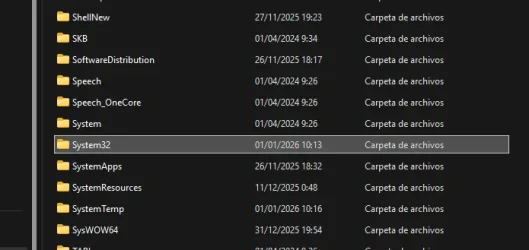
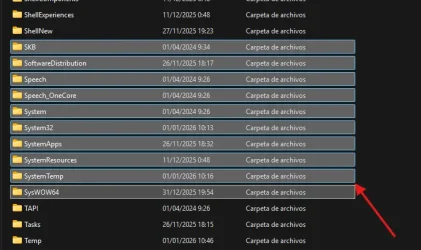
I've been struggling recently to figure out where this color comes from or how I can change it.
Unfortunately, I haven't been able to find any information about it. I also couldn't find the color in the registry, unlike some other colors used by the Control Panel, such as the HilightColor or BorderColor keys.
The color in question is #60CDFF (RGB 96, 205, 255).
My windows version is Windows 11 LTSC 24H2
A couple of pictures will be more helpful.
With single selection, it looks like this:
Multiple select looks like this:
Does anybody knows how to find or change this color ?
Thank you very much in advance
I've been struggling recently to figure out where this color comes from or how I can change it.
Unfortunately, I haven't been able to find any information about it. I also couldn't find the color in the registry, unlike some other colors used by the Control Panel, such as the HilightColor or BorderColor keys.
The color in question is #60CDFF (RGB 96, 205, 255).
My windows version is Windows 11 LTSC 24H2
A couple of pictures will be more helpful.
With single selection, it looks like this:
Multiple select looks like this:
Does anybody knows how to find or change this color ?
Thank you very much in advance
Attachments
My Computer
At a glance
Windows 11
- OS
- Windows 11






