Backup specific list of registry entries, create a merged output file, any easy way to do that?


paradoxum

Sublimed
Member
Local time
2:27 PM
Posts
187
OS
Windows 11 [22H2] [22621.2428]
So I reinstall a lot using symlinks to a 'persistent' partition which makes reinstalling windows pretty fast, but a lot of things I want to quickly make a backup of their .reg entries for to import after installing.
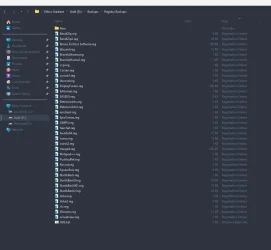
1762186396255.webp

I tried making a batch script to do it following something from google like so;
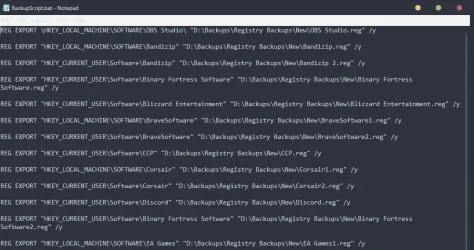
1762186439270.webp

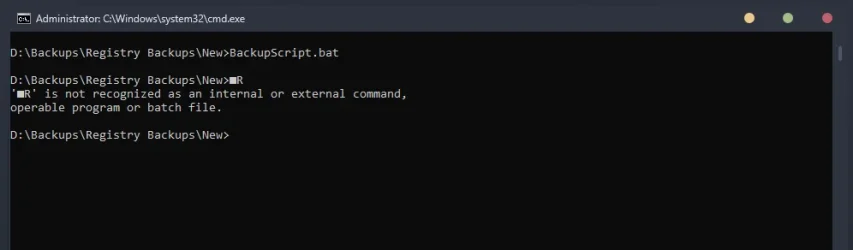
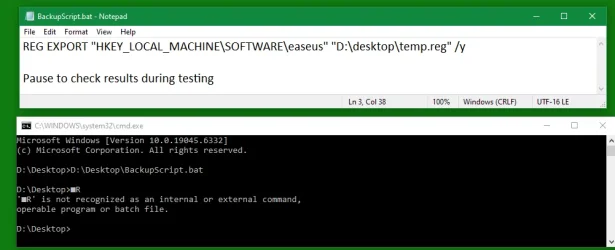
But when I run it I get this:
1762186469116.webp

Are there any little utilities or tools that can do this? I use WinaeroTweaker to combine them into a single file after I back them up but the initial backup process takes forever.

Thanks guys.
 
Windows Build/Version
Windows 11, version 25H2 (26200.7019) amd64

My Computer

System One

  • OS
    Windows 11 [22H2] [22621.2428]
    Computer type
    PC/Desktop
    Manufacturer/Model
    Culture-Virus v7.0
    CPU
    Intel Core i9-14900K 3.2 GHz 24-Core Processor
    Motherboard
    Asus ROG MAXIMUS Z790 APEX ENCORE ATX LGA1700 Motherboard
    Memory
    G.Skill Trident Z5 RGB 32 GB (2 x 16 GB) DDR5-7200 CL34 Memory
    Graphics Card(s)
    AMD Radeon RX 6950 XT
    Monitor(s) Displays
    AOC CQ27G2U/BK
    Screen Resolution
    2560x1440
    Hard Drives
    M.2 1: Samsung SSD 990 PRO 2TB
    M.2 2: Samsung SSD 970 EVO Plus 2TB
    PSU
    Corsair RM1000X SHIFT
    Case
    Phanteks NV9
    Cooling
    Custom Water / Direct-Die Cooling
    Keyboard
    Corsair K95 RGB PLATINUM XT Wired Gaming Keyboard
    Mouse
    ROCCAT LEADR Optical
    Internet Speed
    500mb Direct Fiber
    Browser
    Chrome
Your script's first line has
\
instead of
"
before & after its Registry Key path.


Denis
 

My Computer

System One

  • OS
    Windows 11 Home x64 Version 25H2 Build 26200.8037
Thanks I changed that and still get the same error.


REG EXPORT "HKEY_LOCAL_MACHINE\SOFTWARE\OBS Studio" "D:\Backups\Registry Backups\New\OBS Studio.reg" /y

REG EXPORT "HKEY_LOCAL_MACHINE\SOFTWARE\Bandizip" "D:\Backups\Registry Backups\New\Bandizip.reg" /y

REG EXPORT "HKEY_CURRENT_USER\Software\Bandizip" "D:\Backups\Registry Backups\New\Bandizip 2.reg" /y

REG EXPORT "HKEY_CURRENT_USER\Software\Binary Fortress Software" "D:\Backups\Registry Backups\New\Binary Fortress Software.reg" /y

REG EXPORT "HKEY_CURRENT_USER\Software\Blizzard Entertainment" "D:\Backups\Registry Backups\New\Blizzard Entertainment.reg" /y

REG EXPORT "HKEY_LOCAL_MACHINE\SOFTWARE\BraveSoftware" "D:\Backups\Registry Backups\New\BraveSoftware1.reg" /y

REG EXPORT "HKEY_CURRENT_USER\Software\BraveSoftware" "D:\Backups\Registry Backups\New\BraveSoftware2.reg" /y

REG EXPORT "HKEY_CURRENT_USER\Software\CCP" "D:\Backups\Registry Backups\New\CCP.reg" /y

REG EXPORT "HKEY_LOCAL_MACHINE\SOFTWARE\Corsair" "D:\Backups\Registry Backups\New\Corsair1.reg" /y

REG EXPORT "HKEY_CURRENT_USER\Software\Corsair" "D:\Backups\Registry Backups\New\Corsair2.reg" /y

REG EXPORT "HKEY_CURRENT_USER\Software\Discord" "D:\Backups\Registry Backups\New\Discord.reg" /y

REG EXPORT "HKEY_CURRENT_USER\Software\Binary Fortress Software" "D:\Backups\Registry Backups\New\Binary Fortress Software2.reg" /y

REG EXPORT "HKEY_LOCAL_MACHINE\SOFTWARE\EA Games" "D:\Backups\Registry Backups\New\EA Games1.reg" /y

REG EXPORT "HKEY_LOCAL_MACHINE\SOFTWARE\Electronic Arts" "D:\Backups\Registry Backups\New\Electronic Arts1.reg" /y

REG EXPORT "HKEY_CURRENT_USER\Software\Electronic Arts" "D:\Backups\Registry Backups\New\Electronic Arts2.reg" /y

REG EXPORT "HKEY_CURRENT_USER\Software\eM Client" "D:\Backups\Registry Backups\New\eM Client.reg" /y

REG EXPORT "HKEY_CURRENT_USER\Software\Epic Games" "D:\Backups\Registry Backups\New\Epic Games.reg" /y

REG EXPORT "HKEY_LOCAL_MACHINE\SOFTWARE\GIMP 3" "D:\Backups\Registry Backups\New\GIMP 3.reg" /y

REG EXPORT "HKEY_CURRENT_USER\Software\HexChat" "D:\Backups\Registry Backups\New\HexChat.reg" /y

REG EXPORT "HKEY_CURRENT_USER\Software\Pushbullet" "D:\Backups\Registry Backups\New\Pushbullet.reg" /y

REG EXPORT "HKEY_CURRENT_USER\Software\Roccat" "D:\Backups\Registry Backups\New\Roccat.reg" /y

REG EXPORT "HKEY_CURRENT_USER\Software\SquareEnix" "D:\Backups\Registry Backups\New\SquareEnix.reg" /y

REG EXPORT "HKEY_LOCAL_MACHINE\SOFTWARE\StartIsBack" "D:\Backups\Registry Backups\New\StartIsBack1.reg" /y

REG EXPORT "HKEY_CURRENT_USER\Software\StartIsBack" "D:\Backups\Registry Backups\New\StartIsBack2.reg" /y

REG EXPORT "KEY_CURRENT_USER\Software\Microsoft\Windows\CurrentVersion\Explorer\StartPage2" "D:\Backups\Registry Backups\New\StartIsBack3.reg" /y

REG EXPORT "[HKEY_LOCAL_MACHINE\SOFTWARE\Valve]" "D:\Backups\Registry Backups\New\Valve1.reg" /y

REG EXPORT "HKEY_CURRENT_USER\Software\Valve" "D:\Backups\Registry Backups\New\Valve2.reg" /y

REG EXPORT "HKEY_LOCAL_MACHINE\SOFTWARE\VideoLAN" "D:\Backups\Registry Backups\New\VideoLAN.reg" /y

REG EXPORT "HKEY_CURRENT_USER\Software\Winaero.com" "D:\Backups\Registry Backups\New\Winaero.com.reg" /y

REG EXPORT "HKEY_CURRENT_USER\Software\WinSetView" "D:\Backups\Registry Backups\New\WinSetView.reg" /y
 

My Computer

System One

  • OS
    Windows 11 [22H2] [22621.2428]
    Computer type
    PC/Desktop
    Manufacturer/Model
    Culture-Virus v7.0
    CPU
    Intel Core i9-14900K 3.2 GHz 24-Core Processor
    Motherboard
    Asus ROG MAXIMUS Z790 APEX ENCORE ATX LGA1700 Motherboard
    Memory
    G.Skill Trident Z5 RGB 32 GB (2 x 16 GB) DDR5-7200 CL34 Memory
    Graphics Card(s)
    AMD Radeon RX 6950 XT
    Monitor(s) Displays
    AOC CQ27G2U/BK
    Screen Resolution
    2560x1440
    Hard Drives
    M.2 1: Samsung SSD 990 PRO 2TB
    M.2 2: Samsung SSD 970 EVO Plus 2TB
    PSU
    Corsair RM1000X SHIFT
    Case
    Phanteks NV9
    Cooling
    Custom Water / Direct-Die Cooling
    Keyboard
    Corsair K95 RGB PLATINUM XT Wired Gaming Keyboard
    Mouse
    ROCCAT LEADR Optical
    Internet Speed
    500mb Direct Fiber
    Browser
    Chrome
Is what you have posted the entire script?
Might you have some initial line starting with *R that you intended as a comment? It certainly looks that way.

Stick a Pause command on the end e.g.
Pause to check results during testing
and run the batch file by double-clicking on it so that you can observe proceedings.
corrected later - Right-clicking and selecting Run as Admin


Best of luck,
Denis
 

My Computer

System One

  • OS
    Windows 11 Home x64 Version 25H2 Build 26200.8037
I have to open a shell and run it manually because just running the file opens/closes the window, that's the output I get
 

My Computer

System One

  • OS
    Windows 11 [22H2] [22621.2428]
    Computer type
    PC/Desktop
    Manufacturer/Model
    Culture-Virus v7.0
    CPU
    Intel Core i9-14900K 3.2 GHz 24-Core Processor
    Motherboard
    Asus ROG MAXIMUS Z790 APEX ENCORE ATX LGA1700 Motherboard
    Memory
    G.Skill Trident Z5 RGB 32 GB (2 x 16 GB) DDR5-7200 CL34 Memory
    Graphics Card(s)
    AMD Radeon RX 6950 XT
    Monitor(s) Displays
    AOC CQ27G2U/BK
    Screen Resolution
    2560x1440
    Hard Drives
    M.2 1: Samsung SSD 990 PRO 2TB
    M.2 2: Samsung SSD 970 EVO Plus 2TB
    PSU
    Corsair RM1000X SHIFT
    Case
    Phanteks NV9
    Cooling
    Custom Water / Direct-Die Cooling
    Keyboard
    Corsair K95 RGB PLATINUM XT Wired Gaming Keyboard
    Mouse
    ROCCAT LEADR Optical
    Internet Speed
    500mb Direct Fiber
    Browser
    Chrome
Right-click on the batch file and select Run as Admin

Please post the batch script here.


Denis
 

My Computer

System One

  • OS
    Windows 11 Home x64 Version 25H2 Build 26200.8037
yes this is running from an elevated window already
 

My Computer

System One

  • OS
    Windows 11 [22H2] [22621.2428]
    Computer type
    PC/Desktop
    Manufacturer/Model
    Culture-Virus v7.0
    CPU
    Intel Core i9-14900K 3.2 GHz 24-Core Processor
    Motherboard
    Asus ROG MAXIMUS Z790 APEX ENCORE ATX LGA1700 Motherboard
    Memory
    G.Skill Trident Z5 RGB 32 GB (2 x 16 GB) DDR5-7200 CL34 Memory
    Graphics Card(s)
    AMD Radeon RX 6950 XT
    Monitor(s) Displays
    AOC CQ27G2U/BK
    Screen Resolution
    2560x1440
    Hard Drives
    M.2 1: Samsung SSD 990 PRO 2TB
    M.2 2: Samsung SSD 970 EVO Plus 2TB
    PSU
    Corsair RM1000X SHIFT
    Case
    Phanteks NV9
    Cooling
    Custom Water / Direct-Die Cooling
    Keyboard
    Corsair K95 RGB PLATINUM XT Wired Gaming Keyboard
    Mouse
    ROCCAT LEADR Optical
    Internet Speed
    500mb Direct Fiber
    Browser
    Chrome
yes this is running from an elevated window already
And what I'm suggesting is don't do that, don't have any shell / cmd window. You can run it as Admin directly.

And post a copy of the script here. That's where I think the fault is.


All the best,
Denis
 

My Computer

System One

  • OS
    Windows 11 Home x64 Version 25H2 Build 26200.8037
same behaviour opens / closes, same when ran from an already open prompt
 

My Computer

System One

  • OS
    Windows 11 [22H2] [22621.2428]
    Computer type
    PC/Desktop
    Manufacturer/Model
    Culture-Virus v7.0
    CPU
    Intel Core i9-14900K 3.2 GHz 24-Core Processor
    Motherboard
    Asus ROG MAXIMUS Z790 APEX ENCORE ATX LGA1700 Motherboard
    Memory
    G.Skill Trident Z5 RGB 32 GB (2 x 16 GB) DDR5-7200 CL34 Memory
    Graphics Card(s)
    AMD Radeon RX 6950 XT
    Monitor(s) Displays
    AOC CQ27G2U/BK
    Screen Resolution
    2560x1440
    Hard Drives
    M.2 1: Samsung SSD 990 PRO 2TB
    M.2 2: Samsung SSD 970 EVO Plus 2TB
    PSU
    Corsair RM1000X SHIFT
    Case
    Phanteks NV9
    Cooling
    Custom Water / Direct-Die Cooling
    Keyboard
    Corsair K95 RGB PLATINUM XT Wired Gaming Keyboard
    Mouse
    ROCCAT LEADR Optical
    Internet Speed
    500mb Direct Fiber
    Browser
    Chrome
Then I remain convinced that there is an initial line in your batch file before the first command that is shown in your OP diagram.


Denis
 

My Computer

System One

  • OS
    Windows 11 Home x64 Version 25H2 Build 26200.8037
so it should run from what I pasted? because I mean that's the file contents.
 

Attachments

My Computer

System One

  • OS
    Windows 11 [22H2] [22621.2428]
    Computer type
    PC/Desktop
    Manufacturer/Model
    Culture-Virus v7.0
    CPU
    Intel Core i9-14900K 3.2 GHz 24-Core Processor
    Motherboard
    Asus ROG MAXIMUS Z790 APEX ENCORE ATX LGA1700 Motherboard
    Memory
    G.Skill Trident Z5 RGB 32 GB (2 x 16 GB) DDR5-7200 CL34 Memory
    Graphics Card(s)
    AMD Radeon RX 6950 XT
    Monitor(s) Displays
    AOC CQ27G2U/BK
    Screen Resolution
    2560x1440
    Hard Drives
    M.2 1: Samsung SSD 990 PRO 2TB
    M.2 2: Samsung SSD 970 EVO Plus 2TB
    PSU
    Corsair RM1000X SHIFT
    Case
    Phanteks NV9
    Cooling
    Custom Water / Direct-Die Cooling
    Keyboard
    Corsair K95 RGB PLATINUM XT Wired Gaming Keyboard
    Mouse
    ROCCAT LEADR Optical
    Internet Speed
    500mb Direct Fiber
    Browser
    Chrome
In that case, I really do not understand what is going wrong.
I would expect your script to run.
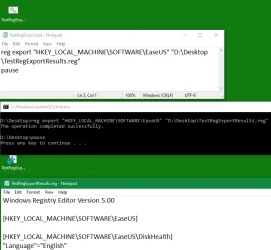
My example works:
TestRegExportResults.webp


By the way, I only referred to Admin permissions because you did. I think Admin is only need for Reg Export commands if your software has put relevant restrictions on the Registry Keys involved.


Denis
 

My Computer

System One

  • OS
    Windows 11 Home x64 Version 25H2 Build 26200.8037
If you enter a simple cmd in your cmd prompt window, does it work alright?
And does a simple batch file run alright? Try, say,
echo %ComputerName%
dir
Pause to look at the results in the cmd prompt window

Do you get a normal value of PathExt?
[I'm expecting the answer, Yes.]
echo %PathExt%
should respond
.COM;.EXE;.BAT;.CMD;.VBS;.VBE;.JS;.JSE;.WSF;.WSH;.MSC


Denis
 

My Computer

System One

  • OS
    Windows 11 Home x64 Version 25H2 Build 26200.8037
You have hidden characters preceding your
Reg export
words.
The fault applies to at least the first two lines.
Perhaps you copied the batch file from MSWord or the internet. Doing so can cause script problems.

I found the problem by repeating my post #12 test but by copying the text from your script.
1762193202603.webp

Just rewrite the Reg export words in every line of a new file and copy across all your Registry key & output path bits.


Denis
 

My Computer

System One

  • OS
    Windows 11 Home x64 Version 25H2 Build 26200.8037
thanks I tried with that and still had the issue, i''ll try it again now cause i'm doing a format.
 

My Computer

System One

  • OS
    Windows 11 [22H2] [22621.2428]
    Computer type
    PC/Desktop
    Manufacturer/Model
    Culture-Virus v7.0
    CPU
    Intel Core i9-14900K 3.2 GHz 24-Core Processor
    Motherboard
    Asus ROG MAXIMUS Z790 APEX ENCORE ATX LGA1700 Motherboard
    Memory
    G.Skill Trident Z5 RGB 32 GB (2 x 16 GB) DDR5-7200 CL34 Memory
    Graphics Card(s)
    AMD Radeon RX 6950 XT
    Monitor(s) Displays
    AOC CQ27G2U/BK
    Screen Resolution
    2560x1440
    Hard Drives
    M.2 1: Samsung SSD 990 PRO 2TB
    M.2 2: Samsung SSD 970 EVO Plus 2TB
    PSU
    Corsair RM1000X SHIFT
    Case
    Phanteks NV9
    Cooling
    Custom Water / Direct-Die Cooling
    Keyboard
    Corsair K95 RGB PLATINUM XT Wired Gaming Keyboard
    Mouse
    ROCCAT LEADR Optical
    Internet Speed
    500mb Direct Fiber
    Browser
    Chrome

I'm really confused how to use this - do I need to backup these hive files too? can you put some example registry keys down for me so I have something to go from?

Like I've been trying REG EXPORT "HKEY_LOCAL_MACHINE\SOFTWARE\OBS Studio" "D:\Backups\Registry Backups\New\OBS Studio.reg" /y etc

If you enter a simple cmd in your cmd prompt window, does it work alright?
And does a simple batch file run alright? Try, say,
echo %ComputerName%
dir
Pause to look at the results in the cmd prompt window

Do you get a normal value of PathExt?
[I'm expecting the answer, Yes.]
echo %PathExt%
should respond
.COM;.EXE;.BAT;.CMD;.VBS;.VBE;.JS;.JSE;.WSF;.WSH;.MSC


Denis
 

My Computer

System One

  • OS
    Windows 11 [22H2] [22621.2428]
    Computer type
    PC/Desktop
    Manufacturer/Model
    Culture-Virus v7.0
    CPU
    Intel Core i9-14900K 3.2 GHz 24-Core Processor
    Motherboard
    Asus ROG MAXIMUS Z790 APEX ENCORE ATX LGA1700 Motherboard
    Memory
    G.Skill Trident Z5 RGB 32 GB (2 x 16 GB) DDR5-7200 CL34 Memory
    Graphics Card(s)
    AMD Radeon RX 6950 XT
    Monitor(s) Displays
    AOC CQ27G2U/BK
    Screen Resolution
    2560x1440
    Hard Drives
    M.2 1: Samsung SSD 990 PRO 2TB
    M.2 2: Samsung SSD 970 EVO Plus 2TB
    PSU
    Corsair RM1000X SHIFT
    Case
    Phanteks NV9
    Cooling
    Custom Water / Direct-Die Cooling
    Keyboard
    Corsair K95 RGB PLATINUM XT Wired Gaming Keyboard
    Mouse
    ROCCAT LEADR Optical
    Internet Speed
    500mb Direct Fiber
    Browser
    Chrome
If you put an image in your post, your readers can see it.


Denis
 

My Computer

System One

  • OS
    Windows 11 Home x64 Version 25H2 Build 26200.8037
The first line contains the Hex codes FF FE in front of the 'R'.
 

My Computers

System One System Two

  • OS
    W10
    Computer type
    PC/Desktop
    Manufacturer/Model
    Home brew
    CPU
    Ryzen3-2200G
    Motherboard
    GA-A320M-S2H
    Memory
    16 GB Kingston HyperX DDR4
    Graphics Card(s)
    Integrated
    Sound Card
    Integrated
    Monitor(s) Displays
    LG W2246
    Screen Resolution
    1920x1080
    Hard Drives
    Intel 760p 256GB NVMe M.2
    Seagate Barracuda 7200 1TB
    Gash Seagate ST31608
    PSU
    2006-vintage no-name
    Case
    Acer Aspire 2006
    Cooling
    Air (fan-assist)
    Keyboard
    HP SK-2885
    Mouse
    wireless
    Internet Speed
    32 mbps
    Browser
    FF latest
    Antivirus
    MS Defender
  • Operating System
    W10
    Computer type
    Laptop
    Manufacturer/Model
    HP 255 G8
    CPU
    Ryzen 5 3500U
    Memory
    8 GB
    Graphics card(s)
    on-board
    Monitor(s) Displays
    16"
    Screen Resolution
    1920x1080
    Hard Drives
    Samsung SSD 512GB Nvme
    Browser
    FF + Edge
    Antivirus
    MS Defender
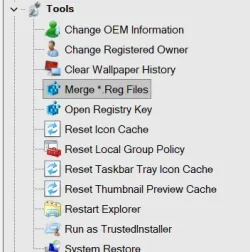
I use Winaero Tweaker. I merged 35 tweaks into one regedit file.
Winaero Tweaker
Screenshot 2025-12-01 215126.webp
 

My Computers

System One System Two

  • OS
    Windows 11 Pro 25H2 26200.8655
    Computer type
    PC/Desktop
    Manufacturer/Model
    Dell Optiplex 7080
    CPU
    i9-10900 10 core 20 threads
    Motherboard
    DELL 0J37VM
    Memory
    32 gb
    Graphics Card(s)
    none-Intel UHD Graphics 630
    Sound Card
    Integrated Realtek
    Monitor(s) Displays
    Benq 27
    Screen Resolution
    2560x1440
    Hard Drives
    2x1tb Solidigm m.2 nvme /External drives 512gb Samsung m.2 sata+2tb Kingston m2.nvme
    PSU
    500w
    Case
    MT
    Cooling
    Dell Premium
    Keyboard
    Logitech wired
    Mouse
    Logitech wireless
    Internet Speed
    so slow I'm too embarrassed to tell
    Browser
    #1 Edge #2 Firefox
    Antivirus
    Defender+MWB Premium
  • Operating System
    Windows 11 Pro 24H2 26200.8457
    Computer type
    PC/Desktop
    Manufacturer/Model
    Beelink Mini PC SER5
    CPU
    AMD Ryzen 7 6800U
    Memory
    32 gb
    Graphics card(s)
    integrated
    Sound Card
    integrated
    Monitor(s) Displays
    Benq 27
    Screen Resolution
    2560x1440
    Hard Drives
    1TB Crucial nvme
    Keyboard
    Logitech wired
    Mouse
    Logitech wireless
    Internet Speed
    still too embarrassed to tell
    Browser
    Firefox
    Antivirus
    Defender
    Other Info
    System 3 is non compliant Dell 9020 i7-4770/24gb ram Win11 PRO 26200.8457

Latest Support Threads

Back
Top Bottom