- Local time
- 7:40 PM
- Posts
- 292
- OS
- Window 11 v24H2 Build 26100.2033
[Batch/PowerShell] Master Offline Windows OS Servicing & Multi-EFI Bootloader Repair Toolkit
Hello everyone,
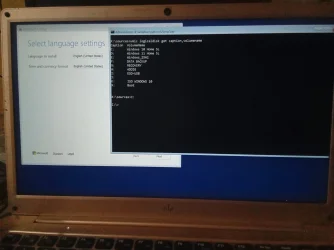
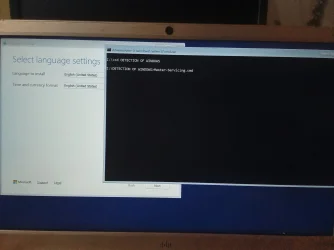
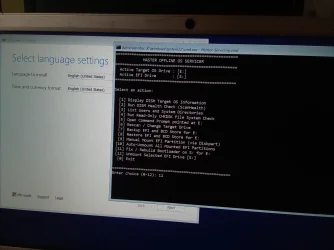
I wanted to share a native batch and PowerShell offline maintenance and bootloader servicing toolkit that I developed and refined for managing complex Windows environments (multi-boot configurations, Windows To Go, cloned drives, and live WinPE rescue environments like Sergei Strelec).
Unlike heavy third-party GUI utilities, this toolkit relies entirely on native Windows command-line binaries (
Key Features
Setup Instructions
Code 1: Detect-Windows.cmd
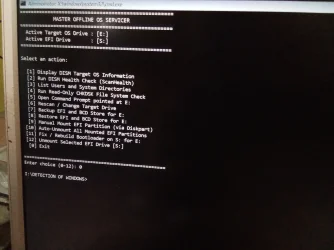
Code 2: Master-Servicing.cmd
Standard Workflow
courtesy :--- Detect Windows Drives Without Diskpart - Google Gemini
Hello everyone,
I wanted to share a native batch and PowerShell offline maintenance and bootloader servicing toolkit that I developed and refined for managing complex Windows environments (multi-boot configurations, Windows To Go, cloned drives, and live WinPE rescue environments like Sergei Strelec).
Unlike heavy third-party GUI utilities, this toolkit relies entirely on native Windows command-line binaries (
DISM, BCDBoot, BCDEdit, Robocopy, and PowerShell Partition cmdlets) without injecting stale NVRAM firmware entries or risking GPT/EFI partition corruption.Key Features
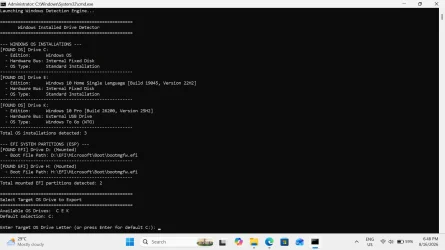
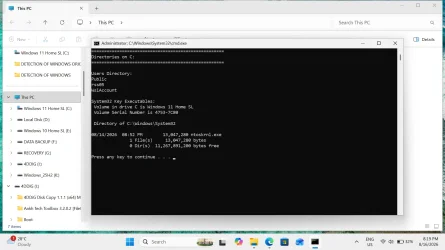
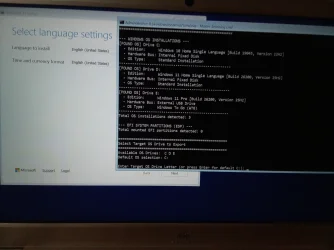
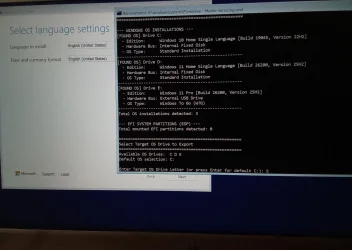
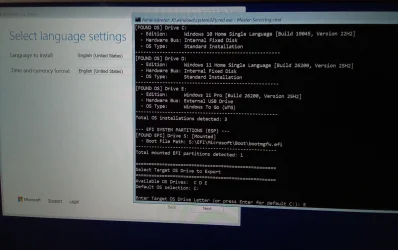
- Multi-OS Hardware Bus Detection: Automatically scans all mounted volumes to identify Windows installations, distinguishing between internal fixed disks, external USB drives, and Windows To Go (WTG).
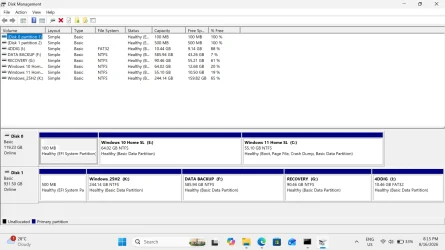
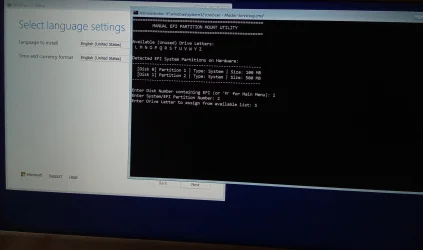
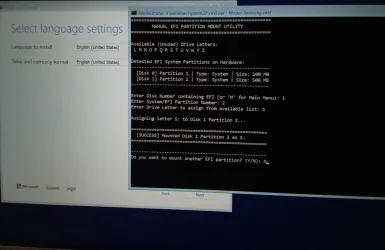
- Interactive Manual EFI Mounting: Scans hardware for physical EFI System Partitions (ESP), displays current unused/available drive letters, and allows you to map specific letters without collisions.
- One-Click EFI Cleanup: Unmounts active or all mounted EFI partitions cleanly via partition access paths without breaking volume metadata.
- Non-Destructive EFI & BCD Backup: Mirrors the active EFI structure and exports a pure BCD registry hive snapshot directly to the selected target OS drive (
\EFI_Backup\). - Safe BCD & EFI Restore: Restores boot files and imports the BCD database without requiring full partition formatting.
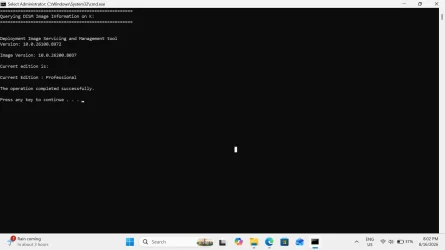
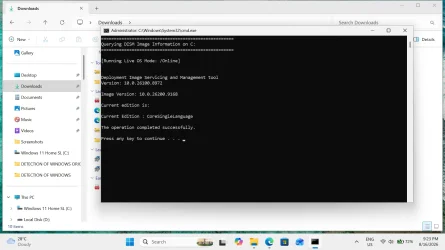
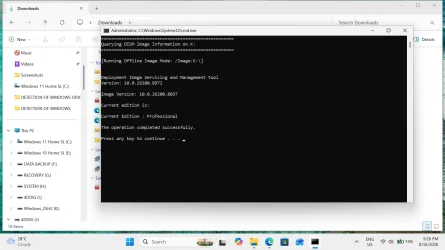
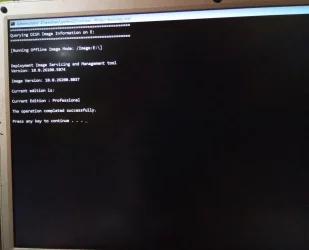
- Offline DISM & Servicing: Inspect image editions, execute offline
/ScanHealth, run read-onlyCHKDSK, or spawn target-rooted command shells instantly. - WinPE & Live OS Agnostic: Fully compatible with running Windows 11/10 installations as well as WinPE recovery media.
Setup Instructions
- Create a dedicated folder on your drive or WinPE USB (e.g.,
C:\DETECTION OF WINDOWS). - Inside that folder, create two files: Detect-Windows.cmd and Master-Servicing.cmd.
- Paste the respective code blocks below into each file.
- Important: Save both files using ANSI encoding in Notepad.
- Right-click Master-Servicing.cmd and select Run as administrator (or execute directly in WinPE).
Code 1: Detect-Windows.cmd
Code:
@echo off
setlocal enabledelayedexpansion

:: ====================================================
:: Windows Installed Drive & EFI Partition Detector
:: ====================================================

echo ====================================================
echo        Windows Installed Drive Detector
echo ====================================================
echo.

set "OS_COUNT=0"
set "EFI_COUNT=0"
set "DETECTED_OS_DRIVES="
set "DETECTED_EFI_DRIVES="

:: ----------------------------------------------------
:: 1. Detect Installed Windows OS Partitions
:: ----------------------------------------------------
echo --- WINDOWS OS INSTALLATIONS ---

powershell -NoProfile -ExecutionPolicy Bypass -Command ^
  "$drives = Get-PSDrive -PSProvider FileSystem | Where-Object { Test-Path ($_.Root + 'Windows\System32\ntoskrnl.exe') }; " ^
  "foreach ($d in $drives) { " ^
  "  $letter = $d.Name + ':'; " ^
  "  $regPath = $letter + '\Windows\System32\config\SOFTWARE'; " ^
  "  $prodName = 'Windows OS'; " ^
  "  $build = ''; $displayVer = ''; " ^
  "  if (Test-Path $regPath) { " ^
  "    reg load HKLM\OFFLINE_TEMP $regPath >$null 2>&1; " ^
  "    if ($?) { " ^
  "      $prodName = (Get-ItemProperty -Path 'HKLM:\OFFLINE_TEMP\Microsoft\Windows NT\CurrentVersion' -Name ProductName -ErrorAction SilentlyContinue).ProductName; " ^
  "      $build = (Get-ItemProperty -Path 'HKLM:\OFFLINE_TEMP\Microsoft\Windows NT\CurrentVersion' -Name CurrentBuild -ErrorAction SilentlyContinue).CurrentBuild; " ^
  "      $displayVer = (Get-ItemProperty -Path 'HKLM:\OFFLINE_TEMP\Microsoft\Windows NT\CurrentVersion' -Name DisplayVersion -ErrorAction SilentlyContinue).DisplayVersion; " ^
  "      [GC]::Collect(); [GC]::WaitForPendingFinalizers(); " ^
  "      reg unload HKLM\OFFLINE_TEMP >$null 2>&1; " ^
  "    } " ^
  "  } " ^
  "  $part = Get-Partition -DriveLetter $d.Name -ErrorAction SilentlyContinue; " ^
  "  $disk = if ($part) { Get-Disk -Number $part.DiskNumber -ErrorAction SilentlyContinue } else { $null }; " ^
  "  $busType = if ($disk) { $disk.BusType.ToString() } else { 'Unknown' }; " ^
  "  $wtg = 'Standard Installation'; " ^
  "  if (Test-Path ($letter + '\Windows\System32\wlanpref.netxml')) { $wtg = 'Standard Installation' }; " ^
  "  if ($busType -eq 'USB') { $wtg = 'Windows To Go (WTG)' }; " ^
  "  Write-Host ('[FOUND OS] Drive ' + $letter); " ^
  "  if ($build) { Write-Host ('  - Edition:      ' + $prodName + ' [Build ' + $build + ', Version ' + $displayVer + ']') } else { Write-Host ('  - Edition:      ' + $prodName) }; " ^
  "  Write-Host ('  - Hardware Bus: ' + (if ($busType -eq 'USB') { 'External USB Drive' } else { 'Internal Fixed Disk' })); " ^
  "  Write-Host ('  - OS Type:      ' + $wtg); " ^
  "  Write-Host '----------------------------------------------------'; " ^
  "}"

:: Export list of OS drive letters
for /f "tokens=*" %%A in ('powershell -NoProfile -ExecutionPolicy Bypass -Command "$d = Get-PSDrive -PSProvider FileSystem | Where-Object { Test-Path ($_.Root + 'Windows\System32\ntoskrnl.exe') }; ($d.Name) -join ' '"') do (
    set "DETECTED_OS_DRIVES=%%A"
)

:: Count detected OS partitions
for %%D in (%DETECTED_OS_DRIVES%) do (
    set /a OS_COUNT+=1
)
echo Total OS installations detected: %OS_COUNT%
echo.

:: ----------------------------------------------------
:: 2. Detect Mounted EFI System Partitions (ESP)
:: ----------------------------------------------------
echo --- EFI SYSTEM PARTITIONS (ESP) ---

powershell -NoProfile -ExecutionPolicy Bypass -Command ^
  "$efis = Get-PSDrive -PSProvider FileSystem | Where-Object { Test-Path ($_.Root + 'EFI\Microsoft\Boot\bootmgfw.efi') }; " ^
  "foreach ($e in $efis) { " ^
  "  $eLetter = $e.Name + ':'; " ^
  "  Write-Host ('[FOUND EFI] Drive ' + $eLetter + ' (Mounted)'); " ^
  "  Write-Host ('  - Boot File Path: ' + $eLetter + '\EFI\Microsoft\Boot\bootmgfw.efi'); " ^
  "  Write-Host '----------------------------------------------------'; " ^
  "}"

:: Export list of EFI drive letters
for /f "tokens=*" %%B in ('powershell -NoProfile -ExecutionPolicy Bypass -Command "$e = Get-PSDrive -PSProvider FileSystem | Where-Object { Test-Path ($_.Root + 'EFI\Microsoft\Boot\bootmgfw.efi') }; ($e.Name) -join ' '"') do (
    set "DETECTED_EFI_DRIVES=%%B"
)

:: Count detected EFI partitions
for %%E in (%DETECTED_EFI_DRIVES%) do (
    set /a EFI_COUNT+=1
)
echo Total mounted EFI partitions detected: %EFI_COUNT%
echo.

:: ----------------------------------------------------
:: 3. Interactive Target Selection & Export
:: ----------------------------------------------------
echo ====================================================
echo Select Target OS Drive to Export
echo ====================================================
echo Available OS Drives:  %DETECTED_OS_DRIVES%

:: Set first detected drive as default
for %%F in (%DETECTED_OS_DRIVES%) do (
    if not defined DEFAULT_TARGET set "DEFAULT_TARGET=%%F:"
)
if not defined DEFAULT_TARGET set "DEFAULT_TARGET=C:"

echo Default selection: %DEFAULT_TARGET%
echo.
set "USER_OS_CHOICE="
set /p "USER_OS_CHOICE=Enter Target OS Drive Letter (or press Enter for default %DEFAULT_TARGET%): "

if "%USER_OS_CHOICE%"=="" set "USER_OS_CHOICE=%DEFAULT_TARGET%"
set "USER_OS_CHOICE=%USER_OS_CHOICE:~0,1%:"

:: Match or assign active EFI Drive
set "ACTIVE_EFI=Unassigned"
for %%E in (%DETECTED_EFI_DRIVES%) do (
    if not defined FIRST_EFI set "FIRST_EFI=%%E:"
)
if defined FIRST_EFI set "ACTIVE_EFI=%FIRST_EFI%"

:: Pass environment variables back to caller
endlocal & (
    set "TARGET_OS_DRIVE=%USER_OS_CHOICE%"
    set "EFI_DRIVE=%ACTIVE_EFI%"
)
exit /b 0
Code 2: Master-Servicing.cmd
Code:
@echo off
setlocal enabledelayedexpansion

:RESTART_SERVICER
cls
echo Launching Windows Detection Engine...
echo.

if not exist "%~dp0Detect-Windows.cmd" (
    echo [ERROR] Detect-Windows.cmd was not found in: %~dp0
    pause
    exit /b 1
)

:: Call the detection script
call "%~dp0Detect-Windows.cmd"

if not defined TARGET_OS_DRIVE (
    echo.
    echo [ERROR] No target OS drive was selected or detected.
    pause
    exit /b 1
)

:MENU
cls
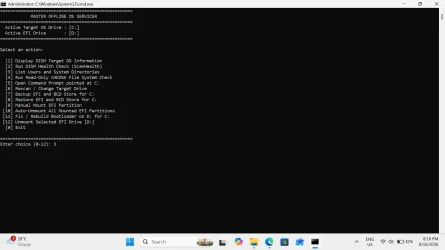
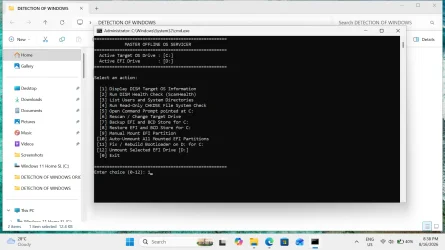
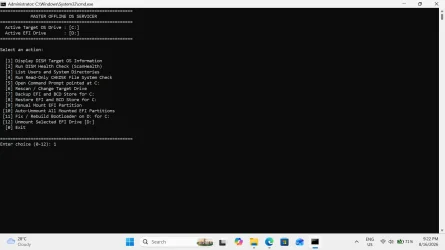
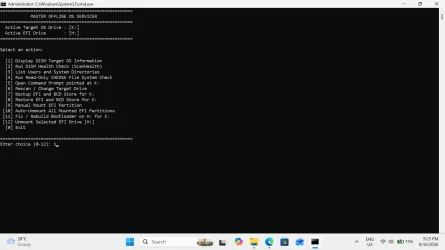
echo ====================================================
echo             MASTER OFFLINE OS SERVICER
echo ====================================================
echo   Active Target OS Drive : [%TARGET_OS_DRIVE%]
echo   Active EFI Drive       : [%EFI_DRIVE%]
echo ====================================================
echo.
echo Select an action:
echo.
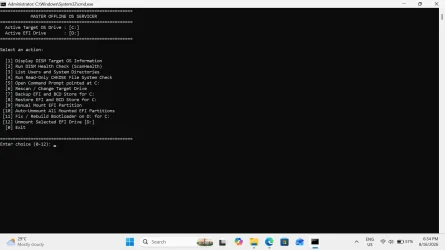
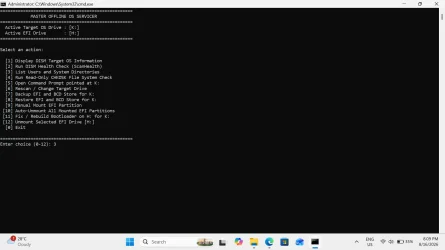
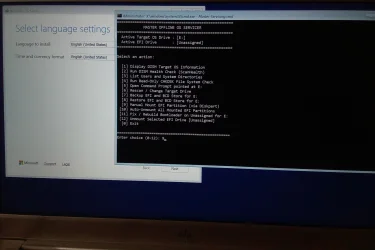
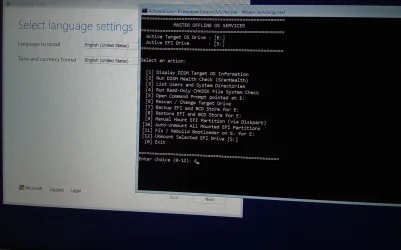
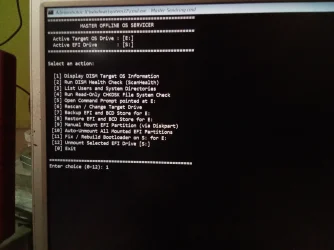
echo   [1] Display DISM Target OS Information
echo   [2] Run DISM Health Check (ScanHealth)
echo   [3] List Users and System Directories
echo   [4] Run Read-Only CHKDSK File System Check
echo   [5] Open Command Prompt pointed at %TARGET_OS_DRIVE%
echo   [6] Rescan / Change Target Drive
echo   [7] Backup EFI and BCD Store for %TARGET_OS_DRIVE%
echo   [8] Restore EFI and BCD Store for %TARGET_OS_DRIVE%
echo   [9] Manual Mount EFI Partition
echo  [10] Auto-Unmount All Mounted EFI Partitions
echo  [11] Fix / Rebuild Bootloader on %EFI_DRIVE% for %TARGET_OS_DRIVE%
echo  [12] Unmount Selected EFI Drive [%EFI_DRIVE%]
echo   [0] Exit
echo.
echo ====================================================
set "CHOICE="
set /p "CHOICE=Enter choice (0-12): "

if "%CHOICE%"=="1" goto DISM_INFO
if "%CHOICE%"=="2" goto DISM_SCAN
if "%CHOICE%"=="3" goto LIST_FILES
if "%CHOICE%"=="4" goto CHKDSK_CHECK
if "%CHOICE%"=="5" goto OPEN_CMD
if "%CHOICE%"=="6" goto RESTART_SERVICER
if "%CHOICE%"=="7" goto BACKUP_EFI
if "%CHOICE%"=="8" goto RESTORE_EFI
if "%CHOICE%"=="9" goto MOUNT_ALL_EFI
if "%CHOICE%"=="10" goto UNMOUNT_ALL_EFI
if "%CHOICE%"=="11" goto REBUILD_BCD
if "%CHOICE%"=="12" goto UNMOUNT_TARGET_EFI
if "%CHOICE%"=="0" exit /b 0

echo Invalid choice. Please enter a number between 0 and 12.
timeout /t 2 >nul
goto MENU

:: ======================================================
:: SUBROUTINES
:: ======================================================

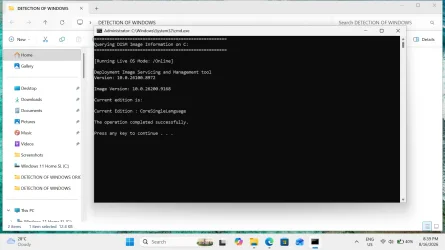
:DISM_INFO
cls
echo ====================================================
echo Querying DISM Image Information on %TARGET_OS_DRIVE%
echo ====================================================
echo.
dism /Image:%TARGET_OS_DRIVE%\ /Get-CurrentEdition
echo.
pause
goto MENU

:DISM_SCAN
cls
echo ====================================================
echo Running DISM ScanHealth on %TARGET_OS_DRIVE%
echo ====================================================
echo.
dism /Image:%TARGET_OS_DRIVE%\ /Cleanup-Image /ScanHealth
echo.
pause
goto MENU

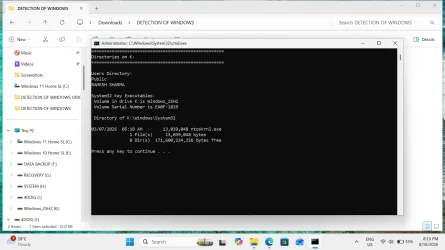
:LIST_FILES
cls
echo ====================================================
echo Directories on %TARGET_OS_DRIVE%
echo ====================================================
echo.
echo Users Directory:
dir "%TARGET_OS_DRIVE%\Users" /b 2>nul
echo.
echo System32 Key Executables:
dir "%TARGET_OS_DRIVE%\Windows\System32\ntoskrnl.exe" 2>nul
echo.
pause
goto MENU

:CHKDSK_CHECK
cls
echo ====================================================
echo Running Read-Only CHKDSK on %TARGET_OS_DRIVE%
echo ====================================================
echo.
chkdsk %TARGET_OS_DRIVE%
echo.
pause
goto MENU

:OPEN_CMD
cls
echo Opening Command Prompt targeting %TARGET_OS_DRIVE%...
echo Type 'exit' to return to the Master Menu.
echo.
cmd /k "cd /d %TARGET_OS_DRIVE%\"
goto MENU

:BACKUP_EFI
cls
echo ====================================================
echo            EFI AND BCD BACKUP UTILITY
echo ====================================================
echo.
echo   Target OS Drive : [%TARGET_OS_DRIVE%]
echo   Target EFI Drive: [%EFI_DRIVE%]
echo ====================================================
echo.

if not defined EFI_DRIVE (
    echo [ERROR] No mounted EFI partition was selected.
    pause
    goto MENU
)
if /i "%EFI_DRIVE%"=="Unassigned" (
    echo [ERROR] Target EFI partition is Unassigned.
    pause
    goto MENU
)

echo [1/4] Exporting BCD store snapshot...
bcdedit /export "%TARGET_OS_DRIVE%\BCD_Backup.bcd"

echo [2/4] Creating backup folder structure...
mkdir "%TARGET_OS_DRIVE%\EFI_Backup\EFI\Microsoft\Boot" 2>nul

echo [3/4] Mirroring EFI files from %EFI_DRIVE%\EFI...
robocopy "%EFI_DRIVE%\EFI" "%TARGET_OS_DRIVE%\EFI_Backup\EFI" /E /ZB /XF BCD* /R:0 /W:0

echo [4/4] Finalizing BCD file placement...
copy /y "%TARGET_OS_DRIVE%\BCD_Backup.bcd" "%TARGET_OS_DRIVE%\EFI_Backup\EFI\Microsoft\Boot\BCD"
del /f /q "%TARGET_OS_DRIVE%\BCD_Backup.bcd" 2>nul

echo.
echo ====================================================
echo   EFI Backup Completed Successfully on %TARGET_OS_DRIVE%
echo ====================================================
echo.
pause
goto MENU

:RESTORE_EFI
cls
echo ====================================================
echo            EFI AND BCD RESTORE UTILITY
echo ====================================================
echo.
echo   Target OS Drive : [%TARGET_OS_DRIVE%]
echo   Target EFI Drive: [%EFI_DRIVE%]
echo ====================================================
echo.

if not defined TARGET_OS_DRIVE (
    echo [ERROR] No Target OS Drive is defined. Please run Option 6 first.
    echo.
    pause
    goto MENU
)

if not defined EFI_DRIVE goto NO_EFI_TARGET
if /i "%EFI_DRIVE%"=="Unassigned" goto NO_EFI_TARGET
goto VERIFY_BACKUP

:NO_EFI_TARGET
echo [ERROR] Target EFI Drive is Unassigned or not mounted.
echo Please run Option 9 to mount, then Option 6 to select it.
echo.
pause
goto MENU

:VERIFY_BACKUP
if not exist "%TARGET_OS_DRIVE%\EFI_Backup\EFI\Microsoft\Boot\BCD" (
    echo [ERROR] No valid EFI backup found in %TARGET_OS_DRIVE%\EFI_Backup\
    echo Please run Option 7 to create a backup before attempting a restore.
    echo.
    pause
    goto MENU
)

if not exist "%EFI_DRIVE%\" (
    echo [ERROR] Target EFI partition [%EFI_DRIVE%] is not accessible.
    echo.
    pause
    goto MENU
)

echo WARNING: This will restore EFI boot files to %EFI_DRIVE%
echo from backup folder: %TARGET_OS_DRIVE%\EFI_Backup\
echo.
set "CONFIRM_RESTORE="
set /p "CONFIRM_RESTORE=Proceed with restore? (Y/N): "
if /i not "%CONFIRM_RESTORE%"=="Y" goto MENU

echo.
echo [1/3] Restoring EFI files to %EFI_DRIVE%\EFI...
robocopy "%TARGET_OS_DRIVE%\EFI_Backup\EFI" "%EFI_DRIVE%\EFI" /E /ZB /XF BCD* /R:1 /W:1

echo.
echo [2/3] Restoring BCD store...
copy /y "%TARGET_OS_DRIVE%\EFI_Backup\EFI\Microsoft\Boot\BCD" "%EFI_DRIVE%\EFI\Microsoft\Boot\BCD"

echo.
echo [3/3] Validating BCD store...
bcdedit /store "%EFI_DRIVE%\EFI\Microsoft\Boot\BCD" /enum active >nul 2>&1

if %errorlevel% equ 0 (
    echo.
    echo ====================================================
    echo   [SUCCESS] EFI and BCD Restored Successfully on %EFI_DRIVE%
    echo ====================================================
) else (
    echo.
    echo [WARNING] BCD copied, but validation returned an alert.
)

echo.
pause
goto MENU

:MOUNT_ALL_EFI
cls
echo ====================================================
echo         MANUAL EFI PARTITION MOUNT UTILITY
echo ====================================================
echo.

:MOUNT_LOOP
echo Available (Unused) Drive Letters:
powershell -NoProfile -ExecutionPolicy Bypass -Command "$used = (Get-PSDrive -PSProvider FileSystem).Name; $avail = [char[]](68..90) | Where-Object { $used -notcontains [string]$_ }; Write-Host ' ' ($avail -join ' ') -ForegroundColor Cyan"
echo.

echo Detected EFI System Partitions on Hardware:
echo ----------------------------------------------------
powershell -NoProfile -ExecutionPolicy Bypass -Command "Get-Partition | Where-Object { $_.GptType -eq '{c12a7328-f81f-11d2-ba4b-00a0c93ec93b}' } | ForEach-Object { $letter = if ($_.DriveLetter) { [string]$_.DriveLetter + ':' } else { 'Hidden (Unassigned)' }; Write-Host (' Disk ' + $_.DiskNumber + ' | Partition ' + $_.PartitionNumber + ' | Size: ' + [math]::Round($_.Size/1MB) + ' MB | Current Letter: ' + $letter) -ForegroundColor Yellow; }"
echo ----------------------------------------------------
echo.

set "TARGET_DISK="
set /p "TARGET_DISK=Enter Disk Number to mount (or 'M' to return to Main Menu): "
if /i "%TARGET_DISK%"=="M" goto MENU
if "%TARGET_DISK%"=="" goto MENU

set "TARGET_PART="
set /p "TARGET_PART=Enter Partition Number for that Disk: "
if "%TARGET_PART%"=="" goto MENU

set "CHOSEN_LETTER="
set /p "CHOSEN_LETTER=Enter Drive Letter to assign (e.g. D or H): "
if "%CHOSEN_LETTER%"=="" goto MENU

set "CHOSEN_LETTER=%CHOSEN_LETTER:~0,1%"

echo.
echo Assigning letter %CHOSEN_LETTER%: to Disk %TARGET_DISK% Partition %TARGET_PART%...
powershell -NoProfile -ExecutionPolicy Bypass -Command "Set-Partition -DiskNumber %TARGET_DISK% -PartitionNumber %TARGET_PART% -NewDriveLetter '%CHOSEN_LETTER%' -ErrorAction SilentlyContinue"

if %errorlevel% equ 0 (
    echo.
    echo [SUCCESS] Mounted Disk %TARGET_DISK% Partition %TARGET_PART% as %CHOSEN_LETTER%:
) else (
    echo.
    echo [ERROR] Failed to mount. Please verify disk and partition numbers.
)

echo.
echo ----------------------------------------------------
set "ANOTHER="
set /p "ANOTHER=Do you want to mount another EFI partition? (Y/N): "
if /i "%ANOTHER%"=="Y" (
    cls
    echo ====================================================
    echo         MANUAL EFI PARTITION MOUNT UTILITY
    echo ====================================================
    echo.
    goto MOUNT_LOOP
)
goto MENU

:UNMOUNT_ALL_EFI
cls
echo ====================================================
echo        AUTO-UNMOUNT ALL MOUNTED EFI PARTITIONS
echo ====================================================
echo.
echo Removing assigned letters from all EFI System Partitions...
echo.

powershell -NoProfile -ExecutionPolicy Bypass -Command "Get-Partition | Where-Object { $_.GptType -eq '{c12a7328-f81f-11d2-ba4b-00a0c93ec93b}' -and $_.DriveLetter } | ForEach-Object { Write-Host 'Removing drive letter' ($_.DriveLetter + ':') 'from Disk' $_.DiskNumber 'Partition' $_.PartitionNumber; $_ | Remove-PartitionAccessPath -AccessPath ($_.DriveLetter + ':\') -ErrorAction SilentlyContinue; }"

echo.
echo All EFI drive letters have been removed cleanly.
echo.
pause
goto MENU

:REBUILD_BCD
cls
echo ====================================================
echo             REBUILD EFI BOOTLOADER
echo ====================================================
echo.
echo   Target OS Drive : [%TARGET_OS_DRIVE%]
echo   Target EFI Drive: [%EFI_DRIVE%]
echo.

if not defined EFI_DRIVE (
    echo [ERROR] No EFI Drive variable is set.
    pause
    goto MENU
)
if /i "%EFI_DRIVE%"=="Unassigned" (
    echo [ERROR] Target EFI partition is Unassigned.
    pause
    goto MENU
)

bcdboot %TARGET_OS_DRIVE%\Windows /s %EFI_DRIVE% /f UEFI /v

if %errorlevel% equ 0 (
    echo.
    echo ====================================================
    echo   Bootloader successfully rebuilt on %EFI_DRIVE%!
    echo ====================================================
) else (
    echo.
    echo [ERROR] Failed to rebuild bootloader. Verify drive letters.
)
echo.
pause
goto MENU

:UNMOUNT_TARGET_EFI
cls
echo ====================================================
echo       UNMOUNT SELECTED EFI DRIVE [%EFI_DRIVE%]
echo ====================================================
echo.

if not defined EFI_DRIVE (
    echo [ERROR] No active EFI drive letter is defined.
    pause
    goto MENU
)
if /i "%EFI_DRIVE%"=="Unassigned" (
    echo [ERROR] Target EFI partition is already unassigned.
    pause
    goto MENU
)

set "CLEAN_LETTER=%EFI_DRIVE:~0,1%"
echo Removing drive letter assignment for %CLEAN_LETTER%: ...
echo.

powershell -NoProfile -ExecutionPolicy Bypass -Command "Get-Partition | Where-Object { $_.AccessPaths -contains '%CLEAN_LETTER%:\' } | Remove-PartitionAccessPath -AccessPath '%CLEAN_LETTER%:\'" >nul 2>&1

set "EFI_DRIVE=Unassigned"
echo Letter %CLEAN_LETTER%: unassigned successfully.
echo.
pause
goto MENU
Standard Workflow
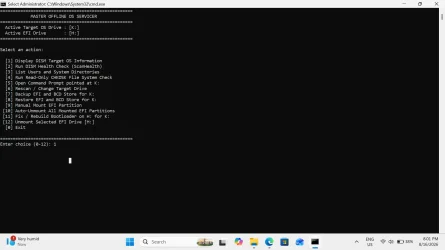
- Run Master-Servicing.cmd as Administrator.
- The detection script lists all Windows builds along with mounted EFI partitions across your drives.
- Select your desired Target OS Drive (e.g.,
C:orK:). - If your EFI partition is not yet mounted, choose Option [9] to mount it to an available drive letter (e.g.,
D:orH:). - Choose Option [7] to create an EFI and BCD backup directly on the target OS drive.
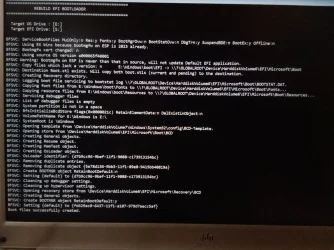
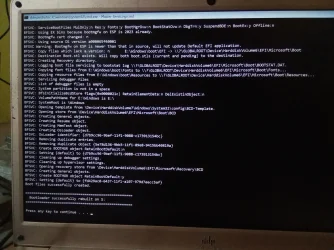
- Service your image or repair your bootloader safely with Option [11].
- When finished, unmount the EFI partitions using Option [10] or Option [12] to return your system to its clean, hidden-ESP state.
courtesy :--- Detect Windows Drives Without Diskpart - Google Gemini
- Windows Build/Version
- Windows 11 Home Single Language v25H2 OS Build 26200.8875
Attachments
My Computer
At a glance
Window 11 v24H2 Build 26100.2033Intel(R) Core(TM) i3-2100 CPU @ 3.10GHz 3.10 GHz4.00 GB (3.89 GB usable)Onboard
- OS
- Window 11 v24H2 Build 26100.2033
- Computer type
- PC/Desktop
- Manufacturer/Model
- ASSEMMBLED
- CPU
- Intel(R) Core(TM) i3-2100 CPU @ 3.10GHz 3.10 GHz
- Motherboard
- ZEBRONICS
- Memory
- 4.00 GB (3.89 GB usable)
- Graphics Card(s)
- Onboard
- Sound Card
- Onboard
- Monitor(s) Displays
- LG
- Screen Resolution
- 1366x768
- Hard Drives
- Toshiba HDD 1 TB
- Keyboard
- Mechanical
- Mouse
- Mechanical
- Internet Speed
- 700 kb/s
- Browser
- Microsoft EDGE, CHROME
- Antivirus
- Microsoft Defender