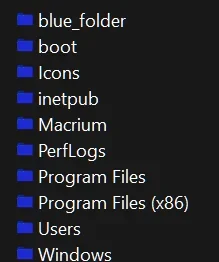
change the yellow folders' icon for the whole system at once


Martin901

Member
Local time
1:43 PM
Posts
3
OS
Windows 11
Hello everyone,
This is my first post ever in this forum, and I really hope I can find a help here.
Long story short, I'm a windows user since windows 98, I have been working with these "yellow" folders šŸ“ all the time, so is there an effective way to change the yellow folders' icon for the whole system at once in windows 11 ?

I'm so aware of the way to change the folder's icon individually for each and every single folder by going to properties > customize > change icon, but I have thousands of folders on my PC, I just want to get rid off all the yellow folders from my system at once and forever though.

Any help with a tutorial would be really appreciated.
 
Windows Build/Version
Windows 11

My Computer

System One

  • OS
    Windows 11
    Computer type
    PC/Desktop
    Manufacturer/Model
    HP
    CPU
    Intel i7 9th gen
    Memory
    16 GB DDR4
    Graphics Card(s)
    GTX 1660S
I have a batch script which you can use to change Windows 10 or Windows 11 folder icons.
 

Attachments

My Computer

System One

  • OS
    Windows 11
    Computer type
    PC/Desktop
    Manufacturer/Model
    HP Pavilion
    CPU
    AMD Ryzen 7 5700G
    Motherboard
    Erica6
    Memory
    Micron Technology DDR4-3200 16GB
    Graphics Card(s)
    NVIDIA GeForce RTX 3060
    Sound Card
    Realtek ALC671
    Monitor(s) Displays
    Samsung SyncMaster U28E590
    Screen Resolution
    3840 x 2160
    Hard Drives
    SAMSUNG MZVLQ1T0HALB-000H1
Welcome to the forum. I can attest @FreeBooter solution works like a charm. It even changes the pukey yellow color in regedit as well as file explorer.
 

My Computers

System One System Two

  • OS
    Windows 11 Pro 25H2
    Computer type
    PC/Desktop
    Manufacturer/Model
    Dell Optiplex 7080
    CPU
    i9-10900 10 core 20 threads
    Motherboard
    DELL 0J37VM
    Memory
    32 gb
    Graphics Card(s)
    none-Intel UHD Graphics 630
    Sound Card
    Integrated Realtek
    Monitor(s) Displays
    Benq 27
    Screen Resolution
    2560x1440
    Hard Drives
    2x1tb Solidigm m.2 nvme /External drives 512gb Samsung m.2 sata+2tb Kingston m2.nvme
    PSU
    500w
    Case
    MT
    Cooling
    Dell Premium
    Keyboard
    Logitech wired
    Mouse
    Logitech wireless
    Internet Speed
    so slow I'm too embarrassed to tell
    Browser
    #1 Edge #2 Firefox
    Antivirus
    Defender+MWB Premium
  • Operating System
    Windows 11 Pro 24H2 26200.8457
    Computer type
    PC/Desktop
    Manufacturer/Model
    Beelink Mini PC SER5
    CPU
    AMD Ryzen 7 6800U
    Memory
    32 gb
    Graphics card(s)
    integrated
    Sound Card
    integrated
    Monitor(s) Displays
    Benq 27
    Screen Resolution
    2560x1440
    Hard Drives
    1TB Crucial nvme
    Keyboard
    Logitech wired
    Mouse
    Logitech wireless
    Internet Speed
    still too embarrassed to tell
    Browser
    Firefox
    Antivirus
    Defender
    Other Info
    System 3 is non compliant Dell 9020 i7-4770/24gb ram Win11 PRO 26200.8457
I have a batch script which you can use to change Windows 10 or Windows 11 folder icons.
Thank you so much FreeBooter, I really do appreciate it, if you Don't mind can you please explain to me how to run your script, I already have an icon for folders that I really would like to use for all folders, I attached the icon with this post, can I use it with your script?

and if you don't mind can you please teach me how can I change the folders's icon manually without a script? Like how to modify the icons inside SHELL32.dll folder, that would be really appreciated, and again thanks a lot bro !
 

Attachments

My Computer

System One

  • OS
    Windows 11
    Computer type
    PC/Desktop
    Manufacturer/Model
    HP
    CPU
    Intel i7 9th gen
    Memory
    16 GB DDR4
    Graphics Card(s)
    GTX 1660S
You double-click the batch script and type 1 and press Enter key to change the Windows 11 icon for folders.

If you want to use different folder icon replace the Blue Folder.ico with your folder icon and rename your folder icon as Blue Folder and execute the script.
 

My Computer

System One

  • OS
    Windows 11
    Computer type
    PC/Desktop
    Manufacturer/Model
    HP Pavilion
    CPU
    AMD Ryzen 7 5700G
    Motherboard
    Erica6
    Memory
    Micron Technology DDR4-3200 16GB
    Graphics Card(s)
    NVIDIA GeForce RTX 3060
    Sound Card
    Realtek ALC671
    Monitor(s) Displays
    Samsung SyncMaster U28E590
    Screen Resolution
    3840 x 2160
    Hard Drives
    SAMSUNG MZVLQ1T0HALB-000H1
You double-click the batch script and type 1 and press Enter key to change the Windows 11 icon for folders.

If you want to use different folder icon replace the Blue Folder.ico with your folder icon and rename your folder icon as Blue Folder and execute the script.

Thanks a lot FreeBooter, it worked but when I change the view to large icons or medium icons, they go back to the yellow folder icons again though ! The new folder icon appears only in small icons view and list view
 

My Computer

System One

  • OS
    Windows 11
    Computer type
    PC/Desktop
    Manufacturer/Model
    HP
    CPU
    Intel i7 9th gen
    Memory
    16 GB DDR4
    Graphics Card(s)
    GTX 1660S
Hello everyone,
This is my first post ever in this forum, and I really hope I can find a help here.
Long story short, I'm a windows user since windows 98, I have been working with these "yellow" folders šŸ“ all the time, so is there an effective way to change the yellow folders' icon for the whole system at once in windows 11 ?

I'm so aware of the way to change the folder's icon individually for each and every single folder by going to properties > customize > change icon, but I have thousands of folders on my PC, I just want to get rid off all the yellow folders from my system at once and forever though.

Any help with a tutorial would be really appreciated.
Just voicing an opinion. FreeBooters script is great and works great(doesnt change folder color for folders in start menu though for me anyway). You can also download a small app called 7tsp and download 7tsp icon packs
from say a website like deviantArt. That is just another way but by using 7tsp icon packs there is a whole array of folder styles, colors, sizes etc.
However you prefer, is always up to you, the user.
 

My Computer

System One

  • OS
    Windows 11 Pro Version 23H2(OS Build 22631.4890)
    Computer type
    PC/Desktop
    Manufacturer/Model
    AMD
    CPU
    12-Core AMD Ryzen 9 5900X, 4950 MHz (49.5 x 100)
    Motherboard
    Gigabyte X570 Aorus Master
    Memory
    4 - G Skill Trident Z Neo F4-3600C16-16GTZNC
    Graphics Card(s)
    PCI Express 4.0 x16: PowerColor RX 6800
    Sound Card
    Realtek ALC1220 @ AMD K19.2 - High Definition Audio Controller
    Monitor(s) Displays
    2 - 27 inch Westinghouse
    Screen Resolution
    1920 x 1080
    Hard Drives
    2 SSD - 2 TB each
    1 SSD - 4TB
    1 HDD - 2TB
    Keyboard
    logitech
    Mouse
    logitech
    Internet Speed
    1 GB
    Browser
    Firefox
    Antivirus
    Eset Endpoint Security
a small app called 7tsp
Accoding to deviantart site 7tsp "Never patches explorer.exe and shell32.dll on windows 8, 8.1 and 10 systems even if the res file exists in the used pack."
 

My Computers

System One System Two

  • OS
    Windows 11 Pro 25H2
    Computer type
    PC/Desktop
    Manufacturer/Model
    Dell Optiplex 7080
    CPU
    i9-10900 10 core 20 threads
    Motherboard
    DELL 0J37VM
    Memory
    32 gb
    Graphics Card(s)
    none-Intel UHD Graphics 630
    Sound Card
    Integrated Realtek
    Monitor(s) Displays
    Benq 27
    Screen Resolution
    2560x1440
    Hard Drives
    2x1tb Solidigm m.2 nvme /External drives 512gb Samsung m.2 sata+2tb Kingston m2.nvme
    PSU
    500w
    Case
    MT
    Cooling
    Dell Premium
    Keyboard
    Logitech wired
    Mouse
    Logitech wireless
    Internet Speed
    so slow I'm too embarrassed to tell
    Browser
    #1 Edge #2 Firefox
    Antivirus
    Defender+MWB Premium
  • Operating System
    Windows 11 Pro 24H2 26200.8457
    Computer type
    PC/Desktop
    Manufacturer/Model
    Beelink Mini PC SER5
    CPU
    AMD Ryzen 7 6800U
    Memory
    32 gb
    Graphics card(s)
    integrated
    Sound Card
    integrated
    Monitor(s) Displays
    Benq 27
    Screen Resolution
    2560x1440
    Hard Drives
    1TB Crucial nvme
    Keyboard
    Logitech wired
    Mouse
    Logitech wireless
    Internet Speed
    still too embarrassed to tell
    Browser
    Firefox
    Antivirus
    Defender
    Other Info
    System 3 is non compliant Dell 9020 i7-4770/24gb ram Win11 PRO 26200.8457
Accoding to deviantart site 7tsp "Never patches explorer.exe and shell32.dll on windows 8, 8.1 and 10 systems even if the res file exists in the used pack."
Hmm...Interesting. But I did find it depended on the icon packs themselves. If I say used a 7tsp Icon pack from
one developer and one from a different developer, even though they were created/packed using similar methods
one icon pack wouldnt change a few different aspects of windows. I have about 20 different packs that work on 8, 10 and 11 and having
used them on both windows 10 pro and windows 11 pro one pack wouldnt change the file explorer or the start menu just as an example
but another would theme ALL folder icons system wide even in those places as well. At least thats what I have had happen to me.
 

My Computer

System One

  • OS
    Windows 11 Pro Version 23H2(OS Build 22631.4890)
    Computer type
    PC/Desktop
    Manufacturer/Model
    AMD
    CPU
    12-Core AMD Ryzen 9 5900X, 4950 MHz (49.5 x 100)
    Motherboard
    Gigabyte X570 Aorus Master
    Memory
    4 - G Skill Trident Z Neo F4-3600C16-16GTZNC
    Graphics Card(s)
    PCI Express 4.0 x16: PowerColor RX 6800
    Sound Card
    Realtek ALC1220 @ AMD K19.2 - High Definition Audio Controller
    Monitor(s) Displays
    2 - 27 inch Westinghouse
    Screen Resolution
    1920 x 1080
    Hard Drives
    2 SSD - 2 TB each
    1 SSD - 4TB
    1 HDD - 2TB
    Keyboard
    logitech
    Mouse
    logitech
    Internet Speed
    1 GB
    Browser
    Firefox
    Antivirus
    Eset Endpoint Security
I wrote this somewhere else, but I'll say it again. If you have the know how (there's guides that aren't hard to find), you should use Resource Hacker and replace icons inside imageres.dll.mun and shell32.dll.mun. There are more files to change other than the one that the script changes. I also find the blue folder boring, and I think the folder design is the problem, not the color.
 

My Computer

System One

  • OS
    Windows 11
I have a batch script which you can use to change Windows 10 or Windows 11 folder icons.
OMG You Are God. Thank You. So Much. It works perfectly. I thought i never found a solution for this. Really Thanks.
 

My Computer

System One

  • OS
    wINDOWS 11
    Computer type
    Laptop
    Manufacturer/Model
    Gf thin 10ue

My Computer

System One

  • OS
    Windows 11
    Computer type
    PC/Desktop
    Manufacturer/Model
    HP Pavilion
    CPU
    AMD Ryzen 7 5700G
    Motherboard
    Erica6
    Memory
    Micron Technology DDR4-3200 16GB
    Graphics Card(s)
    NVIDIA GeForce RTX 3060
    Sound Card
    Realtek ALC671
    Monitor(s) Displays
    Samsung SyncMaster U28E590
    Screen Resolution
    3840 x 2160
    Hard Drives
    SAMSUNG MZVLQ1T0HALB-000H1
I know this thread is old, but using the script or similar ones I only managed to replace default icons. Larger folder icons as well as folder icons with thumbnails are still yellow. Does anyone have an idea how do fix this in Windows 11? Thanks.
 

My Computer

System One

  • OS
    Windows 11
    Computer type
    PC/Desktop
Larger folder icons as well as folder icons with thumbnails are still yellow.
This still works, thanks to our guy @FreeBooter.
To make icon for folder blue, put this subfolder at root of C: and run the bat file inside. I always run it as administrator.
You can use any icon as default folder icon, Just put the .ico file you want to use into the folder and name that icon 'Blue Folder'. Double-click the batch script.


My Computers

System One System Two

  • OS
    Windows 11 Pro 25H2
    Computer type
    PC/Desktop
    Manufacturer/Model
    Dell Optiplex 7080
    CPU
    i9-10900 10 core 20 threads
    Motherboard
    DELL 0J37VM
    Memory
    32 gb
    Graphics Card(s)
    none-Intel UHD Graphics 630
    Sound Card
    Integrated Realtek
    Monitor(s) Displays
    Benq 27
    Screen Resolution
    2560x1440
    Hard Drives
    2x1tb Solidigm m.2 nvme /External drives 512gb Samsung m.2 sata+2tb Kingston m2.nvme
    PSU
    500w
    Case
    MT
    Cooling
    Dell Premium
    Keyboard
    Logitech wired
    Mouse
    Logitech wireless
    Internet Speed
    so slow I'm too embarrassed to tell
    Browser
    #1 Edge #2 Firefox
    Antivirus
    Defender+MWB Premium
  • Operating System
    Windows 11 Pro 24H2 26200.8457
    Computer type
    PC/Desktop
    Manufacturer/Model
    Beelink Mini PC SER5
    CPU
    AMD Ryzen 7 6800U
    Memory
    32 gb
    Graphics card(s)
    integrated
    Sound Card
    integrated
    Monitor(s) Displays
    Benq 27
    Screen Resolution
    2560x1440
    Hard Drives
    1TB Crucial nvme
    Keyboard
    Logitech wired
    Mouse
    Logitech wireless
    Internet Speed
    still too embarrassed to tell
    Browser
    Firefox
    Antivirus
    Defender
    Other Info
    System 3 is non compliant Dell 9020 i7-4770/24gb ram Win11 PRO 26200.8457

My Computers

System One System Two

  • OS
    Windows 11 Enterprise 25H2 26200 7462
    Computer type
    PC/Desktop
    Manufacturer/Model
    Custom Build
    CPU
    Intel XEON E5-2699 v3
    Motherboard
    ASUS X99-A
    Memory
    64GB Teamgroup UD4-3600
    Graphics Card(s)
    NVIDIA GeForce GTX 1080 Ti
    Sound Card
    Integrated
    Monitor(s) Displays
    ACER X34 Predator
    Screen Resolution
    3440 x 1440
    Hard Drives
    Crucial CT1000P 3P SSD8 1TB
    Crucial CT1000 BX500 SSD 1TB
    PSU
    GameMax Pro
    Case
    Fractal Design
    Cooling
    Corsair H110iGT + 6 140mm Fans
    Keyboard
    Corsair K4
    Mouse
    G-Skill G502
    Internet Speed
    300MBs
    Browser
    Chrome
    Antivirus
    OEM
    Other Info
    ASUS RT-AC87U Router
  • Operating System
    25H2 26200.5074
    Computer type
    Laptop
    Manufacturer/Model
    ASUS X555LA
    Memory
    8GB
    Browser
    Chrome
    Antivirus
    OEM
You double-click the batch script and type 1 and press Enter key to change the Windows 11 icon for folders.

If you want to use different folder icon replace the Blue Folder.ico with your folder icon and rename your folder icon as Blue Folder and execute the script.
This is a great Custom Icon too.
Screenshot 2026-02-02 091950.webp
 

My Computers

System One System Two

  • OS
    Windows11 Pro 26200.8524
    Computer type
    PC/Desktop
    Manufacturer/Model
    Dell Alienware Aurora R16
    CPU
    Intel Core i9 14900F (24 -Core, 68 MB Total Cache)
    Motherboard
    Dell Alienware
    Memory
    32GB DDR5
    Graphics Card(s)
    RTX 4080 Super w/581.95
    Sound Card
    Realtec
    Monitor(s) Displays
    Corsair XENEON 32QHD165
    Screen Resolution
    2560 X 1440
    Hard Drives
    1-2TB Samsung 990 Pro PCIe NVMe M2 SSD
    1-4TB Samsung 990 Pro PCIe NVMe M2 SSD
    PSU
    1000 Watt Platinum Dell
    Case
    Alienware
    Cooling
    Liquid Closed Loop
    Keyboard
    Corsair Strafe RGB
    Mouse
    Logitech MK270 Wireless
    Internet Speed
    100Gb's Down-20 Up
    Browser
    Firefox 151.0.3
    Antivirus
    Defender
    Other Info
    Very Quiet And Fast
    CyberPower UPS CP1500PFCLCD
  • Operating System
    PClinuxOS Mate (2025.7)
    Computer type
    PC/Desktop
    Manufacturer/Model
    Intel
    CPU
    13th Gen Inter(R) Core(TM) i3-1315U
    Motherboard
    Intel
    Memory
    64 GB DDR4 @3200 MHz.
    Graphics card(s)
    Internal
    Sound Card
    None
    Monitor(s) Displays
    Dell 2419HGCF
    Screen Resolution
    1920 X 1080
    Hard Drives
    SAMSUNG 980 PRO SSD 2TB, PCIe 4.0 M.2 2280
    PSU
    Chicony 30 Watt
    Case
    Small
    Keyboard
    Dell
    Mouse
    Razor
    Internet Speed
    1GB
    Browser
    Slimjet
Back
Top Bottom