My Computer
System One
-
- OS
- Win 11
- Computer type
- Laptop
- Manufacturer/Model
- Lenovo
- CPU
- Ryzen 7 6900 HS
- Memory
- 32 GB RAM
- Graphics Card(s)
- RTX 3050ti
Follow along with the video below to see how to install our site as a web app on your home screen.
Note: This feature may not be available in some browsers.
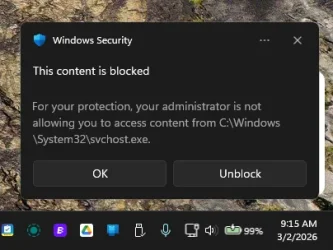
I tried adding that folder to exclusions:
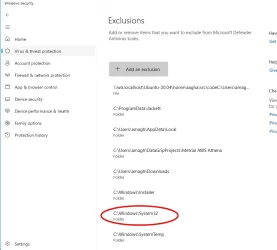
svchost.exe improperly.Boy, that's a fact...and I'll bet we're not seeing all of it. Might as well not have any protection.In fact, looking at your exclusion list, is scary.
What would you recommend removing?In fact, looking at your exclusion list, is scary.
Interesting.Is this relevant to you? Jan 22 report.
![]()
Windows defender blocks Jackett updates under "C:\Windows\SystemTemp\JackettUpdate-...." · Issue #16511 · Jackett/Jackett
Have you checked our Troubleshooting page for your issue? I have checked the Troubleshooting page Is there already an issue for your problem? I have checked older issues, open and closed Have you r...github.com
If Jackett (whatever that is) has an update check, disable it and see if this stops.
That's all of it.Boy, that's a fact...and I'll bet we're not seeing all of it. Might as well not have any protection.
OK, still having this error come up.I've made the change suggested here:
![]()
Windows defender blocks Jackett updates under "C:\Windows\SystemTemp\JackettUpdate-...." · Issue #16511 · Jackett/Jackett
Have you checked our Troubleshooting page for your issue? I have checked the Troubleshooting page Is there already an issue for your problem? I have checked older issues, open and closed Have you r...github.com
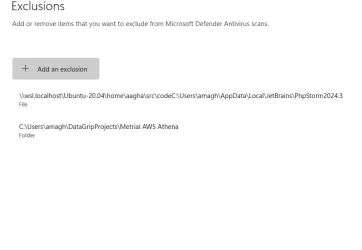
I'm going to let this run a few days and see if it's still an issue before I tackle DataGrip so I'm not changing more than 1 var at a time. Thanks.
Thanks.If it were me I would not exclude the appdata folder, windows Installer, system 32, systemtemp, nor svchost. While I do have my downloads folder excluded, I scan most things I download manually. Only ones I don't scan are directly from OFFICIAL well known sites. I'm really picky where I download from. TBH I don't remember why I excluded that folder years ago. In fact, I think I'll take it off the list.
If something throws out a false positive and you KNOW it's safe, exclude only the file/executable that is causing it.

www.elevenforum.com
www.elevenforum.com
www.elevenforum.com
You're on the right track using event viewer. I'm going to mention a word some consider evil and the bane of mankind....CO-PILOT.
Here is the answer I got from the all-knowing (said facetiously) AI.
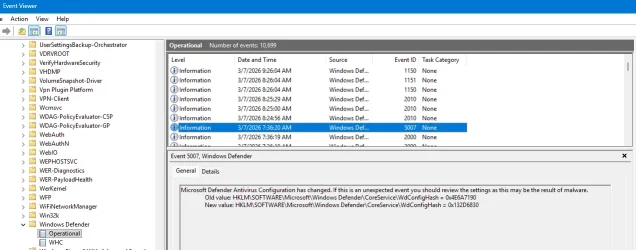
Event Viewer→ Applications and Services Logs → Microsoft → Windows → Windows Defender → Operational
3) Look for these event IDs around the timestamp
These events will show:
- 1123 — Controlled Folder Access blocked an app
- 1127 — Controlled Folder Access allowed an app
- 5007 — Defender settings changed
- 1116 / 1117 — Malware detection events
- 1006 / 1007 — Network protection blocks
This is the single most important step — it reveals the parent process that the popup hides.
- The real process behind the block
- The path it tried to access
- The user context
- The service or scheduled task involved

Copy. I'll check these.Your open forum thread mentions two common offenders:
Likely culprits based on your tab’s context
Both are known to trigger CFA blocks, and both run background tasks multiple times per day.
- Jackett auto-updater (writes to SystemTemp)
- JetBrains DataGrip (PowerShell scripts and project indexing)
If you use either, they’re high on the suspect list.
Depending on what you find:
What to do once you identify the process
- If it’s a legitimate app updater Disable its auto-update task or add only that specific executable as an exclusion.
- If it’s a JetBrains IDE Exclude only the project folder or the IDE’s update helper, not System32.
- If it’s a service you don’t recognize That’s a red flag — we should dig deeper.
- If it’s a script in AppData or Temp Often indicates an updater or a misbehaving background tool.
drive.google.com
www.elevenforum.com
www.elevenforum.com
Name AMD Radeon(TM) Graphics
PNP Device ID PCI\VEN_1002&DEV_1681&SUBSYS_3B1E17AA&REV_02\4&23FBA460&0&0041
Adapter Type AMD Radeon Graphics Processor (0x1681), Advanced Micro Devices, Inc. compatible
Adapter Description AMD Radeon(TM) Graphics
Adapter RAM (1,048,576) bytes
Installed Drivers C:\WINDOWS\System32\DriverStore\FileRepository\u0197639.inf_amd64_6e9872ffe0e526d3\B025646\atidx9loader64.dll,C:\WINDOWS\System32\DriverStore\FileRepository\u0197639.inf_amd64_6e9872ffe0e526d3\B025646\amdxx64.dll,C:\WINDOWS\System32\DriverStore\FileRepository\u0197639.inf_amd64_6e9872ffe0e526d3\B025646\amdxx64.dll,C:\WINDOWS\System32\DriverStore\FileRepository\u0197639.inf_amd64_6e9872ffe0e526d3\B025646\amdxc64.dll
Driver Version 32.0.21041.1000
INF File oem167.inf (ati2mtag_Rembrandt section)
Driver C:\WINDOWS\SYSTEM32\DRIVERSTORE\FILEREPOSITORY\U0197639.INF_AMD64_6E9872FFE0E526D3\B025646\AMDKMDAG.SYS (32.0.21041.1000, 97.36 MB (102,087,184 bytes), 2/1/2026 12:28 PM)
Event[556]
Log Name: System
Source: Service Control Manager
Date: 2026-03-07T10:12:34.7610000Z
Event ID: 7046
Task: N/A
Level: Error
Opcode: N/A
Keyword: Classic,
User: N/A
User Name: N/A
Computer: METRICALPC
Description:
The following service has repeatedly stopped responding to service control requests: Arq 7 Agent
Contact the service vendor or the system administrator about whether to disable this service until the problem is identified.
You may have to restart the computer in safe mode before you can disable the service.
The Nvidia GPU is sometimes turned off in the BIOS because when I need to be mobile, it eats the battery and my laptop lasts 2-3 hours, but with it off, I can get 8-9 hours. I turn it back on when hard-wired.