Content blocked: svchost.exe


aagha

Well-known member
Local time
7:40 AM
Posts
30
OS
Win 11
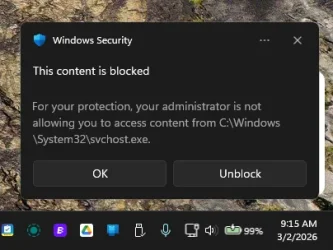
I keep getting this error multiple times a day, even though I hit `Unblock` every time:

1772498687531.webp

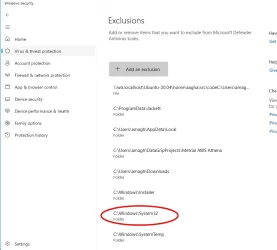
I tried adding that folder to exclusions:

1772498717482.webp

Earlier, I tired adding that process for exclusions too, but with no luck. How do I get it to stop?
 
Windows Build/Version
25h2

My Computer

System One

  • OS
    Win 11
    Computer type
    Laptop
    Manufacturer/Model
    Lenovo
    CPU
    Ryzen 7 6900 HS
    Memory
    32 GB RAM
    Graphics Card(s)
    RTX 3050ti
I tried adding that folder to exclusions:

That’s a really bad idea considering you don’t know what is causing it, yet. Because Malware or a script can use svchost.exe improperly.

In fact, looking at your exclusion list, is scary.
 

My Computers

System One System Two

  • OS
    Windows 11 Pro 25H2 Build 26200.8524
    Computer type
    PC/Desktop
    Manufacturer/Model
    Sin-built 2013
    CPU
    Intel(R) Core(TM) i7-4770K CPU @ 3.50GHz
    Motherboard
    ASUS ROG Maximus VI Formula
    Memory
    32.0 GB of I forget and the box is in storage.
    Graphics Card(s)
    Gigabyte nVidia GeForce GTX 1660 Super OC 6GB
    Sound Card
    Onboard thingy
    Monitor(s) Displays
    5 x LG 25MS500-B - 1 x 24MK430H-B - 1 x Wacom Pro 22" Touch Screen Tablet
    Screen Resolution
    All over the place
    Hard Drives
    Too many to list.
    OS on Samsung 1TB 870 QVO SATA
    PSU
    Silverstone 1500
    Case
    NZXT Phantom 820 Full-Tower Case
    Cooling
    Noctua NH-D15 Elite Class Dual Tower CPU Cooler / 6 x EziDIY 120mm / 2 x Corsair 140mm somethings / 1 x 140mm Thermaltake something / 2 x 200mm Corsair.
    Keyboard
    Corsair K95 / Logitech diNovo Edge Wireless
    Mouse
    Logitech: G402 / G502 / Mx Masters / Mx Air Cordless
    Internet Speed
    2000/500Mbps
    Browser
    All sorts
    Antivirus
    Kaspersky Premium
    Other Info
    ㅤㅤㅤㅤㅤㅤㅤㅤㅤㅤㅤㅤㅤㅤㅤㅤㅤㅤㅤㅤㅤㅤㅤㅤㅤㅤㅤㅤㅤㅤㅤㅤㅤㅤㅤㅤㅤㅤㅤㅤ⠀⠀⠀⠀⠀⠀⠀⠀⠀⠀
    TP-Link BE9300 WiFi 7 Bluetooth 5.4 (Archer TBE550E)
    TP-Link TX201 V1 2.5GB Lan

    Grandstream HT812 - VoIP
    ASUS DSL-AX82U - Mesh
    ASUS RT-AC68U - Mesh
    ASUS RT-BE88U Router

    Brother MFC-L2880DW Printer

    I’m on a horse.
  • Operating System
    Windows 11 Pro 25H2 Build 26200.8524
    Computer type
    Laptop
    Manufacturer/Model
    LENOVO Yoga 7 14IRL8 - 7i EVO OLED 14" Touchscreen i5 12 Core 16GB/512GB
    CPU
    Intel Core 12th Gen i5-1240P Processor (1.7 - 4.4GHz)
    Memory
    16GB LPDDR5 RAM
    Graphics card(s)
    Intel Iris Xe Graphics Processor
    Sound Card
    Optimized with Dolby Atmos®
    Screen Resolution
    QHD 2880 x 1800 OLED
    Hard Drives
    M.2 512GB
    Antivirus
    Defender / Malwarebytes
    Other Info
    …still on a horse.
Something is running in the background, or at least set to run, is my guess.
Next time it pops up, immediately note the time and then check event viewer and see if you can identify what’s triggering it.
 

My Computers

System One System Two

  • OS
    Windows 11 Pro 25H2 Build 26200.8524
    Computer type
    PC/Desktop
    Manufacturer/Model
    Sin-built 2013
    CPU
    Intel(R) Core(TM) i7-4770K CPU @ 3.50GHz
    Motherboard
    ASUS ROG Maximus VI Formula
    Memory
    32.0 GB of I forget and the box is in storage.
    Graphics Card(s)
    Gigabyte nVidia GeForce GTX 1660 Super OC 6GB
    Sound Card
    Onboard thingy
    Monitor(s) Displays
    5 x LG 25MS500-B - 1 x 24MK430H-B - 1 x Wacom Pro 22" Touch Screen Tablet
    Screen Resolution
    All over the place
    Hard Drives
    Too many to list.
    OS on Samsung 1TB 870 QVO SATA
    PSU
    Silverstone 1500
    Case
    NZXT Phantom 820 Full-Tower Case
    Cooling
    Noctua NH-D15 Elite Class Dual Tower CPU Cooler / 6 x EziDIY 120mm / 2 x Corsair 140mm somethings / 1 x 140mm Thermaltake something / 2 x 200mm Corsair.
    Keyboard
    Corsair K95 / Logitech diNovo Edge Wireless
    Mouse
    Logitech: G402 / G502 / Mx Masters / Mx Air Cordless
    Internet Speed
    2000/500Mbps
    Browser
    All sorts
    Antivirus
    Kaspersky Premium
    Other Info
    ㅤㅤㅤㅤㅤㅤㅤㅤㅤㅤㅤㅤㅤㅤㅤㅤㅤㅤㅤㅤㅤㅤㅤㅤㅤㅤㅤㅤㅤㅤㅤㅤㅤㅤㅤㅤㅤㅤㅤㅤ⠀⠀⠀⠀⠀⠀⠀⠀⠀⠀
    TP-Link BE9300 WiFi 7 Bluetooth 5.4 (Archer TBE550E)
    TP-Link TX201 V1 2.5GB Lan

    Grandstream HT812 - VoIP
    ASUS DSL-AX82U - Mesh
    ASUS RT-AC68U - Mesh
    ASUS RT-BE88U Router

    Brother MFC-L2880DW Printer

    I’m on a horse.
  • Operating System
    Windows 11 Pro 25H2 Build 26200.8524
    Computer type
    Laptop
    Manufacturer/Model
    LENOVO Yoga 7 14IRL8 - 7i EVO OLED 14" Touchscreen i5 12 Core 16GB/512GB
    CPU
    Intel Core 12th Gen i5-1240P Processor (1.7 - 4.4GHz)
    Memory
    16GB LPDDR5 RAM
    Graphics card(s)
    Intel Iris Xe Graphics Processor
    Sound Card
    Optimized with Dolby Atmos®
    Screen Resolution
    QHD 2880 x 1800 OLED
    Hard Drives
    M.2 512GB
    Antivirus
    Defender / Malwarebytes
    Other Info
    …still on a horse.

My Computers

System One System Two

  • OS
    Windows 11 Pro 25H2 Build 26200.8524
    Computer type
    PC/Desktop
    Manufacturer/Model
    Sin-built 2013
    CPU
    Intel(R) Core(TM) i7-4770K CPU @ 3.50GHz
    Motherboard
    ASUS ROG Maximus VI Formula
    Memory
    32.0 GB of I forget and the box is in storage.
    Graphics Card(s)
    Gigabyte nVidia GeForce GTX 1660 Super OC 6GB
    Sound Card
    Onboard thingy
    Monitor(s) Displays
    5 x LG 25MS500-B - 1 x 24MK430H-B - 1 x Wacom Pro 22" Touch Screen Tablet
    Screen Resolution
    All over the place
    Hard Drives
    Too many to list.
    OS on Samsung 1TB 870 QVO SATA
    PSU
    Silverstone 1500
    Case
    NZXT Phantom 820 Full-Tower Case
    Cooling
    Noctua NH-D15 Elite Class Dual Tower CPU Cooler / 6 x EziDIY 120mm / 2 x Corsair 140mm somethings / 1 x 140mm Thermaltake something / 2 x 200mm Corsair.
    Keyboard
    Corsair K95 / Logitech diNovo Edge Wireless
    Mouse
    Logitech: G402 / G502 / Mx Masters / Mx Air Cordless
    Internet Speed
    2000/500Mbps
    Browser
    All sorts
    Antivirus
    Kaspersky Premium
    Other Info
    ㅤㅤㅤㅤㅤㅤㅤㅤㅤㅤㅤㅤㅤㅤㅤㅤㅤㅤㅤㅤㅤㅤㅤㅤㅤㅤㅤㅤㅤㅤㅤㅤㅤㅤㅤㅤㅤㅤㅤㅤ⠀⠀⠀⠀⠀⠀⠀⠀⠀⠀
    TP-Link BE9300 WiFi 7 Bluetooth 5.4 (Archer TBE550E)
    TP-Link TX201 V1 2.5GB Lan

    Grandstream HT812 - VoIP
    ASUS DSL-AX82U - Mesh
    ASUS RT-AC68U - Mesh
    ASUS RT-BE88U Router

    Brother MFC-L2880DW Printer

    I’m on a horse.
  • Operating System
    Windows 11 Pro 25H2 Build 26200.8524
    Computer type
    Laptop
    Manufacturer/Model
    LENOVO Yoga 7 14IRL8 - 7i EVO OLED 14" Touchscreen i5 12 Core 16GB/512GB
    CPU
    Intel Core 12th Gen i5-1240P Processor (1.7 - 4.4GHz)
    Memory
    16GB LPDDR5 RAM
    Graphics card(s)
    Intel Iris Xe Graphics Processor
    Sound Card
    Optimized with Dolby Atmos®
    Screen Resolution
    QHD 2880 x 1800 OLED
    Hard Drives
    M.2 512GB
    Antivirus
    Defender / Malwarebytes
    Other Info
    …still on a horse.
And Datagrip:

DataGrip, along with other IntelliJ-based IDEs, is known to trigger Windows Security (Windows Defender) blocks,
often due to real-time scanning of project files or PowerShell scripts used for configuration.

To stop Windows Defender from blocking DataGrip, you need to exclude the application process and your project folders.
  • Open Windows Security: Click the Start menu, type "Windows Security," and open it.
  • Navigate to Exclusions: Go to Virus & threat protection > Manage settings(under Virus & threat protection settings) > Add or remove exclusions.
  • Add Folder Exclusions: Click + Add an exclusion, select Folder, and add your DataGrip projects folder (e.g., C:\Users\YourUser\IdeaProjects).
  • Add Process Exclusions: Click + Add an exclusion, select Process, and type datagrip64.exe
The .idea folder could be hidden, so show hidden files and folders.
I couldn’t reach the source page for this information because it says my browser isn’t supported. I’m guessing Ubuntu is needed? I have no idea.
 

My Computers

System One System Two

  • OS
    Windows 11 Pro 25H2 Build 26200.8524
    Computer type
    PC/Desktop
    Manufacturer/Model
    Sin-built 2013
    CPU
    Intel(R) Core(TM) i7-4770K CPU @ 3.50GHz
    Motherboard
    ASUS ROG Maximus VI Formula
    Memory
    32.0 GB of I forget and the box is in storage.
    Graphics Card(s)
    Gigabyte nVidia GeForce GTX 1660 Super OC 6GB
    Sound Card
    Onboard thingy
    Monitor(s) Displays
    5 x LG 25MS500-B - 1 x 24MK430H-B - 1 x Wacom Pro 22" Touch Screen Tablet
    Screen Resolution
    All over the place
    Hard Drives
    Too many to list.
    OS on Samsung 1TB 870 QVO SATA
    PSU
    Silverstone 1500
    Case
    NZXT Phantom 820 Full-Tower Case
    Cooling
    Noctua NH-D15 Elite Class Dual Tower CPU Cooler / 6 x EziDIY 120mm / 2 x Corsair 140mm somethings / 1 x 140mm Thermaltake something / 2 x 200mm Corsair.
    Keyboard
    Corsair K95 / Logitech diNovo Edge Wireless
    Mouse
    Logitech: G402 / G502 / Mx Masters / Mx Air Cordless
    Internet Speed
    2000/500Mbps
    Browser
    All sorts
    Antivirus
    Kaspersky Premium
    Other Info
    ㅤㅤㅤㅤㅤㅤㅤㅤㅤㅤㅤㅤㅤㅤㅤㅤㅤㅤㅤㅤㅤㅤㅤㅤㅤㅤㅤㅤㅤㅤㅤㅤㅤㅤㅤㅤㅤㅤㅤㅤ⠀⠀⠀⠀⠀⠀⠀⠀⠀⠀
    TP-Link BE9300 WiFi 7 Bluetooth 5.4 (Archer TBE550E)
    TP-Link TX201 V1 2.5GB Lan

    Grandstream HT812 - VoIP
    ASUS DSL-AX82U - Mesh
    ASUS RT-AC68U - Mesh
    ASUS RT-BE88U Router

    Brother MFC-L2880DW Printer

    I’m on a horse.
  • Operating System
    Windows 11 Pro 25H2 Build 26200.8524
    Computer type
    Laptop
    Manufacturer/Model
    LENOVO Yoga 7 14IRL8 - 7i EVO OLED 14" Touchscreen i5 12 Core 16GB/512GB
    CPU
    Intel Core 12th Gen i5-1240P Processor (1.7 - 4.4GHz)
    Memory
    16GB LPDDR5 RAM
    Graphics card(s)
    Intel Iris Xe Graphics Processor
    Sound Card
    Optimized with Dolby Atmos®
    Screen Resolution
    QHD 2880 x 1800 OLED
    Hard Drives
    M.2 512GB
    Antivirus
    Defender / Malwarebytes
    Other Info
    …still on a horse.
In fact, looking at your exclusion list, is scary.
Boy, that's a fact...and I'll bet we're not seeing all of it. Might as well not have any protection.
 

My Computers

System One System Two

  • OS
    Windows 11 Pro 25H2
    Computer type
    PC/Desktop
    Manufacturer/Model
    Dell Optiplex 7080
    CPU
    i9-10900 10 core 20 threads
    Motherboard
    DELL 0J37VM
    Memory
    32 gb
    Graphics Card(s)
    none-Intel UHD Graphics 630
    Sound Card
    Integrated Realtek
    Monitor(s) Displays
    Benq 27
    Screen Resolution
    2560x1440
    Hard Drives
    2x1tb Solidigm m.2 nvme /External drives 512gb Samsung m.2 sata+2tb Kingston m2.nvme
    PSU
    500w
    Case
    MT
    Cooling
    Dell Premium
    Keyboard
    Logitech wired
    Mouse
    Logitech wireless
    Internet Speed
    so slow I'm too embarrassed to tell
    Browser
    #1 Edge #2 Firefox
    Antivirus
    Defender+MWB Premium
  • Operating System
    Windows 11 Pro 24H2 26200.8457
    Computer type
    PC/Desktop
    Manufacturer/Model
    Beelink Mini PC SER5
    CPU
    AMD Ryzen 7 6800U
    Memory
    32 gb
    Graphics card(s)
    integrated
    Sound Card
    integrated
    Monitor(s) Displays
    Benq 27
    Screen Resolution
    2560x1440
    Hard Drives
    1TB Crucial nvme
    Keyboard
    Logitech wired
    Mouse
    Logitech wireless
    Internet Speed
    still too embarrassed to tell
    Browser
    Firefox
    Antivirus
    Defender
    Other Info
    System 3 is non compliant Dell 9020 i7-4770/24gb ram Win11 PRO 26200.8457

My Computer

System One

  • OS
    Win 11
    Computer type
    Laptop
    Manufacturer/Model
    Lenovo
    CPU
    Ryzen 7 6900 HS
    Memory
    32 GB RAM
    Graphics Card(s)
    RTX 3050ti
Is this relevant to you? Jan 22 report.


If Jackett (whatever that is) has an update check, disable it and see if this stops.
Interesting.

Thanks.

I've made the change suggested here:


I'm going to let this run a few days and see if it's still an issue before I tackle DataGrip so I'm not changing more than 1 var at a time. Thanks.
 

My Computer

System One

  • OS
    Win 11
    Computer type
    Laptop
    Manufacturer/Model
    Lenovo
    CPU
    Ryzen 7 6900 HS
    Memory
    32 GB RAM
    Graphics Card(s)
    RTX 3050ti
Boy, that's a fact...and I'll bet we're not seeing all of it. Might as well not have any protection.
That's all of it.

Advice on what to NOT have there would be appreciated.
 

My Computer

System One

  • OS
    Win 11
    Computer type
    Laptop
    Manufacturer/Model
    Lenovo
    CPU
    Ryzen 7 6900 HS
    Memory
    32 GB RAM
    Graphics Card(s)
    RTX 3050ti
If it were me I would not exclude the appdata folder, windows Installer, system 32, systemtemp, nor svchost. While I do have my downloads folder excluded, I scan most things I download manually. Only ones I don't scan are directly from OFFICIAL well known sites. I'm really picky where I download from. TBH I don't remember why I excluded that folder years ago. In fact, I think I'll take it off the list.

If something throws out a false positive and you KNOW it's safe, exclude only the file/executable that is causing it.
 

My Computers

System One System Two

  • OS
    Windows 11 Pro 25H2
    Computer type
    PC/Desktop
    Manufacturer/Model
    Dell Optiplex 7080
    CPU
    i9-10900 10 core 20 threads
    Motherboard
    DELL 0J37VM
    Memory
    32 gb
    Graphics Card(s)
    none-Intel UHD Graphics 630
    Sound Card
    Integrated Realtek
    Monitor(s) Displays
    Benq 27
    Screen Resolution
    2560x1440
    Hard Drives
    2x1tb Solidigm m.2 nvme /External drives 512gb Samsung m.2 sata+2tb Kingston m2.nvme
    PSU
    500w
    Case
    MT
    Cooling
    Dell Premium
    Keyboard
    Logitech wired
    Mouse
    Logitech wireless
    Internet Speed
    so slow I'm too embarrassed to tell
    Browser
    #1 Edge #2 Firefox
    Antivirus
    Defender+MWB Premium
  • Operating System
    Windows 11 Pro 24H2 26200.8457
    Computer type
    PC/Desktop
    Manufacturer/Model
    Beelink Mini PC SER5
    CPU
    AMD Ryzen 7 6800U
    Memory
    32 gb
    Graphics card(s)
    integrated
    Sound Card
    integrated
    Monitor(s) Displays
    Benq 27
    Screen Resolution
    2560x1440
    Hard Drives
    1TB Crucial nvme
    Keyboard
    Logitech wired
    Mouse
    Logitech wireless
    Internet Speed
    still too embarrassed to tell
    Browser
    Firefox
    Antivirus
    Defender
    Other Info
    System 3 is non compliant Dell 9020 i7-4770/24gb ram Win11 PRO 26200.8457
I've made the change suggested here:


I'm going to let this run a few days and see if it's still an issue before I tackle DataGrip so I'm not changing more than 1 var at a time. Thanks.
OK, still having this error come up.

Looking at the Event Viewer, in Windows Logs as soon as I got another svchost.exe blocked message:
- Application: 9 Info events from CoworkVMService
- Security: 197 info events from Microsoft Windows security auditing, most with Task Category=User Account Management
- Setup: None
- System: 8 events; source: DistributedCOM, Task Category=None; Log=system
- Forwarded Events: None

Any suggestions on where to dig in?
 

My Computer

System One

  • OS
    Win 11
    Computer type
    Laptop
    Manufacturer/Model
    Lenovo
    CPU
    Ryzen 7 6900 HS
    Memory
    32 GB RAM
    Graphics Card(s)
    RTX 3050ti
If it were me I would not exclude the appdata folder, windows Installer, system 32, systemtemp, nor svchost. While I do have my downloads folder excluded, I scan most things I download manually. Only ones I don't scan are directly from OFFICIAL well known sites. I'm really picky where I download from. TBH I don't remember why I excluded that folder years ago. In fact, I think I'll take it off the list.

If something throws out a false positive and you KNOW it's safe, exclude only the file/executable that is causing it.
Thanks.

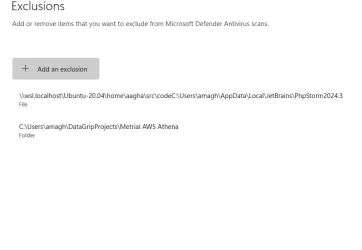
Updated:

1772762065632.webp
 

My Computer

System One

  • OS
    Win 11
    Computer type
    Laptop
    Manufacturer/Model
    Lenovo
    CPU
    Ryzen 7 6900 HS
    Memory
    32 GB RAM
    Graphics Card(s)
    RTX 3050ti
1) Please add WMIC:


2) Run the V2 log collector > post a share link


3) Run tuneup_plus_log.zip > post a share link


4) Run event_viewer-2021-09-14.bat > post a share link


My Computer

System One

  • OS
    Windows 10
    Computer type
    Laptop
    Manufacturer/Model
    HP
    CPU
    Intel(R) Core(TM) i7-4800MQ CPU @ 2.70GHz
    Motherboard
    Product : 190A Version : KBC Version 94.56
    Memory
    16 GB Total: Manufacturer : Samsung MemoryType : DDR3 FormFactor : SODIMM Capacity : 8GB Speed : 1600
    Graphics Card(s)
    NVIDIA Quadro K3100M; Intel(R) HD Graphics 4600
    Sound Card
    IDT High Definition Audio CODEC; PNP Device ID HDAUDIO\FUNC_01&VEN_111D&DEV_76E0
    Hard Drives
    Model Hitachi HTS727575A9E364
    Antivirus
    Microsoft Defender
    Other Info
    Mobile Workstation
You're on the right track using event viewer. I'm going to mention a word some consider evil and the bane of mankind....CO-PILOT.
Here is the answer I got from the all-knowing (said facetiously) AI.

Event Viewer→ Applications and Services Logs → Microsoft → Windows → Windows Defender → Operational

3) Look for these event IDs around the timestamp​

  • 1123 — Controlled Folder Access blocked an app
  • 1127 — Controlled Folder Access allowed an app
  • 5007 — Defender settings changed
  • 1116 / 1117 — Malware detection events
  • 1006 / 1007 — Network protection blocks
These events will show:

  • The real process behind the block
  • The path it tried to access
  • The user context
  • The service or scheduled task involved
This is the single most important step — it reveals the parent process that the popup hides.

Additional places to check when the cause isn’t obvious​

🟦 1) Scheduled Tasks​

Many apps (JetBrains IDEs, Jackett, game launchers, cloud sync tools) run update checks via scheduled tasks that call PowerShell or service hosts.

Check:

Task Scheduler → Task Scheduler Library → (sort by Last Run Time)
Look for tasks that run at the same time as the popup.

🟦 2) Services using svchost groups​

Some services run inside shared svchost.exe groups. To see which service group is active at the moment of the popup:

tasklist /svc /fi "imagename eq svchost.exe"
Compare timestamps to see which service was active.

🟦 3) Windows Defender Protection History​

Windows Security → Virus & threat protection → Protection historyFilter by “Controlled folder access”.

This often shows the blocked path even when the popup doesn’t.


🧩 Likely culprits based on your tab’s context​

Your open forum thread mentions two common offenders:
  • Jackett auto-updater (writes to SystemTemp)
  • JetBrains DataGrip (PowerShell scripts and project indexing)
Both are known to trigger CFA blocks, and both run background tasks multiple times per day.

If you use either, they’re high on the suspect list.


🛠️ What to do once you identify the process​

Depending on what you find:

  • If it’s a legitimate app updater Disable its auto-update task or add only that specific executable as an exclusion.
  • If it’s a JetBrains IDE Exclude only the project folder or the IDE’s update helper, not System32.
  • If it’s a service you don’t recognize That’s a red flag — we should dig deeper.
  • If it’s a script in AppData or Temp Often indicates an updater or a misbehaving background tool.

🧨 What not to do​

  • Don’t exclude System32, svchost.exe, or Windows Installer.
  • Don’t add broad folder exclusions.
  • Don’t click “Unblock” repeatedly — it doesn’t fix the root cause.

 
Last edited:

My Computers

System One System Two

  • OS
    Windows 11 Pro 25H2
    Computer type
    PC/Desktop
    Manufacturer/Model
    Dell Optiplex 7080
    CPU
    i9-10900 10 core 20 threads
    Motherboard
    DELL 0J37VM
    Memory
    32 gb
    Graphics Card(s)
    none-Intel UHD Graphics 630
    Sound Card
    Integrated Realtek
    Monitor(s) Displays
    Benq 27
    Screen Resolution
    2560x1440
    Hard Drives
    2x1tb Solidigm m.2 nvme /External drives 512gb Samsung m.2 sata+2tb Kingston m2.nvme
    PSU
    500w
    Case
    MT
    Cooling
    Dell Premium
    Keyboard
    Logitech wired
    Mouse
    Logitech wireless
    Internet Speed
    so slow I'm too embarrassed to tell
    Browser
    #1 Edge #2 Firefox
    Antivirus
    Defender+MWB Premium
  • Operating System
    Windows 11 Pro 24H2 26200.8457
    Computer type
    PC/Desktop
    Manufacturer/Model
    Beelink Mini PC SER5
    CPU
    AMD Ryzen 7 6800U
    Memory
    32 gb
    Graphics card(s)
    integrated
    Sound Card
    integrated
    Monitor(s) Displays
    Benq 27
    Screen Resolution
    2560x1440
    Hard Drives
    1TB Crucial nvme
    Keyboard
    Logitech wired
    Mouse
    Logitech wireless
    Internet Speed
    still too embarrassed to tell
    Browser
    Firefox
    Antivirus
    Defender
    Other Info
    System 3 is non compliant Dell 9020 i7-4770/24gb ram Win11 PRO 26200.8457
You're on the right track using event viewer. I'm going to mention a word some consider evil and the bane of mankind....CO-PILOT.
Here is the answer I got from the all-knowing (said facetiously) AI.

Event Viewer→ Applications and Services Logs → Microsoft → Windows → Windows Defender → Operational

3) Look for these event IDs around the timestamp​

  • 1123 — Controlled Folder Access blocked an app
  • 1127 — Controlled Folder Access allowed an app
  • 5007 — Defender settings changed
  • 1116 / 1117 — Malware detection events
  • 1006 / 1007 — Network protection blocks
These events will show:
  • The real process behind the block
  • The path it tried to access
  • The user context
  • The service or scheduled task involved
This is the single most important step — it reveals the parent process that the popup hides.

Thanks

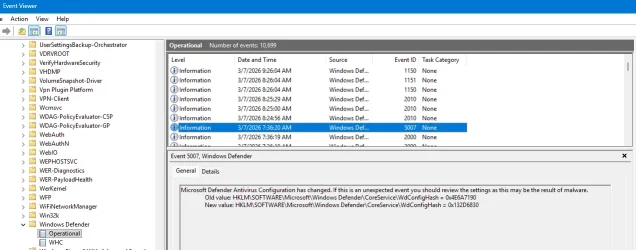
Found this--there's not many of the codes from above, but as you can see from the date/time column, there are quite a few!

I filtered for the values above and the vast majority are 5007, but almost all look like the image below.

I downloaded the filter log and can attach if that would be helpful.

1772906540471.webp

🧩 Likely culprits based on your tab’s context​

Your open forum thread mentions two common offenders:
  • Jackett auto-updater (writes to SystemTemp)
  • JetBrains DataGrip (PowerShell scripts and project indexing)
Both are known to trigger CFA blocks, and both run background tasks multiple times per day.

If you use either, they’re high on the suspect list.


🛠️ What to do once you identify the process​

Depending on what you find:

  • If it’s a legitimate app updater Disable its auto-update task or add only that specific executable as an exclusion.
  • If it’s a JetBrains IDE Exclude only the project folder or the IDE’s update helper, not System32.
  • If it’s a service you don’t recognize That’s a red flag — we should dig deeper.
  • If it’s a script in AppData or Temp Often indicates an updater or a misbehaving background tool.
Copy. I'll check these.
 

My Computer

System One

  • OS
    Win 11
    Computer type
    Laptop
    Manufacturer/Model
    Lenovo
    CPU
    Ryzen 7 6900 HS
    Memory
    32 GB RAM
    Graphics Card(s)
    RTX 3050ti
I've disabled updates in JetBrains and will see if that reduces the errors.

Jackett only manually gets updated when I run winget.

Will report back.
 

My Computer

System One

  • OS
    Win 11
    Computer type
    Laptop
    Manufacturer/Model
    Lenovo
    CPU
    Ryzen 7 6900 HS
    Memory
    32 GB RAM
    Graphics Card(s)
    RTX 3050ti
The computer has been having BSODs.


In January: Thu Jan 15 01:41:49.689 2026 (UTC - 6:00) Nvidia GPU: nvlddmkm.sys

In February: Mon Feb 9 16:19:44.813 2026 (UTC - 6:00) AMD GPO: amdkmdag.sys

The newest BSODs were today 03/07/2026.


The Nvidia GPU appears to no longer be in use.


1) Please replace the AMD GPU from the Lenovo website.


2) Reinstall Arq 7 7.38.5.0 Haystack Software LLC 20260303


3) Create a new restore point


4) For any new BSOD post a new V2 share link into the newest post


5) If there are no BSOD for 48 hours after replacing amdkmdag.sys then place the computer into clean boot:


Code:
Name    AMD Radeon(TM) Graphics
PNP Device ID    PCI\VEN_1002&DEV_1681&SUBSYS_3B1E17AA&REV_02\4&23FBA460&0&0041
Adapter Type    AMD Radeon Graphics Processor (0x1681), Advanced Micro Devices, Inc. compatible
Adapter Description    AMD Radeon(TM) Graphics
Adapter RAM    (1,048,576) bytes
Installed Drivers    C:\WINDOWS\System32\DriverStore\FileRepository\u0197639.inf_amd64_6e9872ffe0e526d3\B025646\atidx9loader64.dll,C:\WINDOWS\System32\DriverStore\FileRepository\u0197639.inf_amd64_6e9872ffe0e526d3\B025646\amdxx64.dll,C:\WINDOWS\System32\DriverStore\FileRepository\u0197639.inf_amd64_6e9872ffe0e526d3\B025646\amdxx64.dll,C:\WINDOWS\System32\DriverStore\FileRepository\u0197639.inf_amd64_6e9872ffe0e526d3\B025646\amdxc64.dll
Driver Version    32.0.21041.1000
INF File    oem167.inf (ati2mtag_Rembrandt section)
Driver    C:\WINDOWS\SYSTEM32\DRIVERSTORE\FILEREPOSITORY\U0197639.INF_AMD64_6E9872FFE0E526D3\B025646\AMDKMDAG.SYS (32.0.21041.1000, 97.36 MB (102,087,184 bytes), 2/1/2026 12:28 PM)


Code:
Event[556]
  Log Name: System
  Source: Service Control Manager
  Date: 2026-03-07T10:12:34.7610000Z
  Event ID: 7046
  Task: N/A
  Level: Error
  Opcode: N/A
  Keyword: Classic,
  User: N/A
  User Name: N/A
  Computer: METRICALPC
  Description:
The following service has repeatedly stopped responding to service control requests: Arq 7 Agent

Contact the service vendor or the system administrator about whether to disable this service until the problem is identified.

You may have to restart the computer in safe mode before you can disable the service.
 

My Computer

System One

  • OS
    Windows 10
    Computer type
    Laptop
    Manufacturer/Model
    HP
    CPU
    Intel(R) Core(TM) i7-4800MQ CPU @ 2.70GHz
    Motherboard
    Product : 190A Version : KBC Version 94.56
    Memory
    16 GB Total: Manufacturer : Samsung MemoryType : DDR3 FormFactor : SODIMM Capacity : 8GB Speed : 1600
    Graphics Card(s)
    NVIDIA Quadro K3100M; Intel(R) HD Graphics 4600
    Sound Card
    IDT High Definition Audio CODEC; PNP Device ID HDAUDIO\FUNC_01&VEN_111D&DEV_76E0
    Hard Drives
    Model Hitachi HTS727575A9E364
    Antivirus
    Microsoft Defender
    Other Info
    Mobile Workstation
If BSOD = Blue Screen of Death, I have not been getting any of those.

The Nvidia GPU is sometimes turned off in the BIOS because when I need to be mobile, it eats the battery and my laptop lasts 2-3 hours, but with it off, I can get 8-9 hours. I turn it back on when hard-wired.

I will re-install Arq 7 Agent.
 

My Computer

System One

  • OS
    Win 11
    Computer type
    Laptop
    Manufacturer/Model
    Lenovo
    CPU
    Ryzen 7 6900 HS
    Memory
    32 GB RAM
    Graphics Card(s)
    RTX 3050ti
The Nvidia GPU is sometimes turned off in the BIOS because when I need to be mobile, it eats the battery and my laptop lasts 2-3 hours, but with it off, I can get 8-9 hours. I turn it back on when hard-wired.


Plan to use the computer with a power source so that the Nvidia hardware / driver can be tested during multiple purposes (regular use, gaming, etc.)


After several days of use :


Run administrative command prompt: > post share links


wevtutil epl SYSTEM "%userprofile%\Desktop\System.evt"

wevtutil epl APPLICATION "%userprofile%\Desktop\Application.evt"
 

My Computer

System One

  • OS
    Windows 10
    Computer type
    Laptop
    Manufacturer/Model
    HP
    CPU
    Intel(R) Core(TM) i7-4800MQ CPU @ 2.70GHz
    Motherboard
    Product : 190A Version : KBC Version 94.56
    Memory
    16 GB Total: Manufacturer : Samsung MemoryType : DDR3 FormFactor : SODIMM Capacity : 8GB Speed : 1600
    Graphics Card(s)
    NVIDIA Quadro K3100M; Intel(R) HD Graphics 4600
    Sound Card
    IDT High Definition Audio CODEC; PNP Device ID HDAUDIO\FUNC_01&VEN_111D&DEV_76E0
    Hard Drives
    Model Hitachi HTS727575A9E364
    Antivirus
    Microsoft Defender
    Other Info
    Mobile Workstation

Latest Support Threads

Back
Top Bottom