delete D:\Windows


Odd because I've installed Windows plenty of times, and its never gotten "confused" on were to install the OS.
The only problem I ever had was the boot partition being on the wrong drive. I was dual booting using two drives.
 

My Computers My Computers

  • At a glance

    Windows 11 Pro 25H2Intel Core i7-10700K16GB (8GB PC4-19200 DDR4 SDRAM x2)NVIDIA GeForce GTX 1050 TI
    OS
    Windows 11 Pro 25H2
    Computer type
    PC/Desktop
    Manufacturer/Model
    PowerSpec B746
    CPU
    Intel Core i7-10700K
    Motherboard
    ASRock Z490 Phantom Gaming 4/ax
    Memory
    16GB (8GB PC4-19200 DDR4 SDRAM x2)
    Graphics Card(s)
    NVIDIA GeForce GTX 1050 TI
    Sound Card
    Realtek Audio
    Monitor(s) Displays
    #1. LG ULTRAWIDE 34" #2. AOC Q32G2WG3 32"
    Screen Resolution
    #1. 3440 X 1440 #2. 1920 x 1080
    Hard Drives
    NVMe WDC WDS100T2B0C-00PXH0 1TB
    Samsung SSD 860 EVO 1TB
    PSU
    750 Watts (62.5A)
    Case
    PowerSpec/Lian Li ATX 205
    Keyboard
    Logitech K270
    Mouse
    Logitech M185
    Browser
    Microsoft Edge and Firefox
    Antivirus
    Webroot SecureAnywhere CE 26.1
  • At a glance

    Windows 11 Canary ChannelIntel Core i5-8400 CPU @ 2.80GHz16 MB DDR 4-2666
    Operating System
    Windows 11 Canary Channel
    Computer type
    PC/Desktop
    Manufacturer/Model
    PowerSpec G156
    CPU
    Intel Core i5-8400 CPU @ 2.80GHz
    Motherboard
    AsusTeK Prime B360M-A
    Memory
    16 MB DDR 4-2666
    Monitor(s) Displays
    23" Speptre HDMI 75Hz
    Screen Resolution
    1920x1080
    Hard Drives
    Samsung 970 EVO 500GB NVMe
    Keyboard
    Logitek K270
    Mouse
    Logitek M185
    Browser
    Firefox, Edge and Edge Canary
    Antivirus
    Windows Defender
How about take ownership of the folder... give yourself full control... click the option to "apply the to all sub folders",etc.... then go get lunch while it does that.

When you come back you should be able to delete the folder.
 

My Computer My Computer

At a glance

Windows 11 Pro 24H2Intel Ultra 7 155H16gbIntel Arc integrated
OS
Windows 11 Pro 24H2
Computer type
Laptop
Manufacturer/Model
HP
CPU
Intel Ultra 7 155H
Memory
16gb
Graphics Card(s)
Intel Arc integrated
Hard Drives
SSD
You can do it from some kind of winpe . If your recovery sequence is working at admin cmd prompt type
reagentc -boottore
next restart will boot to winre
once in winre at cmd ptompt type notepad
when notepad pops up click file>save
you can use the save dialog to browse around and delete the unwanted files/folders

or you can do it with dism++ file explorer which ignores permissions
 

My Computers My Computers

  • At a glance

    Win7,Win11i7-97002x16gb 3600mhz
    OS
    Win7,Win11
    Computer type
    PC/Desktop
    CPU
    i7-9700
    Motherboard
    gigabyte b365m ds3h
    Memory
    2x16gb 3600mhz
    Monitor(s) Displays
    benq gw2480
    PSU
    bequiet pure power 11 400CM
    Cooling
    cryorig m9i
  • At a glance

    win7,win11i5-84002x8gb 3200
    Operating System
    win7,win11
    Computer type
    PC/Desktop
    CPU
    i5-8400
    Motherboard
    gigabyte b365m ds3h
    Memory
    2x8gb 3200
    PSU
    xfx pro 450
I updated to Macrium X when the offer was a good deal. Even though I use it and like it, I feel that it's not worth being a subscription program. I prefer to pay for new version of a program if I feel the updates are worth me spending my money.
When I upgraded to Macrium X, it was a God Friday special, where I would get a 4-pack subscription at half-price for life. The offer seemed to be to good to pass up. Although I'm not a fan of subscriptions, it seems as that is what is happening with a lot of other software now.
 

My Computers My Computers

  • At a glance

    Windows 11 Pro 25H2AMD Ryzen 9 7940HS32 GBRadeon 780M Graphics
    OS
    Windows 11 Pro 25H2
    Computer type
    PC/Desktop
    Manufacturer/Model
    Geekom AX7 Pro
    CPU
    AMD Ryzen 9 7940HS
    Memory
    32 GB
    Graphics Card(s)
    Radeon 780M Graphics
    Monitor(s) Displays
    Dell S2425H 24"
    Screen Resolution
    1920 x 1080
    Hard Drives
    2 TB NVMe SSD
    Internet Speed
    100 Mbs
    Browser
    Microsoft Edge / Firefox
    Antivirus
    F-Secure Security Suite
  • At a glance

    Windows 11 Pro 25H212th Gen Intel Core i7-12700 processor (12-Co...16 GBIntel(R) UHD Graphics 770 with shared graphic...
    Operating System
    Windows 11 Pro 25H2
    Computer type
    PC/Desktop
    Manufacturer/Model
    Dell Inspiron 3910
    CPU
    12th Gen Intel Core i7-12700 processor (12-Core, 25M Cache, 2.1GHz to 4.8GHz)
    Motherboard
    Dell 0KHP4K
    Memory
    16 GB
    Graphics card(s)
    Intel(R) UHD Graphics 770 with shared graphics memory
    Monitor(s) Displays
    Dell 27" Monitor S2721DS,
    Screen Resolution
    QHD 2560 x 1440 @ 75 Hz
    Hard Drives
    1TB M.2, PCIe NVMe, SSD
    Internet Speed
    100 Mbps
    Browser
    Edge
    Antivirus
    F-Secure Security Suite
Run these commands:

NOTE: The commands below will give you access to all files on D:. If you need to operate on specific folders such as D:\Windows, substitute that path in the commands. Note too that if you specify the root of the drive (D:\), then there may be some errors trying to take ownership of stuff like the recycle bin or system volume information. This is OK!

After running these commands, you should have full access to the files on D:\

EDIT: Do this from an ELEVATED command prompt

C:\windows\system32\takeown /f D:\
icacls d:\ /grant %username%:F
C:\windows\system32\takeown /f D:\*.* /r /d y
icacls D:\*.* /T /grant %username%:F
 

My Computers My Computers

  • At a glance

    Win11 Pro 25H2 (RTM+)Intel i7-14650HX32 GBNo GPU - Built-in Intel Graphics
    OS
    Win11 Pro 25H2 (RTM+)
    Computer type
    PC/Desktop
    Manufacturer/Model
    Acemagic
    CPU
    Intel i7-14650HX
    Memory
    32 GB
    Graphics Card(s)
    No GPU - Built-in Intel Graphics
    Sound Card
    Integrated
    Monitor(s) Displays
    Varies as machine will often be moved to locations with different monitors
    Screen Resolution
    Varies
    Hard Drives
    1 x 1TB Gen 4 NVMe SSD
    PSU
    120W Power Brick
    Keyboard
    Corsair K70 Max RGB Magnetic Keyboard
    Mouse
    Logitech MX Master 3
    Internet Speed
    1Gb Up / 1 Gb Down
    Browser
    Edge
    Antivirus
    Windows Defender
  • At a glance

    Win11 Pro 25H2 (RTM+)Intel i7-1255U16 GBIntel Iris Xe Graphics
    Operating System
    Win11 Pro 25H2 (RTM+)
    Computer type
    Laptop
    Manufacturer/Model
    Lenovo ThinkBook 13x Gen 2
    CPU
    Intel i7-1255U
    Memory
    16 GB
    Graphics card(s)
    Intel Iris Xe Graphics
    Sound Card
    Realtek® ALC3306-CG codec
    Monitor(s) Displays
    13.3-inch IPS Display
    Screen Resolution
    WQXGA (2560 x 1600)
    Hard Drives
    2 TB 4 x 4 NVMe SSD
    PSU
    USB-C / Thunderbolt 4 Power / Charging
    Keyboard
    Backlit, spill resistant keyboard
    Mouse
    Buttonless Glass Precision Touchpad
    Internet Speed
    1Gb Up / 1Gb Down
    Browser
    Edge
    Antivirus
    Windows Defender
    Other Info
    WiFi 6e / Bluetooth 5.1 / Facial Recognition / Fingerprint Sensor / ToF (Time of Flight) Human Presence Sensor
I had one instance where a clean install of Win10 in 2016 caused a similar issue. Turned out the BIOS had a setting in it that during install it used both drives that were attached internally, it was for AHCI/RAID, problem found when detaching what was supposed to be D: caused failure of Windows booting. Things were corrected by changing the BIOS and installing again.

If the computer in the OP were mine I booted a Linux LiveUSB or LiveDVD and transfer all files desired be saved onto a USB drive of sufficient size. I prefer the Ubuntu/Debian flavors, Mint in particular, and they contain workable programs such as GPARTED [partition editor] good for manipulating the partitions or fully cleaning a drive. The drives work just as if installed in a computer albeit a bit slower.
 

My Computers My Computers

  • At a glance

    Win11 Pro RTM Version 24H2 Build 26100.4202Intel Core i5 11th Gen. 2.40GHz12GB
    OS
    Win11 Pro RTM Version 24H2 Build 26100.4202
    Computer type
    Laptop
    Manufacturer/Model
    Dell Vostro 3400
    CPU
    Intel Core i5 11th Gen. 2.40GHz
    Memory
    12GB
    Hard Drives
    256GB SSD NVMe M.2
  • At a glance

    Win11 Pro RTM Version 24H2 Build 26100.4202Intel Core i5 10th Gen. 2.90GHz16GBOnboard, no VGA, using a DisplayPort-to-VGA a...
    Operating System
    Win11 Pro RTM Version 24H2 Build 26100.4202
    Computer type
    PC/Desktop
    Manufacturer/Model
    Dell Vostro 5890
    CPU
    Intel Core i5 10th Gen. 2.90GHz
    Memory
    16GB
    Graphics card(s)
    Onboard, no VGA, using a DisplayPort-to-VGA adapter
    Monitor(s) Displays
    24" Dell
    Hard Drives
    512GB SSD NVMe, 4TB Seagate HDD
    Browser
    Firefox, Edge
    Antivirus
    Windows Defender/Microsoft Security
When I upgraded to Macrium X, it was a God Friday special, where I would get a 4-pack subscription at half-price for life. The offer seemed to be to good to pass up. Although I'm not a fan of subscriptions, it seems as that is what is happening with a lot of other software now.
That's the deal I went with. I like Macrium but I'm not a fan of subscription software
I prefer to only pay for updates that I think is worth while updating to. I don't mind Microsoft 365 because I can share it with family and I like having all of my documents and pictures on OneDrive. I have my phone set to automatically upload my pictures to OneDrive.
 

My Computers My Computers

  • At a glance

    Windows 11 Pro 25H2Intel Core i7-10700K16GB (8GB PC4-19200 DDR4 SDRAM x2)NVIDIA GeForce GTX 1050 TI
    OS
    Windows 11 Pro 25H2
    Computer type
    PC/Desktop
    Manufacturer/Model
    PowerSpec B746
    CPU
    Intel Core i7-10700K
    Motherboard
    ASRock Z490 Phantom Gaming 4/ax
    Memory
    16GB (8GB PC4-19200 DDR4 SDRAM x2)
    Graphics Card(s)
    NVIDIA GeForce GTX 1050 TI
    Sound Card
    Realtek Audio
    Monitor(s) Displays
    #1. LG ULTRAWIDE 34" #2. AOC Q32G2WG3 32"
    Screen Resolution
    #1. 3440 X 1440 #2. 1920 x 1080
    Hard Drives
    NVMe WDC WDS100T2B0C-00PXH0 1TB
    Samsung SSD 860 EVO 1TB
    PSU
    750 Watts (62.5A)
    Case
    PowerSpec/Lian Li ATX 205
    Keyboard
    Logitech K270
    Mouse
    Logitech M185
    Browser
    Microsoft Edge and Firefox
    Antivirus
    Webroot SecureAnywhere CE 26.1
  • At a glance

    Windows 11 Canary ChannelIntel Core i5-8400 CPU @ 2.80GHz16 MB DDR 4-2666
    Operating System
    Windows 11 Canary Channel
    Computer type
    PC/Desktop
    Manufacturer/Model
    PowerSpec G156
    CPU
    Intel Core i5-8400 CPU @ 2.80GHz
    Motherboard
    AsusTeK Prime B360M-A
    Memory
    16 MB DDR 4-2666
    Monitor(s) Displays
    23" Speptre HDMI 75Hz
    Screen Resolution
    1920x1080
    Hard Drives
    Samsung 970 EVO 500GB NVMe
    Keyboard
    Logitek K270
    Mouse
    Logitek M185
    Browser
    Firefox, Edge and Edge Canary
    Antivirus
    Windows Defender
Well formatting a drive to delete one folder is a bit like putting a nail in with a sledgehammer. Sure you can do it, but then your wife says, "why are you always staring at my sister?!"

Oh, I think I might have mixed my metaphors.
Well, he did mention he had at least one other partition that he wanted to get rid of. In any case, manipulating partitions without a backup is playing with fire, one slip and it's by-by data. If you have a good backup, then formatting is simple and sure. There are plenty of stories about people fooling around with partitions and losing everything, why risk it.
 

My Computers My Computers

  • At a glance

    Win 11 Pro 25H2, Build 26200.8655Intel Core i5 1450064GB DDR4GeForce RTX 4060
    OS
    Win 11 Pro 25H2, Build 26200.8655
    Computer type
    PC/Desktop
    Manufacturer/Model
    Home Brew
    CPU
    Intel Core i5 14500
    Motherboard
    Gigabyte B760M G P WIFI
    Memory
    64GB DDR4
    Graphics Card(s)
    GeForce RTX 4060
    Sound Card
    Chipset Realtek
    Monitor(s) Displays
    LG 45" Ultragear, Acer 24" 1080p
    Screen Resolution
    5120x1440, 1920x1080
    Hard Drives
    Crucial P310 2TB 2280 PCIe Gen4 3D NAND NVMe M.2 SSD (O/S)
    Silicon Power 2TB US75 NVMe PCIe Gen4 M.2 2280 SSD (backup)
    Crucial BX500 2TB 3D NAND (2nd backup)
    Seagate 4TB Ironwolf, rotating HDD archive files
    External off-line backup Drives: 2 NVMe 4TB drives in external enclosures
    PSU
    Thermaltake Toughpower GF3 750W
    Case
    LIAN LI LANCOOL 216 E-ATX PC Case
    Cooling
    Lots of fans!
    Keyboard
    Microsoft Comfort Curve 2000
    Mouse
    Logitech G305
    Internet Speed
    Verizon FiOS 1GB
    Browser
    Firefox
    Antivirus
    Malware Bytes & Windows Defender Security
  • At a glance

    Win 11 Pro 25H2, Build 26200.8524Intel Core i5 1440032GB DDR5Intel 700 Embedded GPU
    Operating System
    Win 11 Pro 25H2, Build 26200.8524
    Computer type
    PC/Desktop
    Manufacturer/Model
    Home Brew
    CPU
    Intel Core i5 14400
    Motherboard
    Gigabyte B760M DS3H AX
    Memory
    32GB DDR5
    Graphics card(s)
    Intel 700 Embedded GPU
    Sound Card
    Realtek Embedded
    Monitor(s) Displays
    27" HP 1080p
    Screen Resolution
    1920x1080
    Hard Drives
    Crucial P310 2TB 2280 PCIe Gen4 eD NAND PCIe SSD
    Samsung EVO 990 2TB NVMe Gen4 SSD
    Samsung 2TB SATA SSD
    PSU
    Thermaltake Smart BM3 650W
    Case
    Okinos Micro ATX Case
    Cooling
    Fans
    Keyboard
    Microsoft Comfort Curve 2000
    Mouse
    Logitech G305
    Internet Speed
    Verizon FiOS 1GB
    Browser
    Firefox
    Antivirus
    Malware Bytes & Windows Defender Security
There are 3rd party applications that will zap most anything, some require a reboot to remove them before Windows starts protecting things.:-)
 

My Computers My Computers

  • At a glance

    Win 11 Pro 25H2, Build 26200.8655Intel Core i5 1450064GB DDR4GeForce RTX 4060
    OS
    Win 11 Pro 25H2, Build 26200.8655
    Computer type
    PC/Desktop
    Manufacturer/Model
    Home Brew
    CPU
    Intel Core i5 14500
    Motherboard
    Gigabyte B760M G P WIFI
    Memory
    64GB DDR4
    Graphics Card(s)
    GeForce RTX 4060
    Sound Card
    Chipset Realtek
    Monitor(s) Displays
    LG 45" Ultragear, Acer 24" 1080p
    Screen Resolution
    5120x1440, 1920x1080
    Hard Drives
    Crucial P310 2TB 2280 PCIe Gen4 3D NAND NVMe M.2 SSD (O/S)
    Silicon Power 2TB US75 NVMe PCIe Gen4 M.2 2280 SSD (backup)
    Crucial BX500 2TB 3D NAND (2nd backup)
    Seagate 4TB Ironwolf, rotating HDD archive files
    External off-line backup Drives: 2 NVMe 4TB drives in external enclosures
    PSU
    Thermaltake Toughpower GF3 750W
    Case
    LIAN LI LANCOOL 216 E-ATX PC Case
    Cooling
    Lots of fans!
    Keyboard
    Microsoft Comfort Curve 2000
    Mouse
    Logitech G305
    Internet Speed
    Verizon FiOS 1GB
    Browser
    Firefox
    Antivirus
    Malware Bytes & Windows Defender Security
  • At a glance

    Win 11 Pro 25H2, Build 26200.8524Intel Core i5 1440032GB DDR5Intel 700 Embedded GPU
    Operating System
    Win 11 Pro 25H2, Build 26200.8524
    Computer type
    PC/Desktop
    Manufacturer/Model
    Home Brew
    CPU
    Intel Core i5 14400
    Motherboard
    Gigabyte B760M DS3H AX
    Memory
    32GB DDR5
    Graphics card(s)
    Intel 700 Embedded GPU
    Sound Card
    Realtek Embedded
    Monitor(s) Displays
    27" HP 1080p
    Screen Resolution
    1920x1080
    Hard Drives
    Crucial P310 2TB 2280 PCIe Gen4 eD NAND PCIe SSD
    Samsung EVO 990 2TB NVMe Gen4 SSD
    Samsung 2TB SATA SSD
    PSU
    Thermaltake Smart BM3 650W
    Case
    Okinos Micro ATX Case
    Cooling
    Fans
    Keyboard
    Microsoft Comfort Curve 2000
    Mouse
    Logitech G305
    Internet Speed
    Verizon FiOS 1GB
    Browser
    Firefox
    Antivirus
    Malware Bytes & Windows Defender Security
Well, he did mention he had at least one other partition that he wanted to get rid of. In any case, manipulating partitions without a backup is playing with fire, one slip and it's by-by data. If you have a good backup, then formatting is simple and sure. There are plenty of stories about people fooling around with partitions and losing everything, why risk it.
The only people that mentioned partitions were Winuser and you.
 

My Computer My Computer

At a glance

Windows 11 Pro 25H212th Gen Core i7-1260P64 GB Micron PC4-25600Intel Iris Xe Graphics
OS
Windows 11 Pro 25H2
Computer type
PC/Desktop
Manufacturer/Model
Intel NUC12WSHi7
CPU
12th Gen Core i7-1260P
Motherboard
NUC12WSBi7
Memory
64 GB Micron PC4-25600
Graphics Card(s)
Intel Iris Xe Graphics
Sound Card
on-board Realtek HD Audio
Monitor(s) Displays
Dell U3219Q
Screen Resolution
3840 x 2160
Hard Drives
Samsung SSD 990 PRO 1TB
Crucial MX500 2 TB
Antivirus
Microsoft Defender
Managed to solve this. I originally had a second SSD connected when I installed widows. This never used to be a problem before. I would have to HDDs and install Windows onto one only.

I had a spare SSD and transferred the contents of D: to E: But even thou I reinstalled Windows again properly, it dug it’s heels in on my D: drive and refused to be deleted. Everything is now working error free. Thanks for all your help.
 
Last edited:

My Computer My Computer

At a glance

Windows 11Intel i3 12100 CPU2x 8GB Team DDR4On Board Intel UHD Graphics 730?
OS
Windows 11
Computer type
PC/Desktop
Manufacturer/Model
N/A
CPU
Intel i3 12100 CPU
Motherboard
ASRock H610-M-HVS/M.2 (rev 2.0)
Memory
2x 8GB Team DDR4
Graphics Card(s)
On Board Intel UHD Graphics 730?
Sound Card
On Board Realtek
Monitor(s) Displays
LG
Screen Resolution
1920 * 1080
Hard Drives
500GB Team NVMe drive + 2x 500GB Team GX2 SATA SSD
dacrone
download ubuntu and make a linux live... its free

I did try this before but it got stuck when the downloaded software wanted to download the updates. It couldn't get to grips with my Virgin media wireless router which was plugged in.

I would love to try this again as I have a few spare SSDs which I could use. Problem is this is a Windows forum so not the right place to ask this question. Did try a lynux forum but as I told them I used windows and wanted to set up a lynux PC, the atmosphere towards me was notably hostile. I gave up in the end.
 

My Computer My Computer

At a glance

Windows 11Intel i3 12100 CPU2x 8GB Team DDR4On Board Intel UHD Graphics 730?
OS
Windows 11
Computer type
PC/Desktop
Manufacturer/Model
N/A
CPU
Intel i3 12100 CPU
Motherboard
ASRock H610-M-HVS/M.2 (rev 2.0)
Memory
2x 8GB Team DDR4
Graphics Card(s)
On Board Intel UHD Graphics 730?
Sound Card
On Board Realtek
Monitor(s) Displays
LG
Screen Resolution
1920 * 1080
Hard Drives
500GB Team NVMe drive + 2x 500GB Team GX2 SATA SSD
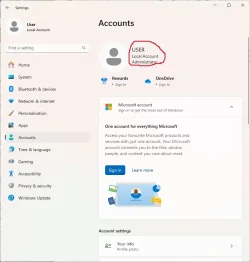
If I unplug the D: drive (an internal SSD), windows boots up fine. When I try to delete the files, it will not allow me. Could this have something to do with file permissions? This is a home computer and I am the sole user. Do I not have administrative writes? Has that been the problem? How do I correct this to be an administrator?
 

Attachments

  • Administrator2.webp
    Administrator2.webp
    35.2 KB · Views: 1

My Computer My Computer

At a glance

Windows 11Intel i3 12100 CPU2x 8GB Team DDR4On Board Intel UHD Graphics 730?
OS
Windows 11
Computer type
PC/Desktop
Manufacturer/Model
N/A
CPU
Intel i3 12100 CPU
Motherboard
ASRock H610-M-HVS/M.2 (rev 2.0)
Memory
2x 8GB Team DDR4
Graphics Card(s)
On Board Intel UHD Graphics 730?
Sound Card
On Board Realtek
Monitor(s) Displays
LG
Screen Resolution
1920 * 1080
Hard Drives
500GB Team NVMe drive + 2x 500GB Team GX2 SATA SSD

My Computers My Computers

  • At a glance

    Win7,Win11i7-97002x16gb 3600mhz
    OS
    Win7,Win11
    Computer type
    PC/Desktop
    CPU
    i7-9700
    Motherboard
    gigabyte b365m ds3h
    Memory
    2x16gb 3600mhz
    Monitor(s) Displays
    benq gw2480
    PSU
    bequiet pure power 11 400CM
    Cooling
    cryorig m9i
  • At a glance

    win7,win11i5-84002x8gb 3200
    Operating System
    win7,win11
    Computer type
    PC/Desktop
    CPU
    i5-8400
    Motherboard
    gigabyte b365m ds3h
    Memory
    2x8gb 3200
    PSU
    xfx pro 450
Get another external HDD of the same size or larger than your D: drive.
Drag and drop or copy and paste the files you want to keep to the new drive, then Format the D: drive.
After that, reverse the process and copy the files back to D: Keep the new external as a backup of D:
 

My Computer My Computer

At a glance

Windows 11 Pro Insider 64 bit 25H2 26200.5742Intel Core i7 9700K 3.6016 GBnVidia GEForce RTX 2060 Super
OS
Windows 11 Pro Insider 64 bit 25H2 26200.5742
Computer type
PC/Desktop
Manufacturer/Model
Gigabyte Z390 UD
CPU
Intel Core i7 9700K 3.60
Motherboard
Gigabyte Z390 UD
Memory
16 GB
Graphics Card(s)
nVidia GEForce RTX 2060 Super
Sound Card
onboard
Monitor(s) Displays
Two 27" Dell 4K monitors
Screen Resolution
3840 x 2160
Hard Drives
M.2 NVME SSD, 500 GB; Two 2TB Mechanical HDD's
PSU
850w PSU
Case
Cyberpower PC
Cooling
Water cooled
Keyboard
Backlit Cyberpower gaming keyboard
Mouse
Backlit Cyberpower gaming mouse
Internet Speed
1 GB mbps
Browser
Brave
Antivirus
Windows Security
If it is an installation you need higher permissions than admin to delete some of the files?

YUes it does have a Windows folder. I originaly had my D: SSD plugged in when I ORIGINALY re-installed windows. This was never a problem in the days of W7 or even W10. Windows did what it was told. It was never used afterawards even after lots of re-instalations to get it right.

PC works with SSD disconnected.
 

My Computer My Computer

At a glance

Windows 11Intel i3 12100 CPU2x 8GB Team DDR4On Board Intel UHD Graphics 730?
OS
Windows 11
Computer type
PC/Desktop
Manufacturer/Model
N/A
CPU
Intel i3 12100 CPU
Motherboard
ASRock H610-M-HVS/M.2 (rev 2.0)
Memory
2x 8GB Team DDR4
Graphics Card(s)
On Board Intel UHD Graphics 730?
Sound Card
On Board Realtek
Monitor(s) Displays
LG
Screen Resolution
1920 * 1080
Hard Drives
500GB Team NVMe drive + 2x 500GB Team GX2 SATA SSD

My Computers My Computers

  • At a glance

    Win7,Win11i7-97002x16gb 3600mhz
    OS
    Win7,Win11
    Computer type
    PC/Desktop
    CPU
    i7-9700
    Motherboard
    gigabyte b365m ds3h
    Memory
    2x16gb 3600mhz
    Monitor(s) Displays
    benq gw2480
    PSU
    bequiet pure power 11 400CM
    Cooling
    cryorig m9i
  • At a glance

    win7,win11i5-84002x8gb 3200
    Operating System
    win7,win11
    Computer type
    PC/Desktop
    CPU
    i5-8400
    Motherboard
    gigabyte b365m ds3h
    Memory
    2x8gb 3200
    PSU
    xfx pro 450
It would not allow me to delete any windows folders
 

My Computer My Computer

At a glance

Windows 11Intel i3 12100 CPU2x 8GB Team DDR4On Board Intel UHD Graphics 730?
OS
Windows 11
Computer type
PC/Desktop
Manufacturer/Model
N/A
CPU
Intel i3 12100 CPU
Motherboard
ASRock H610-M-HVS/M.2 (rev 2.0)
Memory
2x 8GB Team DDR4
Graphics Card(s)
On Board Intel UHD Graphics 730?
Sound Card
On Board Realtek
Monitor(s) Displays
LG
Screen Resolution
1920 * 1080
Hard Drives
500GB Team NVMe drive + 2x 500GB Team GX2 SATA SSD
First use regular windows explorer to delete d:\windows\system32\config

after that use dism++ file explorer to delete the windows namespace folders one at a time

Program Files
Program Files (x86)
Programdata
Users
Windows


I have done it dozens of times.
 

My Computers My Computers

  • At a glance

    Win7,Win11i7-97002x16gb 3600mhz
    OS
    Win7,Win11
    Computer type
    PC/Desktop
    CPU
    i7-9700
    Motherboard
    gigabyte b365m ds3h
    Memory
    2x16gb 3600mhz
    Monitor(s) Displays
    benq gw2480
    PSU
    bequiet pure power 11 400CM
    Cooling
    cryorig m9i
  • At a glance

    win7,win11i5-84002x8gb 3200
    Operating System
    win7,win11
    Computer type
    PC/Desktop
    CPU
    i5-8400
    Motherboard
    gigabyte b365m ds3h
    Memory
    2x8gb 3200
    PSU
    xfx pro 450
Back
Top Bottom