JavaScript is disabled. For a better experience, please enable JavaScript in your browser before proceeding.
You are using an out of date browser. It may not display this or other websites correctly.
You should upgrade or use an
alternative browser .
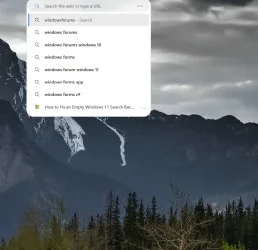
I do not mind the Desktop Search Bar at the top of the Edge browser. I do not like how it displays previous searches. Is there any way to not show the previous searches?
Windows 11 AMD Rysen 7 8700G G.SKILL Flare X5 Series DDR5 RAM (2x16GB) non Windows 11 PC/Desktop Asus AMD Rysen 7 8700G Asus Tuf Gaming B850 Plus Wifi G.SKILL Flare X5 Series DDR5 RAM (2x16GB) non non Acer XR382CQK & LG 24Ud58-B 3840 x 2160 Samsung SSD 980 500GB Corsair RM650e Antec ADM Wraith Cooler 500GB Comet & Edge
Well-known member
Power User
VIP
If you don't want to see your own search history, click in the Search box, and at the bottom of the search results, click on the gear icon.
Turn off "Show suggestions from history, favorites and other data on this device using your typed characters:"
That will show you "trending searches" but not searches you made yourself.
Hope this helps.
Windows 11 Professional 25H2 Intel Core i9 11900K 64GB NVIDIA GeForce GTX 1650 Windows 11 Professional 25H2 PC/Desktop Digital Storm VELOX Intel Core i9 11900K ASUS PRIME Z590-P 64GB NVIDIA GeForce GTX 1650 Realtek onboard Acer R221Q 21.5" 1920 x 1080 2 x Samsung SSD 990 EVO Plus (1 TB) None VELOX Cooler Master Logitech Kensington trackball Firefox, Chrome Windows Defender, Malwarebytes