Reach the right customers at the right time with your games and apps
Content is at the heart of the Windows PC experience. Consumers typically visit the Microsoft Store to learn more about a wide variety of PC apps or games, from productivity apps that accelerate work to creativity apps that empower innovation, games that incentivize connection, and more. Because most consumers live a multi-screen life—moving from smartphones to PCs and back again—the lines between “mobile” and “desktop” have blurred. In turn, the behaviors consumers are accustomed to on mobile are transferable to the way people expect apps on PCs to look, feel, and function. Developers know that apps are central to how we work, play, and connect. And the great news is PC apps are having their moment. From the pandemic accelerating PC use to app-savvy millennial and Gen-Z audiences growing up creating and using apps—a wide audience is looking for app-centric experiences, not only on mobile, but on PCs, too.
Reach a wider app audience with Microsoft Store Ads
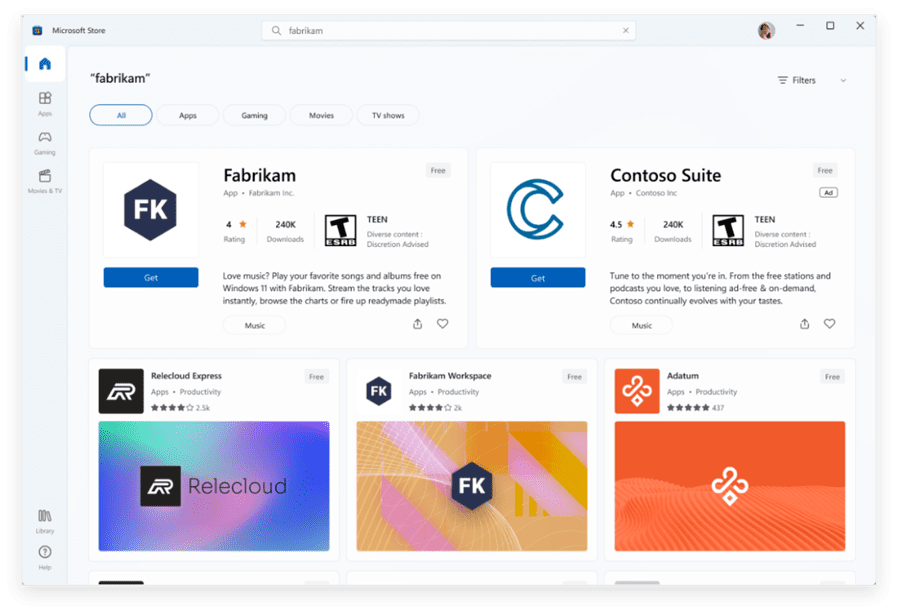
Our passion for helping developers more easily bring their apps to customers inspired us to redesign the Microsoft Store on Windows—which now features a new desktop app distribution experience that looks and feels more like mobile. Now, when customers visit the Microsoft Store, they can download apps for either mobile or PC.
With Microsoft Store Ads, developers now have new app discoverability opportunities on Windows. Microsoft Store Ads is all desktop traffic, with mission-driven users that have a high intent to download a desktop app. The opportunity is vast; 2022 was a record year, with over 900 million unique users worldwide utilizing the Microsoft Store, and a 122% year-over-year increase in developer submissions of new apps and games.
Microsoft Store Ads was designed to help developers grow their business by getting their apps or games in front of the right customers at the right time, and to inspire Microsoft Store customers with great content. A developer of a music-making app, for example, will be able to create an ad campaign to get their app in front of an audience that likes music or likes to create music.
Whether you’re about to launch a brand-new app or have a 2.0 bug update for an app currently on the Windows Store, developers can now advertise right on the Microsoft Store, to incentivize people to install or update.
All developers are welcome
We are now offering a new set of Open App Store Principles that welcome all developers to bring the best apps and games to Windows 11 devices, from apps using their own commerce to third-party storefronts. And last year, we announced a waitlist program for Win32 apps in Microsoft Store and welcomed hundreds of developers. Today, we are pleased to share that the program is now open to all Win32 developers (.NET, C++, Electron, Flutter, Qt, Rust, and more). If your app or game is not in the Microsoft Store yet, begin by publishing your Windows app.
All developers have access to Microsoft Store Ads, where they can create ad campaigns in the Microsoft Store, using Microsoft Advertising, reaching customers on Windows 10 and Windows 11 devices. However, only developers with published content on the Store will be able to run ad campaigns, which ensures ads are contextual for customers.
Get started today
Microsoft Store Ads is built for apps already on Windows—and for your latest release. Now is the time to promote and invest in your desktop app. Having just announced ads on the Microsoft StoreOpens in new window, the costs per click (CPC) are very competitive, which can bring your overall cost per action (CPA) down.
We recommend developers reach out to their marketing team to create a strategic app marketing plan leveraging Microsoft Store Ads. Let the team know that with Microsoft Store Ads you promote your desktop app to customers on Windows 10 and Windows 11 devices by creating ads on the Microsoft Advertising platform. Once created, developers will see their app advertised live right on the Microsoft Store. Customers will click the ad, download or update the app to their PC, and let the writing, playing, or gaming come to life.
Choose your way to get started:
To learn how Microsoft Store Ads can help consumers discover your app and for product updates and channel information, visit the Microsoft Store Ads page.
- Ask your marketing team to reach out to their Microsoft Advertising account manager or Microsoft Store representative.
- If your marketing team does not have a Microsoft Advertising account manager or Microsoft Store representative, Contact Us.
- If your app or game is not in the Microsoft Store yet, begin by publishing your Windows app.
Source:

Developers, meet Microsoft Store Ads
Reach the right customers at the right time with your games and apps Content is at the heart of the Windows PC experience. Consumers typically visit the Microsoft Store to learn more about a wide variety of PC apps or games, from productivit
 blogs.windows.com
Last edited: