Edit for photos right click context menu gone from Windows 11?


Spartan

Well-known member
Member
VIP
Local time
1:28 PM
Posts
274
Location
Dubai
OS
Windows 11 Pro
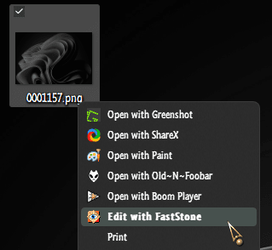
There was a tweak to customize what app opens when you right click a picture and choose edit (not talking about the "Edit with Photos" context menu) in Windows 10

Is there a way to bring this back for Windows 11?

This was the tweak I used in Windows 10 to have it open FastStone Capture for editing photos:

Code:
Windows Registry Editor Version 5.00

[HKEY_CLASSES_ROOT\SystemFileAssociations\image\shell\edit\command]
@=hex(2):22,00,43,00,3a,00,5c,00,50,00,72,00,6f,00,67,00,72,00,61,00,6d,00,20,\
  00,46,00,69,00,6c,00,65,00,73,00,20,00,28,00,78,00,38,00,36,00,29,00,5c,00,\
  46,00,61,00,73,00,74,00,53,00,74,00,6f,00,6e,00,65,00,20,00,43,00,61,00,70,\
  00,74,00,75,00,72,00,65,00,5c,00,46,00,53,00,43,00,61,00,70,00,74,00,75,00,\
  72,00,65,00,2e,00,65,00,78,00,65,00,22,00,20,00,22,00,25,00,31,00,22,00,00,\
  00
 

My Computers My Computers

  • At a glance

    Windows 11 ProIntel Core Ultra 9 386HSamsung 32GB LPDDR5X 8533 RAMGeForce RTX 5070 Ti 12GB GDDR7
    OS
    Windows 11 Pro
    Computer type
    Laptop
    Manufacturer/Model
    ASUS ROG Zephyrus G14 GU405AR
    CPU
    Intel Core Ultra 9 386H
    Motherboard
    ASUS
    Memory
    Samsung 32GB LPDDR5X 8533 RAM
    Graphics Card(s)
    GeForce RTX 5070 Ti 12GB GDDR7
    Sound Card
    4-speaker (dual-force woofer) system with Smart Amplifier Technology, 2 Tweeters
    Monitor(s) Displays
    INNOCN GA27T1M 27' 1440p 320Hz Mini-LED Monitor
    Screen Resolution
    QHD (2560x1440)
    Hard Drives
    Samsung 990 Pro 4TB SSD
    PSU
    Rectangle Conn, 250W AC Adapter
    Cooling
    Thermal Grizzly Conductonaut + IETS GT600 Cooling Pad
    Keyboard
    ROG Strix Scope II 96 RX Wireless
    Mouse
    ROG Chakram X Origin
    Internet Speed
    1 GBPS Down / 921 MBPS Up
    Browser
    Google Chrome
  • At a glance

    Windows 11 EducationAMD Ryzen 9 27016GB LPDDR5X 7500 RAMnVIDIA GeForce RTX 5050 8GB GDDR7
    Operating System
    Windows 11 Education
    Computer type
    Laptop
    Manufacturer/Model
    ASUS ROG Zephyrus G14 GA403UH
    CPU
    AMD Ryzen 9 270
    Memory
    16GB LPDDR5X 7500 RAM
    Graphics card(s)
    nVIDIA GeForce RTX 5050 8GB GDDR7
    Sound Card
    Realtek
    Monitor(s) Displays
    14' ROG Nebula Display 3K OLED 120Hz
    Screen Resolution
    2880 x 1800
    Hard Drives
    Samsung 990 PRO 4TB SSD
    PSU
    Rectangle Conn, 200W AC Adapter
    Cooling
    Thermal Grizzly Conductonaut
    Mouse
    ASUS ROG Chakram X Origin Gaming Mouse
    Internet Speed
    1 GBPS Down / 875 MBPS Up
    Browser
    Google Chrome
    Antivirus
    AVG Internet Security
There was a tweak to customize what app opens when you right click a picture and choose edit (not talking about the "Edit with Photos" context menu) in Windows 10

Is there a way to bring this back for Windows 11?

This was the tweak I used in Windows 10 to have it open FastStone Capture for editing photos:

Code:
Windows Registry Editor Version 5.00

[HKEY_CLASSES_ROOT\SystemFileAssociations\image\shell\edit\command]
@=hex(2):22,00,43,00,3a,00,5c,00,50,00,72,00,6f,00,67,00,72,00,61,00,6d,00,20,\
  00,46,00,69,00,6c,00,65,00,73,00,20,00,28,00,78,00,38,00,36,00,29,00,5c,00,\
  46,00,61,00,73,00,74,00,53,00,74,00,6f,00,6e,00,65,00,20,00,43,00,61,00,70,\
  00,74,00,75,00,72,00,65,00,5c,00,46,00,53,00,43,00,61,00,70,00,74,00,75,00,\
  72,00,65,00,2e,00,65,00,78,00,65,00,22,00,20,00,22,00,25,00,31,00,22,00,00,\
  00
Make the command follow the path of the exe plus add space"%1" to the end.

0002416.png
 

My Computers My Computers

  • At a glance

    Windows 11 Pro
    OS
    Windows 11 Pro
    Computer type
    PC/Desktop
    Manufacturer/Model
    ASUS ROG Strix
  • At a glance

    Windows 11 Pro
    Operating System
    Windows 11 Pro
    Computer type
    Laptop
    Manufacturer/Model
    ASUS VivoBook
  • ASUS VivoBook 'Lite' ~ Windows 11 Home
Make the command follow the path of the exe plus add space"%1" to the end.
Can you type the full text for me in a code box?

This is the location of the EXE:

C:\Program Files (x86)\FastStone Capture\FSCapture.exe
 

My Computers My Computers

  • At a glance

    Windows 11 ProIntel Core Ultra 9 386HSamsung 32GB LPDDR5X 8533 RAMGeForce RTX 5070 Ti 12GB GDDR7
    OS
    Windows 11 Pro
    Computer type
    Laptop
    Manufacturer/Model
    ASUS ROG Zephyrus G14 GU405AR
    CPU
    Intel Core Ultra 9 386H
    Motherboard
    ASUS
    Memory
    Samsung 32GB LPDDR5X 8533 RAM
    Graphics Card(s)
    GeForce RTX 5070 Ti 12GB GDDR7
    Sound Card
    4-speaker (dual-force woofer) system with Smart Amplifier Technology, 2 Tweeters
    Monitor(s) Displays
    INNOCN GA27T1M 27' 1440p 320Hz Mini-LED Monitor
    Screen Resolution
    QHD (2560x1440)
    Hard Drives
    Samsung 990 Pro 4TB SSD
    PSU
    Rectangle Conn, 250W AC Adapter
    Cooling
    Thermal Grizzly Conductonaut + IETS GT600 Cooling Pad
    Keyboard
    ROG Strix Scope II 96 RX Wireless
    Mouse
    ROG Chakram X Origin
    Internet Speed
    1 GBPS Down / 921 MBPS Up
    Browser
    Google Chrome
  • At a glance

    Windows 11 EducationAMD Ryzen 9 27016GB LPDDR5X 7500 RAMnVIDIA GeForce RTX 5050 8GB GDDR7
    Operating System
    Windows 11 Education
    Computer type
    Laptop
    Manufacturer/Model
    ASUS ROG Zephyrus G14 GA403UH
    CPU
    AMD Ryzen 9 270
    Memory
    16GB LPDDR5X 7500 RAM
    Graphics card(s)
    nVIDIA GeForce RTX 5050 8GB GDDR7
    Sound Card
    Realtek
    Monitor(s) Displays
    14' ROG Nebula Display 3K OLED 120Hz
    Screen Resolution
    2880 x 1800
    Hard Drives
    Samsung 990 PRO 4TB SSD
    PSU
    Rectangle Conn, 200W AC Adapter
    Cooling
    Thermal Grizzly Conductonaut
    Mouse
    ASUS ROG Chakram X Origin Gaming Mouse
    Internet Speed
    1 GBPS Down / 875 MBPS Up
    Browser
    Google Chrome
    Antivirus
    AVG Internet Security
"C:\Program Files (86)\FastStone Capture\FSCapture.exe" "%1"
 

My Computers My Computers

  • At a glance

    Windows 11 Pro
    OS
    Windows 11 Pro
    Computer type
    PC/Desktop
    Manufacturer/Model
    ASUS ROG Strix
  • At a glance

    Windows 11 Pro
    Operating System
    Windows 11 Pro
    Computer type
    Laptop
    Manufacturer/Model
    ASUS VivoBook
  • ASUS VivoBook 'Lite' ~ Windows 11 Home
"C:\Program Files (86)\FastStone Capture\FSCapture.exe" "%1"
I mean in the code which I used before, where do I enter the entry which you showed me?

Code:
Windows Registry Editor Version 5.00

[HKEY_CLASSES_ROOT\SystemFileAssociations\image\shell\edit\command]
@=hex(2):22,00,43,00,3a,00,5c,00,50,00,72,00,6f,00,67,00,72,00,61,00,6d,00,20,\
  00,46,00,69,00,6c,00,65,00,73,00,20,00,28,00,78,00,38,00,36,00,29,00,5c,00,\
  46,00,61,00,73,00,74,00,53,00,74,00,6f,00,6e,00,65,00,20,00,43,00,61,00,70,\
  00,74,00,75,00,72,00,65,00,5c,00,46,00,53,00,43,00,61,00,70,00,74,00,75,00,\
  72,00,65,00,2e,00,65,00,78,00,65,00,22,00,20,00,22,00,25,00,31,00,22,00,00,\
  00
 

My Computers My Computers

  • At a glance

    Windows 11 ProIntel Core Ultra 9 386HSamsung 32GB LPDDR5X 8533 RAMGeForce RTX 5070 Ti 12GB GDDR7
    OS
    Windows 11 Pro
    Computer type
    Laptop
    Manufacturer/Model
    ASUS ROG Zephyrus G14 GU405AR
    CPU
    Intel Core Ultra 9 386H
    Motherboard
    ASUS
    Memory
    Samsung 32GB LPDDR5X 8533 RAM
    Graphics Card(s)
    GeForce RTX 5070 Ti 12GB GDDR7
    Sound Card
    4-speaker (dual-force woofer) system with Smart Amplifier Technology, 2 Tweeters
    Monitor(s) Displays
    INNOCN GA27T1M 27' 1440p 320Hz Mini-LED Monitor
    Screen Resolution
    QHD (2560x1440)
    Hard Drives
    Samsung 990 Pro 4TB SSD
    PSU
    Rectangle Conn, 250W AC Adapter
    Cooling
    Thermal Grizzly Conductonaut + IETS GT600 Cooling Pad
    Keyboard
    ROG Strix Scope II 96 RX Wireless
    Mouse
    ROG Chakram X Origin
    Internet Speed
    1 GBPS Down / 921 MBPS Up
    Browser
    Google Chrome
  • At a glance

    Windows 11 EducationAMD Ryzen 9 27016GB LPDDR5X 7500 RAMnVIDIA GeForce RTX 5050 8GB GDDR7
    Operating System
    Windows 11 Education
    Computer type
    Laptop
    Manufacturer/Model
    ASUS ROG Zephyrus G14 GA403UH
    CPU
    AMD Ryzen 9 270
    Memory
    16GB LPDDR5X 7500 RAM
    Graphics card(s)
    nVIDIA GeForce RTX 5050 8GB GDDR7
    Sound Card
    Realtek
    Monitor(s) Displays
    14' ROG Nebula Display 3K OLED 120Hz
    Screen Resolution
    2880 x 1800
    Hard Drives
    Samsung 990 PRO 4TB SSD
    PSU
    Rectangle Conn, 200W AC Adapter
    Cooling
    Thermal Grizzly Conductonaut
    Mouse
    ASUS ROG Chakram X Origin Gaming Mouse
    Internet Speed
    1 GBPS Down / 875 MBPS Up
    Browser
    Google Chrome
    Antivirus
    AVG Internet Security
I mean in the code which I used before, where do I enter the entry which you showed me?
I haven't a clue how to generate that code!
I just add the path manually...

0001159.png

0001158.png
 

My Computers My Computers

  • At a glance

    Windows 11 Pro
    OS
    Windows 11 Pro
    Computer type
    PC/Desktop
    Manufacturer/Model
    ASUS ROG Strix
  • At a glance

    Windows 11 Pro
    Operating System
    Windows 11 Pro
    Computer type
    Laptop
    Manufacturer/Model
    ASUS VivoBook
  • ASUS VivoBook 'Lite' ~ Windows 11 Home

My Computers My Computers

  • At a glance

    Windows 11 ProIntel Core Ultra 9 386HSamsung 32GB LPDDR5X 8533 RAMGeForce RTX 5070 Ti 12GB GDDR7
    OS
    Windows 11 Pro
    Computer type
    Laptop
    Manufacturer/Model
    ASUS ROG Zephyrus G14 GU405AR
    CPU
    Intel Core Ultra 9 386H
    Motherboard
    ASUS
    Memory
    Samsung 32GB LPDDR5X 8533 RAM
    Graphics Card(s)
    GeForce RTX 5070 Ti 12GB GDDR7
    Sound Card
    4-speaker (dual-force woofer) system with Smart Amplifier Technology, 2 Tweeters
    Monitor(s) Displays
    INNOCN GA27T1M 27' 1440p 320Hz Mini-LED Monitor
    Screen Resolution
    QHD (2560x1440)
    Hard Drives
    Samsung 990 Pro 4TB SSD
    PSU
    Rectangle Conn, 250W AC Adapter
    Cooling
    Thermal Grizzly Conductonaut + IETS GT600 Cooling Pad
    Keyboard
    ROG Strix Scope II 96 RX Wireless
    Mouse
    ROG Chakram X Origin
    Internet Speed
    1 GBPS Down / 921 MBPS Up
    Browser
    Google Chrome
  • At a glance

    Windows 11 EducationAMD Ryzen 9 27016GB LPDDR5X 7500 RAMnVIDIA GeForce RTX 5050 8GB GDDR7
    Operating System
    Windows 11 Education
    Computer type
    Laptop
    Manufacturer/Model
    ASUS ROG Zephyrus G14 GA403UH
    CPU
    AMD Ryzen 9 270
    Memory
    16GB LPDDR5X 7500 RAM
    Graphics card(s)
    nVIDIA GeForce RTX 5050 8GB GDDR7
    Sound Card
    Realtek
    Monitor(s) Displays
    14' ROG Nebula Display 3K OLED 120Hz
    Screen Resolution
    2880 x 1800
    Hard Drives
    Samsung 990 PRO 4TB SSD
    PSU
    Rectangle Conn, 200W AC Adapter
    Cooling
    Thermal Grizzly Conductonaut
    Mouse
    ASUS ROG Chakram X Origin Gaming Mouse
    Internet Speed
    1 GBPS Down / 875 MBPS Up
    Browser
    Google Chrome
    Antivirus
    AVG Internet Security
Did you want to add the application (like Edwin showed) or did you want to edit the actual "Edit" command to use a different application?

I created a small tutorial to change "Edit" to use Photoshop, but you can follow the same directions and just use the path to a different photo editor.
Here's the tutorial: A quick tutorial to change default 'edit' for image files.
 

My Computers My Computers

  • At a glance

    Windows 11 Pro βIntel® Core™ i7-1165G732 GB DDR4-3200 SDRAMIntel® Iris® Xᵉ Graphics
    OS
    Windows 11 Pro β
    Computer type
    Laptop
    Manufacturer/Model
    HP Pavilion Laptop 15-eg0070wm
    CPU
    Intel® Core™ i7-1165G7
    Memory
    32 GB DDR4-3200 SDRAM
    Graphics Card(s)
    Intel® Iris® Xᵉ Graphics
    Screen Resolution
    1920x1080
    Hard Drives
    2TB PCIe® NVMe™ M.2 SSD
  • At a glance

    macOS Ventura3.4 GHz Quad-Core Intel Core i540 GB 2400 MHz DDR4Radeon Pro 570 4 GB
    Operating System
    macOS Ventura
    Computer type
    PC/Desktop
    Manufacturer/Model
    Apple iMac 27" 5K (2017)
    CPU
    3.4 GHz Quad-Core Intel Core i5
    Memory
    40 GB 2400 MHz DDR4
    Graphics card(s)
    Radeon Pro 570 4 GB
    Monitor(s) Displays
    27" 5K, 34" UW
    Screen Resolution
    Mon 1: 5120 × 2880 Mon 2: 2560 x 1080
    Hard Drives
    32GB NVME, 1TB SSD
Did you want to add the application (like Edwin showed) or did you want to edit the actual "Edit" command to use a different application?

I created a small tutorial to change "Edit" to use Photoshop, but you can follow the same directions and just use the path to a different photo editor.
Here's the tutorial: A quick tutorial to change default 'edit' for image files.
I just wanted the EDIT button which went missing from Windows 11 but thank
 

My Computers My Computers

  • At a glance

    Windows 11 ProIntel Core Ultra 9 386HSamsung 32GB LPDDR5X 8533 RAMGeForce RTX 5070 Ti 12GB GDDR7
    OS
    Windows 11 Pro
    Computer type
    Laptop
    Manufacturer/Model
    ASUS ROG Zephyrus G14 GU405AR
    CPU
    Intel Core Ultra 9 386H
    Motherboard
    ASUS
    Memory
    Samsung 32GB LPDDR5X 8533 RAM
    Graphics Card(s)
    GeForce RTX 5070 Ti 12GB GDDR7
    Sound Card
    4-speaker (dual-force woofer) system with Smart Amplifier Technology, 2 Tweeters
    Monitor(s) Displays
    INNOCN GA27T1M 27' 1440p 320Hz Mini-LED Monitor
    Screen Resolution
    QHD (2560x1440)
    Hard Drives
    Samsung 990 Pro 4TB SSD
    PSU
    Rectangle Conn, 250W AC Adapter
    Cooling
    Thermal Grizzly Conductonaut + IETS GT600 Cooling Pad
    Keyboard
    ROG Strix Scope II 96 RX Wireless
    Mouse
    ROG Chakram X Origin
    Internet Speed
    1 GBPS Down / 921 MBPS Up
    Browser
    Google Chrome
  • At a glance

    Windows 11 EducationAMD Ryzen 9 27016GB LPDDR5X 7500 RAMnVIDIA GeForce RTX 5050 8GB GDDR7
    Operating System
    Windows 11 Education
    Computer type
    Laptop
    Manufacturer/Model
    ASUS ROG Zephyrus G14 GA403UH
    CPU
    AMD Ryzen 9 270
    Memory
    16GB LPDDR5X 7500 RAM
    Graphics card(s)
    nVIDIA GeForce RTX 5050 8GB GDDR7
    Sound Card
    Realtek
    Monitor(s) Displays
    14' ROG Nebula Display 3K OLED 120Hz
    Screen Resolution
    2880 x 1800
    Hard Drives
    Samsung 990 PRO 4TB SSD
    PSU
    Rectangle Conn, 200W AC Adapter
    Cooling
    Thermal Grizzly Conductonaut
    Mouse
    ASUS ROG Chakram X Origin Gaming Mouse
    Internet Speed
    1 GBPS Down / 875 MBPS Up
    Browser
    Google Chrome
    Antivirus
    AVG Internet Security
Oh, the Edit may be hidden behind the "Show More Options" if you haven't tweaked the context menu to revert to the old style. There's also a tutorial for that on here as well, just don't have the link off hand.


My Computers My Computers

  • At a glance

    Windows 11 Pro βIntel® Core™ i7-1165G732 GB DDR4-3200 SDRAMIntel® Iris® Xᵉ Graphics
    OS
    Windows 11 Pro β
    Computer type
    Laptop
    Manufacturer/Model
    HP Pavilion Laptop 15-eg0070wm
    CPU
    Intel® Core™ i7-1165G7
    Memory
    32 GB DDR4-3200 SDRAM
    Graphics Card(s)
    Intel® Iris® Xᵉ Graphics
    Screen Resolution
    1920x1080
    Hard Drives
    2TB PCIe® NVMe™ M.2 SSD
  • At a glance

    macOS Ventura3.4 GHz Quad-Core Intel Core i540 GB 2400 MHz DDR4Radeon Pro 570 4 GB
    Operating System
    macOS Ventura
    Computer type
    PC/Desktop
    Manufacturer/Model
    Apple iMac 27" 5K (2017)
    CPU
    3.4 GHz Quad-Core Intel Core i5
    Memory
    40 GB 2400 MHz DDR4
    Graphics card(s)
    Radeon Pro 570 4 GB
    Monitor(s) Displays
    27" 5K, 34" UW
    Screen Resolution
    Mon 1: 5120 × 2880 Mon 2: 2560 x 1080
    Hard Drives
    32GB NVME, 1TB SSD
Oh, the Edit may be hidden behind the "Show More Options" if you haven't tweaked the context menu to revert to the old style. There's also a tutorial for that on here as well, just don't have the link off hand.

I always use the classic context menu. The EDIT right click context menu entry has been completely removed in Windows 11 the reg keys are not there. I had to add them manually then only that tweak worked. There is only EDIT WITH PHOTOS by default in Windows 11
 

My Computers My Computers

  • At a glance

    Windows 11 ProIntel Core Ultra 9 386HSamsung 32GB LPDDR5X 8533 RAMGeForce RTX 5070 Ti 12GB GDDR7
    OS
    Windows 11 Pro
    Computer type
    Laptop
    Manufacturer/Model
    ASUS ROG Zephyrus G14 GU405AR
    CPU
    Intel Core Ultra 9 386H
    Motherboard
    ASUS
    Memory
    Samsung 32GB LPDDR5X 8533 RAM
    Graphics Card(s)
    GeForce RTX 5070 Ti 12GB GDDR7
    Sound Card
    4-speaker (dual-force woofer) system with Smart Amplifier Technology, 2 Tweeters
    Monitor(s) Displays
    INNOCN GA27T1M 27' 1440p 320Hz Mini-LED Monitor
    Screen Resolution
    QHD (2560x1440)
    Hard Drives
    Samsung 990 Pro 4TB SSD
    PSU
    Rectangle Conn, 250W AC Adapter
    Cooling
    Thermal Grizzly Conductonaut + IETS GT600 Cooling Pad
    Keyboard
    ROG Strix Scope II 96 RX Wireless
    Mouse
    ROG Chakram X Origin
    Internet Speed
    1 GBPS Down / 921 MBPS Up
    Browser
    Google Chrome
  • At a glance

    Windows 11 EducationAMD Ryzen 9 27016GB LPDDR5X 7500 RAMnVIDIA GeForce RTX 5050 8GB GDDR7
    Operating System
    Windows 11 Education
    Computer type
    Laptop
    Manufacturer/Model
    ASUS ROG Zephyrus G14 GA403UH
    CPU
    AMD Ryzen 9 270
    Memory
    16GB LPDDR5X 7500 RAM
    Graphics card(s)
    nVIDIA GeForce RTX 5050 8GB GDDR7
    Sound Card
    Realtek
    Monitor(s) Displays
    14' ROG Nebula Display 3K OLED 120Hz
    Screen Resolution
    2880 x 1800
    Hard Drives
    Samsung 990 PRO 4TB SSD
    PSU
    Rectangle Conn, 200W AC Adapter
    Cooling
    Thermal Grizzly Conductonaut
    Mouse
    ASUS ROG Chakram X Origin Gaming Mouse
    Internet Speed
    1 GBPS Down / 875 MBPS Up
    Browser
    Google Chrome
    Antivirus
    AVG Internet Security

Latest Support Threads

Back
Top Bottom