HP 840 G6 Type C Charging and USB Dock


jk22

Well-known member
Member
VIP
Local time
7:31 PM
Posts
247
OS
Windows 11 Pro 25H2
Hey guys,

HP 840 G6 have 1 Type C port and from BIOS its enabled to charge from Type C port too. I have plugged in the USB Hub but it remain open when laptop is turned off.

Is it possible that USB Hub turn off when laptop turn off ? And charge option will remain same as it is.

Regards.
 

My Computer My Computer

At a glance

Windows 11 Pro 25H2Intel(R) Core(TM) i5-8365U CPU @ 1.60GHz 1.90...32 GBIntel(R) UHD Graphics 620
OS
Windows 11 Pro 25H2
Computer type
Laptop
Manufacturer/Model
HP Elitebook 840 G6
CPU
Intel(R) Core(TM) i5-8365U CPU @ 1.60GHz 1.90 GHz
Memory
32 GB
Graphics Card(s)
Intel(R) UHD Graphics 620
Monitor(s) Displays
1# 14inch 2# 22inch
Hard Drives
Kingston SNV251000G
Keyboard
Aukey KM-G6 Mechanical Keyboard
Mouse
Bloody ESports ES7 Gaming Mouse
Internet Speed
80 Mbps
Browser
1# Chrome 2# Firefox
Antivirus
Microsoft Defender
have you checked device manager to make sure that port has adjustable power management?
 

My Computer My Computer

At a glance

Windows 11 Pro
OS
Windows 11 Pro

My Computer My Computer

At a glance

Windows 11 Pro 25H2Intel(R) Core(TM) i5-8365U CPU @ 1.60GHz 1.90...32 GBIntel(R) UHD Graphics 620
OS
Windows 11 Pro 25H2
Computer type
Laptop
Manufacturer/Model
HP Elitebook 840 G6
CPU
Intel(R) Core(TM) i5-8365U CPU @ 1.60GHz 1.90 GHz
Memory
32 GB
Graphics Card(s)
Intel(R) UHD Graphics 620
Monitor(s) Displays
1# 14inch 2# 22inch
Hard Drives
Kingston SNV251000G
Keyboard
Aukey KM-G6 Mechanical Keyboard
Mouse
Bloody ESports ES7 Gaming Mouse
Internet Speed
80 Mbps
Browser
1# Chrome 2# Firefox
Antivirus
Microsoft Defender
I'm not sure about HP, but on Lenovo laptops you disable the USB-charging option in BIOS. That setting is specifically meant for keeping the USB port powered when the computer is off. If you disable this feature, you can still charge devices when the computer is on.
 

My Computers My Computers

  • At a glance

    Win 11 Pro 25H2 26200.9550 / Linux Mint 22.3Ryzen 7 2700U Pro32GBiGPU Vega 10
    OS
    Win 11 Pro 25H2 26200.9550 / Linux Mint 22.3
    Computer type
    Laptop
    Manufacturer/Model
    Lenovo A485
    CPU
    Ryzen 7 2700U Pro
    Motherboard
    Lenovo (WiFi/BT module upgraded to Intel Wireless-AC-9260)
    Memory
    32GB
    Graphics Card(s)
    iGPU Vega 10
    Sound Card
    Realtek
    Monitor(s) Displays
    14" FHD (built-in) + 14" Lenovo Thinkvision M14t (touch+pen) + 32" Asus PB328
    Screen Resolution
    FHD + FHD + 1440p
    Hard Drives
    Intel 660p m.2 nVME PCIe3.0 x2 512GB
    PSU
    125W(Dock)/65W(Travel Adapter)
    Keyboard
    Thinkpad / Logitech MX Keys
    Mouse
    Logitech MX Master 2S
    Internet Speed
    1/1Gbit
    Browser
    Firefox
    Antivirus
    Windows Defender
    Other Info
    SecureBoot: Enabled
    TPM2.0: Enabled
    AMD-V: Enabled
  • At a glance

    Win 11 Pro 25H2 26200.9550(RP)i7-7700k @4.8GHz32GB 2x16GB 2133MHz CL15EVGA GTX1080Ti FTW 11GB
    Operating System
    Win 11 Pro 25H2 26200.9550(RP)
    Computer type
    PC/Desktop
    Manufacturer/Model
    Custom
    CPU
    i7-7700k @4.8GHz
    Motherboard
    Asus PRIME Z270-A
    Memory
    32GB 2x16GB 2133MHz CL15
    Graphics card(s)
    EVGA GTX1080Ti FTW 11GB
    Sound Card
    Integrated
    Monitor(s) Displays
    32" 10-bit Asus PB328Q
    Screen Resolution
    WQHD 2560x1440
    Hard Drives
    512GB ADATA SX8000NP NVMe PCIe Gen 3 x4
    PSU
    850W
    Case
    Fractal Design Define 7
    Cooling
    Noctua NH-D15 chromax.black
    Keyboard
    Logitech MX Keys
    Mouse
    Logitech MX Master 2S
    Internet Speed
    1/1Gbit
    Browser
    Firefox
    Antivirus
    Windows Defender
    Other Info
    AC WiFi Card
  • Asus U46SV (laptop), i5-2410M, 8GB RAM, 500GB SSD, 750GB HDD, Windows 10. (used as a local Minecraft server and data dump)
I'm not sure about HP, but on Lenovo laptops you disable the USB-charging option in BIOS. That setting is specifically meant for keeping the USB port powered when the computer is off. If you disable this feature, you can still charge devices when the computer is on.
I have used the lenovo too and I like the lenovo BIOS and their machines but the problem is every laptop have built-in memory and thatswhy I have switched to HP.
 

My Computer My Computer

At a glance

Windows 11 Pro 25H2Intel(R) Core(TM) i5-8365U CPU @ 1.60GHz 1.90...32 GBIntel(R) UHD Graphics 620
OS
Windows 11 Pro 25H2
Computer type
Laptop
Manufacturer/Model
HP Elitebook 840 G6
CPU
Intel(R) Core(TM) i5-8365U CPU @ 1.60GHz 1.90 GHz
Memory
32 GB
Graphics Card(s)
Intel(R) UHD Graphics 620
Monitor(s) Displays
1# 14inch 2# 22inch
Hard Drives
Kingston SNV251000G
Keyboard
Aukey KM-G6 Mechanical Keyboard
Mouse
Bloody ESports ES7 Gaming Mouse
Internet Speed
80 Mbps
Browser
1# Chrome 2# Firefox
Antivirus
Microsoft Defender
If you only have one USB-C port(the one with offline charge) and the hub is connected there, then the hub is either always powered or only when computer is online.
 

My Computers My Computers

  • At a glance

    Win 11 Pro 25H2 26200.9550 / Linux Mint 22.3Ryzen 7 2700U Pro32GBiGPU Vega 10
    OS
    Win 11 Pro 25H2 26200.9550 / Linux Mint 22.3
    Computer type
    Laptop
    Manufacturer/Model
    Lenovo A485
    CPU
    Ryzen 7 2700U Pro
    Motherboard
    Lenovo (WiFi/BT module upgraded to Intel Wireless-AC-9260)
    Memory
    32GB
    Graphics Card(s)
    iGPU Vega 10
    Sound Card
    Realtek
    Monitor(s) Displays
    14" FHD (built-in) + 14" Lenovo Thinkvision M14t (touch+pen) + 32" Asus PB328
    Screen Resolution
    FHD + FHD + 1440p
    Hard Drives
    Intel 660p m.2 nVME PCIe3.0 x2 512GB
    PSU
    125W(Dock)/65W(Travel Adapter)
    Keyboard
    Thinkpad / Logitech MX Keys
    Mouse
    Logitech MX Master 2S
    Internet Speed
    1/1Gbit
    Browser
    Firefox
    Antivirus
    Windows Defender
    Other Info
    SecureBoot: Enabled
    TPM2.0: Enabled
    AMD-V: Enabled
  • At a glance

    Win 11 Pro 25H2 26200.9550(RP)i7-7700k @4.8GHz32GB 2x16GB 2133MHz CL15EVGA GTX1080Ti FTW 11GB
    Operating System
    Win 11 Pro 25H2 26200.9550(RP)
    Computer type
    PC/Desktop
    Manufacturer/Model
    Custom
    CPU
    i7-7700k @4.8GHz
    Motherboard
    Asus PRIME Z270-A
    Memory
    32GB 2x16GB 2133MHz CL15
    Graphics card(s)
    EVGA GTX1080Ti FTW 11GB
    Sound Card
    Integrated
    Monitor(s) Displays
    32" 10-bit Asus PB328Q
    Screen Resolution
    WQHD 2560x1440
    Hard Drives
    512GB ADATA SX8000NP NVMe PCIe Gen 3 x4
    PSU
    850W
    Case
    Fractal Design Define 7
    Cooling
    Noctua NH-D15 chromax.black
    Keyboard
    Logitech MX Keys
    Mouse
    Logitech MX Master 2S
    Internet Speed
    1/1Gbit
    Browser
    Firefox
    Antivirus
    Windows Defender
    Other Info
    AC WiFi Card
  • Asus U46SV (laptop), i5-2410M, 8GB RAM, 500GB SSD, 750GB HDD, Windows 10. (used as a local Minecraft server and data dump)
I have used the lenovo too and I like the lenovo BIOS and their machines but the problem is every laptop have built-in memory and thatswhy I have switched to HP.
I get that. It is both a good and a bad thing. Soldered memory is faster and more reliable and also saves power, but one have to ensure the right amount of RAM is added during purchase.
 

My Computers My Computers

  • At a glance

    Win 11 Pro 25H2 26200.9550 / Linux Mint 22.3Ryzen 7 2700U Pro32GBiGPU Vega 10
    OS
    Win 11 Pro 25H2 26200.9550 / Linux Mint 22.3
    Computer type
    Laptop
    Manufacturer/Model
    Lenovo A485
    CPU
    Ryzen 7 2700U Pro
    Motherboard
    Lenovo (WiFi/BT module upgraded to Intel Wireless-AC-9260)
    Memory
    32GB
    Graphics Card(s)
    iGPU Vega 10
    Sound Card
    Realtek
    Monitor(s) Displays
    14" FHD (built-in) + 14" Lenovo Thinkvision M14t (touch+pen) + 32" Asus PB328
    Screen Resolution
    FHD + FHD + 1440p
    Hard Drives
    Intel 660p m.2 nVME PCIe3.0 x2 512GB
    PSU
    125W(Dock)/65W(Travel Adapter)
    Keyboard
    Thinkpad / Logitech MX Keys
    Mouse
    Logitech MX Master 2S
    Internet Speed
    1/1Gbit
    Browser
    Firefox
    Antivirus
    Windows Defender
    Other Info
    SecureBoot: Enabled
    TPM2.0: Enabled
    AMD-V: Enabled
  • At a glance

    Win 11 Pro 25H2 26200.9550(RP)i7-7700k @4.8GHz32GB 2x16GB 2133MHz CL15EVGA GTX1080Ti FTW 11GB
    Operating System
    Win 11 Pro 25H2 26200.9550(RP)
    Computer type
    PC/Desktop
    Manufacturer/Model
    Custom
    CPU
    i7-7700k @4.8GHz
    Motherboard
    Asus PRIME Z270-A
    Memory
    32GB 2x16GB 2133MHz CL15
    Graphics card(s)
    EVGA GTX1080Ti FTW 11GB
    Sound Card
    Integrated
    Monitor(s) Displays
    32" 10-bit Asus PB328Q
    Screen Resolution
    WQHD 2560x1440
    Hard Drives
    512GB ADATA SX8000NP NVMe PCIe Gen 3 x4
    PSU
    850W
    Case
    Fractal Design Define 7
    Cooling
    Noctua NH-D15 chromax.black
    Keyboard
    Logitech MX Keys
    Mouse
    Logitech MX Master 2S
    Internet Speed
    1/1Gbit
    Browser
    Firefox
    Antivirus
    Windows Defender
    Other Info
    AC WiFi Card
  • Asus U46SV (laptop), i5-2410M, 8GB RAM, 500GB SSD, 750GB HDD, Windows 10. (used as a local Minecraft server and data dump)
I get that. It is both a good and a bad thing. Soldered memory is faster and more reliable and also saves power, but one have to ensure the right amount of RAM is added during purchase.
Okay.
 

My Computer My Computer

At a glance

Windows 11 Pro 25H2Intel(R) Core(TM) i5-8365U CPU @ 1.60GHz 1.90...32 GBIntel(R) UHD Graphics 620
OS
Windows 11 Pro 25H2
Computer type
Laptop
Manufacturer/Model
HP Elitebook 840 G6
CPU
Intel(R) Core(TM) i5-8365U CPU @ 1.60GHz 1.90 GHz
Memory
32 GB
Graphics Card(s)
Intel(R) UHD Graphics 620
Monitor(s) Displays
1# 14inch 2# 22inch
Hard Drives
Kingston SNV251000G
Keyboard
Aukey KM-G6 Mechanical Keyboard
Mouse
Bloody ESports ES7 Gaming Mouse
Internet Speed
80 Mbps
Browser
1# Chrome 2# Firefox
Antivirus
Microsoft Defender
I have used the lenovo too and I like the lenovo BIOS and their machines but the problem is every laptop have built-in memory and thatswhy I have switched to HP.
Many newer HP laptops also have soldered RAM and also almost inaccessible Nvme SSD type internal HDD's so you really need to ensure that you buy initially what you think you will need as upgrading afterwards is all but impossible.

Cheers
jimbo
 

My Computer My Computer

At a glance

Windows XP,11 Linux Fedora Rawhide pre-releas...2 X Intel i7
OS
Windows XP,11 Linux Fedora Rawhide pre-release 46
Computer type
PC/Desktop
CPU
2 X Intel i7
Screen Resolution
4KUHD X 2
How to do that ?
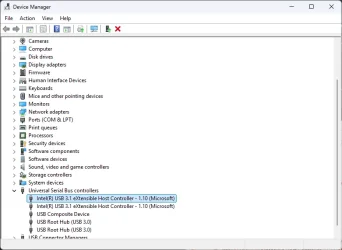
Right Click your Start Button and click on Device Manager
scroll down to Universal Serial Bus Controller > Expand It
1761656943398.webp

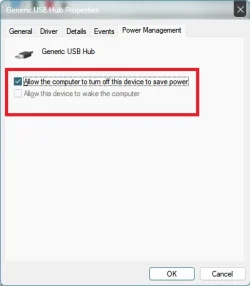
check your USB hubs > Double Click Each > Power Management tab > Uncheck Allow computer to turn off
1761657006849.webp


Also, check this setting (in the tutorial linked) to enable usb suspend:
 

My Computer My Computer

At a glance

Windows 11 Pro
OS
Windows 11 Pro
Right Click your Start Button and click on Device Manager
scroll down to Universal Serial Bus Controller > Expand It
View attachment 150631
check your USB hubs > Double Click Each > Power Management tab > Uncheck Allow computer to turn off
View attachment 150632

Also, check this setting (in the tutorial linked) to enable usb suspend:
I already have turn off usb charging option in BIOS.

This HP model have only 1 Type C port so I also want that port to give charging.

It have 2 charging port 1. Pin 2. Type C

I have 1 Pin charger and 2nd is Type C charger. So, I want to use Type C port aswell to charge the laptop batter. Whereas if I turn off through Second Method than it USB HUB will not work on battery or on plugged in.

But I want to the 1st method. I hope it wont suspend the Type C port when laptop is turned on.
 

Attachments

  • 1761657006849.webp
    1761657006849.webp
    10.5 KB · Views: 3

My Computer My Computer

At a glance

Windows 11 Pro 25H2Intel(R) Core(TM) i5-8365U CPU @ 1.60GHz 1.90...32 GBIntel(R) UHD Graphics 620
OS
Windows 11 Pro 25H2
Computer type
Laptop
Manufacturer/Model
HP Elitebook 840 G6
CPU
Intel(R) Core(TM) i5-8365U CPU @ 1.60GHz 1.90 GHz
Memory
32 GB
Graphics Card(s)
Intel(R) UHD Graphics 620
Monitor(s) Displays
1# 14inch 2# 22inch
Hard Drives
Kingston SNV251000G
Keyboard
Aukey KM-G6 Mechanical Keyboard
Mouse
Bloody ESports ES7 Gaming Mouse
Internet Speed
80 Mbps
Browser
1# Chrome 2# Firefox
Antivirus
Microsoft Defender
I have Power Management option coming in all options except USB composite device so let me know what should I do ?
 

Attachments

  • RGjH3U.webp
    RGjH3U.webp
    33.4 KB · Views: 3

My Computer My Computer

At a glance

Windows 11 Pro 25H2Intel(R) Core(TM) i5-8365U CPU @ 1.60GHz 1.90...32 GBIntel(R) UHD Graphics 620
OS
Windows 11 Pro 25H2
Computer type
Laptop
Manufacturer/Model
HP Elitebook 840 G6
CPU
Intel(R) Core(TM) i5-8365U CPU @ 1.60GHz 1.90 GHz
Memory
32 GB
Graphics Card(s)
Intel(R) UHD Graphics 620
Monitor(s) Displays
1# 14inch 2# 22inch
Hard Drives
Kingston SNV251000G
Keyboard
Aukey KM-G6 Mechanical Keyboard
Mouse
Bloody ESports ES7 Gaming Mouse
Internet Speed
80 Mbps
Browser
1# Chrome 2# Firefox
Antivirus
Microsoft Defender
the device manager power management looks correct.

so you want to keep the port alive when pc is powered off to allow charging the pc, BUT turn off the usb hub simultaneously? short of a manual switch on the usb hub itself, i'm not sure of a method to do this in windows natively...
 

My Computer My Computer

At a glance

Windows 11 Pro
OS
Windows 11 Pro
the device manager power management looks correct.

so you want to keep the port alive when pc is powered off to allow charging the pc, BUT turn off the usb hub simultaneously? short of a manual switch on the usb hub itself, i'm not sure of a method to do this in windows natively...
yeah thats right. port should be turned off when I turn off/hibernate the laptop.
 

My Computer My Computer

At a glance

Windows 11 Pro 25H2Intel(R) Core(TM) i5-8365U CPU @ 1.60GHz 1.90...32 GBIntel(R) UHD Graphics 620
OS
Windows 11 Pro 25H2
Computer type
Laptop
Manufacturer/Model
HP Elitebook 840 G6
CPU
Intel(R) Core(TM) i5-8365U CPU @ 1.60GHz 1.90 GHz
Memory
32 GB
Graphics Card(s)
Intel(R) UHD Graphics 620
Monitor(s) Displays
1# 14inch 2# 22inch
Hard Drives
Kingston SNV251000G
Keyboard
Aukey KM-G6 Mechanical Keyboard
Mouse
Bloody ESports ES7 Gaming Mouse
Internet Speed
80 Mbps
Browser
1# Chrome 2# Firefox
Antivirus
Microsoft Defender
ok, after some research, try this:

BIOS - ENABLE usb charging for powered off state
- save and exit - boot into windows

Device Manager > USB > USB Root Hub (do for all entries of this) > Power Management > uncheck Allow to turn off Box

Start > Edit Power Plan > Change Advanced Power Settings > USB Settings > USB Selective Suspend > Disabled
 

My Computer My Computer

At a glance

Windows 11 Pro
OS
Windows 11 Pro
ok, after some research, try this:

BIOS - ENABLE usb charging for powered off state
- save and exit - boot into windows

Device Manager > USB > USB Root Hub (do for all entries of this) > Power Management > uncheck Allow to turn off Box

Start > Edit Power Plan > Change Advanced Power Settings > USB Settings > USB Selective Suspend > Disabled

on battery or on plugged in or on both ?
 

My Computer My Computer

At a glance

Windows 11 Pro 25H2Intel(R) Core(TM) i5-8365U CPU @ 1.60GHz 1.90...32 GBIntel(R) UHD Graphics 620
OS
Windows 11 Pro 25H2
Computer type
Laptop
Manufacturer/Model
HP Elitebook 840 G6
CPU
Intel(R) Core(TM) i5-8365U CPU @ 1.60GHz 1.90 GHz
Memory
32 GB
Graphics Card(s)
Intel(R) UHD Graphics 620
Monitor(s) Displays
1# 14inch 2# 22inch
Hard Drives
Kingston SNV251000G
Keyboard
Aukey KM-G6 Mechanical Keyboard
Mouse
Bloody ESports ES7 Gaming Mouse
Internet Speed
80 Mbps
Browser
1# Chrome 2# Firefox
Antivirus
Microsoft Defender
Start > Edit Power Plan > Change Advanced Power Settings > USB Settings > USB Selective Suspend > Disabled

on battery or on plugged in or on both ?
both
 

My Computer My Computer

At a glance

Windows 11 Pro
OS
Windows 11 Pro

My Computer My Computer

At a glance

Windows 11 Pro 25H2Intel(R) Core(TM) i5-8365U CPU @ 1.60GHz 1.90...32 GBIntel(R) UHD Graphics 620
OS
Windows 11 Pro 25H2
Computer type
Laptop
Manufacturer/Model
HP Elitebook 840 G6
CPU
Intel(R) Core(TM) i5-8365U CPU @ 1.60GHz 1.90 GHz
Memory
32 GB
Graphics Card(s)
Intel(R) UHD Graphics 620
Monitor(s) Displays
1# 14inch 2# 22inch
Hard Drives
Kingston SNV251000G
Keyboard
Aukey KM-G6 Mechanical Keyboard
Mouse
Bloody ESports ES7 Gaming Mouse
Internet Speed
80 Mbps
Browser
1# Chrome 2# Firefox
Antivirus
Microsoft Defender
Edit: Didnt worked.
 

My Computer My Computer

At a glance

Windows 11 Pro 25H2Intel(R) Core(TM) i5-8365U CPU @ 1.60GHz 1.90...32 GBIntel(R) UHD Graphics 620
OS
Windows 11 Pro 25H2
Computer type
Laptop
Manufacturer/Model
HP Elitebook 840 G6
CPU
Intel(R) Core(TM) i5-8365U CPU @ 1.60GHz 1.90 GHz
Memory
32 GB
Graphics Card(s)
Intel(R) UHD Graphics 620
Monitor(s) Displays
1# 14inch 2# 22inch
Hard Drives
Kingston SNV251000G
Keyboard
Aukey KM-G6 Mechanical Keyboard
Mouse
Bloody ESports ES7 Gaming Mouse
Internet Speed
80 Mbps
Browser
1# Chrome 2# Firefox
Antivirus
Microsoft Defender
i dont think its going to be possible then. to keep the power pass-through for charging but simultaneously kill the power to peripherals through the same usb port is beyond me... i'm out of ideas, sorry
 

My Computer My Computer

At a glance

Windows 11 Pro
OS
Windows 11 Pro
Back
Top Bottom