Explorer taking 40s to appear


tony359

Well-known member
Local time
3:31 PM
Posts
116
OS
Windows 10
HI all

I updated my Lenovo laptop from W11 23H2 to 25H2 and suddenly the first time I open Explorer it takes 40s to display something.
There is no feedback while it's opening, no windows, nothing. If I click on it again it tends to crash and other apps will hang if I try to open them while Explorer is in that weird state.

Once Explorer opens, it's fine. I can close it and open it again and it opens immediately.

I tried waiting a couple of minutes after a reboot before opening Explorer but it's the same thing.

I do have a number of network drives - and some are offline - but I had that before with 23H2 and never had this problem.

I was stuck on 23H2 because my EFI partition had been filled up by Lenovo stuff and Windows Update refused to upgrade. Yesterday I finally shuffled the partitions around and managed to expand the EFI partition - I doubt this has anything to do with this issue but I feel it's fair to mention that.

Can someone point me to a solution please?
Thanks
 

My Computers

System One System Two

  • OS
    Windows 10
    Computer type
    PC/Desktop
    CPU
    Ryzen 5800X
    Motherboard
    MSI B550 Tomahawk
    Memory
    32GB
    Graphics Card(s)
    RTX 3070
  • Operating System
    Windows 11 24H1
    Computer type
    Laptop
    Manufacturer/Model
    Lenovo
    CPU
    Ryzen 6800HS
    Memory
    32GB
Revert to classic Explorer. If you need panes, install a third party app.
 

My Computers

System One System Two

  • OS
    Windows 11 Education For 25H2
    Computer type
    Laptop
    Manufacturer/Model
    HP ZBook G2
    CPU
    Intel® Core i7 5500u
    Motherboard
    HP
    Memory
    8 GB
    Graphics Card(s)
    Intel HD Family Graphics 5500 AMD Firepro 4150M
    Sound Card
    Realtek High Audio
    Hard Drives
    1 TB SSD
    Mouse
    HP USB Mouse
    Antivirus
    Windows Defender
  • Operating System
    Windows 11 Pro For Workstations 25H2
    Computer type
    Laptop
    Manufacturer/Model
    HP Zbook G4
    CPU
    Xeon 1535m v6
    Motherboard
    HP
    Memory
    32 GB
    Graphics card(s)
    AMD Quadro Pro 4100
    Sound Card
    Bang and Olufson Audio
    Hard Drives
    1TB SSD
    Mouse
    HP USB Mouse
    Antivirus
    Windows Defender
You have not told us if File Explorer slow while booting.


See booting into clean boot will help.


Scan your computer for malware infections.

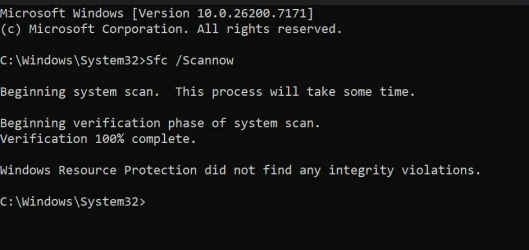
Execute Sfc /Scannow command from Command Prompt that is open as an admin.
 

My Computer

System One

  • OS
    Windows 11
    Computer type
    PC/Desktop
    Manufacturer/Model
    HP Pavilion
    CPU
    AMD Ryzen 7 5700G
    Motherboard
    Erica6
    Memory
    Micron Technology DDR4-3200 16GB
    Graphics Card(s)
    NVIDIA GeForce RTX 3060
    Sound Card
    Realtek ALC671
    Monitor(s) Displays
    Samsung SyncMaster U28E590
    Screen Resolution
    3840 x 2160
    Hard Drives
    SAMSUNG MZVLQ1T0HALB-000H1
You have not told us if File Explorer slow while booting.

Can you elaborate please? I'm not sure I understand.

I'll check the other things later on. Thanks!
 
Last edited:

My Computers

System One System Two

  • OS
    Windows 10
    Computer type
    PC/Desktop
    CPU
    Ryzen 5800X
    Motherboard
    MSI B550 Tomahawk
    Memory
    32GB
    Graphics Card(s)
    RTX 3070
  • Operating System
    Windows 11 24H1
    Computer type
    Laptop
    Manufacturer/Model
    Lenovo
    CPU
    Ryzen 6800HS
    Memory
    32GB
Well when does the File Explorer slow at boot time or after boot?
 

My Computer

System One

  • OS
    Windows 11
    Computer type
    PC/Desktop
    Manufacturer/Model
    HP Pavilion
    CPU
    AMD Ryzen 7 5700G
    Motherboard
    Erica6
    Memory
    Micron Technology DDR4-3200 16GB
    Graphics Card(s)
    NVIDIA GeForce RTX 3060
    Sound Card
    Realtek ALC671
    Monitor(s) Displays
    Samsung SyncMaster U28E590
    Screen Resolution
    3840 x 2160
    Hard Drives
    SAMSUNG MZVLQ1T0HALB-000H1
The first time. I mentioned above that I tried waiting 2 minutes after booting - thinking that maybe it was something running in the background - but no. The first time I open it, it takes 30/40s. Then it's fine.

SFC checks fine.

CleanBoot shows the same issue - well, 18s instead of 30/40, I'm not sure it's an improvement :)
 

Attachments

  • Screenshot 2025-11-12 172912.webp
    Screenshot 2025-11-12 172912.webp
    35.5 KB · Views: 1

My Computers

System One System Two

  • OS
    Windows 10
    Computer type
    PC/Desktop
    CPU
    Ryzen 5800X
    Motherboard
    MSI B550 Tomahawk
    Memory
    32GB
    Graphics Card(s)
    RTX 3070
  • Operating System
    Windows 11 24H1
    Computer type
    Laptop
    Manufacturer/Model
    Lenovo
    CPU
    Ryzen 6800HS
    Memory
    32GB
Update graphic card driver.

Disconnect attached external devices.

In this video, we delve into the common issue of slow boot times in Windows and how to effectively troubleshoot it using Process Monitor.


My Computer

System One

  • OS
    Windows 11
    Computer type
    PC/Desktop
    Manufacturer/Model
    HP Pavilion
    CPU
    AMD Ryzen 7 5700G
    Motherboard
    Erica6
    Memory
    Micron Technology DDR4-3200 16GB
    Graphics Card(s)
    NVIDIA GeForce RTX 3060
    Sound Card
    Realtek ALC671
    Monitor(s) Displays
    Samsung SyncMaster U28E590
    Screen Resolution
    3840 x 2160
    Hard Drives
    SAMSUNG MZVLQ1T0HALB-000H1
@FreeBooter

Thanks but... it's not a slow boot process issue! I can open Explorer after 20 minutes after booting, it will take 30 seconds. Then it'll be fine.

My laptop has zero issues with booting, it boots in 15 seconds and there are no delays at the desktop - regardless, this is not related to a slow boot process.

GPU driver is already up to date.

--

Let me add for clarity: IMMEDIATELY after I land on the desktop after a restart I can open apps (Word, Excel, Whatsapp, Edge) and they open up straight away. No delays.

But if I open File Explorer, it hangs. If I hit the Windows key while Explorer is hung, Windows Explorer crashes and reloads.
 
Last edited:

My Computers

System One System Two

  • OS
    Windows 10
    Computer type
    PC/Desktop
    CPU
    Ryzen 5800X
    Motherboard
    MSI B550 Tomahawk
    Memory
    32GB
    Graphics Card(s)
    RTX 3070
  • Operating System
    Windows 11 24H1
    Computer type
    Laptop
    Manufacturer/Model
    Lenovo
    CPU
    Ryzen 6800HS
    Memory
    32GB
This is now resolved.

When I assigned a letter to the EFI partition to see what was going on (Lenovo filled it up with its stuff so I couldn't upgrade Windows anymore) I unintentionally assigned an existing letter.

So W was both the EFI partition AND an offline network drive. File Explorer didn't like that.

It's taken a few back and forth with Diskpart but it's gone now and File Explorer now opens immediately.

Note to MS: You really should strengthen that section, assigning two volumes to one letter shouldn't be possible!
 

My Computers

System One System Two

  • OS
    Windows 10
    Computer type
    PC/Desktop
    CPU
    Ryzen 5800X
    Motherboard
    MSI B550 Tomahawk
    Memory
    32GB
    Graphics Card(s)
    RTX 3070
  • Operating System
    Windows 11 24H1
    Computer type
    Laptop
    Manufacturer/Model
    Lenovo
    CPU
    Ryzen 6800HS
    Memory
    32GB
Back
Top Bottom