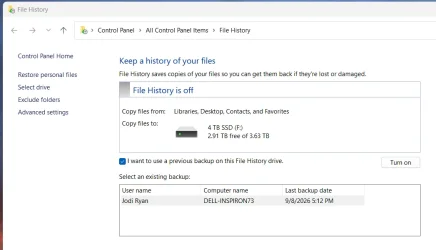
I have a Sandisk 4TB SSD attached to my laptop computer. I has been keeping the file history for years. No, it is not full. There is 2.91 TB free of 3.63 TB.
When I turn off the computer, and then turn it on, the SSD is locked and I run a process to unlock it. It appears as the"F" drive.
Up through 9/8, I could open File History, and see the SSD and simply click the RUN button to activate it.
NOW I see the heading "File History is OFF", below that is the SSD, below that there is no RUN button (like there used to be), there is a checkbox preceeding the sentence "I want to use a previous backup on this File History drive." I check that box.
Below that is a new box with the heading "Select an existing backup:" inside the box, I see my User Name, the computer name and the last backup date of 9/8/26 5:12pm. I can click on the line to highlight it in blue and a "TURN ON" button, on the right, becomes active between the 2 boxes. I click on it and NOTHING HAPPENS.
Can anyone help me?
When I turn off the computer, and then turn it on, the SSD is locked and I run a process to unlock it. It appears as the"F" drive.
Up through 9/8, I could open File History, and see the SSD and simply click the RUN button to activate it.
NOW I see the heading "File History is OFF", below that is the SSD, below that there is no RUN button (like there used to be), there is a checkbox preceeding the sentence "I want to use a previous backup on this File History drive." I check that box.
Below that is a new box with the heading "Select an existing backup:" inside the box, I see my User Name, the computer name and the last backup date of 9/8/26 5:12pm. I can click on the line to highlight it in blue and a "TURN ON" button, on the right, becomes active between the 2 boxes. I click on it and NOTHING HAPPENS.
Can anyone help me?
Attachments
My Computer
At a glance
Windows 11Intel Core i7-8550U16GBIntel UHD Graphics 620
- OS
- Windows 11
- Computer type
- Laptop
- Manufacturer/Model
- Dell Inspiron 7573
- CPU
- Intel Core i7-8550U
- Motherboard
- Intel Serial IO 12C Host Controller 9D60
- Memory
- 16GB
- Graphics Card(s)
- Intel UHD Graphics 620
- Sound Card
- Realtek
- Monitor(s) Displays
- Dell Internal Display & Samsung S27D360 via HDMI
- Screen Resolution
- 1920 x 1080
- Hard Drives
- Samsung SSD PMB871b M.2 2280 512GB
- Keyboard
- Logitech
- Mouse
- Logitech
- Browser
- Google or Duck, Duck, Go
- Antivirus
- Windows Defender