Folder desktop.ini settings


MK77P

Well-known member
Member
Local time
7:47 AM
Posts
155
OS
Windows 11
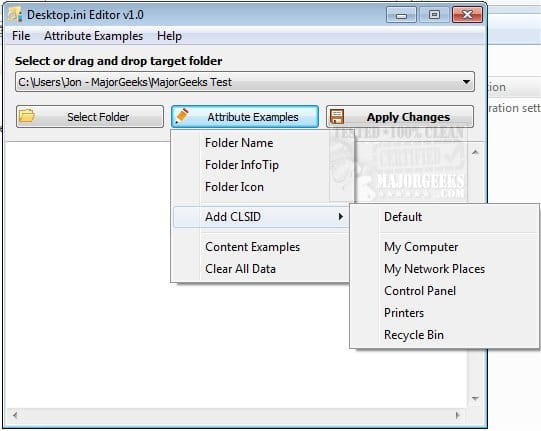
Is there like a tutorial for all of the settings that can be used inside a desktop.ini file for a folder? for example:

Code:
[ViewState]
Mode=
Vid=
FolderType=Pictures
 

My Computer

System One

  • OS
    Windows 11
    Computer type
    PC/Desktop
    Manufacturer/Model
    Custom
    CPU
    Intel Core i5-14600KF
    Motherboard
    MSI PRO Z690-A WIFI DDR4
    Memory
    CORSAIR VENGEANCE RGB PRO SL 32GB (2x16GB) DDR4 3200MHz CL16
    Graphics Card(s)
    GIGABYTE 4080 Gaming OC
    Screen Resolution
    1920 x 1080
    Hard Drives
    Kingston NV3 1TB, Kingston KC600 1TB, SAMSUNG 860 EVO 500GB
    PSU
    Lian Li Edge EG0850G 850W Gold
    Cooling
    ARCTIC Liquid Freezer III 360
    Keyboard
    Logitech G513 Carbon LIGHTSYNC RGB Mechanical
    Mouse
    Steelseries Prime
    Browser
    Firefox
Is there like a tutorial for all of the settings that can be used inside a desktop.ini file for a folder? for example:

Code:
[ViewState]
Mode=
Vid=
FolderType=Pictures


This may get you started...


I highly recommend you make a full system backup before embarking on this journey...


AOMEI Backupper Standard is free.
 

My Computers

System One System Two

  • OS
    Win 11 Home ♦♦♦26200.8457 ♦♦♦♦♦♦♦25H2
    Computer type
    PC/Desktop
    Manufacturer/Model
    Built by Ghot® [May 2020]
    CPU
    AMD Ryzen 7 3700X
    Motherboard
    Asus Pro WS X570-ACE (BIOS 5302)
    Memory
    G.Skill (F4-3200C14D-16GTZKW)
    Graphics Card(s)
    EVGA RTX 2070 (08G-P4-2171-KR)
    Sound Card
    Realtek ALC1220P / ALC S1220A
    Monitor(s) Displays
    Dell U3011 30"
    Screen Resolution
    2560 x 1600
    Hard Drives
    2x Samsung 860 EVO 500GB,
    WD 4TB Black FZBX - SATA III,
    WD 8TB Black FZBX - SATA III,
    DRW-24B1ST CD/DVD Burner
    PSU
    PC Power & Cooling 750W Quad EPS12V
    Case
    Cooler Master ATCS 840 Tower
    Cooling
    CM Hyper 212 EVO (push/pull)
    Keyboard
    Ducky DK9008 Shine II Blue LED
    Mouse
    Logitech Optical M-100
    Internet Speed
    300/300
    Browser
    Firefox (latest)
    Antivirus
    Bitdefender Total Security
    Other Info
    Speakers: Klipsch Pro Media 2.1
  • Operating System
    Windows XP Pro 32bit w/SP3
    Computer type
    PC/Desktop
    Manufacturer/Model
    Built by Ghot® (not in use)
    CPU
    AMD Athlon 64 X2 5000+ (OC'd @ 3.2Ghz)
    Motherboard
    ASUS M2N32-SLI Deluxe Wireless Edition
    Memory
    TWIN2X2048-6400C4DHX (2 x 1GB, DDR2 800)
    Graphics card(s)
    EVGA 256-P2-N758-TR GeForce 8600GT SSC
    Sound Card
    Onboard
    Monitor(s) Displays
    ViewSonic G90FB Black 19" Professional (CRT)
    Screen Resolution
    up to 2048 x 1536
    Hard Drives
    WD 36GB 10,000rpm Raptor SATA
    Seagate 80GB 7200rpm SATA
    Lite-On LTR-52246S CD/RW
    Lite-On LH-18A1P CD/DVD Burner
    PSU
    PC Power & Cooling Silencer 750 Quad EPS12V
    Case
    Generic Beige case, 80mm fans
    Cooling
    ZALMAN 9500A 92mm CPU Cooler
    Keyboard
    Logitech Classic Keybooard 200
    Mouse
    Logitech Optical M-BT96a
    Internet Speed
    300/300
    Browser
    Firefox 3.x ??
    Antivirus
    Symantec (Norton)
    Other Info
    Still assembled, still runs. Haven't turned it on for 15 years?
This may get you started...


I highly recommend you make a full system backup before embarking on this journey...


AOMEI Backupper Standard is free.
Thanks.

Is there anything more detailed and specifc to the view (ViewState) settings only?
 

My Computer

System One

  • OS
    Windows 11
    Computer type
    PC/Desktop
    Manufacturer/Model
    Custom
    CPU
    Intel Core i5-14600KF
    Motherboard
    MSI PRO Z690-A WIFI DDR4
    Memory
    CORSAIR VENGEANCE RGB PRO SL 32GB (2x16GB) DDR4 3200MHz CL16
    Graphics Card(s)
    GIGABYTE 4080 Gaming OC
    Screen Resolution
    1920 x 1080
    Hard Drives
    Kingston NV3 1TB, Kingston KC600 1TB, SAMSUNG 860 EVO 500GB
    PSU
    Lian Li Edge EG0850G 850W Gold
    Cooling
    ARCTIC Liquid Freezer III 360
    Keyboard
    Logitech G513 Carbon LIGHTSYNC RGB Mechanical
    Mouse
    Steelseries Prime
    Browser
    Firefox
Thanks.

Is there anything more detailed and specifc to the view (ViewState) settings only?


I have no idea. I just Googled: editing desktop ini

Maybe try something like... desktop ini edits?

Or... desktop ini view state

Maybe... desktop ini folder view edits?
 

My Computers

System One System Two

  • OS
    Win 11 Home ♦♦♦26200.8457 ♦♦♦♦♦♦♦25H2
    Computer type
    PC/Desktop
    Manufacturer/Model
    Built by Ghot® [May 2020]
    CPU
    AMD Ryzen 7 3700X
    Motherboard
    Asus Pro WS X570-ACE (BIOS 5302)
    Memory
    G.Skill (F4-3200C14D-16GTZKW)
    Graphics Card(s)
    EVGA RTX 2070 (08G-P4-2171-KR)
    Sound Card
    Realtek ALC1220P / ALC S1220A
    Monitor(s) Displays
    Dell U3011 30"
    Screen Resolution
    2560 x 1600
    Hard Drives
    2x Samsung 860 EVO 500GB,
    WD 4TB Black FZBX - SATA III,
    WD 8TB Black FZBX - SATA III,
    DRW-24B1ST CD/DVD Burner
    PSU
    PC Power & Cooling 750W Quad EPS12V
    Case
    Cooler Master ATCS 840 Tower
    Cooling
    CM Hyper 212 EVO (push/pull)
    Keyboard
    Ducky DK9008 Shine II Blue LED
    Mouse
    Logitech Optical M-100
    Internet Speed
    300/300
    Browser
    Firefox (latest)
    Antivirus
    Bitdefender Total Security
    Other Info
    Speakers: Klipsch Pro Media 2.1
  • Operating System
    Windows XP Pro 32bit w/SP3
    Computer type
    PC/Desktop
    Manufacturer/Model
    Built by Ghot® (not in use)
    CPU
    AMD Athlon 64 X2 5000+ (OC'd @ 3.2Ghz)
    Motherboard
    ASUS M2N32-SLI Deluxe Wireless Edition
    Memory
    TWIN2X2048-6400C4DHX (2 x 1GB, DDR2 800)
    Graphics card(s)
    EVGA 256-P2-N758-TR GeForce 8600GT SSC
    Sound Card
    Onboard
    Monitor(s) Displays
    ViewSonic G90FB Black 19" Professional (CRT)
    Screen Resolution
    up to 2048 x 1536
    Hard Drives
    WD 36GB 10,000rpm Raptor SATA
    Seagate 80GB 7200rpm SATA
    Lite-On LTR-52246S CD/RW
    Lite-On LH-18A1P CD/DVD Burner
    PSU
    PC Power & Cooling Silencer 750 Quad EPS12V
    Case
    Generic Beige case, 80mm fans
    Cooling
    ZALMAN 9500A 92mm CPU Cooler
    Keyboard
    Logitech Classic Keybooard 200
    Mouse
    Logitech Optical M-BT96a
    Internet Speed
    300/300
    Browser
    Firefox 3.x ??
    Antivirus
    Symantec (Norton)
    Other Info
    Still assembled, still runs. Haven't turned it on for 15 years?
I have no idea. I just Googled: editing desktop ini

Maybe try something like... desktop ini edits?

Or... desktop ini view state

Maybe... desktop ini folder view edits?
Will do.

Now when I change the view settings for any folder individually where do the settings for that save? I'm trying to find out where they are stored so I can edit them and make backups so I wouldn't have to manually set each folder view.

That's why I'm trying to understand the settings for desktop.ini so I can simply edit each desktop.ini for each folder, found this page detailing the view settings in desktop.ini so I'm trying for example to set one of the folders to have the "list" view, so according to that page " Vid" comes with "list" and it uses a CLSID Key, placed the CLSID Key for "list" like this:

Code:
[ViewState]
Mode=
Vid={0E1FA5E0-3573-11CF-AE69-08002B2E1262}
FolderType=

But that don't seem to make it work? unless I'm doing something wrong...
 
Last edited:

My Computer

System One

  • OS
    Windows 11
    Computer type
    PC/Desktop
    Manufacturer/Model
    Custom
    CPU
    Intel Core i5-14600KF
    Motherboard
    MSI PRO Z690-A WIFI DDR4
    Memory
    CORSAIR VENGEANCE RGB PRO SL 32GB (2x16GB) DDR4 3200MHz CL16
    Graphics Card(s)
    GIGABYTE 4080 Gaming OC
    Screen Resolution
    1920 x 1080
    Hard Drives
    Kingston NV3 1TB, Kingston KC600 1TB, SAMSUNG 860 EVO 500GB
    PSU
    Lian Li Edge EG0850G 850W Gold
    Cooling
    ARCTIC Liquid Freezer III 360
    Keyboard
    Logitech G513 Carbon LIGHTSYNC RGB Mechanical
    Mouse
    Steelseries Prime
    Browser
    Firefox
Will do.

Now when I change the view settings for any folder individually where do the settings for that save? (I'm trying to find out where they are stored so I can edit them and make backups so I wouldn't have to manually set each folder view).


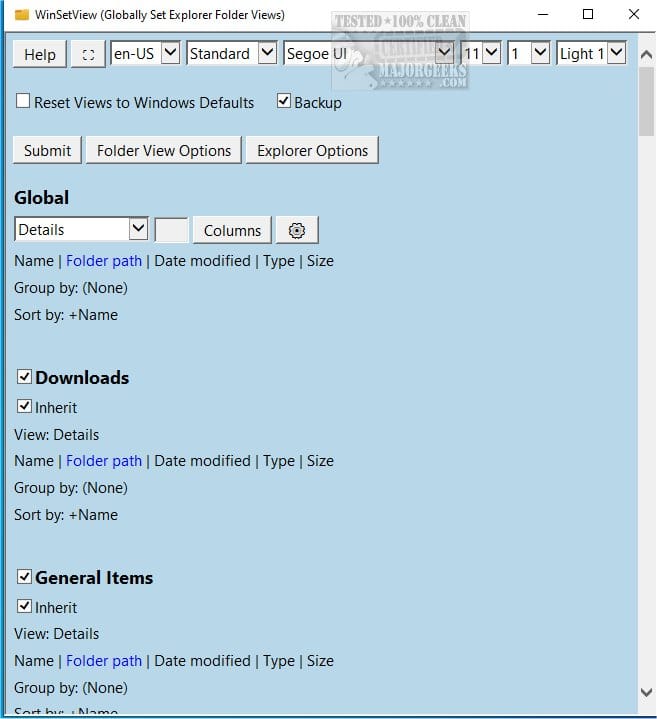
Oh... if you're talking about the File Explorer folder view... there's a program called WinSetView that does that for you.


My Computers

System One System Two

  • OS
    Win 11 Home ♦♦♦26200.8457 ♦♦♦♦♦♦♦25H2
    Computer type
    PC/Desktop
    Manufacturer/Model
    Built by Ghot® [May 2020]
    CPU
    AMD Ryzen 7 3700X
    Motherboard
    Asus Pro WS X570-ACE (BIOS 5302)
    Memory
    G.Skill (F4-3200C14D-16GTZKW)
    Graphics Card(s)
    EVGA RTX 2070 (08G-P4-2171-KR)
    Sound Card
    Realtek ALC1220P / ALC S1220A
    Monitor(s) Displays
    Dell U3011 30"
    Screen Resolution
    2560 x 1600
    Hard Drives
    2x Samsung 860 EVO 500GB,
    WD 4TB Black FZBX - SATA III,
    WD 8TB Black FZBX - SATA III,
    DRW-24B1ST CD/DVD Burner
    PSU
    PC Power & Cooling 750W Quad EPS12V
    Case
    Cooler Master ATCS 840 Tower
    Cooling
    CM Hyper 212 EVO (push/pull)
    Keyboard
    Ducky DK9008 Shine II Blue LED
    Mouse
    Logitech Optical M-100
    Internet Speed
    300/300
    Browser
    Firefox (latest)
    Antivirus
    Bitdefender Total Security
    Other Info
    Speakers: Klipsch Pro Media 2.1
  • Operating System
    Windows XP Pro 32bit w/SP3
    Computer type
    PC/Desktop
    Manufacturer/Model
    Built by Ghot® (not in use)
    CPU
    AMD Athlon 64 X2 5000+ (OC'd @ 3.2Ghz)
    Motherboard
    ASUS M2N32-SLI Deluxe Wireless Edition
    Memory
    TWIN2X2048-6400C4DHX (2 x 1GB, DDR2 800)
    Graphics card(s)
    EVGA 256-P2-N758-TR GeForce 8600GT SSC
    Sound Card
    Onboard
    Monitor(s) Displays
    ViewSonic G90FB Black 19" Professional (CRT)
    Screen Resolution
    up to 2048 x 1536
    Hard Drives
    WD 36GB 10,000rpm Raptor SATA
    Seagate 80GB 7200rpm SATA
    Lite-On LTR-52246S CD/RW
    Lite-On LH-18A1P CD/DVD Burner
    PSU
    PC Power & Cooling Silencer 750 Quad EPS12V
    Case
    Generic Beige case, 80mm fans
    Cooling
    ZALMAN 9500A 92mm CPU Cooler
    Keyboard
    Logitech Classic Keybooard 200
    Mouse
    Logitech Optical M-BT96a
    Internet Speed
    300/300
    Browser
    Firefox 3.x ??
    Antivirus
    Symantec (Norton)
    Other Info
    Still assembled, still runs. Haven't turned it on for 15 years?
Oh... if you're talking about the File Explorer folder view... there's a program called WinSetView that does that for you.

Yes the File Explorer view.

I've edited my post above, don't know if you saw it or not, if the desktop.ini view settings don't work then I'll just do it with WinSetView.
 
Last edited:

My Computer

System One

  • OS
    Windows 11
    Computer type
    PC/Desktop
    Manufacturer/Model
    Custom
    CPU
    Intel Core i5-14600KF
    Motherboard
    MSI PRO Z690-A WIFI DDR4
    Memory
    CORSAIR VENGEANCE RGB PRO SL 32GB (2x16GB) DDR4 3200MHz CL16
    Graphics Card(s)
    GIGABYTE 4080 Gaming OC
    Screen Resolution
    1920 x 1080
    Hard Drives
    Kingston NV3 1TB, Kingston KC600 1TB, SAMSUNG 860 EVO 500GB
    PSU
    Lian Li Edge EG0850G 850W Gold
    Cooling
    ARCTIC Liquid Freezer III 360
    Keyboard
    Logitech G513 Carbon LIGHTSYNC RGB Mechanical
    Mouse
    Steelseries Prime
    Browser
    Firefox
Is there like a tutorial for all of the settings that can be used inside a desktop.ini file for a folder? for example:
This is a an old thread, but I recently came across a site that documents desktop.ini:
 

My Computer

System One

  • OS
    Windows 10/11
    Computer type
    Laptop
    Manufacturer/Model
    Acer
Back
Top Bottom