Force Windows 11 to use NetBIOS to discover old SMB 1.0 devices in the LAN. Possible?


drkh

Member
Member
Local time
10:26 AM
Posts
15
OS
Windows 11 Pro 24H2 build 26100.4349
Hello,

In my home LAN, there is a Window 11 Pro 24H2 PC and a few old media players which only support NetBIOS and SMB 1.0 under Linux. Any of them, PC or player, can access all the others' shares if I manually provide the UNC names: \\ComputerName or \\DeviceName.

However, in terms of dicovering the devices, the players usually can see the PC, but the PC can never see the players.

On the Windows 11 PC, I have added "SMB 1.0/CIFS File Sharing Support" and enabled SMB 1.0 server and client. In Ethernet adapter settings, NetBIOS over TCP/IP is explicitly selected, i.e., not just Default. In Network Connection Details, it's yes for NetBIOS over TCP/IP.

Also, Network Discovery and File and Printer Sharing are turned on for the Private profile. The following services are all running (though the startup types of some are manual):

Computer Browser
Function Discovery Provider Host
Function Discovery Resource Publication
Server (Automatic
SSDP Discovery
TCP/IP NetBIOS Helper
Worktation

I have even tried creating Windows Defender Firewall inbound "Allow" rules for TCP/UDP port 137-139, 445.

But Windows 11 just can not discover those players.

Maybe Windows 11 (esp. 24H2) just doesn't want to use NetBIOS any more?

If so, can we force NetBIOS for Windows 11 in its discovery endeavor?
 
Last edited:

My Computer My Computer

At a glance

Windows 11 Pro 24H2 build 26100.4349Intel Core i5-12600K2 x ADATA XPG GAMMIX D10 DDR4 16GB(iGPU) Intel UHD Graphics 770
OS
Windows 11 Pro 24H2 build 26100.4349
Computer type
PC/Desktop
Manufacturer/Model
self-built in Oct. 2024
CPU
Intel Core i5-12600K
Motherboard
Gigabyte B760M GAMING X AX DDR4 v1.2
Memory
2 x ADATA XPG GAMMIX D10 DDR4 16GB
Graphics Card(s)
(iGPU) Intel UHD Graphics 770
Sound Card
onboard Realtek ALC897 audio codec
Monitor(s) Displays
SamSung S22D300NY LCD (D-Sub, 2015) + Biaze ZH10 HDMI to VGA converter
Screen Resolution
1280 x 720
Hard Drives
1 x WD_BLACK SN850X NVMe SSD 1TB
2 x WD WD5003ABYX RE4 500G SATA2 (RAID 0)
PSU
FSP HEXA 85+ HA350 350W
Case
Cooler Master N400
Cooling
DeepCool AG400 Plus tower cooler, 4 x PWM case fan
Keyboard
Logitech Y-SM48
Mouse
Toshiba Pala-Chan
Internet Speed
522/263 Mbps
Browser
Vivaldi v7.5.3735.58 + MS Edge v137.0.3296.83 (updating disabled for both) + Google Chrome (auto-updated)
Antivirus
Windows Security
Other Info
Epson Expression Home XP-2101 inkjet printer
Hello,

In my home LAN, there is a Window 11 Pro 24H2 PC and a few old media players which only support NetBIOS and SMB 1.0 under Linux. Any of them, PC or player, can access all the others' shares if I manually provide the UNC names: \\ComputerName or \\DeviceName.

However, in terms of dicovering the devices, the players usually can see the PC, but the PC can never see the players.

On the Windows 11 PC, I have added "SMB 1.0/CIFS File Sharing Support" and enabled SMB 1.0 server and client. In Ethernet adapter settings, NetBIOS over TCP/IP is explicitly selected, i.e., not just Default. In Network Connection Details, it's yes for NetBIOS over TCP/IP.

Also, Network Discovery and File and Printer Sharing are turned on for the Private profile. The following services are all running (though the startup types of some are manual):

Computer Browser
Function Discovery Provider Host
Function Discovery Resource Publication
Server (Automatic
SSDP Discovery
TCP/IP NetBIOS Helper
Worktation

I have even tried creating Windows Defender Firewall inbound "Allow" rules for TCP/UDP port 137-139, 445.

But Windows 11 just can not discover those players.

Maybe Windows 11 (esp. 24H2) just doesn't want to use NetBIOS any more?

If so, can we force NetBIOS for Windows 11 in its discovery endeavor?
On most modern Linux distros Netbios is deprecated.

Incidently to use SMB1 the global setting in the Linux samba (/etc/samba/smb.conf) file needs to be set to "min protocol=NT1" for it to access Windows machines on SMB1.

Windows machines usually have no trouble accessing Linux systems but you might now have to access them via its IP address rather than Hostname.

But if you can avoid SMB1 it's worth it. Only really old devices need SMB1 now.

Cheers
jimbo
 

My Computer My Computer

At a glance

Windows XP,11 Linux Fedora Rawhide pre-releas...2 X Intel i7
OS
Windows XP,11 Linux Fedora Rawhide pre-release 45
Computer type
PC/Desktop
CPU
2 X Intel i7
Screen Resolution
4KUHD X 2
Windows machines usually have no trouble accessing Linux systems but you might now have to access them via its IP address rather than Hostname.

May I infer from your remark that in terms of network discovery, Windows 11 now has no way to discover those old media players? And, if so, I can't help but wonder why NetBIOS and SMB 1.0 still exist in Windows 11 since both have been deprecated.

Actually, if I type the UNC names of those old media players, e.g., \\player_1, into the address field of Windows 11 File Explorer. the shares of those players can always be accessed. So, Windows 11 has no problem accessing the players, and vice versa. Additionally, those players can discover the Windows 11 PC almost always.
 

My Computer My Computer

At a glance

Windows 11 Pro 24H2 build 26100.4349Intel Core i5-12600K2 x ADATA XPG GAMMIX D10 DDR4 16GB(iGPU) Intel UHD Graphics 770
OS
Windows 11 Pro 24H2 build 26100.4349
Computer type
PC/Desktop
Manufacturer/Model
self-built in Oct. 2024
CPU
Intel Core i5-12600K
Motherboard
Gigabyte B760M GAMING X AX DDR4 v1.2
Memory
2 x ADATA XPG GAMMIX D10 DDR4 16GB
Graphics Card(s)
(iGPU) Intel UHD Graphics 770
Sound Card
onboard Realtek ALC897 audio codec
Monitor(s) Displays
SamSung S22D300NY LCD (D-Sub, 2015) + Biaze ZH10 HDMI to VGA converter
Screen Resolution
1280 x 720
Hard Drives
1 x WD_BLACK SN850X NVMe SSD 1TB
2 x WD WD5003ABYX RE4 500G SATA2 (RAID 0)
PSU
FSP HEXA 85+ HA350 350W
Case
Cooler Master N400
Cooling
DeepCool AG400 Plus tower cooler, 4 x PWM case fan
Keyboard
Logitech Y-SM48
Mouse
Toshiba Pala-Chan
Internet Speed
522/263 Mbps
Browser
Vivaldi v7.5.3735.58 + MS Edge v137.0.3296.83 (updating disabled for both) + Google Chrome (auto-updated)
Antivirus
Windows Security
Other Info
Epson Expression Home XP-2101 inkjet printer
May I infer from your remark that in terms of network discovery, Windows 11 now has no way to discover those old media players? And, if so, I can't help but wonder why NetBIOS and SMB 1.0 still exist in Windows 11 since both have been deprecated.

Actually, if I type the UNC names of those old media players, e.g., \\player_1, into the address field of Windows 11 File Explorer. the shares of those players can always be accessed. So, Windows 11 has no problem accessing the players, and vice versa. Additionally, those players can discover the Windows 11 PC almost always.
Can you not just use the UNC names to map a network drive for easier access? I find that the easiest way to make Windows co-operate. I have several network shares for my (linux based) NAS and I have mapped one of the folders using the UNC name. The other folders are pinned to start menu and just show up. (But this is all for one device - you would need to map each device.)
 

My Computers My Computers

  • At a glance

    Linux Mint (22.3) and Windows 11Ryzen 3900x32GB (2x16) @ 3600 MHz Corsair Vengeance LPXAsus Geforce RTX 5060 Ti Dual OC 16 GB
    OS
    Linux Mint (22.3) and Windows 11
    Computer type
    PC/Desktop
    Manufacturer/Model
    Home built
    CPU
    Ryzen 3900x
    Motherboard
    Gigabyte Aorus Master x570 rel 1.0
    Memory
    32GB (2x16) @ 3600 MHz Corsair Vengeance LPX
    Graphics Card(s)
    Asus Geforce RTX 5060 Ti Dual OC 16 GB
    Sound Card
    No separate sound card.
    Monitor(s) Displays
    Dell U2718Q
    Screen Resolution
    3840x2160
    Hard Drives
    1TB WD-Black SN850; 1TB Samsung Sata 850 Evo; 4 TB WD Blue Sata SA510 2.5''; 4TB Samsung Sata SSD 870 EVO 2.5".
    PSU
    Be Quiet Dark Power Pro 11 750W
    Case
    Lian Li PC-8FIB
    Cooling
    CPU: Noctua NH-U12A; Case: BeQuiet + Lian Li fans.
    Keyboard
    Steelseries Apex 7 brown keys.
    Mouse
    Logitech (wired) G403
    Internet Speed
    940 Mb/s down; 105 Mb/s up
    Browser
    Firefox
    Other Info
    Pioneer blu-ray optical drive.
  • At a glance

    Windows 11 Home (ARM version) (latest update)Qualcomm Snapdragon X Elite X1E-80-10016 GB LPDDR5Qualcomm Adreno
    Operating System
    Windows 11 Home (ARM version) (latest update)
    Computer type
    Laptop
    Manufacturer/Model
    Samsung Galaxy Book4 Edge 14" Copilot+ PC
    CPU
    Qualcomm Snapdragon X Elite X1E-80-100
    Memory
    16 GB LPDDR5
    Graphics card(s)
    Qualcomm Adreno
    Monitor(s) Displays
    Touch screen 14" AMOLED monitor
    Screen Resolution
    2880x1800
    Hard Drives
    512 GB eUFS
    Internet Speed
    930 Mb/s (Wifi)
    Browser
    Firefox
    Antivirus
    Eset Internet Security
    Other Info
    NPU Qualcomm Hexagon
Can you not just use the UNC names to map a network drive for easier access? I find that the easiest way to make Windows co-operate. I have several network shares for my (linux based) NAS and I have mapped one of the folders using the UNC name. The other folders are pinned to start menu and just show up. (But this is all for one device - you would need to map each device.)
Yes, I agree and can do that. I just don't understand why Windows 11 can't discover those old players using NetBIOS and SMB 1.0 when everything looks well-configured. Maybe it's because Window 11 needs to be forced to do that in some way?
 

My Computer My Computer

At a glance

Windows 11 Pro 24H2 build 26100.4349Intel Core i5-12600K2 x ADATA XPG GAMMIX D10 DDR4 16GB(iGPU) Intel UHD Graphics 770
OS
Windows 11 Pro 24H2 build 26100.4349
Computer type
PC/Desktop
Manufacturer/Model
self-built in Oct. 2024
CPU
Intel Core i5-12600K
Motherboard
Gigabyte B760M GAMING X AX DDR4 v1.2
Memory
2 x ADATA XPG GAMMIX D10 DDR4 16GB
Graphics Card(s)
(iGPU) Intel UHD Graphics 770
Sound Card
onboard Realtek ALC897 audio codec
Monitor(s) Displays
SamSung S22D300NY LCD (D-Sub, 2015) + Biaze ZH10 HDMI to VGA converter
Screen Resolution
1280 x 720
Hard Drives
1 x WD_BLACK SN850X NVMe SSD 1TB
2 x WD WD5003ABYX RE4 500G SATA2 (RAID 0)
PSU
FSP HEXA 85+ HA350 350W
Case
Cooler Master N400
Cooling
DeepCool AG400 Plus tower cooler, 4 x PWM case fan
Keyboard
Logitech Y-SM48
Mouse
Toshiba Pala-Chan
Internet Speed
522/263 Mbps
Browser
Vivaldi v7.5.3735.58 + MS Edge v137.0.3296.83 (updating disabled for both) + Google Chrome (auto-updated)
Antivirus
Windows Security
Other Info
Epson Expression Home XP-2101 inkjet printer
I can't explain the intricacies of Windows 11 networking - I assume it's associated with improving security. I would however reinforce @jimbo45 comment about the undesirability of using SMB 1.0 - it has been a security risk for years.
 

My Computers My Computers

  • At a glance

    Linux Mint (22.3) and Windows 11Ryzen 3900x32GB (2x16) @ 3600 MHz Corsair Vengeance LPXAsus Geforce RTX 5060 Ti Dual OC 16 GB
    OS
    Linux Mint (22.3) and Windows 11
    Computer type
    PC/Desktop
    Manufacturer/Model
    Home built
    CPU
    Ryzen 3900x
    Motherboard
    Gigabyte Aorus Master x570 rel 1.0
    Memory
    32GB (2x16) @ 3600 MHz Corsair Vengeance LPX
    Graphics Card(s)
    Asus Geforce RTX 5060 Ti Dual OC 16 GB
    Sound Card
    No separate sound card.
    Monitor(s) Displays
    Dell U2718Q
    Screen Resolution
    3840x2160
    Hard Drives
    1TB WD-Black SN850; 1TB Samsung Sata 850 Evo; 4 TB WD Blue Sata SA510 2.5''; 4TB Samsung Sata SSD 870 EVO 2.5".
    PSU
    Be Quiet Dark Power Pro 11 750W
    Case
    Lian Li PC-8FIB
    Cooling
    CPU: Noctua NH-U12A; Case: BeQuiet + Lian Li fans.
    Keyboard
    Steelseries Apex 7 brown keys.
    Mouse
    Logitech (wired) G403
    Internet Speed
    940 Mb/s down; 105 Mb/s up
    Browser
    Firefox
    Other Info
    Pioneer blu-ray optical drive.
  • At a glance

    Windows 11 Home (ARM version) (latest update)Qualcomm Snapdragon X Elite X1E-80-10016 GB LPDDR5Qualcomm Adreno
    Operating System
    Windows 11 Home (ARM version) (latest update)
    Computer type
    Laptop
    Manufacturer/Model
    Samsung Galaxy Book4 Edge 14" Copilot+ PC
    CPU
    Qualcomm Snapdragon X Elite X1E-80-100
    Memory
    16 GB LPDDR5
    Graphics card(s)
    Qualcomm Adreno
    Monitor(s) Displays
    Touch screen 14" AMOLED monitor
    Screen Resolution
    2880x1800
    Hard Drives
    512 GB eUFS
    Internet Speed
    930 Mb/s (Wifi)
    Browser
    Firefox
    Antivirus
    Eset Internet Security
    Other Info
    NPU Qualcomm Hexagon
I can't explain the intricacies of Windows 11 networking - I assume it's associated with improving security. I would however reinforce @jimbo45 comment about the undesirability of using SMB 1.0 - it has been a security risk for years.
Thank you for providing a reminder. I think it's alright because the LAN is a very simple network with no important items. Thank you again.
 

My Computer My Computer

At a glance

Windows 11 Pro 24H2 build 26100.4349Intel Core i5-12600K2 x ADATA XPG GAMMIX D10 DDR4 16GB(iGPU) Intel UHD Graphics 770
OS
Windows 11 Pro 24H2 build 26100.4349
Computer type
PC/Desktop
Manufacturer/Model
self-built in Oct. 2024
CPU
Intel Core i5-12600K
Motherboard
Gigabyte B760M GAMING X AX DDR4 v1.2
Memory
2 x ADATA XPG GAMMIX D10 DDR4 16GB
Graphics Card(s)
(iGPU) Intel UHD Graphics 770
Sound Card
onboard Realtek ALC897 audio codec
Monitor(s) Displays
SamSung S22D300NY LCD (D-Sub, 2015) + Biaze ZH10 HDMI to VGA converter
Screen Resolution
1280 x 720
Hard Drives
1 x WD_BLACK SN850X NVMe SSD 1TB
2 x WD WD5003ABYX RE4 500G SATA2 (RAID 0)
PSU
FSP HEXA 85+ HA350 350W
Case
Cooler Master N400
Cooling
DeepCool AG400 Plus tower cooler, 4 x PWM case fan
Keyboard
Logitech Y-SM48
Mouse
Toshiba Pala-Chan
Internet Speed
522/263 Mbps
Browser
Vivaldi v7.5.3735.58 + MS Edge v137.0.3296.83 (updating disabled for both) + Google Chrome (auto-updated)
Antivirus
Windows Security
Other Info
Epson Expression Home XP-2101 inkjet printer
i have this trouble with a old wd nas. windows dont see it but wd access does
 

My Computer My Computer

At a glance

win 11i716ghp
OS
win 11
Computer type
Laptop
Manufacturer/Model
hp
CPU
i7
Motherboard
hp
Memory
16g
Graphics Card(s)
hp
Sound Card
hp
Monitor(s) Displays
laptop
For security reasons, 24H2 disables the fallback for insecure guest logons.
Enable or Disable Require SMB Client Encryption in Windows 11

Run these PowerShell commands as Administrator:
Code:
Set-SmbClientConfiguration -RequireSecuritySignature $false -confirm:$false
Set-SmbClientConfiguration -EnableInsecureGuestLogons $true -confirm:$false
 

My Computer My Computer

At a glance

Windows 7
OS
Windows 7
thank you i give it a shot
 

My Computer My Computer

At a glance

win 11i716ghp
OS
win 11
Computer type
Laptop
Manufacturer/Model
hp
CPU
i7
Motherboard
hp
Memory
16g
Graphics Card(s)
hp
Sound Card
hp
Monitor(s) Displays
laptop
thank you it worked
 

My Computer My Computer

At a glance

win 11i716ghp
OS
win 11
Computer type
Laptop
Manufacturer/Model
hp
CPU
i7
Motherboard
hp
Memory
16g
Graphics Card(s)
hp
Sound Card
hp
Monitor(s) Displays
laptop
I have EXACTLY the same issues after the recent Windows update on BOTH Windows 10 and 11 pro ,
it is the same on 2 other PC's , same models similar specs .

I am accessing a USB drive on my Archer VR900v2 which is Samba/SMB 1 :

UNC ( \\Computername\Share ) or IP ADDRESS if I search in the address bar in EXPLORER
will give me the share and access fine BUT the NETWORK also known as NETWORK NEIGHBOURHOOD, NETWORK PLACES
in EXPLORER refuses to show the share.

Interestingly if I open NETWORK , I can see other PC's but not the share on the VR900v2 , if I then use a
QUICK link from the left menu to the VR900v2 it goes straight to the share and then even appears in the folder tree
on the left side of screen under NETWORK , but never appears in the NETWORK NEIGHBOURHOOD Screen/Folder.

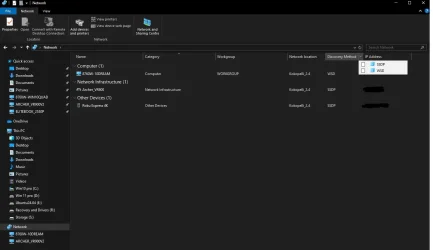
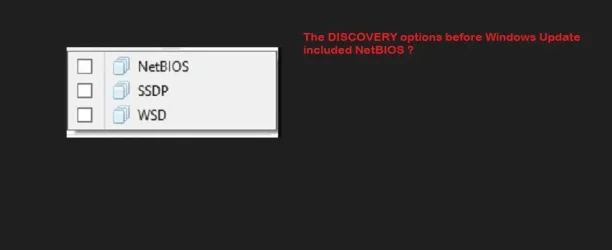
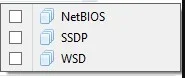
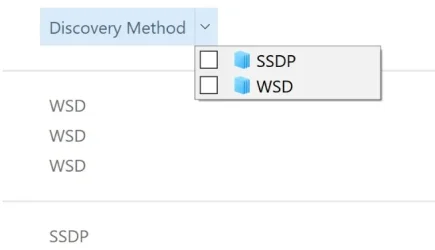
The reason is the NETWORK folder has stopped showing under DISCOVERY METHOD any NetBIOS shares ?

How can I make the Network folder show NetBIOS under the DISCOVERY METHOD ?

Please do not remind me that SMB 1 has security issues , I know about them and they are allowed for
but as this is a PRIVATE LAN with 4 PC's and the info on USB share will be irrelevant stuff , I am
not too bothered.


How DISCOVERY was before update.webpDISCOVERY after update.webpNetwork.webp
 
Last edited:

My Computer My Computer

At a glance

Win 10/11 , Ubuntu ( Tri Boot )
OS
Win 10/11 , Ubuntu ( Tri Boot )
Computer type
Laptop
Manufacturer/Model
HP 8760w Quad with Dreamcolor
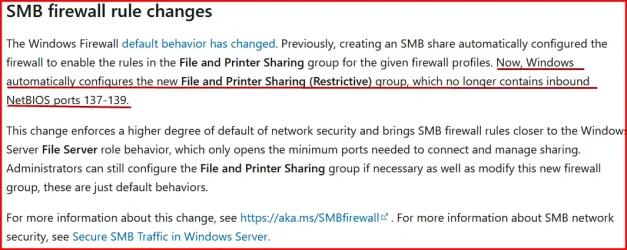
One of the changes for 24H2.

1758470768550.webp
 

My Computers My Computers

  • At a glance

    Win 11 Pro 25H2, Build 26200.8655Intel Core i5 1450064GB DDR4GeForce RTX 4060
    OS
    Win 11 Pro 25H2, Build 26200.8655
    Computer type
    PC/Desktop
    Manufacturer/Model
    Home Brew
    CPU
    Intel Core i5 14500
    Motherboard
    Gigabyte B760M G P WIFI
    Memory
    64GB DDR4
    Graphics Card(s)
    GeForce RTX 4060
    Sound Card
    Chipset Realtek
    Monitor(s) Displays
    LG 45" Ultragear, Acer 24" 1080p
    Screen Resolution
    5120x1440, 1920x1080
    Hard Drives
    Crucial P310 2TB 2280 PCIe Gen4 3D NAND NVMe M.2 SSD (O/S)
    Silicon Power 2TB US75 NVMe PCIe Gen4 M.2 2280 SSD (backup)
    Crucial BX500 2TB 3D NAND (2nd backup)
    Seagate 4TB Ironwolf, rotating HDD archive files
    External off-line backup Drives: 2 NVMe 4TB drives in external enclosures
    PSU
    Thermaltake Toughpower GF3 750W
    Case
    LIAN LI LANCOOL 216 E-ATX PC Case
    Cooling
    Lots of fans!
    Keyboard
    Microsoft Comfort Curve 2000
    Mouse
    Logitech G305
    Internet Speed
    Verizon FiOS 1GB
    Browser
    Firefox
    Antivirus
    Malware Bytes & Windows Defender Security
  • At a glance

    Win 11 Pro 25H2, Build 26200.8524Intel Core i5 1440032GB DDR5Intel 700 Embedded GPU
    Operating System
    Win 11 Pro 25H2, Build 26200.8524
    Computer type
    PC/Desktop
    Manufacturer/Model
    Home Brew
    CPU
    Intel Core i5 14400
    Motherboard
    Gigabyte B760M DS3H AX
    Memory
    32GB DDR5
    Graphics card(s)
    Intel 700 Embedded GPU
    Sound Card
    Realtek Embedded
    Monitor(s) Displays
    27" HP 1080p
    Screen Resolution
    1920x1080
    Hard Drives
    Crucial P310 2TB 2280 PCIe Gen4 eD NAND PCIe SSD
    Samsung EVO 990 2TB NVMe Gen4 SSD
    Samsung 2TB SATA SSD
    PSU
    Thermaltake Smart BM3 650W
    Case
    Okinos Micro ATX Case
    Cooling
    Fans
    Keyboard
    Microsoft Comfort Curve 2000
    Mouse
    Logitech G305
    Internet Speed
    Verizon FiOS 1GB
    Browser
    Firefox
    Antivirus
    Malware Bytes & Windows Defender Security
Thanks for the reply and as I said I am well aware of what enabling SMB 1 on my Home Network envisages .

My FIREWALL rules are all correct , as I said I DO NOT HAVE ANY ACCESS ISSUES with the USB share .

However your reply did not in any way respond to my question of how or why the NetBIOS option
in the drop down in NETWORK DISCOVERY has been removed or how to re enable it .

Please look at the pictures above to understand what my question is .
 

My Computer My Computer

At a glance

Win 10/11 , Ubuntu ( Tri Boot )
OS
Win 10/11 , Ubuntu ( Tri Boot )
Computer type
Laptop
Manufacturer/Model
HP 8760w Quad with Dreamcolor
Discovery Options BEFORE update.webp
 

My Computer My Computer

At a glance

Win 10/11 , Ubuntu ( Tri Boot )
OS
Win 10/11 , Ubuntu ( Tri Boot )
Computer type
Laptop
Manufacturer/Model
HP 8760w Quad with Dreamcolor
Back
Top Bottom