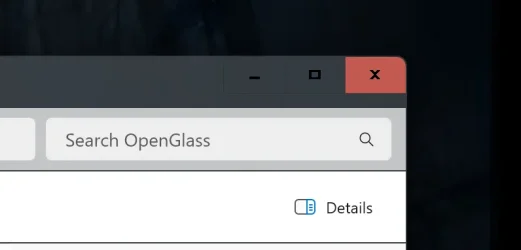
Solved Glitched out Title Bar Buttons?


okod

New member
Local time
9:26 AM
Posts
3
OS
Windows 11
Hey Folks,

I recently upgraded from Win10 to Windows11 23H2, and after installing a bunch of programs (explorerpatcher, SAB, 7TT, Openglass, ClassicShell, WinAero Tweaker) to restore the Windows 7 style, I ran into a weird issue with my title bar buttons. When inactive, they look fairly normal, however when the window is active, the close button is always appearing highlighted. Also, there's these weird seperators between the buttons that were never there before. Any ideas?
 
Windows Build/Version
Windows 11 23H2

Attachments

  • Screenshot 2024-12-20 201756.webp
    Screenshot 2024-12-20 201756.webp
    6.3 KB · Views: 2
  • Screenshot 2024-12-20 201848.webp
    Screenshot 2024-12-20 201848.webp
    5.7 KB · Views: 1

My Computer

System One

  • OS
    Windows 11
First, welcome to ElevenForum!

My suggestion would be to start with uninstalling apps that modify the Windows UI to see if maybe you are encountering a compatibility issue. If that resolves the issue, try checking for updates to these programs before reinstalling.
 

My Computers

System One System Two

  • OS
    Win11 Pro 25H2 (RTM+)
    Computer type
    PC/Desktop
    Manufacturer/Model
    Acemagic
    CPU
    Intel i7-14650HX
    Memory
    32 GB
    Graphics Card(s)
    No GPU - Built-in Intel Graphics
    Sound Card
    Integrated
    Monitor(s) Displays
    Varies as machine will often be moved to locations with different monitors
    Screen Resolution
    Varies
    Hard Drives
    1 x 1TB Gen 4 NVMe SSD
    PSU
    120W Power Brick
    Keyboard
    Corsair K70 Max RGB Magnetic Keyboard
    Mouse
    Logitech MX Master 3
    Internet Speed
    1Gb Up / 1 Gb Down
    Browser
    Edge
    Antivirus
    Windows Defender
  • Operating System
    Win11 Pro 25H2 (RTM+)
    Computer type
    Laptop
    Manufacturer/Model
    Lenovo ThinkBook 13x Gen 2
    CPU
    Intel i7-1255U
    Memory
    16 GB
    Graphics card(s)
    Intel Iris Xe Graphics
    Sound Card
    Realtek® ALC3306-CG codec
    Monitor(s) Displays
    13.3-inch IPS Display
    Screen Resolution
    WQXGA (2560 x 1600)
    Hard Drives
    2 TB 4 x 4 NVMe SSD
    PSU
    USB-C / Thunderbolt 4 Power / Charging
    Keyboard
    Backlit, spill resistant keyboard
    Mouse
    Buttonless Glass Precision Touchpad
    Internet Speed
    1Gb Up / 1Gb Down
    Browser
    Edge
    Antivirus
    Windows Defender
    Other Info
    WiFi 6e / Bluetooth 5.1 / Facial Recognition / Fingerprint Sensor / ToF (Time of Flight) Human Presence Sensor
did you apply a theme atlas? or used uxthemepatcher and just applied a prebuilt theme?
 

My Computer

System One

  • OS
    Windows 11 Pro
First, welcome to ElevenForum!

My suggestion would be to start with uninstalling apps that modify the Windows UI to see if maybe you are encountering a compatibility issue. If that resolves the issue, try checking for updates to these programs before reinstalling.
Thank you =)!

Yep, that was the first thing I did. I uninstalled everything, and tried to undo all of my changes (aside from some OpenGlass DWM registry edits I made, however this issue precedes them). My windows 11 is as close to factory settings as I could get it, without having to do a fresh install, which I'm saving as a last resort.
 

My Computer

System One

  • OS
    Windows 11
did you apply a theme atlas? or used uxthemepatcher and just applied a prebuilt theme?
Yep, that was what I forgot to undo. You nailed it, and have resolved a three hour headache. Thank you very much, friend!

Edit: For context, I restarted my theme in Personalization, and that resolved the issue.
 

My Computer

System One

  • OS
    Windows 11
Back
Top Bottom