You are using an out of date browser. It may not display this or other websites correctly.
You should upgrade or use an
alternative browser.
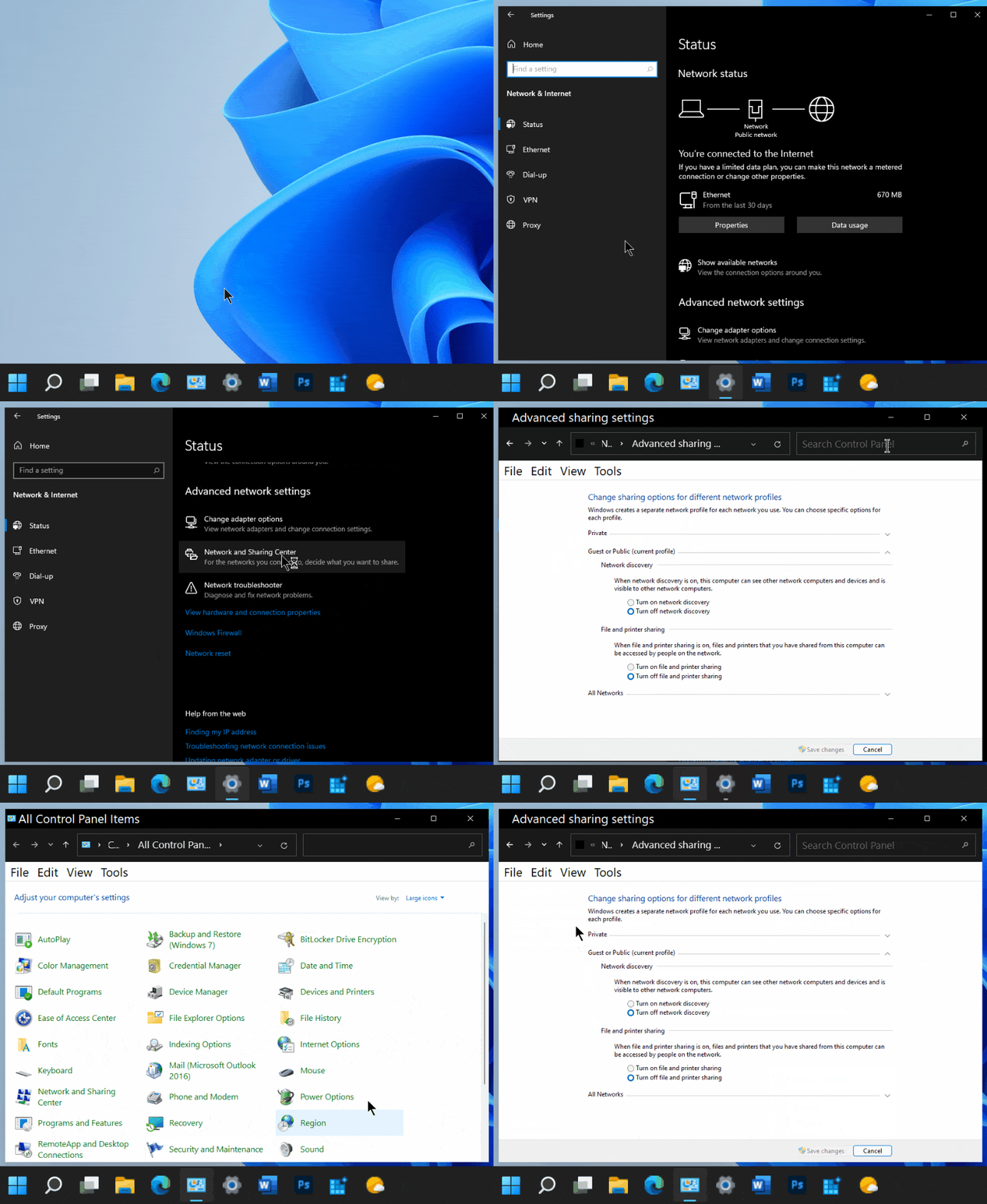
Has anyone found a way to access advanced sharing settings from the new settings GUI?
Well-known member
Guru
VIP
In Windows 10, it was easy to access the Advanced Sharing settings from the Setup GUI.
In Win 11 I can't seem to find how to access this other than by going through the legacy Control Panel.
Not a big deal, just wanted to see if anyone saw a way to do this that I might be missing.
-
Win11 Pro 25H2 (RTM+)Intel i7-14650HX32 GBNo GPU - Built-in Intel Graphics
- OS
- Win11 Pro 25H2 (RTM+)
- Computer type
- PC/Desktop
- Manufacturer/Model
- Acemagic
- CPU
- Intel i7-14650HX
- Memory
- 32 GB
- Graphics Card(s)
- No GPU - Built-in Intel Graphics
- Sound Card
- Integrated
- Monitor(s) Displays
- Varies as machine will often be moved to locations with different monitors
- Screen Resolution
- Varies
- Hard Drives
- 1 x 1TB Gen 4 NVMe SSD
- PSU
- 120W Power Brick
- Keyboard
- Corsair K70 Max RGB Magnetic Keyboard
- Mouse
- Logitech MX Master 3
- Internet Speed
- 1Gb Up / 1 Gb Down
- Browser
- Edge
- Antivirus
- Windows Defender
-
Win11 Pro 25H2 (RTM+)Intel i7-1255U16 GBIntel Iris Xe Graphics
- Operating System
- Win11 Pro 25H2 (RTM+)
- Computer type
- Laptop
- Manufacturer/Model
- Lenovo ThinkBook 13x Gen 2
- CPU
- Intel i7-1255U
- Memory
- 16 GB
- Graphics card(s)
- Intel Iris Xe Graphics
- Sound Card
- Realtek® ALC3306-CG codec
- Monitor(s) Displays
- 13.3-inch IPS Display
- Screen Resolution
- WQXGA (2560 x 1600)
- Hard Drives
- 2 TB 4 x 4 NVMe SSD
- PSU
- USB-C / Thunderbolt 4 Power / Charging
- Keyboard
- Backlit, spill resistant keyboard
- Mouse
- Buttonless Glass Precision Touchpad
- Internet Speed
- 1Gb Up / 1Gb Down
- Browser
- Edge
- Antivirus
- Windows Defender
- Other Info
- WiFi 6e / Bluetooth 5.1 / Facial Recognition / Fingerprint Sensor / ToF (Time of Flight) Human Presence Sensor
Well-known member
Power User
VIP
type systempropertiesadvanced.exe in the Run dialog
Oh. my wrong.
It should be in the About setting.
-
Windows 11 HomeCore i5-12450HX20GB DDR5-4800iGPU + RTX 3050 Mobile (6GB)
- OS
- Windows 11 Home
- Computer type
- Laptop
- Manufacturer/Model
- Lenovo
- CPU
- Core i5-12450HX
- Memory
- 20GB DDR5-4800
- Graphics Card(s)
- iGPU + RTX 3050 Mobile (6GB)
- Sound Card
- Realtek
- Monitor(s) Displays
- the built-in laptop screen, and a generic monitor
- Screen Resolution
- 1080p * 2
- Hard Drives
- GIGABYTE NVMe SSD 256GB (GP-GSM2NE3256GNTD)
Micron NVMe SSD 512GB (MTFDKCD512QFM-1BDIAABLA)
- Browser
- Firefox
- Antivirus
- WD
-
Windows 10 ProCore i3-21004GB DDR3-2133iGPU
- Operating System
- Windows 10 Pro
- Computer type
- PC/Desktop
- Manufacturer/Model
- Dell
- CPU
- Core i3-2100
- Memory
- 4GB DDR3-2133
- Graphics card(s)
- iGPU
- Screen Resolution
- 1080p
- Antivirus
- WD
Well-known member
Guru
VIP
Thread Starter
This is the screen I was talking about. Still not seeing if from Settings.

-
Win11 Pro 25H2 (RTM+)Intel i7-14650HX32 GBNo GPU - Built-in Intel Graphics
- OS
- Win11 Pro 25H2 (RTM+)
- Computer type
- PC/Desktop
- Manufacturer/Model
- Acemagic
- CPU
- Intel i7-14650HX
- Memory
- 32 GB
- Graphics Card(s)
- No GPU - Built-in Intel Graphics
- Sound Card
- Integrated
- Monitor(s) Displays
- Varies as machine will often be moved to locations with different monitors
- Screen Resolution
- Varies
- Hard Drives
- 1 x 1TB Gen 4 NVMe SSD
- PSU
- 120W Power Brick
- Keyboard
- Corsair K70 Max RGB Magnetic Keyboard
- Mouse
- Logitech MX Master 3
- Internet Speed
- 1Gb Up / 1 Gb Down
- Browser
- Edge
- Antivirus
- Windows Defender
-
Win11 Pro 25H2 (RTM+)Intel i7-1255U16 GBIntel Iris Xe Graphics
- Operating System
- Win11 Pro 25H2 (RTM+)
- Computer type
- Laptop
- Manufacturer/Model
- Lenovo ThinkBook 13x Gen 2
- CPU
- Intel i7-1255U
- Memory
- 16 GB
- Graphics card(s)
- Intel Iris Xe Graphics
- Sound Card
- Realtek® ALC3306-CG codec
- Monitor(s) Displays
- 13.3-inch IPS Display
- Screen Resolution
- WQXGA (2560 x 1600)
- Hard Drives
- 2 TB 4 x 4 NVMe SSD
- PSU
- USB-C / Thunderbolt 4 Power / Charging
- Keyboard
- Backlit, spill resistant keyboard
- Mouse
- Buttonless Glass Precision Touchpad
- Internet Speed
- 1Gb Up / 1Gb Down
- Browser
- Edge
- Antivirus
- Windows Defender
- Other Info
- WiFi 6e / Bluetooth 5.1 / Facial Recognition / Fingerprint Sensor / ToF (Time of Flight) Human Presence Sensor
Administrator
Staff member
That's from the leaked build, settings are completely different now.
-
Windows 11 WorkstationRyzen 9 5950XCorsair Vengeance RGB PRO Black 64GB (4x16GB)...ASUS AMD Radeon RX 6900 XT 16GB ROG Strix LC OC
- OS
- Windows 11 Workstation
- Computer type
- PC/Desktop
- Manufacturer/Model
- doofenshmirtz evil incorporated
- CPU
- Ryzen 9 5950X
- Motherboard
- Asus ROG Crosshair VIII Formula
- Memory
- Corsair Vengeance RGB PRO Black 64GB (4x16GB) 3600MHz AMD Ryzen Tuned DDR4
- Graphics Card(s)
- ASUS AMD Radeon RX 6900 XT 16GB ROG Strix LC OC
- Sound Card
- Sound BlasterX Katana
- Monitor(s) Displays
- 3 x27" Dell U2724D & 1 x 34" Dell U3415W
- Hard Drives
- Samsung 980 Pro 1TB M.2 2280 PCI-e 4.0 x4 NVMe Solid State
Drive
- PSU
- ASUS ROG THOR 850W 80 Plus Platinum
- Case
- ASUS ROG Strix Helios Midi-Tower ARGB Gaming Case
- Cooling
- ASUS ROG Strix LC Performance RGB AIO CPU Liquid Cooler - 360mm
- Keyboard
- Logi Ergo
- Mouse
- Logitech MX Vertical
- Internet Speed
- 1000/200 Mbps
- Browser
- Chrome
- Antivirus
- Windows Defender, Malwarebytes Pro
- Other Info
- HP M281 Printer
Logitech Brio Stream webcam
Logitech G Yeti orb mic
-
Windows 11 ProSnapdragon X2 Plus64GB
- Operating System
- Windows 11 Pro
- Computer type
- Laptop
- Manufacturer/Model
- Surface Laptop
- CPU
- Snapdragon X2 Plus
- Memory
- 64GB
- Monitor(s) Displays
- 15"
-
Well-known member
Guru
VIP
Thread Starter
Thanks, I should have been more clear on that point. I mean specifically in the new insider build. The settings UI has been completely changed.
I've got to stop posting in the middle of the night. I tend to leave off important details

-
Win11 Pro 25H2 (RTM+)Intel i7-14650HX32 GBNo GPU - Built-in Intel Graphics
- OS
- Win11 Pro 25H2 (RTM+)
- Computer type
- PC/Desktop
- Manufacturer/Model
- Acemagic
- CPU
- Intel i7-14650HX
- Memory
- 32 GB
- Graphics Card(s)
- No GPU - Built-in Intel Graphics
- Sound Card
- Integrated
- Monitor(s) Displays
- Varies as machine will often be moved to locations with different monitors
- Screen Resolution
- Varies
- Hard Drives
- 1 x 1TB Gen 4 NVMe SSD
- PSU
- 120W Power Brick
- Keyboard
- Corsair K70 Max RGB Magnetic Keyboard
- Mouse
- Logitech MX Master 3
- Internet Speed
- 1Gb Up / 1 Gb Down
- Browser
- Edge
- Antivirus
- Windows Defender
-
Win11 Pro 25H2 (RTM+)Intel i7-1255U16 GBIntel Iris Xe Graphics
- Operating System
- Win11 Pro 25H2 (RTM+)
- Computer type
- Laptop
- Manufacturer/Model
- Lenovo ThinkBook 13x Gen 2
- CPU
- Intel i7-1255U
- Memory
- 16 GB
- Graphics card(s)
- Intel Iris Xe Graphics
- Sound Card
- Realtek® ALC3306-CG codec
- Monitor(s) Displays
- 13.3-inch IPS Display
- Screen Resolution
- WQXGA (2560 x 1600)
- Hard Drives
- 2 TB 4 x 4 NVMe SSD
- PSU
- USB-C / Thunderbolt 4 Power / Charging
- Keyboard
- Backlit, spill resistant keyboard
- Mouse
- Buttonless Glass Precision Touchpad
- Internet Speed
- 1Gb Up / 1Gb Down
- Browser
- Edge
- Antivirus
- Windows Defender
- Other Info
- WiFi 6e / Bluetooth 5.1 / Facial Recognition / Fingerprint Sensor / ToF (Time of Flight) Human Presence Sensor
Antidisestablishmentarianist
Pro User
VIP
Settings --> Search for 'sharing' --> Manage advanced sharing settings --> profit.
-
Windows 11 23H2 Current buildAMD Ryzen 9 3950X4 * 32 GB - Corsair Vengeance 3600 MHzEVGA GeForce RTX 3080 Ti XC3 ULTRA GAMING (12...
- OS
- Windows 11 23H2 Current build
- Computer type
- PC/Desktop
- Manufacturer/Model
- HomeBrew
- CPU
- AMD Ryzen 9 3950X
- Motherboard
- MSI MEG X570 GODLIKE
- Memory
- 4 * 32 GB - Corsair Vengeance 3600 MHz
- Graphics Card(s)
- EVGA GeForce RTX 3080 Ti XC3 ULTRA GAMING (12G-P5-3955-KR)
- Sound Card
- Realtek® ALC1220 Codec
- Monitor(s) Displays
- 2x Eve Spectrum ES07D03 4K Gaming Monitor (Matte) | Eve Spectrum ES07DC9 4K Gaming Monitor (Glossy)
- Screen Resolution
- 3x 3840 x 2160
- Hard Drives
- 3x Samsung 980 Pro NVMe PCIe 4 M.2 2 TB SSD (MZ-V8P2T0B/AM) } 3x Sabrent Rocket NVMe 4.0 1 TB SSD (USB)
- PSU
- PC Power & Cooling’s Silencer Series 1050 Watt, 80 Plus Platinum
- Case
- Fractal Design Define 7 XL Dark ATX Full Tower Case
- Cooling
- Arctic Liquid Freezer III 420 RGB + Air 3x 140mm case fans (pull front) + 1x 120 mm (push back) and 1 x 120 mm (pull bottom)
- Keyboard
- SteelSeries Apex Pro Wired Gaming Keyboard
- Mouse
- Logitech MX Master 3S | MX Master 3 for Business
- Internet Speed
- AT&T LightSpeed Gigabit Duplex Ftth
- Browser
- Nightly (default) + Firefox (stable), Chrome, Edge , Arc
- Antivirus
- Defender + MB 5 Beta
-
ChromeOS Flex Dev Channel (current)Intel(R) Core(TM) i5-6300U CPU @ 2.40GHz, 250...16 GBIntel(R) HD Graphics 520
- Operating System
- ChromeOS Flex Dev Channel (current)
- Computer type
- Laptop
- Manufacturer/Model
- Dell Latitude E5470
- CPU
- Intel(R) Core(TM) i5-6300U CPU @ 2.40GHz, 2501 Mhz, 2 Core(s), 4 Logical Processor(s)
- Motherboard
- Dell
- Memory
- 16 GB
- Graphics card(s)
- Intel(R) HD Graphics 520
- Sound Card
- Intel(R) HD Graphics 520 + RealTek Audio
- Monitor(s) Displays
- Dell laptop display 15"
- Screen Resolution
- 1920 * 1080
- Hard Drives
- Toshiba 128GB M.2 22300 drive
INTEL Cherryville 520 Series SSDSC2CW180A 180 GB SATA III SSD
- PSU
- Dell
- Case
- Dell
- Cooling
- Dell
- Keyboard
- Dell
- Mouse
- Logitech MX Master 3S (shared w. Sys 1) | Dell TouchPad
- Internet Speed
- AT&T LightSpeed Gigabit Duplex Ftth