- Local time
- 2:57 AM
- Posts
- 821
- OS
- W11 Pro Future Platform 29600 branch latest build
I am trying to create a shortcut that can be pinned to the taskbar and that will open Libraries to the correct and full Library view. You would think this would be simple but apparently it is proving to be anything but.
Many moons ago it was possible to do just this and create a desktop shortcut that could then be pinned to the taskbar. Currently you can right click the Library header in the left hand pane and create a shortcut that can be pinned to the Start Menu but that is as good as it gets with W11 as it stands today.
What I have found out (if his makes any sense) is that the Library file path is not a 'real' path but more of a virtual one, something to do with Libraries being a Shell folder? and not a real physical location. It all seems pretty complicated.
The Start Menu shortcut you can create is a .lnk type and those are now rejected by the taskbar when you try to pin them. Apparently it needs to be a .exe that points to somewhere 'real' in order to be able to be pinned. I have heard it may be possible to use a short script to convert the file path that the Start Menu shortcut uses into such a .exe one and that point is where it all gets above my paygrade.
Would anyone be able to create a working file path that can be incorporated into a shortcut that can then be dragged or pinned to the taskbar such that it opens Libraries correctly with a single click?
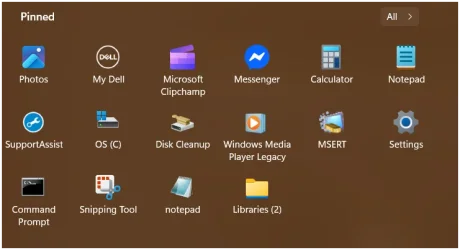
This pins the shortcut to the Start Menu:

And that shortcut it correctly opens Libraries to a full view. I want a similar shortcut on the Taskbar. Can it be done?

Many moons ago it was possible to do just this and create a desktop shortcut that could then be pinned to the taskbar. Currently you can right click the Library header in the left hand pane and create a shortcut that can be pinned to the Start Menu but that is as good as it gets with W11 as it stands today.
What I have found out (if his makes any sense) is that the Library file path is not a 'real' path but more of a virtual one, something to do with Libraries being a Shell folder? and not a real physical location. It all seems pretty complicated.
The Start Menu shortcut you can create is a .lnk type and those are now rejected by the taskbar when you try to pin them. Apparently it needs to be a .exe that points to somewhere 'real' in order to be able to be pinned. I have heard it may be possible to use a short script to convert the file path that the Start Menu shortcut uses into such a .exe one and that point is where it all gets above my paygrade.
Would anyone be able to create a working file path that can be incorporated into a shortcut that can then be dragged or pinned to the taskbar such that it opens Libraries correctly with a single click?
This pins the shortcut to the Start Menu:
And that shortcut it correctly opens Libraries to a full view. I want a similar shortcut on the Taskbar. Can it be done?
My Computer
At a glance
W11 Pro Future Platform 29600 branch latest b...Intel i58GbIntel HD Graphics
- OS
- W11 Pro Future Platform 29600 branch latest build
- Computer type
- Laptop
- Manufacturer/Model
- Dell 7760 Mobile Precision 17"
- CPU
- Intel i5
- Motherboard
- Unknown
- Memory
- 8Gb
- Graphics Card(s)
- Intel HD Graphics
- Sound Card
- Realtek
- Monitor(s) Displays
- Internal
- Hard Drives
- 2 x 256Gb SSD
- PSU
- Dell 240 watt
- Mouse
- Dell Premier Bluetooth
- Internet Speed
- 50Mbps
- Browser
- Edge
- Antivirus
- Default Microsoft Security