
Solved How do I create a Powershell shortcut to the new CTT?


cheaterslick

Well-known member
Power User
Local time
2:35 PM
Posts
1,413
Location
Virginia, USA
OS
Windows 11 Pro 25H2 build: (26200.7623)
For the Chris Titus Utility Tool, at one time there used to be a Create WinUtil Shortcut button down on the lower right to create one as you can see here:
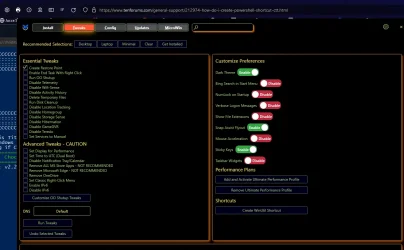

oldCTT.webp


But that's now disappeared as you can see here:
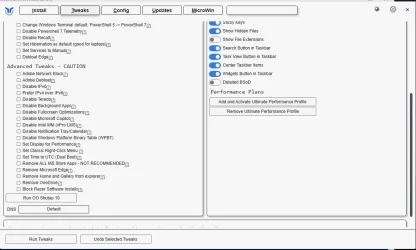

newCTT.webp


The Shortcuts category is gone. Does anybody know where it went to? I looked all over but I could've missed it from somewhere.

Thanks for any help.
 

My Computers

System One System Two

  • OS
    Windows 11 Pro 25H2 build: (26200.7623)
    Computer type
    Laptop
    Manufacturer/Model
    Microsoft Surface Pro
    Memory
    32GB
  • Operating System
    Microsoft 25H2 Pro
    Computer type
    Laptop
    Manufacturer/Model
    Dell Pro 14 - PC14250
    CPU
    Intel Core Ultra 7
    Memory
    64GB
    Graphics card(s)
    Intel Integrated Graphics
    Hard Drives
    Micron 1TB SSD
Looking at the old code, it looks like the shortcut just pointed to

powershell.exe -NoProfile -ExecutionPolicy Bypass -Command "irm https://christitus.com/win | iex"
 

My Computer

System One

  • OS
    Windows 11 Pro 25H2
    Computer type
    PC/Desktop
    Manufacturer/Model
    Intel NUC12WSHi7
    CPU
    12th Gen Core i7-1260P
    Motherboard
    NUC12WSBi7
    Memory
    64 GB Micron PC4-25600
    Graphics Card(s)
    Intel Iris Xe Graphics
    Sound Card
    on-board Realtek HD Audio
    Monitor(s) Displays
    Dell U3219Q
    Screen Resolution
    3840 x 2160
    Hard Drives
    Samsung SSD 990 PRO 1TB
    Crucial MX500 2 TB
    Antivirus
    Microsoft Defender
Heh, create a shortcut to call PS7 to call PS7 …

"C:\Program Files\PowerShell\7\pwsh.exe" -ExecutionPolicy Bypass -Command "Start-Process pwsh.exe… etc etc
 

My Computer

System One

  • OS
    Windows 11 Pro 25H2
    Computer type
    PC/Desktop
    Manufacturer/Model
    Intel NUC12WSHi7
    CPU
    12th Gen Core i7-1260P
    Motherboard
    NUC12WSBi7
    Memory
    64 GB Micron PC4-25600
    Graphics Card(s)
    Intel Iris Xe Graphics
    Sound Card
    on-board Realtek HD Audio
    Monitor(s) Displays
    Dell U3219Q
    Screen Resolution
    3840 x 2160
    Hard Drives
    Samsung SSD 990 PRO 1TB
    Crucial MX500 2 TB
    Antivirus
    Microsoft Defender
According to GitHub issues, it was intentionally removed because 3rd-party AV constantly blocked the shortcut.

The workaround for manually recreating it:
How to: manually create Winutil shortcut · ChrisTitusTech winutil · Discussion #3127

Ah, so that's what happened... :cautious:

Yeah, the only reason I asked is I'm going to install this on another new laptop and was wondering where it went to. My AV never flagged it after I initially (manually) launched it the first time.

Thing is, where can I find that cttlogo.ico ? Clicking on that WinUtil icon: link towards the bottom of his post, takes me nowhere.
 

My Computers

System One System Two

  • OS
    Windows 11 Pro 25H2 build: (26200.7623)
    Computer type
    Laptop
    Manufacturer/Model
    Microsoft Surface Pro
    Memory
    32GB
  • Operating System
    Microsoft 25H2 Pro
    Computer type
    Laptop
    Manufacturer/Model
    Dell Pro 14 - PC14250
    CPU
    Intel Core Ultra 7
    Memory
    64GB
    Graphics card(s)
    Intel Integrated Graphics
    Hard Drives
    Micron 1TB SSD
Scroll back in the workaround. Poster recommends borrowing one of the other PNG’s for the missing .ico file.
 

My Computer

System One

  • OS
    Windows 7

My Computers

System One System Two

  • OS
    Windows 11 Pro 25H2 build: (26200.7623)
    Computer type
    Laptop
    Manufacturer/Model
    Microsoft Surface Pro
    Memory
    32GB
  • Operating System
    Microsoft 25H2 Pro
    Computer type
    Laptop
    Manufacturer/Model
    Dell Pro 14 - PC14250
    CPU
    Intel Core Ultra 7
    Memory
    64GB
    Graphics card(s)
    Intel Integrated Graphics
    Hard Drives
    Micron 1TB SSD

Latest Support Threads

Back
Top Bottom




