

Random_One0113
Member
- Local time
- 4:44 AM
- Posts
- 8
- OS
- Windows 10/11
This might sound like a silly question, but I'm really curious after my friend brought it up.
When you use the volume up key and turn up the volume, it simply goes up in increments of two.
However, when you push the volume down key repeatedly, after a certain number of clicks, the volume starts to decrease at a faster rate. Sometimes, it's decreasing by 10, other times, it's going by more.
The volume where Windows starts to decrease faster is also random and can be anywhere from 50-80.
I tried to graph the amount that it seems to decrease by but I don't think I got it right.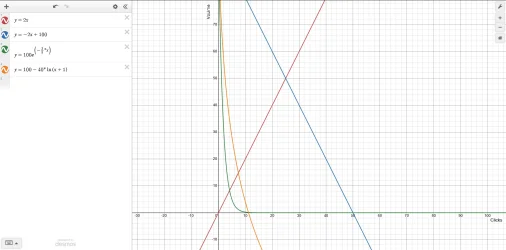
The red line is what the volume goes up by (increments of 2)
The blue line is how it would look if the volume were to decrease gradually by 2.
The green line is an exponential function that probably isn't right.
The orange line is a logarithmic function that looks wrong as well.
Does anybody know what the volume decreases by?
Also, if I posted in the wrong place, I think I can change it.
Thank you!
When you use the volume up key and turn up the volume, it simply goes up in increments of two.
However, when you push the volume down key repeatedly, after a certain number of clicks, the volume starts to decrease at a faster rate. Sometimes, it's decreasing by 10, other times, it's going by more.
The volume where Windows starts to decrease faster is also random and can be anywhere from 50-80.
I tried to graph the amount that it seems to decrease by but I don't think I got it right.
The red line is what the volume goes up by (increments of 2)
The blue line is how it would look if the volume were to decrease gradually by 2.
The green line is an exponential function that probably isn't right.
The orange line is a logarithmic function that looks wrong as well.
Does anybody know what the volume decreases by?
Also, if I posted in the wrong place, I think I can change it.
Thank you!
My Computer
At a glance
Windows 10/11AMD E2-7110 APU16GB DDR3LIntegrated AMD Radeon R2 Graphics
- OS
- Windows 10/11
- Computer type
- Laptop
- Manufacturer/Model
- HP Pavilion 15
- CPU
- AMD E2-7110 APU
- Memory
- 16GB DDR3L
- Graphics Card(s)
- Integrated AMD Radeon R2 Graphics
- Monitor(s) Displays
- 1
- Screen Resolution
- 1366 x 768
- Hard Drives
- 1TB WD Blue SATA SSD
- Keyboard
- Full-sized Built-in US Keyboard
- Mouse
- Built-in Non-Precision Touchpad
- Browser
- Firefox/Microsoft Edge
- Antivirus
- Windows Defender






