I am not receiving update to 24H2 version


My Computer My Computer

At a glance

Windows 10Intel(R) Core(TM) i7-4800MQ CPU @ 2.70GHz16 GB Total: Manufacturer : Samsung MemoryTyp...NVIDIA Quadro K3100M; Intel(R) HD Graphics 4600
OS
Windows 10
Computer type
Laptop
Manufacturer/Model
HP
CPU
Intel(R) Core(TM) i7-4800MQ CPU @ 2.70GHz
Motherboard
Product : 190A Version : KBC Version 94.56
Memory
16 GB Total: Manufacturer : Samsung MemoryType : DDR3 FormFactor : SODIMM Capacity : 8GB Speed : 1600
Graphics Card(s)
NVIDIA Quadro K3100M; Intel(R) HD Graphics 4600
Sound Card
IDT High Definition Audio CODEC; PNP Device ID HDAUDIO\FUNC_01&VEN_111D&DEV_76E0
Hard Drives
Model Hitachi HTS727575A9E364
Antivirus
Microsoft Defender
Other Info
Mobile Workstation
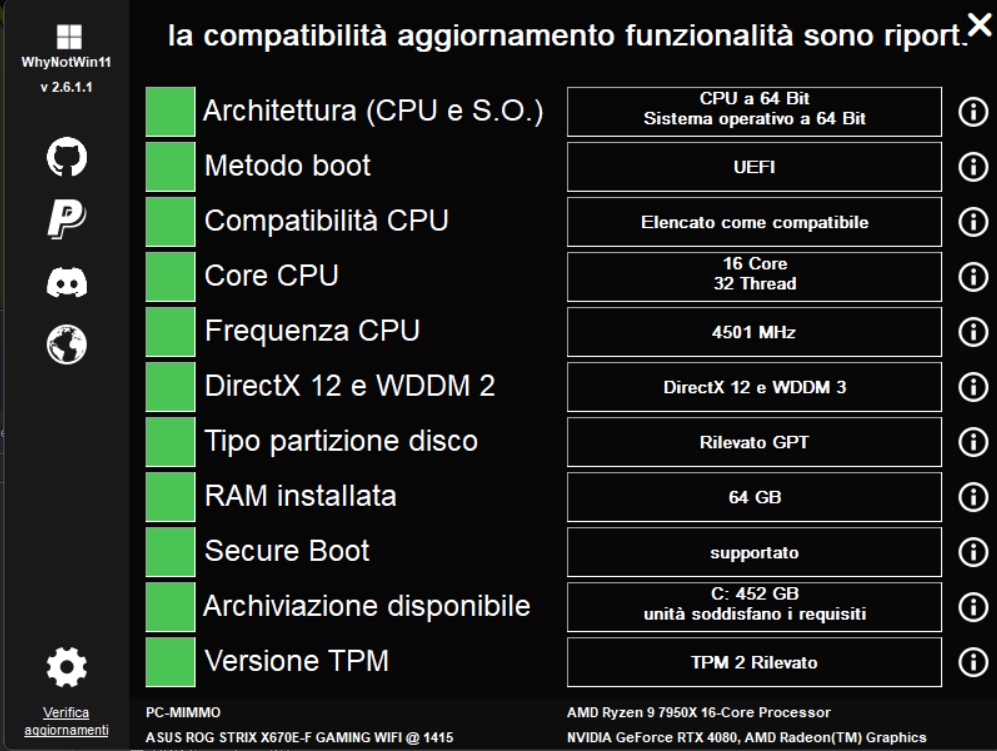
This is the result of the test.

Immagine-2025-03-29-192418.png


Immagine-2025-03-29-192100.png
 

My Computer My Computer

At a glance

W11CPU AMD Ryzen 9 7950XG.Skill Flare X5 32GB Kit DDR5-6000 CL32 (F5-...
OS
W11
Computer type
PC/Desktop
CPU
CPU AMD Ryzen 9 7950X
Motherboard
ASUS ROG Strix X670E-F Gaming WiFi
Memory
G.Skill Flare X5 32GB Kit DDR5-6000 CL32 (F5-6000J3238F16GX2-FX5)
Monitor(s) Displays
LG E2381VR
Screen Resolution
1920x1080
Hard Drives
1x Samsung Memorie MZ-V8P1T0B 980 PRO SSD 1TB
2x Western Digital WD Red Nas 4TB
PSU
SEASONIC FOCUS PX-850 Plus Platinum
Case
Corsair 4000D Airflow
Cooling
ARCTIC Liquid Freezer II 280 A-RGB
Keyboard
Logitech G510
Mouse
Logitech G502 HERO
Browser
Firefox
Antivirus
Avg free
Other Info
Download: 90 Mbps
Upload: 20Mbps
The first image had the results cut-off.

Why not post a full result?

Type: ver

Post a share link
 

My Computer My Computer

At a glance

Windows 10Intel(R) Core(TM) i7-4800MQ CPU @ 2.70GHz16 GB Total: Manufacturer : Samsung MemoryTyp...NVIDIA Quadro K3100M; Intel(R) HD Graphics 4600
OS
Windows 10
Computer type
Laptop
Manufacturer/Model
HP
CPU
Intel(R) Core(TM) i7-4800MQ CPU @ 2.70GHz
Motherboard
Product : 190A Version : KBC Version 94.56
Memory
16 GB Total: Manufacturer : Samsung MemoryType : DDR3 FormFactor : SODIMM Capacity : 8GB Speed : 1600
Graphics Card(s)
NVIDIA Quadro K3100M; Intel(R) HD Graphics 4600
Sound Card
IDT High Definition Audio CODEC; PNP Device ID HDAUDIO\FUNC_01&VEN_111D&DEV_76E0
Hard Drives
Model Hitachi HTS727575A9E364
Antivirus
Microsoft Defender
Other Info
Mobile Workstation
An upgrade requires at least 30G of free space on the main drive.

Why don't you do an in place upgrade? Download Win11 24h2 iso file and, under windows, run setup.
 

My Computers My Computers

  • At a glance

    Windows 11 Pro - Windows 7 HP 64 - Lubuntui5 6600K - 800MHz to 4400MHz4+4G GSkill DDR4 3000IG - Intel 530
    OS
    Windows 11 Pro - Windows 7 HP 64 - Lubuntu
    Computer type
    PC/Desktop
    Manufacturer/Model
    custom build
    CPU
    i5 6600K - 800MHz to 4400MHz
    Motherboard
    GA-Z170-HD3P
    Memory
    4+4G GSkill DDR4 3000
    Graphics Card(s)
    IG - Intel 530
    Monitor(s) Displays
    Samsung 226BW
    Screen Resolution
    1680x1050
    Hard Drives
    (1) -1 SM951 – 128GB M.2 AHCI PCIe SSD drive for Win 11
    (2) -1 WD SATA 3 - 1T for Data
    (3) -1 WD SATA 3 - 1T for backup
    (4) -1 BX500 SSD - 256G for Windows 7 and Lubuntu
    PSU
    Thermaltake 450W TR2 gold
    Keyboard
    Old and good Chicony mechanical keyboard
    Mouse
    Logitech mX performance - 9 buttons (had to disable some)
    Internet Speed
    500 Mb/s
    Browser
    Firefox 64
  • At a glance

    Windows 11 Proi7-4500U 800- 3000MHz(4+4)G DDR3 1600IG intel 4400 + NVIDIA GeForce GT 745M
    Operating System
    Windows 11 Pro
    Computer type
    Laptop
    Manufacturer/Model
    Asus Q550LF
    CPU
    i7-4500U 800- 3000MHz
    Motherboard
    Asus Q550LF
    Memory
    (4+4)G DDR3 1600
    Graphics card(s)
    IG intel 4400 + NVIDIA GeForce GT 745M
    Sound Card
    Realtek
    Monitor(s) Displays
    LG Display LP156WF4-SPH1
    Screen Resolution
    1920 x 1080
    Hard Drives
    BX500 120G SSD for Windows and programs
    & 1T HDD for data
    Internet Speed
    500 Mb/s
    Browser
    Firefox 64
  • Like
Reactions: DMD

My Computer My Computer

At a glance

W11CPU AMD Ryzen 9 7950XG.Skill Flare X5 32GB Kit DDR5-6000 CL32 (F5-...
OS
W11
Computer type
PC/Desktop
CPU
CPU AMD Ryzen 9 7950X
Motherboard
ASUS ROG Strix X670E-F Gaming WiFi
Memory
G.Skill Flare X5 32GB Kit DDR5-6000 CL32 (F5-6000J3238F16GX2-FX5)
Monitor(s) Displays
LG E2381VR
Screen Resolution
1920x1080
Hard Drives
1x Samsung Memorie MZ-V8P1T0B 980 PRO SSD 1TB
2x Western Digital WD Red Nas 4TB
PSU
SEASONIC FOCUS PX-850 Plus Platinum
Case
Corsair 4000D Airflow
Cooling
ARCTIC Liquid Freezer II 280 A-RGB
Keyboard
Logitech G510
Mouse
Logitech G502 HERO
Browser
Firefox
Antivirus
Avg free
Other Info
Download: 90 Mbps
Upload: 20Mbps
An upgrade requires at least 30G of free space on the main drive.

Why don't you do an in place upgrade? Download Win11 24h2 iso file and, under windows, run setup.
Yes. I had already decided on this option anyway, I just wanted to confirm because I don't get norified wia W.U. update.
By now it seems that it is the motherboard that is not covered in the update.
 

My Computer My Computer

At a glance

W11CPU AMD Ryzen 9 7950XG.Skill Flare X5 32GB Kit DDR5-6000 CL32 (F5-...
OS
W11
Computer type
PC/Desktop
CPU
CPU AMD Ryzen 9 7950X
Motherboard
ASUS ROG Strix X670E-F Gaming WiFi
Memory
G.Skill Flare X5 32GB Kit DDR5-6000 CL32 (F5-6000J3238F16GX2-FX5)
Monitor(s) Displays
LG E2381VR
Screen Resolution
1920x1080
Hard Drives
1x Samsung Memorie MZ-V8P1T0B 980 PRO SSD 1TB
2x Western Digital WD Red Nas 4TB
PSU
SEASONIC FOCUS PX-850 Plus Platinum
Case
Corsair 4000D Airflow
Cooling
ARCTIC Liquid Freezer II 280 A-RGB
Keyboard
Logitech G510
Mouse
Logitech G502 HERO
Browser
Firefox
Antivirus
Avg free
Other Info
Download: 90 Mbps
Upload: 20Mbps
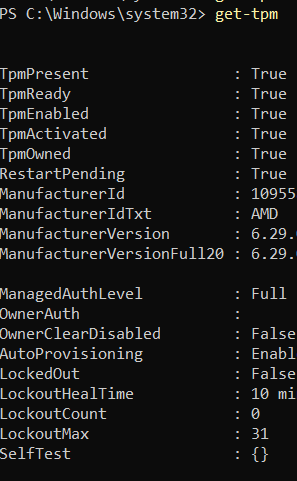
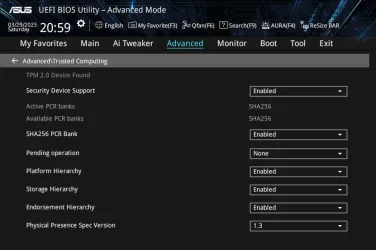
To be scrupulous, I checked the bios, the TPM is on.

250329185023-rid.png

Also look at Advanced/Trusted Computing for TPM info.

TPM.webp

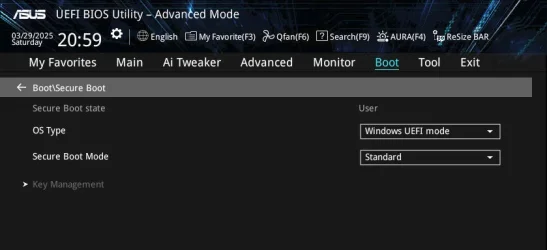
Other red reason you had was UEFI secure boot which is required for 24H2 to install.
Want it set like this:

Boot.webp
 

My Computer My Computer

At a glance

Windows 11 Pro
OS
Windows 11 Pro
These are the current settings

250330124219-rid.png


250330124307.png
 

My Computer My Computer

At a glance

W11CPU AMD Ryzen 9 7950XG.Skill Flare X5 32GB Kit DDR5-6000 CL32 (F5-...
OS
W11
Computer type
PC/Desktop
CPU
CPU AMD Ryzen 9 7950X
Motherboard
ASUS ROG Strix X670E-F Gaming WiFi
Memory
G.Skill Flare X5 32GB Kit DDR5-6000 CL32 (F5-6000J3238F16GX2-FX5)
Monitor(s) Displays
LG E2381VR
Screen Resolution
1920x1080
Hard Drives
1x Samsung Memorie MZ-V8P1T0B 980 PRO SSD 1TB
2x Western Digital WD Red Nas 4TB
PSU
SEASONIC FOCUS PX-850 Plus Platinum
Case
Corsair 4000D Airflow
Cooling
ARCTIC Liquid Freezer II 280 A-RGB
Keyboard
Logitech G510
Mouse
Logitech G502 HERO
Browser
Firefox
Antivirus
Avg free
Other Info
Download: 90 Mbps
Upload: 20Mbps
Over time, I have seen many instances of people suggesting the use of a sledgehammer to pound in a finishing nail when it comes to Windows. I cannot begin to list the number of times where the simplest solution turned out to be the correct course of action. I see it here in this thread too: drastic measures such as complete reinstallation of one's OS requiring multiple steps to fix an issue that, with a bit of cleverness, can be solved by the simplest of means.

Normally I don't post on forums, but I made an account here specifically because this solution needs to be exposed to the greatest number of individuals. It appears to me that this the most helpful thread addressing the issue, so I thought it would be best to resurrect it.

I've had the same issue as many here: Windows Update was not offering 24H2 to me, no matter what I tried. There's a lot of great advice in this thread regarding how to ascertain whether a Safeguard Hold has been placed on a system and other useful test-script. I used them all and found that I have no blocks whatsoever. Still, I could not get Windows Update to offer me 24H2. Since there are so many documented issues with 24H2, I didn't care to get it for the longest time, but with the release of 25H2 I decided it was time to figure out the issue because 24H2 has to precede 25H2 or 25H2 cannot be acquired (as I understand it).

Here is what I concluded:

Modify Group Policies​

  1. Open Local Group Policy Editor.
  2. Navigate to Computer Configuration > Administrative Templates > Windows Components > Windows Update > Manage updates offered from Windows Update.
  3. In the right panel, double-click Select the target Feature Update version.
  4. In the new window, select the Enabled option. In the “Which Windows produce version would you like to receive feature updates for” section, type Windows 11. Under “Target Version for Feature Updates”, type 24H2. Click Apply.
  5. Restart your computer and check if Windows 11 24H2 shows up.

Modify Registry Values​

If you are using Windows Home editions, there may be no Local Group Policy Editor. In this case, you can use Registry Editor to complete the same task.
  1. Open regedit.
  2. Go to: Computer\HKEY_LOCAL_MACHINE\SOFTWARE\Policies\Microsoft\Windows\WindowsUpdate (if WindowsUpdate does not exist, right-click the Windows key, choose New > Key, and name it WindowsUpdate).
  3. Right-click WindowsUpdate and select New > String Value.
  4. Name the value ProductVersion, set its value data to Windows 11, and click OK to save it.
  5. Create another string value in the right panel. Name it TargetReleaseVersionInfo and set its value data to 24H2.
  6. Right-click on the blank area and select New > DWORD (32-bit) Value. Name it TargetReleaseVersion, set its value data to 1, and save the change.
  7. Restart your computer and Windows 11 24H2 should appear in Windows Update.


Personally, I used the Group Policy method and it worked like a charm. No disk imaging or other drastic action required. After a restart, 24H2 showed up instantly. Once it completed (and even while it was installing) I went ahead and changed “Target Version for Feature Updates” to 25H2, and as soon as 24H2 restart-mania completed, Windows Update instantly offered me 25H2, which installed without a hitch. A few 'catch-up-dates' later, and I am running the latest build.

PLEASE NOTE WELL: Upon completion of this process, be sure to return the Group Policy setting to Not Configured. If 24H2 (or 25H2, or any 'XXH2') is left active, it will block any future 'XXH2' from being offered and instead maintain the status quo (this according to the description in the Policy itself). If you used the regedit method, just delete the keys and values you created (success means you don't need them anymore anyway). ((The fact that this might be used (or misused) to prevent new "Feature Updates" from ever being offered is not lost on me, but that's a different thread))

I hope this helps anyone who is struggling with this issue, seemingly to no avail. Personally, I found very few search results that were related specifically to not being offered 24H2.

Best wishes to all.

 

My Computer My Computer

At a glance

Windows 11 Pro, Version 25H2, Build 26200.7840Intel Core i9-14900KF 3.2 GHz 24-CoreG.Skill Ripjaws S5 64 GB (2 x 32 GB) DDR5-640...MSI GAMING X SLIM GeForce RTX 4060 Ti 16 GB
OS
Windows 11 Pro, Version 25H2, Build 26200.7840
Computer type
PC/Desktop
Manufacturer/Model
My Own Custom Build
CPU
Intel Core i9-14900KF 3.2 GHz 24-Core
Motherboard
Asus TUF GAMING Z790-PRO WIFI ATX LGA1700 (BIOS Version: 1825)
Memory
G.Skill Ripjaws S5 64 GB (2 x 32 GB) DDR5-6400 CL32
Graphics Card(s)
MSI GAMING X SLIM GeForce RTX 4060 Ti 16 GB
Sound Card
On-Board
Monitor(s) Displays
Gigabyte AORUS FV43U 43.0" 3840 x 2160 144 Hz; Asus VG289Q1A 28.0" 3840 x 2160 60 Hz
Screen Resolution
3840 x 2160
Hard Drives
(1) Samsung SSD 990 Pro 4 TB M.2-2280 PCIe 4.0 X4 NVME
(2) Samsung SSD 980 Pro 1 TB M.2-2280 PCIe 4.0 X4 NVME
(3) Samsung SSD 860 EVO 500GB 2.5"
(4) Samsung SSD 860 EVO 500GB 2.5"
(5) Mushkin Chronos 240 GB 2.5"
PSU
EVGA SuperNOVA 1300 G2 1300 W 80+ Gold Certified Fully Modular ATX
Case
NZXT Source 530 ATX Full Tower
Cooling
Corsair H100 47.73 CFM Liquid CPU Cooler; ARCTIC MX-6 4 g Thermal Paste; Noctua A14 industrialPPC-3000 PWM 158.5 CFM 140mm Fans
Keyboard
Logitech G510s Wired Gaming
Mouse
Logitech G502 Proteus Spectrum Wired Optical
Internet Speed
Light
Browser
FF
Antivirus
WinDef+Umatrix+Common_Sense
Other Info
Asus DRW-24B3ST/BLK/G/AS DVD/CD Writer
Creative Labs Inspire T6300 57 W 5.1-Channel Speakers
After some poking around on these forums, I found this:


It fully details every step of the process, and might provide additional aid.
 

My Computer My Computer

At a glance

Windows 11 Pro, Version 25H2, Build 26200.7840Intel Core i9-14900KF 3.2 GHz 24-CoreG.Skill Ripjaws S5 64 GB (2 x 32 GB) DDR5-640...MSI GAMING X SLIM GeForce RTX 4060 Ti 16 GB
OS
Windows 11 Pro, Version 25H2, Build 26200.7840
Computer type
PC/Desktop
Manufacturer/Model
My Own Custom Build
CPU
Intel Core i9-14900KF 3.2 GHz 24-Core
Motherboard
Asus TUF GAMING Z790-PRO WIFI ATX LGA1700 (BIOS Version: 1825)
Memory
G.Skill Ripjaws S5 64 GB (2 x 32 GB) DDR5-6400 CL32
Graphics Card(s)
MSI GAMING X SLIM GeForce RTX 4060 Ti 16 GB
Sound Card
On-Board
Monitor(s) Displays
Gigabyte AORUS FV43U 43.0" 3840 x 2160 144 Hz; Asus VG289Q1A 28.0" 3840 x 2160 60 Hz
Screen Resolution
3840 x 2160
Hard Drives
(1) Samsung SSD 990 Pro 4 TB M.2-2280 PCIe 4.0 X4 NVME
(2) Samsung SSD 980 Pro 1 TB M.2-2280 PCIe 4.0 X4 NVME
(3) Samsung SSD 860 EVO 500GB 2.5"
(4) Samsung SSD 860 EVO 500GB 2.5"
(5) Mushkin Chronos 240 GB 2.5"
PSU
EVGA SuperNOVA 1300 G2 1300 W 80+ Gold Certified Fully Modular ATX
Case
NZXT Source 530 ATX Full Tower
Cooling
Corsair H100 47.73 CFM Liquid CPU Cooler; ARCTIC MX-6 4 g Thermal Paste; Noctua A14 industrialPPC-3000 PWM 158.5 CFM 140mm Fans
Keyboard
Logitech G510s Wired Gaming
Mouse
Logitech G502 Proteus Spectrum Wired Optical
Internet Speed
Light
Browser
FF
Antivirus
WinDef+Umatrix+Common_Sense
Other Info
Asus DRW-24B3ST/BLK/G/AS DVD/CD Writer
Creative Labs Inspire T6300 57 W 5.1-Channel Speakers
Personally, I used the Group Policy method and it worked like a charm. No disk imaging or other drastic action required. After a restart, 24H2 showed up instantly. Once it completed (and even while it was installing) I went ahead and changed “Target Version for Feature Updates” to 25H2, and as soon as 24H2 restart-mania completed, Windows Update instantly offered me 25H2, which installed without a hitch.
Welcome to Eleven Forum.

Yes, most people use the TargetReleaseVersion to hold back the tide and stay on an earlier version. Few realise that it works both ways. I used it to get 24H2 as soon as it was released, and again to get 25H2 on the day it was released.

Windows Update not offering 24H2 yet? Want Windows Update to get 24H2 straight away? Set the Target Release Version for 24H2 then check for updates....
Specify Target Feature Update Version in Windows 11
Once upgraded you can delete the target release version so you'll get any future feature updates.
If you set 25H2 as the Target Release Version, then you'll get it when you check for updates.
 

My Computers My Computers

  • At a glance

    Windows 11 HomeAMD Athlon Silver 3050U8GBRadeon Graphics
    OS
    Windows 11 Home
    Computer type
    Laptop
    Manufacturer/Model
    Acer Aspire 3 A315-23-R9VY
    CPU
    AMD Athlon Silver 3050U
    Memory
    8GB
    Graphics Card(s)
    Radeon Graphics
    Monitor(s) Displays
    laptop screen
    Screen Resolution
    1366x768 native resolution, up to 2560x1440 with Radeon Virtual Super Resolution
    Hard Drives
    1TB Samsung EVO 870 SSD (from April 2026: 250GB EVO 850)
    Internet Speed
    150 Mbps
    Browser
    Edge, Firefox
    Antivirus
    Defender
    Other Info
    fully 'Windows 11 ready' laptop. Windows 10 C: partition migrated from my old unsupported 'main machine' then upgraded to 11. A test migration ran Insider builds for 2 months. When 11 was released on 5th October 2021 it was re-imaged back to 10 and was offered the upgrade in Windows Update on 20th October. Windows Update offered the 22H2 Feature Update on 20th September 2022. It got the 23H2 Feature Update on 4th November 2023 through Windows Update, 24H2 on 3rd October 2024 through Windows Update by setting the Target Release Version for 24H2, and 25H2 on 30th September 2025 through Windows Update by setting the Target Release Version for 25H2.

    UPDATE - 11 April 2026: due to mechanical deterioration this PC has been retired from active duty. The OS with all software and files has been migrated to my System Seven in 'Other systems' to carry on as my general purpose 'main machine'.
  • At a glance

    Windows 11 ProIntel® Core™ i5-520M8GB(integrated graphics) Intel HD Graphics
    Operating System
    Windows 11 Pro
    Computer type
    Laptop
    Manufacturer/Model
    Dell Latitude E4310
    CPU
    Intel® Core™ i5-520M
    Motherboard
    0T6M8G
    Memory
    8GB
    Graphics card(s)
    (integrated graphics) Intel HD Graphics
    Screen Resolution
    1366x768
    Hard Drives
    500GB Crucial MX500 SSD
    Browser
    Firefox, Edge
    Antivirus
    Defender
    Other Info
    unsupported machine: Legacy bios, MBR, TPM 1.2, upgraded from W10 to W11 using W10/W11 hybrid install media workaround.

    In-place upgrade to 22H2 using ISO and a workaround.
    Feature Update to 23H2 by manually installing the Enablement Package.
    In-place upgrade to 24H2 using hybrid 23H2/24H2 install media.
    Upgraded to 25H2 by Enablement Package.

    Also running Insider Dev, and Canary builds and Windows 10 as native boot .vhdx.
  • My SYSTEM THREE is a Dell Latitude 5410, i7-10610U, 32GB RAM, 512GB NVMe ssd, supported device running Windows 11 Pro.

    My SYSTEM FOUR is a 2-in-1 convertible Lenovo Yoga 11e 20DA, Celeron N2930, 8GB RAM, 256GB ssd. Unsupported device: currently running Win10 Pro, plus Win11 Pro RTM and Insider Dev, Beta, and RP 24H2 as native boot vhdx.

    My SYSTEM FIVE is a Dell Latitude 3190 2-in-1, Pentium Silver N5030, 8GB RAM, 1TB NVMe ssd, supported device running Windows 11 Pro, plus Insider Beta, Dev, and Canary builds (and a few others) as a native boot .vhdx.

    My SYSTEM SIX is a Dell Latitude 5550, Core Ultra 7 165H, 64GB RAM, 1TB NVMe SSD, supported device, Windows 11 Pro 24H2, Hyper-V host machine. Updated to 25H2 on 30th September 2025.

    My SYSTEM SEVEN is a Lenovo Thinkpad T580, Intel Core i7-8650U, 16GB RAM, 512GB NVMe SSD + 2nd 512GB NVMe SSD, a supported device for Windows 11. This is my current general purpose 'main machine'. The installed Windows 11 Home from my System One has been migrated to this machine.
Back
Top Bottom