I need to transfer a Windows 11 operating system to a new drive


Murby

Member
Local time
7:51 PM
Posts
65
OS
Windows 11 Home
My wife's computer is currently using a 500gig SSD.. I want to transfer her operating system to an NVME PCI SSD that is much faster..

What software do you folks recommend? Preferably something free if it's available.

Any problems I should watch out for?

Thanks,
 

My Computer My Computer

At a glance

Windows 11 HomeAMD RYZEN 5 360032 Gb 3200MTGeForce GTX
OS
Windows 11 Home
Computer type
PC/Desktop
CPU
AMD RYZEN 5 3600
Motherboard
ASUS B450M DS3H WIFI
Memory
32 Gb 3200MT
Graphics Card(s)
GeForce GTX
Monitor(s) Displays
YES
Screen Resolution
Enough
Hard Drives
SAMSUNG 990 PRO SSD 1TB NVMe
PSU
YES
Case
Thermaltake
Cooling
YES
Keyboard
Logitech K120
Mouse
Logitech
Internet Speed
200 Mb/s - 1 Gbs
Browser
Firefox
Antivirus
Windows Defender
Consider making free or pay backup images.

Save the backup image to another disk drive or to the cloud.

Plan to restore the image onto the new drive.

(Acronis, Aoemi, EaseUS, Hasleo, Macrium, Paragon, etc.)


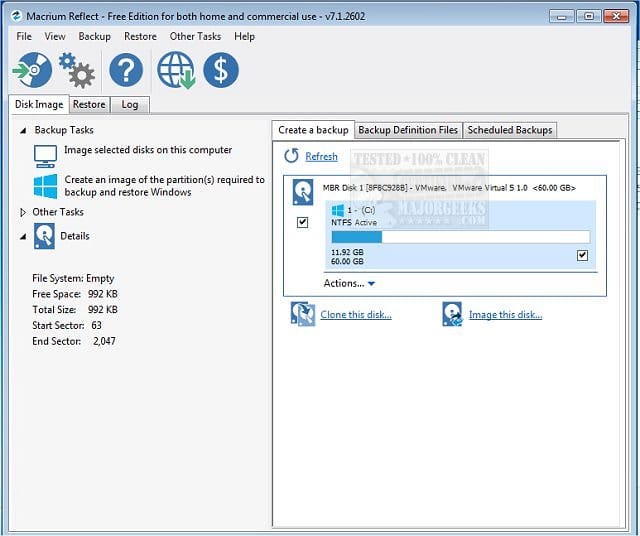
Macrium is widely used in Ten Forums.

Macrium Software | Your Image is Everything


Backup and Restore with Macrium Reflect
 

My Computer My Computer

At a glance

Windows 10Intel(R) Core(TM) i7-4800MQ CPU @ 2.70GHz16 GB Total: Manufacturer : Samsung MemoryTyp...NVIDIA Quadro K3100M; Intel(R) HD Graphics 4600
OS
Windows 10
Computer type
Laptop
Manufacturer/Model
HP
CPU
Intel(R) Core(TM) i7-4800MQ CPU @ 2.70GHz
Motherboard
Product : 190A Version : KBC Version 94.56
Memory
16 GB Total: Manufacturer : Samsung MemoryType : DDR3 FormFactor : SODIMM Capacity : 8GB Speed : 1600
Graphics Card(s)
NVIDIA Quadro K3100M; Intel(R) HD Graphics 4600
Sound Card
IDT High Definition Audio CODEC; PNP Device ID HDAUDIO\FUNC_01&VEN_111D&DEV_76E0
Hard Drives
Model Hitachi HTS727575A9E364
Antivirus
Microsoft Defender
Other Info
Mobile Workstation
Check if your current Windows is running in UEFI boot mode, as using Legacy/CSM in the BIOS might cause boot issues.
Here’s a link on how to clone a disk.
 

My Computer My Computer

At a glance

Windows 10Intel Core i5-6200U12 GB DDR4-2400 / PC4-19200 DDR4 SDRAM SO-DIMMIntel HD Graphics 520 (Skylake-U GT2) [D0/D1]...
OS
Windows 10
Computer type
Laptop
Manufacturer/Model
Lenovo ThinkPad T470s W10DG (Type 20JT)
CPU
Intel Core i5-6200U
Motherboard
LENOVO 20JTS21X0A
Memory
12 GB DDR4-2400 / PC4-19200 DDR4 SDRAM SO-DIMM
Graphics Card(s)
Intel HD Graphics 520 (Skylake-U GT2) [D0/D1] [Lenovo]
Sound Card
Realtek High Definition Audio
Monitor(s) Displays
LEN40A9
Screen Resolution
1920 x 1080(p) (60.031Hz)
Hard Drives
SanDisk SD8TN8U256G1001 243.6 GB
PSU
Lenovo 65W Standard AC Adapter (USB Type-C)
Internet Speed
24Mb Speed ADSL
Browser
Edge
Antivirus
Microsoft Defender Antivirus,
Many options - Hasleo, Easus, Aomei to name a few.

Best option is to make an image backup (choose disk mode) and restore image to nvme.

Note: do not expect a great performance improvement over an ssd as they are pretty fast anyway. Other factors like RAM, CPU speed etc influence overall performance.
 

My Computer My Computer

At a glance

Windows 11 Pro + Win11 Canary VM.I9 13th gen i9-13900H 2.60 GHZ16 GB solderedIntegrated Intel Iris XE
OS
Windows 11 Pro + Win11 Canary VM.
Computer type
Laptop
Manufacturer/Model
ASUS Zenbook 14
CPU
I9 13th gen i9-13900H 2.60 GHZ
Motherboard
Yep, Laptop has one.
Memory
16 GB soldered
Graphics Card(s)
Integrated Intel Iris XE
Sound Card
Realtek built in
Monitor(s) Displays
laptop OLED screen
Screen Resolution
2880x1800 touchscreen
Hard Drives
1 TB NVME SSD (only weakness is only one slot)
PSU
Internal + 65W thunderbolt USB4 charger
Case
Yep, got one
Cooling
Stella Artois (UK pint cans - 568 ml) - extra cost.
Keyboard
Built in UK keybd
Mouse
Bluetooth , wireless dongled, wired
Internet Speed
900 mbs (ethernet), wifi 6 typical 350-450 mb/s both up and down
Browser
Edge
Antivirus
Defender
Other Info
TPM 2.0, 2xUSB4 thunderbolt, 1xUsb3 (usb a), 1xUsb-c, hdmi out, 3.5 mm audio out/in combo, ASUS backlit trackpad (inc. switchable number pad)

Macrium Reflect Home V8
Office 365 Family (6 users each 1TB onedrive space)
Hyper-V (a vm runs almost as fast as my older laptop)
I don't recommend restoring a backup or any migration utilities based on some bad experiences ... Why not installing Windows on it and then transferring the files?
 

My Computers My Computers

  • At a glance

    Windows 11 Pro 25H2Ryzen 5 3500U8GBVega 8
    OS
    Windows 11 Pro 25H2
    Computer type
    Laptop
    Manufacturer/Model
    Huawei MateBook D15
    CPU
    Ryzen 5 3500U
    Memory
    8GB
    Graphics Card(s)
    Vega 8
    Screen Resolution
    FHD
    Hard Drives
    256GB Samsung SSD + 1TB HDD
    Browser
    Microsoft Edge
    Antivirus
    ESET Smart Security Premium
  • At a glance

    Windows 10 Enterprise LTSC 21H2intel core i7 6700HQ16GBNvidia Geforce GTX1060 (6GB)
    Operating System
    Windows 10 Enterprise LTSC 21H2
    Computer type
    Laptop
    Manufacturer/Model
    MSI GS73 6RF Stealth Pro
    CPU
    intel core i7 6700HQ
    Memory
    16GB
    Graphics card(s)
    Nvidia Geforce GTX1060 (6GB)
    Screen Resolution
    FHD
    Hard Drives
    128GB SSD + 1TB HDD
    Browser
    Microsoft Edge
    Antivirus
    Windows Defender
Most folks here will advise you to clone one disk to the other using one of the many cloning softwares, but I am not one of them. I prefer to image the current installation and then restore that image to the new disk using an imaging software that can resize the partitions when I restore that image to the new disk.
My reasoning behind this is when cloning to a larger disk, most cloning softwares will create a partition the same size as the source disk, leaving the rest as unallocated space. To use all the disk space, once the new disk is installed, the user has to manually resize the partition using a third party partitioning software like Minitool Partition Wizard.

Another reason I do not recommend cloning is that in many cases the user has only one nvme slot on their motherboard, In order to clone, they are forced to purchase an external enclosure for the new drive to be connected to their system during the cloning process. Of course, this is not necessary if one has an second nvme slot.

Personally, I regularly use Macrium Reflect (paid)to create images of my system. It can easily resize partitions when restoring to a larger disk.
Hasleo Backup Suite, which is free, touts that it can resize partitions during a restore as well, but I have not used it since I have used Macrium for many years.
Hasleo can also clone and says it can also resize partitions during a clone or restoral of an image..

If one choses to clone using Macrium, It has a "Shrink or expand to fill the target disk" feature which prevents the user from having to re-partition afterwards.. Another valuable feature of Macrium is that it can fix issues when a disk will not boot.

I'll let the others chime in on their cloning suggestions since I stay away from cloning.

 

My Computers My Computers

  • At a glance

    Windows 11 Pro 25H2 26200.8655i9-10900 10 core 20 threads32 gbnone-Intel UHD Graphics 630
    OS
    Windows 11 Pro 25H2 26200.8655
    Computer type
    PC/Desktop
    Manufacturer/Model
    Dell Optiplex 7080
    CPU
    i9-10900 10 core 20 threads
    Motherboard
    DELL 0J37VM
    Memory
    32 gb
    Graphics Card(s)
    none-Intel UHD Graphics 630
    Sound Card
    Integrated Realtek
    Monitor(s) Displays
    Benq 27
    Screen Resolution
    2560x1440
    Hard Drives
    2x1tb Solidigm m.2 nvme /External drives 512gb Samsung m.2 sata+2tb Kingston m2.nvme
    PSU
    500w
    Case
    MT
    Cooling
    Dell Premium
    Keyboard
    Logitech wired
    Mouse
    Logitech wireless
    Internet Speed
    so slow I'm too embarrassed to tell
    Browser
    #1 Edge #2 Firefox
    Antivirus
    Defender+MWB Premium
  • At a glance

    Windows 11 Pro 24H2 26200.8457AMD Ryzen 7 6800U32 gbintegrated
    Operating System
    Windows 11 Pro 24H2 26200.8457
    Computer type
    PC/Desktop
    Manufacturer/Model
    Beelink Mini PC SER5
    CPU
    AMD Ryzen 7 6800U
    Memory
    32 gb
    Graphics card(s)
    integrated
    Sound Card
    integrated
    Monitor(s) Displays
    Benq 27
    Screen Resolution
    2560x1440
    Hard Drives
    1TB Crucial nvme
    Keyboard
    Logitech wired
    Mouse
    Logitech wireless
    Internet Speed
    still too embarrassed to tell
    Browser
    Firefox
    Antivirus
    Defender
    Other Info
    System 3 is non compliant Dell 9020 i7-4770/24gb ram Win11 PRO 26200.8457
Download a copy of Macrium Free from link below:
https://updates.macrium.com/Reflect/v8/getmsi.asp?edition=0&type=4&arch=1&redirect=Y
Install then run
1- select: clone this disk under current windows
2 - Click on: Select destination disk ( select your new nvme PCI)
3 - Delete all partitions on destination disk if any existed ( nvme PCI). select then click on delete
4 - Drag and drop each partition from source disk to destnation disk in this order:
EFI system partition, 16MB MSR, Recovery. Select Recovery then click on float right)
finally drag and drop C drive to empty space between MSR and Recovery. If there any empty space after C drive, select C drive then click on fill space.
Click Next ->Finish.
5 - change Boot order in BIOS then reboot.
 

My Computers My Computers

  • At a glance

    Windows 11 Pro 25H2, Linux Mint 21.3Intel Core i9-14900K @5.8GHZ64GB (2XG Skill F5-6400J3239G32G) @6800Radeon (TM) RX 480 Graphics (8 GB)
    OS
    Windows 11 Pro 25H2, Linux Mint 21.3
    Computer type
    PC/Desktop
    Manufacturer/Model
    Self Build Feb.2024
    CPU
    Intel Core i9-14900K @5.8GHZ
    Motherboard
    MSI MAG Z790 Tomahawk Max WiFi 7
    Memory
    64GB (2XG Skill F5-6400J3239G32G) @6800
    Graphics Card(s)
    Radeon (TM) RX 480 Graphics (8 GB)
    Sound Card
    Intergrated Realtek
    Monitor(s) Displays
    Samsung
    Screen Resolution
    3840x2160
    Hard Drives
    1 - Crucial 705 1TB GEN5
    1 - Crucial 705 2TB GEN5
    2 - Crucial T500 2TB Gen4
    PSU
    750W EVGA-G3
    Case
    Antec NX410
    Cooling
    H2O Thermalright
    Keyboard
    Logitech K800
    Mouse
    Logitech Master 2S
    Internet Speed
    600 Mbps
    Browser
    Chrome
    Antivirus
    WD
  • At a glance

    Windows 11 Pro & Linux Mint X64Intel(R) Core(TM) i7-3770K CPU @ 4.20 GHz32.0GB Dual-Channel CMY16GX3M2A1600C9NVIDIA GeForce GT 740
    Operating System
    Windows 11 Pro & Linux Mint X64
    Computer type
    PC/Desktop
    Manufacturer/Model
    MSI Z77 MPower (MS-7751)
    CPU
    Intel(R) Core(TM) i7-3770K CPU @ 4.20 GHz
    Motherboard
    Z77 MPower (MS-7751)
    Memory
    32.0GB Dual-Channel CMY16GX3M2A1600C9
    Graphics card(s)
    NVIDIA GeForce GT 740
    Monitor(s) Displays
    40" Samsung
    Screen Resolution
    1920X1080
    Hard Drives
    WIN10 - 111GB Samsung SSD 840 Series
    WIN11 - 223GB Crucial CT240BX500SSD
    2X931GB Crucial CT1000BX500SSD1
    PSU
    Antec 850W
    Case
    Antec 900
    Cooling
    H20
    Keyboard
    Logitech K800 Wireless
    Mouse
    Logitech MX Master 2S
    Internet Speed
    100 Mbps
    Browser
    Chrome
    Antivirus
    Windows Defender
Thank you for the replies. Looks like Macrium it is..
 

My Computer My Computer

At a glance

Windows 11 HomeAMD RYZEN 5 360032 Gb 3200MTGeForce GTX
OS
Windows 11 Home
Computer type
PC/Desktop
CPU
AMD RYZEN 5 3600
Motherboard
ASUS B450M DS3H WIFI
Memory
32 Gb 3200MT
Graphics Card(s)
GeForce GTX
Monitor(s) Displays
YES
Screen Resolution
Enough
Hard Drives
SAMSUNG 990 PRO SSD 1TB NVMe
PSU
YES
Case
Thermaltake
Cooling
YES
Keyboard
Logitech K120
Mouse
Logitech
Internet Speed
200 Mb/s - 1 Gbs
Browser
Firefox
Antivirus
Windows Defender
Download a copy of Macrium Free from link below:
https://updates.macrium.com/Reflect/v8/getmsi.asp?edition=0&type=4&arch=1&redirect=Y
Install then run
1- select: clone this disk under current windows
2 - Click on: Select destination disk ( select your new nvme PCI)
3 - Delete all partitions on destination disk if any existed ( nvme PCI). select then click on delete
4 - Drag and drop each partition from source disk to destnation disk in this order:
EFI system partition, 16MB MSR, Recovery. Select Recovery then click on float right)
finally drag and drop C drive to empty space between MSR and Recovery. If there any empty space after C drive, select C drive then click on fill space.
Click Next ->Finish.
5 - change Boot order in BIOS then reboot.
I would also use Macrium Reflect Free but I prefer to make an image file on an external drive then recover the image to the new drive.
 

My Computer My Computer

At a glance

Windows 11 ProCore i7-13700K64 GB Kingston Fury Beast DDR5Gigabyte GeForce RTX 2060 Super Gaming OC 8G
OS
Windows 11 Pro
Computer type
PC/Desktop
Manufacturer/Model
Self build
CPU
Core i7-13700K
Motherboard
Asus TUF Gaming Plus WiFi Z790
Memory
64 GB Kingston Fury Beast DDR5
Graphics Card(s)
Gigabyte GeForce RTX 2060 Super Gaming OC 8G
Sound Card
Realtek S1200A
Monitor(s) Displays
Viewsonic VP2770 & Dell (secondary)
Screen Resolution
2560 x 1440
Hard Drives
Kingston KC3000 2TB NVME SSD & SATA HDDs & SSD
PSU
EVGA SuperNova G2 850W
Case
Nanoxia Deep Silence 1
Cooling
Noctua NH-D14
Keyboard
Microsoft Digital Media Pro
Mouse
Logitech Wireless
Internet Speed
80 Mb / s
Browser
Chrome
Antivirus
Defender, Malwarebytes Free & AdwCleaner
Download a copy of Macrium Free from link below:
https://updates.macrium.com/Reflect/v8/getmsi.asp?edition=0&type=4&arch=1&redirect=Y
Install then run
1- select: clone this disk under current windows
2 - Click on: Select destination disk ( select your new nvme PCI)
3 - Delete all partitions on destination disk if any existed ( nvme PCI). select then click on delete
4 - Drag and drop each partition from source disk to destnation disk in this order:
EFI system partition, 16MB MSR, Recovery. Select Recovery then click on float right)
finally drag and drop C drive to empty space between MSR and Recovery. If there any empty space after C drive, select C drive then click on fill space.
Click Next ->Finish.
5 - change Boot order in BIOS then reboot.
The procedure is exactly the same I use to clone a drive.
 

My Computers My Computers

  • At a glance

    Windows 11 Pro - Windows 7 HP 64 - Lubuntui5 6600K - 800MHz to 4400MHz4+4G GSkill DDR4 3000IG - Intel 530
    OS
    Windows 11 Pro - Windows 7 HP 64 - Lubuntu
    Computer type
    PC/Desktop
    Manufacturer/Model
    custom build
    CPU
    i5 6600K - 800MHz to 4400MHz
    Motherboard
    GA-Z170-HD3P
    Memory
    4+4G GSkill DDR4 3000
    Graphics Card(s)
    IG - Intel 530
    Monitor(s) Displays
    Samsung 226BW
    Screen Resolution
    1680x1050
    Hard Drives
    (1) -1 SM951 – 128GB M.2 AHCI PCIe SSD drive for Win 11
    (2) -1 WD SATA 3 - 1T for Data
    (3) -1 WD SATA 3 - 1T for backup
    (4) -1 BX500 SSD - 256G for Windows 7 and Lubuntu
    PSU
    Thermaltake 450W TR2 gold
    Keyboard
    Old and good Chicony mechanical keyboard
    Mouse
    Logitech mX performance - 9 buttons (had to disable some)
    Internet Speed
    500 Mb/s
    Browser
    Firefox 64
  • At a glance

    Windows 11 Proi7-4500U 800- 3000MHz(4+4)G DDR3 1600IG intel 4400 + NVIDIA GeForce GT 745M
    Operating System
    Windows 11 Pro
    Computer type
    Laptop
    Manufacturer/Model
    Asus Q550LF
    CPU
    i7-4500U 800- 3000MHz
    Motherboard
    Asus Q550LF
    Memory
    (4+4)G DDR3 1600
    Graphics card(s)
    IG intel 4400 + NVIDIA GeForce GT 745M
    Sound Card
    Realtek
    Monitor(s) Displays
    LG Display LP156WF4-SPH1
    Screen Resolution
    1920 x 1080
    Hard Drives
    BX500 120G SSD for Windows and programs
    & 1T HDD for data
    Internet Speed
    500 Mb/s
    Browser
    Firefox 64
Back
Top Bottom