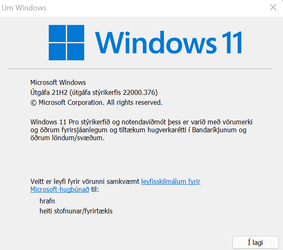
Win Update KB5008215 Cumulative Update for Windows 11 Build 22000.376 - Dec. 14


UPDATE 1/11:

December 14, 2021—KB5008215 (OS Build 22000.376)​


11/9/2021
IMPORTANT
Because of minimal operations during the holidays and the upcoming Western new year, there won’t be a preview release (known as a “C” release) for the month of December 2021. There will be a monthly security release (known as a “B” release) for December 2021. Normal monthly servicing for both B and C releases will resume in January 2022.

For information about Windows update terminology, see the article about the types of Windows updates and the monthly quality update types. For an overview of Windows 11 (original release), see its update history page.

Note Follow @WindowsUpdate to find out when new content is published to the Windows release health dashboard.


Highlights​

  • Updates security for your Windows operating system.

Improvements and fixes​

This security update includes quality improvements. Key changes include:
  • This update contains miscellaneous security improvements to internal OS functionality. No additional issues were documented for this release.
If you installed earlier updates, only the new fixes contained in this package will be downloaded and installed on your device.

For more information about the resolved security vulnerabilities, please refer to the Security Update Guide website and the December 2021 Security Updates.

Windows 11 servicing stack update - 22000.345​

  • This update makes quality improvements to the servicing stack, which is the component that installs Windows updates. Servicing stack updates (SSU) ensure that you have a robust and reliable servicing stack so that your devices can receive and install Microsoft updates.

Known issues in this update​

Microsoft is not currently aware of any issues in this update.

How to get this update​

Before installing this update

Microsoft combines the latest servicing stack update (SSU) for your operating system with the latest cumulative update (LCU). For general information about SSUs, see Servicing stack updates and Servicing Stack Updates (SSU): Frequently Asked Questions.

Install this update

Release ChannelAvailableNext Step
Windows Update and Microsoft UpdateYesNone. This update will be downloaded and installed automatically from Windows Update.
Windows Update for BusinessYesNone. This update will be downloaded and installed automatically from Windows Update in accordance with configured policies.
Microsoft Update CatalogYesTo get the standalone package for this update, go to the Microsoft Update Catalog website.
Windows Server Update Services (WSUS)YesThis update will automatically sync with WSUS if you configure Products and Classifications as follows:
Product: Windows 11
Classification: Security Updates

If you want to remove the LCU

To remove the LCU after installing the combined SSU and LCU package, use the DISM/Remove-Package command line option with the LCU package name as the argument. You can find the package name by using this command: DISM /online /get-packages.

Running Windows Update Standalone Installer (wusa.exe) with the /uninstall switch on the combined package will not work because the combined package contains the SSU. You cannot remove the SSU from the system after installation.

File information

For a list of the files that are provided in this update, download the file information for cumulative update 5008215.

For a list of the files that are provided in the servicing stack update, download the file information for the SSU - version 22000.345.


Source: December 14, 2021—KB5008215 (OS Build 22000.376)


Direct download links for KB5008215 MSU file from Microsoft Update Catalog:

[fa]fas fa-download[/fa] Download KB5008215 MSU for Windows 11 64-bit (x64) - 220.5 MB

[fa]fas fa-download[/fa] Download KB5008215 MSU for Windows 11 ARM64 - 272.1 MB


UUP Dump:

64-bit ISO download:
Select language for Upgrade to Windows 11 (22000.376) amd64

ARM64 ISO download: Select language for Upgrade to Windows 11 (22000.376) arm64

 
Last edited:
I realize that but, I want to sync all my stuff, across all my devices, via Google, not Microsoft.
 

My Computers My Computers

  • At a glance

    Windows 11 Pro
    OS
    Windows 11 Pro
    Computer type
    PC/Desktop
    Manufacturer/Model
    ASUS ROG Strix
  • At a glance

    Windows 11 Pro
    Operating System
    Windows 11 Pro
    Computer type
    Laptop
    Manufacturer/Model
    ASUS VivoBook
  • ASUS VivoBook 'Lite' ~ Windows 11 Home
One thing I do like about Edge is that you can still disable those gawd-awful tab hover cards!
(Who comes up with that ridiculous, cumbersome sh stuff anyway!?!?!?)

0001714.png
 

My Computers My Computers

  • At a glance

    Windows 11 Pro
    OS
    Windows 11 Pro
    Computer type
    PC/Desktop
    Manufacturer/Model
    ASUS ROG Strix
  • At a glance

    Windows 11 Pro
    Operating System
    Windows 11 Pro
    Computer type
    Laptop
    Manufacturer/Model
    ASUS VivoBook
  • ASUS VivoBook 'Lite' ~ Windows 11 Home
I realize that but, I want to sync all my stuff, across all my devices, via Google, not Microsoft.
Yeah, I know what you mean but it seems like only Chrome would have that part while other browsers that are chromium based don't as I remember reading some news/article on Brave vs Chrome and that was what they said was something Google kept as a chrome only feature which is not in chromium.


My Computer My Computer

At a glance

WindowsXP/7/8/8.1/10/11,Linux,Android,FreeBSD...Intel® Core™ i7-8750H 8th Gen 2.2Ghz up to 4....64GB using 2x32GB CL16 Mushkin redLine modulesIntel UHD 630 & NVIDIA GeForce GTX 1050 Ti wi...
OS
WindowsXP/7/8/8.1/10/11,Linux,Android,FreeBSD Unix
Computer type
Laptop
Manufacturer/Model
Dell XPS 15 9570
CPU
Intel® Core™ i7-8750H 8th Gen 2.2Ghz up to 4.1Ghz
Motherboard
Dell XPS 15 9570
Memory
64GB using 2x32GB CL16 Mushkin redLine modules
Graphics Card(s)
Intel UHD 630 & NVIDIA GeForce GTX 1050 Ti with 4GB DDR5
Sound Card
Realtek ALC3266-CG
Monitor(s) Displays
15.6" 4K Touch UltraHD 3840x2160 made by Sharp
Screen Resolution
3840x2160 4K UltraHD
Hard Drives
Samsung MZ-V9P4T0B/AM 990 PRO 4TB PCIe®4.0 NVMe™ M.2 SSD was Toshiba KXG60ZNV1T02 NVMe 1TB SSD
PSU
Dell XPS 15 9570
Case
Dell XPS 15 9570
Cooling
Stock
Keyboard
Stock
Mouse
SwitftPoint ProPoint
Internet Speed
Comcast/XFinity 1.44Gbps/42.5Mbps
Browser
Microsoft EDGE (Chromium based) & Google Chrome
Antivirus
Windows Defender that came with Windows
One thing I do like about Edge is that you can still disable those gawd-awful tab hover cards!
(Who comes up with that ridiculous, cumbersome sh stuff anyway!?!?!?)

View attachment 16346
I actually like the hover cards because I have a lot of tabs and the cards actually make it easier for me to know what's on what tab when I have multiple tabs from the same site.
 

My Computer My Computer

At a glance

WindowsXP/7/8/8.1/10/11,Linux,Android,FreeBSD...Intel® Core™ i7-8750H 8th Gen 2.2Ghz up to 4....64GB using 2x32GB CL16 Mushkin redLine modulesIntel UHD 630 & NVIDIA GeForce GTX 1050 Ti wi...
OS
WindowsXP/7/8/8.1/10/11,Linux,Android,FreeBSD Unix
Computer type
Laptop
Manufacturer/Model
Dell XPS 15 9570
CPU
Intel® Core™ i7-8750H 8th Gen 2.2Ghz up to 4.1Ghz
Motherboard
Dell XPS 15 9570
Memory
64GB using 2x32GB CL16 Mushkin redLine modules
Graphics Card(s)
Intel UHD 630 & NVIDIA GeForce GTX 1050 Ti with 4GB DDR5
Sound Card
Realtek ALC3266-CG
Monitor(s) Displays
15.6" 4K Touch UltraHD 3840x2160 made by Sharp
Screen Resolution
3840x2160 4K UltraHD
Hard Drives
Samsung MZ-V9P4T0B/AM 990 PRO 4TB PCIe®4.0 NVMe™ M.2 SSD was Toshiba KXG60ZNV1T02 NVMe 1TB SSD
PSU
Dell XPS 15 9570
Case
Dell XPS 15 9570
Cooling
Stock
Keyboard
Stock
Mouse
SwitftPoint ProPoint
Internet Speed
Comcast/XFinity 1.44Gbps/42.5Mbps
Browser
Microsoft EDGE (Chromium based) & Google Chrome
Antivirus
Windows Defender that came with Windows
All good except I had to reboot to get rid of a display problem (tiny horizontal black lines every few pixels).
 

My Computers My Computers

  • At a glance

    windows 11 25H2I5-85008GB
    OS
    windows 11 25H2
    Computer type
    PC/Desktop
    Manufacturer/Model
    Dell Optiplex 3060
    CPU
    I5-8500
    Motherboard
    Dell
    Memory
    8GB
    Monitor(s) Displays
    2 x Dell 24 inch
    Screen Resolution
    2560 x 1440
    Hard Drives
    250GB NVMe SSD, 2x 250 GB SSD
    PSU
    Intel(R) Core(TM) i5-8500 CPU @ 3.00GHz 3.00 GHz
    Mouse
    Logitech M310t
    Internet Speed
    100/20
    Browser
    Edge
    Antivirus
    Win Defender
  • At a glance

    Win 11 25H2I5-6300U8GBFHD
    Operating System
    Win 11 25H2
    Computer type
    Laptop
    Manufacturer/Model
    HP Elitebook 840 G3
    CPU
    I5-6300U
    Memory
    8GB
    Graphics card(s)
    FHD
    Hard Drives
    256 SSD
    Internet Speed
    100/20
    Browser
    Edge
All good except I had to reboot to get rid of a display problem (tiny horizontal black lines every few pixels).
Did you try one of these:

1)) Restart Explorer.exe
2) Restart StartMenuExperienceHost.exe
3) Restart dwm.exe
4) Ctrl+Shift+WindowsKey+B
 

My Computer My Computer

At a glance

WindowsXP/7/8/8.1/10/11,Linux,Android,FreeBSD...Intel® Core™ i7-8750H 8th Gen 2.2Ghz up to 4....64GB using 2x32GB CL16 Mushkin redLine modulesIntel UHD 630 & NVIDIA GeForce GTX 1050 Ti wi...
OS
WindowsXP/7/8/8.1/10/11,Linux,Android,FreeBSD Unix
Computer type
Laptop
Manufacturer/Model
Dell XPS 15 9570
CPU
Intel® Core™ i7-8750H 8th Gen 2.2Ghz up to 4.1Ghz
Motherboard
Dell XPS 15 9570
Memory
64GB using 2x32GB CL16 Mushkin redLine modules
Graphics Card(s)
Intel UHD 630 & NVIDIA GeForce GTX 1050 Ti with 4GB DDR5
Sound Card
Realtek ALC3266-CG
Monitor(s) Displays
15.6" 4K Touch UltraHD 3840x2160 made by Sharp
Screen Resolution
3840x2160 4K UltraHD
Hard Drives
Samsung MZ-V9P4T0B/AM 990 PRO 4TB PCIe®4.0 NVMe™ M.2 SSD was Toshiba KXG60ZNV1T02 NVMe 1TB SSD
PSU
Dell XPS 15 9570
Case
Dell XPS 15 9570
Cooling
Stock
Keyboard
Stock
Mouse
SwitftPoint ProPoint
Internet Speed
Comcast/XFinity 1.44Gbps/42.5Mbps
Browser
Microsoft EDGE (Chromium based) & Google Chrome
Antivirus
Windows Defender that came with Windows
Nah, just restarted.
 

My Computers My Computers

  • At a glance

    windows 11 25H2I5-85008GB
    OS
    windows 11 25H2
    Computer type
    PC/Desktop
    Manufacturer/Model
    Dell Optiplex 3060
    CPU
    I5-8500
    Motherboard
    Dell
    Memory
    8GB
    Monitor(s) Displays
    2 x Dell 24 inch
    Screen Resolution
    2560 x 1440
    Hard Drives
    250GB NVMe SSD, 2x 250 GB SSD
    PSU
    Intel(R) Core(TM) i5-8500 CPU @ 3.00GHz 3.00 GHz
    Mouse
    Logitech M310t
    Internet Speed
    100/20
    Browser
    Edge
    Antivirus
    Win Defender
  • At a glance

    Win 11 25H2I5-6300U8GBFHD
    Operating System
    Win 11 25H2
    Computer type
    Laptop
    Manufacturer/Model
    HP Elitebook 840 G3
    CPU
    I5-6300U
    Memory
    8GB
    Graphics card(s)
    FHD
    Hard Drives
    256 SSD
    Internet Speed
    100/20
    Browser
    Edge
Nah, just restarted.
Well, I mean try those and see if any of them fixes the problem. I hate restarting as it would take 30 minutes to manually start up everything I need.
 

My Computer My Computer

At a glance

WindowsXP/7/8/8.1/10/11,Linux,Android,FreeBSD...Intel® Core™ i7-8750H 8th Gen 2.2Ghz up to 4....64GB using 2x32GB CL16 Mushkin redLine modulesIntel UHD 630 & NVIDIA GeForce GTX 1050 Ti wi...
OS
WindowsXP/7/8/8.1/10/11,Linux,Android,FreeBSD Unix
Computer type
Laptop
Manufacturer/Model
Dell XPS 15 9570
CPU
Intel® Core™ i7-8750H 8th Gen 2.2Ghz up to 4.1Ghz
Motherboard
Dell XPS 15 9570
Memory
64GB using 2x32GB CL16 Mushkin redLine modules
Graphics Card(s)
Intel UHD 630 & NVIDIA GeForce GTX 1050 Ti with 4GB DDR5
Sound Card
Realtek ALC3266-CG
Monitor(s) Displays
15.6" 4K Touch UltraHD 3840x2160 made by Sharp
Screen Resolution
3840x2160 4K UltraHD
Hard Drives
Samsung MZ-V9P4T0B/AM 990 PRO 4TB PCIe®4.0 NVMe™ M.2 SSD was Toshiba KXG60ZNV1T02 NVMe 1TB SSD
PSU
Dell XPS 15 9570
Case
Dell XPS 15 9570
Cooling
Stock
Keyboard
Stock
Mouse
SwitftPoint ProPoint
Internet Speed
Comcast/XFinity 1.44Gbps/42.5Mbps
Browser
Microsoft EDGE (Chromium based) & Google Chrome
Antivirus
Windows Defender that came with Windows
My original post said I rebooted. Rebooting is usually the way to fix a likely driver issue.
 

My Computers My Computers

  • At a glance

    windows 11 25H2I5-85008GB
    OS
    windows 11 25H2
    Computer type
    PC/Desktop
    Manufacturer/Model
    Dell Optiplex 3060
    CPU
    I5-8500
    Motherboard
    Dell
    Memory
    8GB
    Monitor(s) Displays
    2 x Dell 24 inch
    Screen Resolution
    2560 x 1440
    Hard Drives
    250GB NVMe SSD, 2x 250 GB SSD
    PSU
    Intel(R) Core(TM) i5-8500 CPU @ 3.00GHz 3.00 GHz
    Mouse
    Logitech M310t
    Internet Speed
    100/20
    Browser
    Edge
    Antivirus
    Win Defender
  • At a glance

    Win 11 25H2I5-6300U8GBFHD
    Operating System
    Win 11 25H2
    Computer type
    Laptop
    Manufacturer/Model
    HP Elitebook 840 G3
    CPU
    I5-6300U
    Memory
    8GB
    Graphics card(s)
    FHD
    Hard Drives
    256 SSD
    Internet Speed
    100/20
    Browser
    Edge
Edwin, you are apparently anti-Edge. I'm curious as to why. I've been using Edge on all my computers and phones for the past year and have been quite pleased.
I dislike its looks (not fitting the theme), plus takes a lot of vertical space, plus absence of MathML support. Also, the new tab page is full of advertising and in a language I do not know! Also, the font subpixel smoothing is worse than the system-wide setting. Also, it has to start with the required command line options, but how to specify them if it is started via hyperlink in another program?
 

My Computer My Computer

At a glance

Windows 11
OS
Windows 11
I dislike its looks (not fitting the theme), plus takes a lot of vertical space, plus absence of MathML support. Also, the new tab page is full of advertising and in a language I do not know! Also, the font subpixel smoothing is worse than the system-wide setting. Also, it has to start with the required command line options, but how to specify them if it is started via hyperlink in another program?
I'm discussing the new Microsoft Edge based on Chromium.
 

My Computers My Computers

  • At a glance

    Windows 11 ProIntel Series 3 Core Ultra X9 388H64GB LPDDR5x 9600 MT/sIntel Arc graphics B390 Panther Lake
    OS
    Windows 11 Pro
    Computer type
    Laptop
    Manufacturer/Model
    Dell XPS 16 DA16260
    CPU
    Intel Series 3 Core Ultra X9 388H
    Memory
    64GB LPDDR5x 9600 MT/s
    Graphics Card(s)
    Intel Arc graphics B390 Panther Lake
    Monitor(s) Displays
    16" 3.2K Tandem OLED Infinity Edge
    Screen Resolution
    3200 x 2000 16:10 236 PPI
    Hard Drives
    1 Terabyte M.2 PCIe NVMe SSD
    Case
    Black Anodized Aluminum
    Cooling
    Vapor Chamber Cooling
    Mouse
    None
    Internet Speed
    942 Mbps Netgear Mesh + 2 Satellites
    Browser
    Microsoft Edge (Chromium)
    Antivirus
    Windows Security (Defender)
    Other Info
    NPU delivering 67 TOPS
    Microsoft 365 subscription
    Microsoft Office 365
    Microsoft OneDrive 1TB Cloud
    Microsoft Visual Studio
    Microsoft Visual Studio Code
    Microsoft Sysinternals Suite
    Microsoft BitLocker
    Microsoft Copilot
    Dell Support Assist
    Dell Command | Update
    Macrium Reflect X subscription
    1Password Password Manager
    Amazon Kindle for PC
    Lightroom/Photoshop subscription
    Interactive Brokers Trader Workstation
  • At a glance

    Windows 11 ProSnapdragon® X Elite (12 Core) with Hexagon NP...32GB LPDDR5x 8448 MT/sIntegrated Adreno GPU
    Operating System
    Windows 11 Pro
    Computer type
    Laptop
    Manufacturer/Model
    Microsoft Surface Laptop 7
    CPU
    Snapdragon® X Elite (12 Core) with Hexagon NPU delivering 45 TOPS
    Memory
    32GB LPDDR5x 8448 MT/s
    Graphics card(s)
    Integrated Adreno GPU
    Sound Card
    Omnisonic speakers with Dolby Atmos spatial sound
    Monitor(s) Displays
    13.8″ PixelSense Flow touchscreen 120 Hz 600 NIT
    Screen Resolution
    2304 × 1536 (201 PPI), 3:2 aspect ratio
    Hard Drives
    1 TB PCIe NVMe Gen 4 SSD
    Case
    Black Anodized Aluminum
    Cooling
    Vapor Chamber Cooling
    Mouse
    None
    Internet Speed
    942 Mbps Netgear Mesh + 2 Satellites
    Browser
    Microsoft Edge (Chromium)
    Antivirus
    Windows Security (Defender)
    Other Info
    Microsoft 365 subscription (Office)
    Microsoft Office 365
    Microsoft OneDrive 1TB Cloud
    Microsoft Visual Studio 2026
    Microsoft Visual Studio Code
    Interactive Brokers Trader Workstation
    Lightroom/Photoshop subscription
    1Password Password Manager
    Microsoft Sysinternals
    Amazon Kindle for PC
    Microsoft BitLocker
    Microsoft Copilot
My original post said I rebooted. Rebooting is usually the way to fix a likely driver issue.
I know,I meant if you experience the problem next time, you can try those and see if it makes a difference. #4 is to restart the display driver which takes seconds.
 

My Computer My Computer

At a glance

WindowsXP/7/8/8.1/10/11,Linux,Android,FreeBSD...Intel® Core™ i7-8750H 8th Gen 2.2Ghz up to 4....64GB using 2x32GB CL16 Mushkin redLine modulesIntel UHD 630 & NVIDIA GeForce GTX 1050 Ti wi...
OS
WindowsXP/7/8/8.1/10/11,Linux,Android,FreeBSD Unix
Computer type
Laptop
Manufacturer/Model
Dell XPS 15 9570
CPU
Intel® Core™ i7-8750H 8th Gen 2.2Ghz up to 4.1Ghz
Motherboard
Dell XPS 15 9570
Memory
64GB using 2x32GB CL16 Mushkin redLine modules
Graphics Card(s)
Intel UHD 630 & NVIDIA GeForce GTX 1050 Ti with 4GB DDR5
Sound Card
Realtek ALC3266-CG
Monitor(s) Displays
15.6" 4K Touch UltraHD 3840x2160 made by Sharp
Screen Resolution
3840x2160 4K UltraHD
Hard Drives
Samsung MZ-V9P4T0B/AM 990 PRO 4TB PCIe®4.0 NVMe™ M.2 SSD was Toshiba KXG60ZNV1T02 NVMe 1TB SSD
PSU
Dell XPS 15 9570
Case
Dell XPS 15 9570
Cooling
Stock
Keyboard
Stock
Mouse
SwitftPoint ProPoint
Internet Speed
Comcast/XFinity 1.44Gbps/42.5Mbps
Browser
Microsoft EDGE (Chromium based) & Google Chrome
Antivirus
Windows Defender that came with Windows
This release seems to be working without any problems for me.
Minor glitch in Language display is fixed as well.

Skjámynd 2021-12-23 114829.png

I only got the update this morning -- but "better late than never"

cheers
jimbo
 

My Computer My Computer

At a glance

Windows XP,11 Linux Fedora Rawhide pre-releas...2 X Intel i7
OS
Windows XP,11 Linux Fedora Rawhide pre-release 45
Computer type
PC/Desktop
CPU
2 X Intel i7
Screen Resolution
4KUHD X 2
UPDATE:
 

My Computers My Computers

  • At a glance

    Windows 11 Pro for WorkstationsIntel i7-8700K 5 GHz64 GB (4x16GB) G.SKILL TridentZ RGB DDR4 3600...ASUS ROG-STRIX-GTX1080TI-O11G-GAMING (11GB GD...
    OS
    Windows 11 Pro for Workstations
    Computer type
    PC/Desktop
    Manufacturer/Model
    Custom self build
    CPU
    Intel i7-8700K 5 GHz
    Motherboard
    ASUS ROG Maximus XI Formula Z390
    Memory
    64 GB (4x16GB) G.SKILL TridentZ RGB DDR4 3600 MHz (F4-3600C18D-32GTZR)
    Graphics Card(s)
    ASUS ROG-STRIX-GTX1080TI-O11G-GAMING (11GB GDDR5X)
    Sound Card
    Integrated Digital Audio (S/PDIF)
    Monitor(s) Displays
    2 x Samsung Odyssey G75 27"
    Screen Resolution
    2560x1440
    Hard Drives
    1TB Samsung 990 PRO M.2,
    4TB Samsung 990 PRO M.2,
    TerraMaster F8 SSD Plus NAS
    PSU
    Seasonic Prime Titanium 850W
    Case
    Thermaltake Core P3 wall mounted
    Cooling
    Corsair Hydro H115i
    Keyboard
    Amazon Basics Wired Full Keyboard MD005
    Mouse
    Logitech MX Master 4
    Internet Speed
    2 Gbps Download and 100 Mbps Upload
    Browser
    Chrome and Edge
    Antivirus
    Microsoft Defender
    Other Info
    Logitech Z625 speaker system,
    Logitech BRIO 4K Pro webcam,
    HP Color LaserJet Pro MFP M477fdn,
    CyberPower CP1500PFCLCD
    Galaxy S23 Plus phone
  • At a glance

    Windows 11 ProSnapdragon X Elite (12 core) 3.42 GHz16 GB LPDDR5x-7467 MHz
    Operating System
    Windows 11 Pro
    Computer type
    Laptop
    Manufacturer/Model
    Surface Laptop 7 Copilot+ PC
    CPU
    Snapdragon X Elite (12 core) 3.42 GHz
    Memory
    16 GB LPDDR5x-7467 MHz
    Monitor(s) Displays
    15" HDR
    Screen Resolution
    2496 x 1664
    Hard Drives
    1 TB SSD
    Internet Speed
    Wi-Fi 7 and Bluetooth 5.4
    Browser
    Chrome and Edge
    Antivirus
    Microsoft Defender

Latest Support Threads

Back
Top Bottom