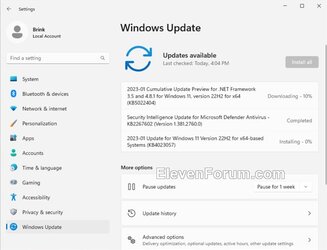
Win Update KB5022404 Cumulative Update .NET Framework 3.5 and 4.8.1 (22H2)


UPDATE 1/31:


January 26, 2023 - KB5022404 Cumulative Update Preview for .NET Framework 3.5 and 4.8.1 for Windows 11, version 22H2​


The January 26, 2023 update for Windows 11, version 22H2 includes cumulative reliability improvements in .NET Framework 3.5 and 4.8.1. We recommend that you apply this update as part of your regular maintenance routines. Before you install this update, see the Prerequisites and Restart requirement sections.

Summary​

Security Improvements

There are no new security improvements in this release. This update is cumulative and contains all previously released security improvements.

Quality and Reliability Improvements

WPF1- Addresses an issue in propagation of ElementHost controls Visible property to underlying HwndWrapper.
- Addresses an issue that restores VirtualizingScrollPanel scrolling behavior for CollectionChange event.
- Addresses an issue to ignore Win32LastError when calling GetWindowText and GetWindowTextLength methods.
- Addresses Null Reference Exception when ToolTip is visible property is overridden to be always be false.
Networking- Addresses an issue in the Socket.EndReceiveFrom method that may lead to AccessViolationException in rare scenarios.
1Windows Presentation Foundation (WPF)

Known issues in this update​

Microsoft is not currently aware of any issues in this update.

How to get this update​

Install this update

Release ChannelAvailableNext Step
Windows Update and Microsoft UpdateYesNone. This update will be downloaded and installed automatically from Windows Update.
Windows Update for BusinessNoNone. These changes will be included in the next security update to this channel. For more information about Windows Update for Business go to the Windows Update for Business website.
Microsoft Update CatalogYesTo get the standalone package for this update, go to the Microsoft Update Catalog website.
Windows Server Update Services (WSUS)NoYou can import this update into WSUS manually. See the Microsoft Update Catalog for instructions.

File information

For a list of the files that are provided in this update, download the file information for cumulative update.

Prerequisites​

To apply this update, you must have .NET Framework 3.5 or 4.8.1 installed.

Restart requirement​

You must restart the computer after you apply this update if any affected files are being used. We recommend that you exit all .NET Framework-based applications before you apply this update.

Source:
 
Last edited:
KB5022404.jpg
 

My Computers

System One System Two

  • OS
    Windows 11 Pro for Workstations
    Computer type
    PC/Desktop
    Manufacturer/Model
    Custom self build
    CPU
    Intel i7-8700K 5 GHz
    Motherboard
    ASUS ROG Maximus XI Formula Z390
    Memory
    64 GB (4x16GB) G.SKILL TridentZ RGB DDR4 3600 MHz (F4-3600C18D-32GTZR)
    Graphics Card(s)
    ASUS ROG-STRIX-GTX1080TI-O11G-GAMING (11GB GDDR5X)
    Sound Card
    Integrated Digital Audio (S/PDIF)
    Monitor(s) Displays
    2 x Samsung Odyssey G75 27"
    Screen Resolution
    2560x1440
    Hard Drives
    1TB Samsung 990 PRO M.2,
    4TB Samsung 990 PRO M.2,
    TerraMaster F8 SSD Plus NAS
    PSU
    Seasonic Prime Titanium 850W
    Case
    Thermaltake Core P3 wall mounted
    Cooling
    Corsair Hydro H115i
    Keyboard
    Amazon Basics Wired Full Keyboard MD005
    Mouse
    Logitech MX Master 4
    Internet Speed
    2 Gbps Download and 100 Mbps Upload
    Browser
    Chrome and Edge
    Antivirus
    Microsoft Defender
    Other Info
    Logitech Z625 speaker system,
    Logitech BRIO 4K Pro webcam,
    HP Color LaserJet Pro MFP M477fdn,
    CyberPower CP1500PFCLCD
    Galaxy S23 Plus phone
  • Operating System
    Windows 11 Pro
    Computer type
    Laptop
    Manufacturer/Model
    Surface Laptop 7 Copilot+ PC
    CPU
    Snapdragon X Elite (12 core) 3.42 GHz
    Memory
    16 GB LPDDR5x-7467 MHz
    Monitor(s) Displays
    15" HDR
    Screen Resolution
    2496 x 1664
    Hard Drives
    1 TB SSD
    Internet Speed
    Wi-Fi 7 and Bluetooth 5.4
    Browser
    Chrome and Edge
    Antivirus
    Microsoft Defender
Do we really need it? Or can I hide it?
 

My Computer

System One

  • OS
    Windows 11
    Computer type
    Laptop
    Manufacturer/Model
    HP
    CPU
    AMD Rizen 5
    Memory
    8gb
    Screen Resolution
    1080 UHD
    Hard Drives
    SSD
    Browser
    FF
    Antivirus
    Defender
Do we really need it? Or can I hide it?
If MS has issued this update, they must have done this for (good?) reasons - see 'quality and reliability imImprovements' above.

Provided you take a full systerm image of your OS beforehand, you will always be able to get back to the pre-updated state.
 

My Computer

System One

  • OS
    Windows 11 Pro 25H2 (Build 26200.8524)
    Computer type
    PC/Desktop
    Manufacturer/Model
    Dell Pro Max Tower T2 FCT2250
    CPU
    Intel Core Ultra 9 285 5.6 GHz
    Motherboard
    64-bit operating system, x64-based processor
    Memory
    32.00 GB
    Graphics Card(s)
    Intel Integrated Graphics (128 MB)
    Sound Card
    Realtek Audio
    Monitor(s) Displays
    Dell P2714H Monitor
    Screen Resolution
    1920 x 1080
    Hard Drives
    1 x 512GB M.2 XG10d SED KIOXIA PCIe solid state drive (Internal)
    1 x 2TB Seagate ST2000DM008-2UB102 HDD (Internal)
    1 x 1TB Seagate STGX4000400 External HDD
    1 x 4TB Seagate STGX4000400 External HDD
    1 x 6TB WD Elements AE 2689 External HDD
    PSU
    500 Watts
    Cooling
    Air
    Keyboard
    Microsoft Wired Keyboard 600
    Mouse
    Microsoft USB Basic Optical Mouse v2.0
    Browser
    Firefox
    Antivirus
    Windows Defender + Malwarebytes Premium
    Other Info
    BaseBoard Manufacturer Dell Inc.
    BaseBoard Product 022RY57
    BaseBoard Version A01
Okay, looks like out install it, thanks Ian.
From the old school days, I always thought we didn't need MS .net, that it was only used so 3rd party software could run on Windows. Wonder if that's changed?
 

My Computer

System One

  • OS
    Windows 11
    Computer type
    Laptop
    Manufacturer/Model
    HP
    CPU
    AMD Rizen 5
    Memory
    8gb
    Screen Resolution
    1080 UHD
    Hard Drives
    SSD
    Browser
    FF
    Antivirus
    Defender
Thanks again Shawn!
Installed fine and working well on all of my laptops.
Best Regards,
Dav
 

My Computer

System One

  • OS
    Windows 11 Pro
    Computer type
    Laptop
    Manufacturer/Model
    HP/Envy-17T
    CPU
    Intel Core i7 @ 1.80GHz
    Motherboard
    HP - 8485 (U3E1)
    Memory
    16gb
    Graphics Card(s)
    Intel UHD Graphics 620 and NVIDIA GeForce MX150
    Sound Card
    Realtek High Definition Audio / Intel Display Audio / NVIDIA Virtual Audio Device (Wave Extensible) (WDM)
    Monitor(s) Displays
    Generic PnP Monitor on Intel UHD Graphics 620
    Screen Resolution
    1536x864 pixels
    Hard Drives
    KBG30ZMV256G TOSHIBA (SSD)
    ST1000LM049-2GH172 (SSD)
    PSU
    HP Standard
    Cooling
    HP CoolSense
    Keyboard
    Standard PS/2 Keyboard
    Mouse
    Anker
    Internet Speed
    95Mbps
    Browser
    FireFox
    Antivirus
    WebRoot
Okay, looks like out install it, thanks Ian.
From the old school days, I always thought we didn't need MS .net, that it was only used so 3rd party software could run on Windows. Wonder if that's changed?

If you run any old school apps, especielly games (like Battlefield 2) then its needed.
 

My Computers

System One System Two

  • OS
    Win 11 Pro 25H2 26200.8524
    Computer type
    PC/Desktop
    Manufacturer/Model
    Self Built
    CPU
    Intel® Core™ i7-14700K
    Motherboard
    ASUS TUF Z690-PLUS WIFI BIOS 4505 11/29/25
    Memory
    G.SKILL Ripjaws S5 Series 64GB (2 x 32GB) DDR5
    Graphics Card(s)
    ASUS GeForce RTX 4070 Super 12GB
    Sound Card
    Sound Blaster AE-5 Plus
    Monitor(s) Displays
    ASUS TUF Gaming 27" 2K HDR Gaming
    Screen Resolution
    2560 x 1440
    Hard Drives
    Samsung 990 Pro 1TB NVMe (Win 11 25H2)
    SK hynix P41 500GB NVMe 25H2 DEV/Games
    SK hynix P41 2TB NVMe (x3)
    Crucial P3 Plus 4TB
    PSU
    Corsair RM850x Shift
    Case
    Antec Dark Phantom DP502 FLUX
    Cooling
    Corsair Nautilus 360 RS AIO
    Keyboard
    Logitech MK 320
    Mouse
    Razer Basilisk V3
    Internet Speed
    350Mbs
    Browser
    Firefox
    Antivirus
    Winows Security
    Other Info
    MR 8.1 Home

    System 3 Specs
    Win 11 Pro 25H2 26200.8524
    ASUS PRIME Z370-P II BIOS 3004 7/12/21
    Intel Core i7-8700 CPU @ 3.20GHz
    32GB DDR4 RAM (4x8)
    iGPU Intel UHD Graphics 630
  • Operating System
    Win 11 Pro 25H2 26200.8524
    Computer type
    PC/Desktop
    Manufacturer/Model
    Self Built
    CPU
    Intel Core i7-11700F
    Motherboard
    Asus TUF Gaming Z590 Plus WiFi (BIOS 2803)
    Memory
    64 GB DDR4
    Graphics card(s)
    MSI GeForce RTX 3060 Ventus 2X 12GB
    Sound Card
    SoundBlaster Audigy Fx V2
    Monitor(s) Displays
    Samsung F27T350
    Screen Resolution
    1920x1080
    Hard Drives
    Samsung 980 Pro 1TB
    Samsung 970 EVO Plus 2TB
    Samsung 870 EVO 500GB SSD
    PSU
    Corsair HX750
    Case
    Cougar MX330-G Window
    Cooling
    Thermalright Frozen Edge 240 Black AIO
    Internet Speed
    350Mbps
    Browser
    Firefox
    Antivirus
    Windows Security
KB5022404 installed OK, it did not ask for a restart but will do it anyway. DISM online and SFC found no issues.
 
Last edited:

My Computers

System One System Two

  • OS
    Windows 11 Home 25H2 build: 26200.8524
    Computer type
    Laptop
    Manufacturer/Model
    Acer Swift A.I SF14-51T
    CPU
    Intel(R) Core(TM) Ultra 7 258V, 2200 Mhz, 8 Cores
    Motherboard
    Icefish_LNV, Version V1.15
    Memory
    32 GB LPDDR5X (soldered)
    Graphics Card(s)
    Intel(R) Arc(TM) 140V GPU (16GB)
    Sound Card
    RealTek + Intel Smart Sound
    Monitor(s) Displays
    14" IPS WUXGA
    Screen Resolution
    1920x1200x60Hz
    Hard Drives
    Micron_2550_MTFDKBA1T0TGE, NVMe Gen4, 1TB
    PSU
    45W USB-C GaN charger
    Case
    Full aluminum body
    Cooling
    1 fan
    Keyboard
    US with Backlight
    Mouse
    Precision Trackpad
    Internet Speed
    25 Mb/s 5G
    Browser
    Edge
    Antivirus
    Windows Defender
    Other Info
    BIOS Version/Date Insyde Corp. V1.15, 8/28/2025, Windows Hello IR camera with Facial recognition. Secure Boot 2026 KEK key installed
  • Operating System
    Windows 11 Home 25H2 build: 26200.8524
    Computer type
    Laptop
    Manufacturer/Model
    Asus Vivobook K3502Z S15 15" OLED
    CPU
    Intel 12th Gen. i7 12700H, 14 cores, 2.3 GHz (24M Cache, up to 4.7 GHz, 6P+8E cores)
    Motherboard
    Alder Lake-H, 1700-4700 MHz clock rate
    Memory
    8GB LPDDR4 on board + 8GB LPDDR4 3200 MHz in Dual Channel.
    Graphics card(s)
    Intel Iris Xe supports up to 4096 x 2304 @ 120Hz
    Sound Card
    Harman Kardon - DTS
    Monitor(s) Displays
    OLED 15.6inch 2.8K (2880 x 1620)
    Screen Resolution
    16:9 aspect ratio 0.2ms response time 120Hz refresh rate, 550nits
    Hard Drives
    512GB M.2 NVMe Gen4 PCIe 4.0 SSD, Micron_2450_MTFDKBA512TFK
    PSU
    90-Watt USB charger (Thunderbolt4)
    Case
    Metal lid, plastic case
    Cooling
    1 fan
    Keyboard
    With adjustable backlight
    Mouse
    Precision Trackpad
    Internet Speed
    ISP provides 15 mb/s WIFI LTE (4G), laptop WIFI 6 adapter.
    Browser
    Edge
    Antivirus
    Windows Defender
    Other Info
    BIOS American Megatrends International, LLC. 10.1.2.312, 13/03/2024. Network adapter: Intel Wi-Fi 6E AX211 160 MHz, Secure Boot 2026 KEK key installed

Latest Support Threads

Back
Top Bottom