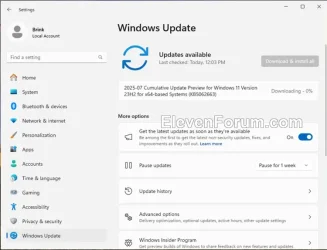
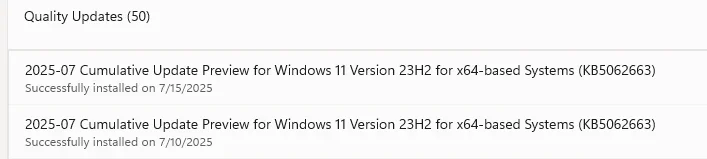
UPDATE 8/12:

 www.elevenforum.com
Important: Secure Boot certificates used by most Windows devices are set to expire starting in June 2026. This might affect the ability of certain personal and business devices to boot securely if not updated in time. To avoid disruption, we recommend reviewing the guidance and taking action to update certificates in advance. For details and preparation steps, see Windows Secure Boot certificate expiration and CA updates.
To learn about Windows update terminology, see the pages on types of Windows updates and monthly quality update types. For an overview, see the update history page for Windows 11, version 23H2.
Follow @WindowsUpdate to find out when new content is published to the Windows release health dashboard.
Note: Experience seamless device migration with Windows Backup for Organizations, now available for a limited public preview. This feature ensures a smooth transition to Windows 11 for new or reimaged Microsoft Entra joined devices. To learn more, see Announcing Windows Backup for Organizations.
This security update includes quality improvements. Key changes include:
Microsoft combines the latest servicing stack update (SSU) for your operating system with the latest cumulative update (LCU). For general information about SSUs, see Servicing stack updates and Servicing Stack Updates (SSU): Frequently Asked Questions.
Install this update
To install this update, use one of the following Windows and Microsoft release channels.
If you want to remove the LCU
To remove the LCU after installing the combined SSU and LCU package, use the DISM/Remove-Package command line option with the LCU package name as the argument. You can find the package name by using this command: DISM /online /get-packages.
Running Windows Update Standalone Installer (wusa.exe) with the /uninstall switch on the combined package will not work because the combined package contains the SSU. You cannot remove the SSU from the system after installation.
File information
For a list of the files provided in this update, download the file information for cumulative update 5062663.
For a list of the files provided in the servicing stack update, download the file information for the SSU (KB5062686) - versions 22621.5690 and 22631.5690.
 support.microsoft.com
Check Windows Updates
UUP Dump:
64-bit ISO download:

ARM64 ISO download:
 www.elevenforum.com
KB5063875 Windows 11 Cumulative Update build 22631.5768 (23H2) - Aug. 12
Windows Blogs: Source: Check Windows Updates UUP Dump: 64-bit ISO download: https://uupdump.net/selectlang.php?id=439308a6-c89e-4608-8bf6-73aa4d49c6f2 ARM64 ISO download: https://uupdump.net/selectlang.php?id=774615b3-a1a5-4138-a87c-8b1583b82d78...
www.elevenforum.com
Windows Blogs:
July 22, 2025 - KB5062663 (OS Builds 22621.5699 and 22631.5699) Preview
Windows Secure Boot certificate expirationImportant: Secure Boot certificates used by most Windows devices are set to expire starting in June 2026. This might affect the ability of certain personal and business devices to boot securely if not updated in time. To avoid disruption, we recommend reviewing the guidance and taking action to update certificates in advance. For details and preparation steps, see Windows Secure Boot certificate expiration and CA updates.
To learn about Windows update terminology, see the pages on types of Windows updates and monthly quality update types. For an overview, see the update history page for Windows 11, version 23H2.
Follow @WindowsUpdate to find out when new content is published to the Windows release health dashboard.
Note: Experience seamless device migration with Windows Backup for Organizations, now available for a limited public preview. This feature ensures a smooth transition to Windows 11 for new or reimaged Microsoft Entra joined devices. To learn more, see Announcing Windows Backup for Organizations.
Highlights
- This update addresses non-security issues for your Windows operating system.
Improvements
Windows 11, version 23H2
Important: Use EKB KB5027397 to update to Windows 11, version 23H2.This security update includes quality improvements. Key changes include:
- This build includes all the improvements in Windows 11, version 22H2.
- There are no additional issues documented in this release.
Windows 11, version 22H2
This preview update contains fixes and quality improvements from KB5062552 (released July 8, 2025). The following summary outlines key issues addressed by the KB after you install it. Also, included are available new features. The bold text within the brackets indicates the item or area of the change.- [Country and Operator Settings Asset (COSA)] Fixed: This update brings profiles up to date for certain mobile operators.
- [File systems]
- Fixed: This update addresses an issue in the Resilient File System (ReFS) where using backup applications on large files could occasionally result in system memory becoming fully exhausted.
- Fixed: An issue where searching for PDF files in a shared folder could return incorrect error messages—such as “No More Files” or “STATUS_NO_MORE_FILES.” These errors disrupted output to the virtual PDF printer and interfered with backup processes.
- [Input (known issue)]
- Fixed: An issue when using the Microsoft Changjie IME (input method editor) for Traditional Chinese might cause problems such as not being able to form or select words, unresponsive spacebar or blank key, incorrect word output, or a broken candidate window display. This can occur after installing KB5062552.
- Fixed: This update addresses an issue that affects Phonetic input methods, including the Hindi Phonetic Input keyboard and the Marathi Phonetic keyboard, which might not work correctly after installing KB5062552.
- Fixed: An issue when using the Microsoft Changjie IME (input method editor) for Traditional Chinese might cause problems such as not being able to form or select words, unresponsive spacebar or blank key, incorrect word output, or a broken candidate window display. This can occur after installing KB5062552.
- [Networking] Fixed: An issue where peripheral devices could take longer to work after resuming from hibernation on some devices with active cellular connections.
- [Printer] Improved: Printer names now appear more clearly when using IPP Directed Discovery, making it easier to identify printers during setup.
- [Stability issue] Fixed: This update addresses an issue observed in rare cases after installing the May 2025 security update and subsequent updates causing devices to experience stability issues. Some devices became unresponsive and stopped responding in specific scenarios.
- [Taskbar] Fixed: This update addresses an issue where the taskbar icons for accessibility features are not appearing.
Windows 11 servicing stack update (KB5062686) - 22621.5690 and 22631.5690
This update makes quality improvements to the servicing stack, which is the component that installs Windows updates. Servicing stack updates (SSU) ensure that you have a robust and reliable servicing stack so that your devices can receive and install Microsoft updates. To learn more about SSUs, see Simplifying on-premises deployment of servicing stack updates.Known issues in this update
Microsoft is not currently aware of any issues with this update.How to get this update
Before you install this updateMicrosoft combines the latest servicing stack update (SSU) for your operating system with the latest cumulative update (LCU). For general information about SSUs, see Servicing stack updates and Servicing Stack Updates (SSU): Frequently Asked Questions.
Install this update
To install this update, use one of the following Windows and Microsoft release channels.
| Available | Next Step |
|---|---|

| This update downloads and installs automatically from Windows Update and Microsoft Update. |
|
| To get the standalone package for this update, go to Microsoft Update Catalog. |
If you want to remove the LCU
To remove the LCU after installing the combined SSU and LCU package, use the DISM/Remove-Package command line option with the LCU package name as the argument. You can find the package name by using this command: DISM /online /get-packages.
Running Windows Update Standalone Installer (wusa.exe) with the /uninstall switch on the combined package will not work because the combined package contains the SSU. You cannot remove the SSU from the system after installation.
File information
For a list of the files provided in this update, download the file information for cumulative update 5062663.
For a list of the files provided in the servicing stack update, download the file information for the SSU (KB5062686) - versions 22621.5690 and 22631.5690.
Source:
July 22, 2025—KB5062663 (OS Builds 22631.5699) Preview | Microsoft Support
July 22, 2025—KB5062663 (OS Builds 22631.5699) Preview
support.microsoft.com
Check Windows Updates
UUP Dump:
64-bit ISO download:
Select language for Windows 11, version 23H2 (22631.5699) amd64
Select language for Windows 11, version 23H2 (22631.5699) amd64 on UUP dump. UUP dump lets you download Unified Update Platform files, like Windows Insider updates, directly from Windows Update.
uupdump.net
ARM64 ISO download:
Select language for Windows 11, version 23H2 (22631.5699) arm64
Select language for Windows 11, version 23H2 (22631.5699) arm64 on UUP dump. UUP dump lets you download Unified Update Platform files, like Windows Insider updates, directly from Windows Update.
uupdump.net
UUP Dump - Download Windows Insider ISO
UUP Dump is the most practical and easy way to get ISO images of any Insider Windows 10 or Windows 11 version, as soon as Microsoft has released a new build. UUP Dump creates a download configuration file according to your choices, downloads necessary files directly from Microsoft servers, and...
www.elevenforum.com
Last edited: