Windows Insider Blog:
- This update includes a small set of general improvements and fixes that improve the overall experience for Insiders running this build on their PCs.
- After resuming the rollout of Administrator protection as enabled by IT admins, we are also now rolling out the ability to enable Administrator Protection in Settings under Privacy & security > Windows Security > Account protection and switching the toggle to on. A restart will be required.

Enable or Disable Administrator Protection for Admin Approval Mode in Windows 11
This tutorial will show you how to enable or disable Administrator Protection for admin approval mode elevations in Windows 11. Starting with Windows 11 build 26220.7961 (Beta 25H2) and build 26300.7965 (Dev 25H2), Administrator protection is being gradually re-enabled and aims to protect free... www.elevenforum.com
Source:

Announcing new builds 8 June 2026
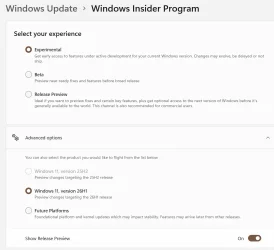
Hello Windows Insiders, Announcing several new builds today across Beta and Experimental, including a new build train for 26H1!
 blogs.windows.com
Check Windows Updates
UUP Dump:
64-bit ISO download:

Select language for Windows 11 Insider Preview Feature Update (28120.2242) amd64
Select language for Windows 11 Insider Preview Feature Update (28120.2242) amd64 on UUP dump. UUP dump lets you download Unified Update Platform files, like Windows Insider updates, directly from Windows Update.
uupdump.net
ARM64 ISO download:

UUP Dump - Download Windows Insider ISO
UUP Dump is the most practical and easy way to get ISO images of any Insider Windows 10 or Windows 11 version, as soon as Microsoft has released a new build. UUP Dump creates a download configuration file according to your choices, downloads necessary files directly from Microsoft servers, and...
www.elevenforum.com
Last edited: