UPDATE 7/20:

 www.elevenforum.com
[UPDATE 7/13/2026] – Today, we’re rolling out several improvements to Windows Search Box which are available to Windows Insiders who are on Experimental build 26300.8772 via Controlled Feature Rollout. See the Windows Search Box Windows Insider blog for more details.
 www.elevenforum.com


 blogs.windows.com
Check Windows Updates
ISO from Microsoft:
 www.elevenforum.com
UUP Dump:
64-bit ISO download:

ARM64 ISO download:
 www.elevenforum.com
Windows 11 Insider Experimental (26H2) build 26300.8935 - July 20
Windows Insider Blog: Source: Check Windows Updates UUP Dump: 64-bit ISO download: https://uupdump.net/selectlang.php?id=955e06c5-f7ab-4107-b67e-3f4f0b291323 ARM64 ISO download: https://uupdump.net/selectlang.php?id=2c1d69b4-deed-42fc-b42c-ed3630c68f89...
www.elevenforum.com
Windows Insider Blog:
[UPDATE 7/13/2026] – Today, we’re rolling out several improvements to Windows Search Box which are available to Windows Insiders who are on Experimental build 26300.8772 via Controlled Feature Rollout. See the Windows Search Box Windows Insider blog for more details.
Microsoft improving Windows 11 Search Box with less clutter and more control
Windows Insider Blog: Hello Windows Insiders, You’ve have been asking for search that is faster, more relevant, and easier to use—whether you’re opening an app, finding a file, or changing a setting. Because the Windows Search Box is where many people start, we focused first on making results...
www.elevenforum.com
Changes and improvements gradually being rolled out
[Recovery]
- We're introducing Cloud rebuild, a new recovery option that restores a Windows 11 PC to a clean, known-good state by performing a full OS reinstall, even when Windows won't boot. Unlike Reset this PC, Cloud rebuild downloads both the target Windows image and the device's drivers from Windows Update, so the device comes back fully functional without USB media, without a custom image, and without depending on the health of the currently installed OS.
- In this preview, you can try Cloud rebuild today:
- Start it directly from the Windows Recovery Environment (WinRE) by selecting Troubleshoot > Recovery and uninstall > Cloud rebuild.
- Connect over wired Ethernet or a Wi-Fi network from within WinRE.
- Review the target Windows build, edition, and language, then confirm the data-loss warning before the rebuild begins.

Cloud Rebuild Windows 11
This tutorial will show you how to use Cloud rebuild to perform a full clean reinstall of Windows 11 from Windows Recovery (WinRE). Starting with Windows 11 build 26300.8772 (Experimental 26H2), build 26220.9343 (Beta 25H2), and build 28120.3032 (Experimental 26H1) for Insiders, Microsoft is...
www.elevenforum.com
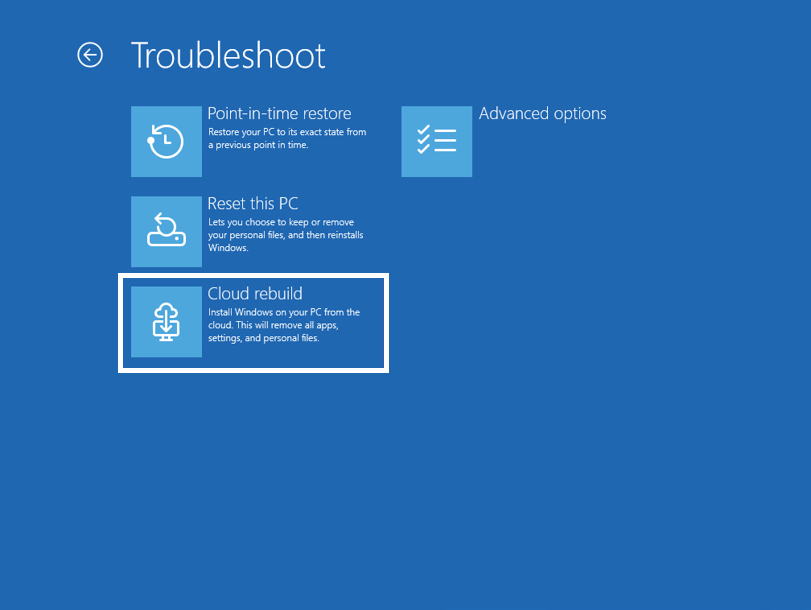
The new Cloud rebuild option in Windows Recovery Environment (WinRE), enabling a full Windows reinstall using files downloaded from Windows Update.
Feedback: Share your thoughts in Feedback Hub (WIN + F) under Recovery > Cloud rebuild.
To learn more, see Cloud rebuild (Preview).
[Backup and restore on by default for commercial]
- Starting in Windows 11, version 26H2, the backup policy of Windows settings backup and restore will be enabled by default on eligible Microsoft Entra joined or Microsoft Entra hybrid joined devices. Windows settings backup is no longer something admins must configure first. It becomes a resilience baseline that automatically captures user settings and the Microsoft Store app list. So, when a device is reimaged or reset, users can return to a familiar setup without relying on prior configuration, improving recovery consistency, and reducing time to productivity.
- Admins remain in full control: existing policies still apply, explicit configurations override the default, and restore remains opt-in and admin-managed. By making settings backup the default, this change establishes a more resilient, recoverable device experience, minimizing disruption and reducing setup friction.
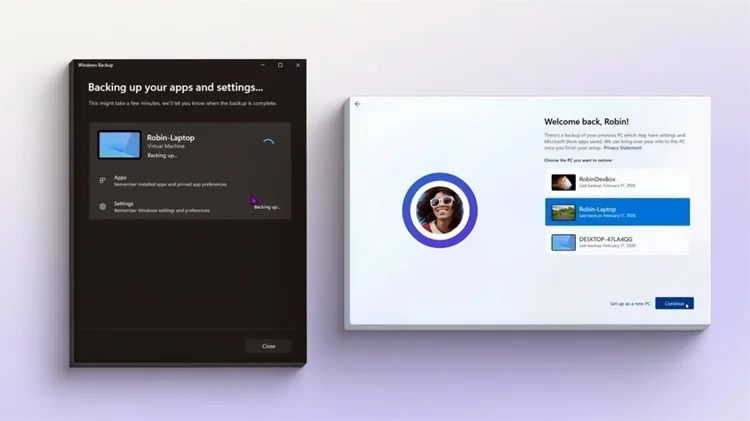
Windows 11 settings backup becoming a new resilience baseline
Windows IT Pro Blog: Editor’s note 9.29.2026: This feature is now generally available on eligible devices. Resilience is about to get easier for the Windows devices you manage! Eligible devices will now have the backup function on by default with Windows settings backup and restore (previously...
www.elevenforum.com
[Account Control]
- The Windows 11 Account Control flyout has a refreshed, modern design and a clear subscription badge to make the user's account status instantly visible. This helps users easily identify their plan, discover benefits, and explore upgrades.

Add or Remove User Tile on Start Menu in Windows 11
This tutorial will show you how to add or remove user tile on the Start menu for all users in Windows 10 and Windows 11. The user tile (aka: "account picture menu") on the Start menu allows you to Change account settings in the Account Control flyout, Lock the computer, Sign out, or switch...
www.elevenforum.com
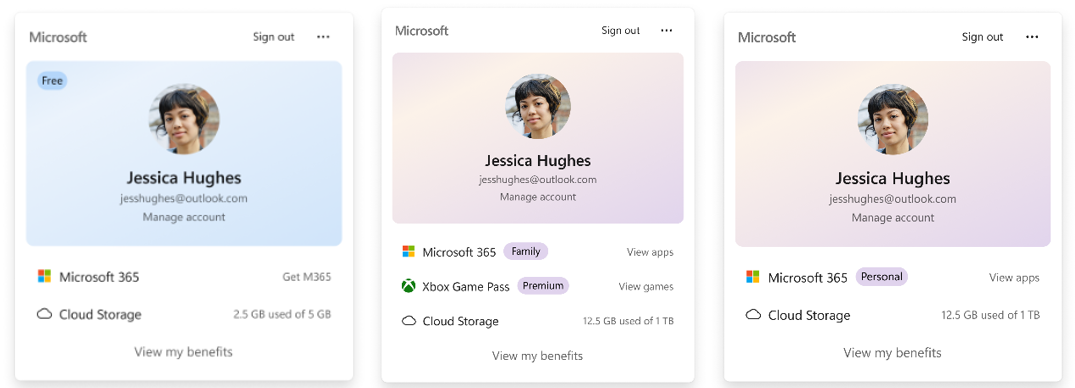
UI showing the refreshed Account Control flyout with subscription badges, account benefits, and storage details.
Feedback: Share your thoughts in Feedback Hub (WIN + F) under Settings > Start Menu.
[Search]
- We are increasing the height of the search box by 4 pixels.

Add or Remove Search Button on Taskbar in Windows 11
This tutorial will show you how to add or remove the Search button on the taskbar for your account or all users in Windows 11. The Search button on the taskbar allows you to quickly use Windows Search (Win+S) to search for apps, documents, email, files, folders, music, people, photos, settings...
www.elevenforum.com
[Settings]
- The Bluetooth quick settings page is now navigable using gamepad input.
[Taskbar]
- Fixed issue where the search icon might be invisible when using the taskbar in a vertical position.
[Run]
- Improved how keyboard focus is announced for screen readers when using the new Run design.
[Fonts]
- Improved Mongolian Baiti shaping and rendering behavior to ensure accurate and consistent text output, increasing text fidelity for Mongolian script.
[Other]
- If you were having issues with Outlook not responding to the close button last week, that should be addressed now.
- Improved resource usage over time of title bar tooltips.
Reminders for Windows Insiders in the Experimental channel
- Updates are based on Windows 11, version 26H2 via an enablement package (Build 26300.8772).
26H2 Enablement packaged (if needed)
Download - Many features are rolled out using Controlled Feature Rollout technology, starting with a subset of Insiders and ramping up over time. We monitor feedback to see how they land before pushing them out to everyone in this channel.
- For Windows Insiders who want to be the first to try new features, see the available list of features to toggle on at the Feature flags page under Settings > Windows Update > Windows Insider Program.
- The desktop watermark shown at the lower right corner of the desktop is normal for Windows Insider pre-release builds.
- Features and experiences included in these builds might never get released as we try out different concepts and get feedback. Features might change over time, be removed, or replaced and never get released beyond Windows Insiders. Some of these features and experiences could show up in future Windows releases when they're ready.
- Some features in active development we preview with Windows Insiders might not be fully localized, and localization will happen over time as features are finalized. As you see issues with localization in your language, please report those issues to us via Feedback Hub.
- Check out Flight Hub for a complete look at what build is in which Insider channel.
Source:
Windows 11 Insider Experimental Preview Build 26300.8772 - Windows Insider Program
Release notes for Windows 11 Insider Experimental Preview Build 26300.8772
learn.microsoft.com
Announcing new builds for July 6 2026
Hello Windows Insiders, We have new releases today with builds across Beta and Experimental. New builds this week Today we are releasing new Windows 11 Insider Preview Builds. As a reminder, all Insiders can find the rel
blogs.windows.com
Check Windows Updates
ISO from Microsoft:
Download Official Windows 11 ISO file from Microsoft
This tutorial will show you how to download an official Windows Server or Windows 11 64-bit or ARM64 ISO file from Microsoft. Microsoft provides ISO files for Windows Server and Windows 11 to download. You can use these ISO files to clean install or in-place upgrade Windows 11. The Flight Hub...
www.elevenforum.com
UUP Dump:
64-bit ISO download:
Select language for Windows 11 Insider Preview Feature Update (26300.8772) amd64
Select language for Windows 11 Insider Preview Feature Update (26300.8772) amd64 on UUP dump. UUP dump lets you download Unified Update Platform files, like Windows Insider updates, directly from Windows Update.
uupdump.net
ARM64 ISO download:
Select language for Windows 11 Insider Preview Feature Update (26300.8772) arm64
Select language for Windows 11 Insider Preview Feature Update (26300.8772) arm64 on UUP dump. UUP dump lets you download Unified Update Platform files, like Windows Insider updates, directly from Windows Update.
uupdump.net
UUP Dump - Download Windows Insider ISO
UUP Dump is the most practical and easy way to get ISO images of any Insider Windows 10 or Windows 11 version, as soon as Microsoft has released a new build. UUP Dump creates a download configuration file according to your choices, downloads necessary files directly from Microsoft servers, and...
www.elevenforum.com
Attachments
Last edited:

 The cadence has slowed.