UPDATE 9/08:
 www.elevenforum.com
[Update 2 September 2026: Inclusion of more focused widgets on lock screen into this build]
As part of our continued commitment to making Windows calmer and higher quality, we’re updating the default lock screen widget experience for Insiders on newer builds. With this change, Weather will be the primary widget shown on the lock screen, reducing recommended widget content and making the experience feel more focused. We're also giving users more control of personalizing the widgets on lock, curating the ones they find most useful for them. Users can access these settings by going to Settings > Personalization > Lock screen.
[Please note: You may need to restart your device if you are already on build 26220.9233 to see the change]
 www.elevenforum.com


 blogs.windows.com
Check Windows Updates
UUP Dump:
64-bit ISO download:

ARM64 ISO download:
 www.elevenforum.com
Windows 11 Insider Experimental (26H2) build 26340.9354 - Sept. 8
Microsoft Support: Source: https://blogs.windows.com/windows-insider/2026/09/08/announcing-new-builds-for-8-september-2026/ https://learn.microsoft.com/en-us/windows-insider/release-notes/experimental/preview-build-26340-9354 Check Windows Updates UUP Dump: 64-bit ISO download: x...
www.elevenforum.com
Windows Insider Blog:
[Update 2 September 2026: Inclusion of more focused widgets on lock screen into this build]
Changes and improvements gradually being rolled out
[Widgets]
More focused widgets on the lock screenAs part of our continued commitment to making Windows calmer and higher quality, we’re updating the default lock screen widget experience for Insiders on newer builds. With this change, Weather will be the primary widget shown on the lock screen, reducing recommended widget content and making the experience feel more focused. We're also giving users more control of personalizing the widgets on lock, curating the ones they find most useful for them. Users can access these settings by going to Settings > Personalization > Lock screen.
[Please note: You may need to restart your device if you are already on build 26220.9233 to see the change]
Add and Remove Widgets on Lock Screen in Windows 11
This tutorial will show you how to add and remove widgets on the lock screen for your account in Windows 11. You can stay informed and efficient with dynamic updates that bring weather, finance, sports, traffic, and app notifications right to your lock screen. Starting with Windows 11 build...
www.elevenforum.com
[Modernized AutoPlay experience]
- We've updated the AutoPlay dialog that helps you choose the preferred experience when devices are connected to your PC, such as a phone, camera, or removable drive. Rebuilt with WinUI, the refreshed experience is more consistent with the rest of Windows, supports dark mode, and continues to provide the familiar AutoPlay actions you use today. The experience is also more responsive to text scaling and display settings. Notifications for this dialog are now docked in the notification center for easy access.
Turn On or Off AutoPlay in Windows 11
This tutorial will show you how to turn on or off AutoPlay for all media and devices in your account in Windows 11. AutoPlay lets you choose an action for different kinds of media when you plug in a device or insert media. You can set AutoPlay to open different kinds of content, such as photos...
www.elevenforum.com
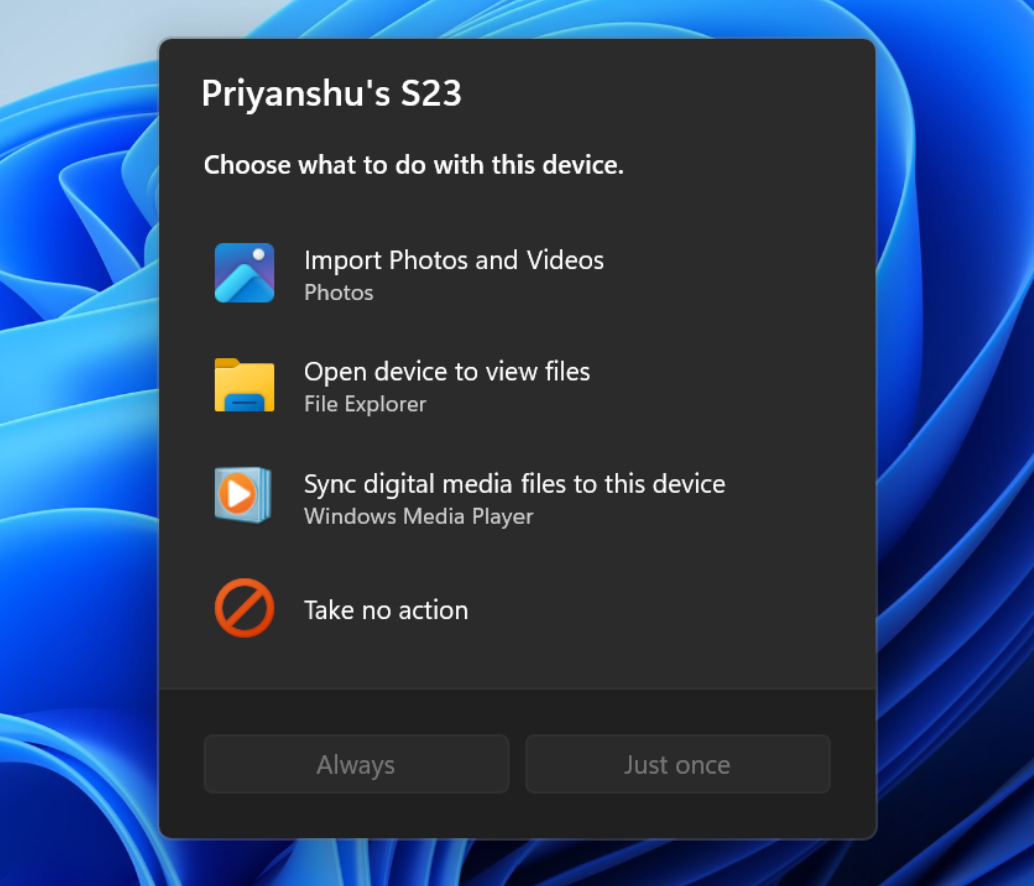
The new AutoPlay experience, shown in dark mode.
[Accessibility]
A simpler way to open apps maximized- We're introducing a new accessibility setting, Open apps maximized, that automatically maximizes app windows when they open, so you no longer have to do it yourself every time. This small change removes a bit of everyday friction, whether you use a screen reader or magnification, work in tablet mode, or simply prefer a consistent, full-screen workspace.
- To turn it on, go to Settings > Accessibility > Visual effects, and turn on Open apps maximized. Once enabled, Windows maximizes app windows for you as they open. Give it a try, and let us know how it works for you.

Enable or Disable Open Apps Maximized by Default in Windows 11
This tutorial will show you how to turn on or off always open apps maximized by default for your account in Windows 11. You can manually maximize an app window in Windows 11 to "fit to screen" or "fill the screen" with the window. Starting with Windows 11 build 26340.9233 (Experimental 26H2)...
www.elevenforum.com
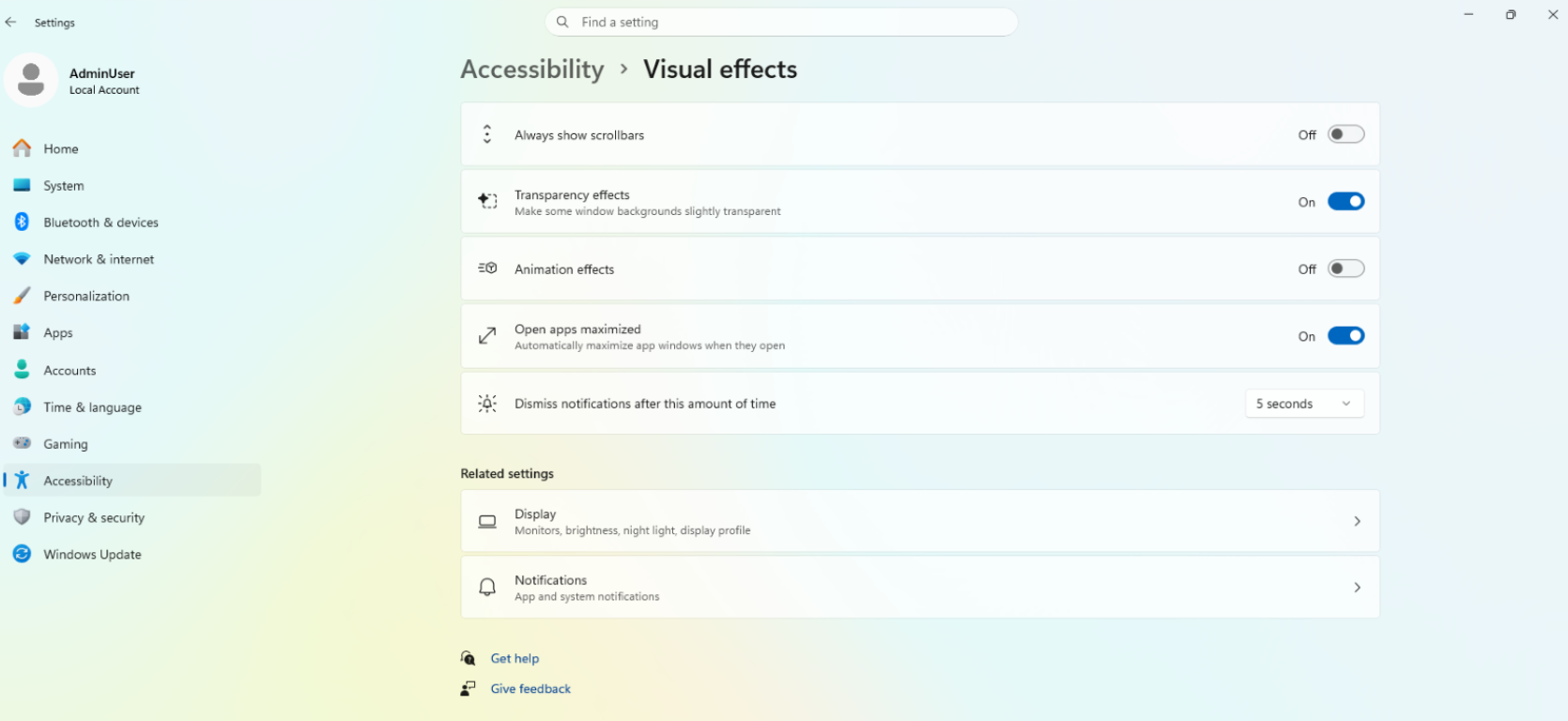
UI showing the new Open apps maximized accessibility setting in Settings.
[Manage camera, microphone, and location access for desktop apps]
- Windows Insiders can now manage camera, microphone, and location permissions for individual desktop apps. Previously, access for traditional desktop applications was managed through a single device-wide setting.
- With this update, you can review and control access on an app-by-app basis, giving you greater visibility into which apps are requesting access to sensitive resources and more control over your privacy choices. Our goal is to make privacy permissions easier to understand and manage across the wide range of desktop apps people use every day.

Enable or Disable Apps Access to Camera in Windows 11
This tutorial will show you how to allow or deny apps access to the camera for your account or all users in Windows 11. Many apps and services request and use the camera, and Windows settings give you control over which apps can use your camera. There are three types of cameras that apps and...
www.elevenforum.com
Enable or Disable Apps Access to Microphone in Windows 11
This tutorial will show you how to allow or deny apps access to the microphone for your account or all users in Windows 11. Many apps and services request and use the microphone, and Windows settings give you control over which apps can use your microphone. You can choose which apps can access...
www.elevenforum.com

Turn On or Off Let Apps Access Location in Windows 11
This tutorial will show you how to turn on or off "Let apps access your location" and "Let desktop apps access your location" for your account Windows 11. Microsoft operates a location service that helps determine the precise geographic location of your Windows device. The precise location of...
www.elevenforum.com
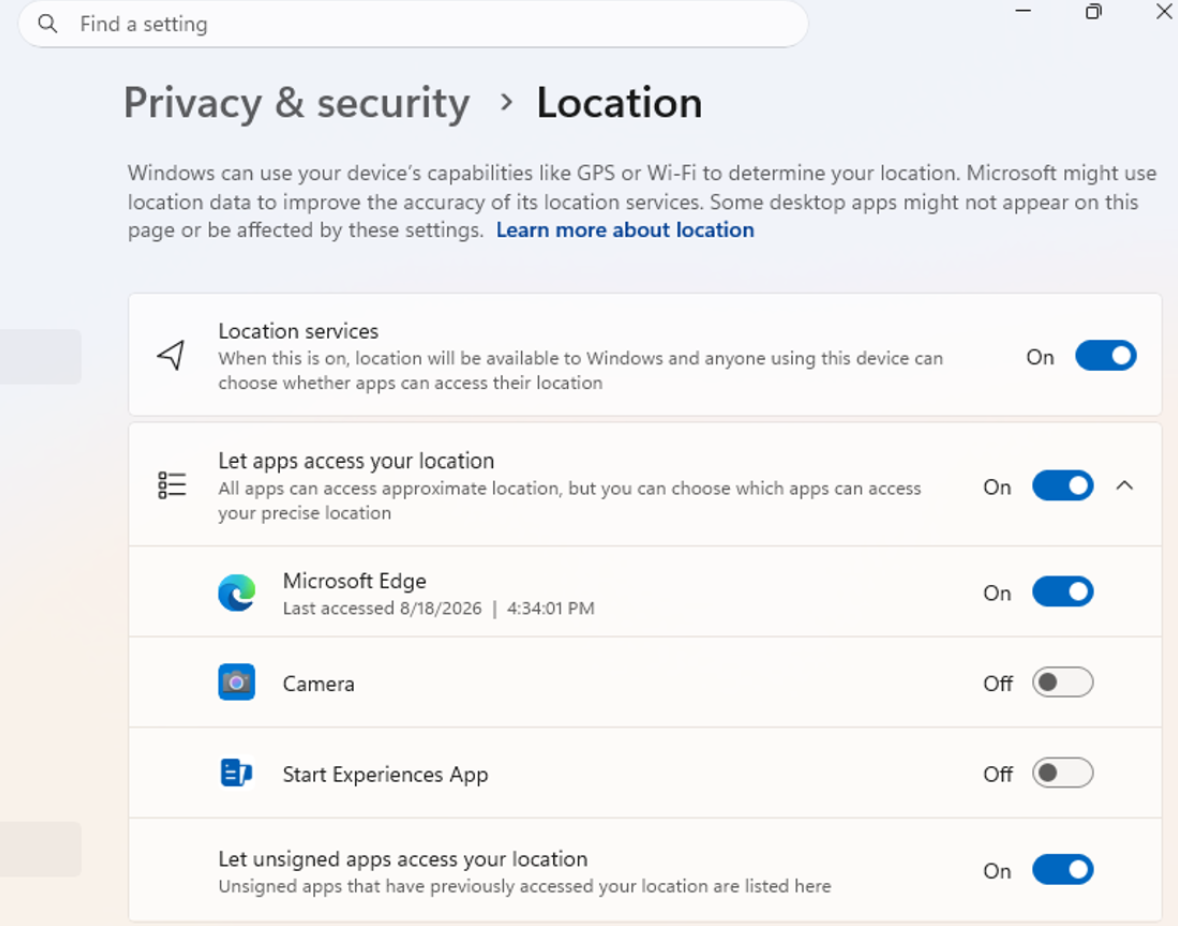
UI showing the new privacy controls for individual desktop apps in Settings.
- Allow or deny access for each desktop app individually.
- Go to Settings > Privacy & security > Camera, Microphone, or Location to review and manage permissions.
- Apps that haven't yet accessed a resource prompt for permission the first time access is requested.
- Existing app permission decisions are preserved.
- Apps previously granted access continue to have access.
- Apps previously denied access remain denied.
- No action is required, and no settings are reset.
- Existing enterprise policies continue to function as designed. We're exploring additional management capabilities.
- Most desktop apps appear with clear app attribution. However, some apps that rely on shared system components, browser-hosted experiences, or similar technologies might appear under a different name than expected.
- Some desktop apps might appear as Unsigned if Windows can't verify publisher information. Only grant access to apps you recognize and trust.
[File Explorer]
- PDF and non-HTML files downloaded from the web can now be previewed automatically in the preview pane.
Show or Hide Preview Pane in File Explorer in Windows 11
This tutorial will show you how to show or hide the preview pane in File Explorer for your account in Windows 11. The preview pane in File Explorer shows you the contents of a file, such as image or text files, without having to open it with an app. Starting with Windows 11 build 26100.8116...
www.elevenforum.com
[Microsoft Store]
- This update provides support for in-app purchases in packaged WinUI 3 apps that require elevation, helping developers offer purchases through Microsoft's integrated commerce platform.
[Taskbar]
- Fixed an issue in the latest builds causing taskbar animations to briefly work and then stop working.
[Input]
- Fixed an issue in the latest builds causing the mouse cursor not to be visible in certain apps.
[Other]
- Fixed an issue from the last flight causing Settings > Windows Update > Windows Insider Program > Flags to appear empty even though flags were available.

Enable or Disable Hidden Feature Flags in Windows 11
This tutorial will show you how to enable or disable hidden experimental feature flags in Windows 11. ViVeTool is an open source tool that can be used to enable hidden features that are part of controlled feature roll-outs or A/B testing in Insider builds of Windows 11. Windows Insider builds...
www.elevenforum.com
- Updated Settings > Apps > Installed apps to show the version number at the top level for packaged apps, as it already does for other apps.

Find Version of Installed Apps in Windows 11
This tutorial will show you how to find the current version of installed apps in Windows 11. Option One: Find Version of Installed Apps in Settings Option Two: Find Version of Installed Apps in Control Panel Option Three: Find Version of Installed Apps in Microsoft Store Option Four: Find...
www.elevenforum.com
Reminders for Windows Insiders in the Experimental channel
- Updates are based on Windows 11, version 26H2 via an enablement package (Build 26340.9233).
- Many features are rolled out using Controlled Feature Rollout technology, starting with a subset of Insiders and ramping up over time. We monitor feedback to see how they land before pushing them out to everyone in this channel.
- The desktop watermark shown at the lower right corner of the desktop is normal for Windows Insider pre-release builds.
- Features and experiences included in these builds might never get released as we try out different concepts and get feedback. Features might change over time, be removed, or replaced and never get released beyond Windows Insiders. Some of these features and experiences could show up in future Windows releases when they're ready.
- Some features in active development we preview with Windows Insiders might not be fully localized, and localization will happen over time as features are finalized. As you see issues with localization in your language, report those issues to us via Feedback Hub.
- Check out Flight Hub for a complete look at what build is in which Insider channel.
Source:
Windows 11 Insider Experimental Preview Build 26340.9233 - Windows Insider Program
Release notes for Windows 11 Insider Experimental Preview Build 26340.9233
learn.microsoft.com
Announcing new builds for 21 August 2026
Hello Windows Insiders, Today, we’re releasing new Windows 11 Insider Preview builds to the Beta and Experimental Channels. Experimental Feature Flags We’ve fixed the issue causing the Feature Flags list to show empty for Ins
blogs.windows.com
Check Windows Updates
UUP Dump:
64-bit ISO download:
Select language for Windows 11 Insider Preview Feature Update (26340.9233) amd64
Select language for Windows 11 Insider Preview Feature Update (26340.9233) amd64 on UUP dump. UUP dump lets you download Unified Update Platform files, like Windows Insider updates, directly from Windows Update.
uupdump.net
ARM64 ISO download:
Select language for Windows 11 Insider Preview Feature Update (26340.9233) arm64
Select language for Windows 11 Insider Preview Feature Update (26340.9233) arm64 on UUP dump. UUP dump lets you download Unified Update Platform files, like Windows Insider updates, directly from Windows Update.
uupdump.net
UUP Dump - Download Windows Insider ISO
UUP Dump is the most practical and easy way to get ISO images of any Insider Windows 10 or Windows 11 version, as soon as Microsoft has released a new build. UUP Dump creates a download configuration file according to your choices, downloads necessary files directly from Microsoft servers, and...
www.elevenforum.com
Last edited:

 Apple 13" Macbook Pro 2020 (m1)


 When I installed 9278, I got all of the options I expected to see in 26H2 except for Feature Flags...so I'm back on Experimental once again...