Lost Computer Manager


coukou

Well-known member
Local time
5:33 PM
Posts
34
OS
Windows 11 Pro 25H2 Build 26200.8246
Hello,
I'm using Win11 22H2 Build 22621.1702
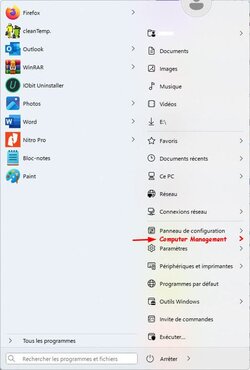
With previous versions of windows, by clicking on Start, I had access to the Computer Manager.
How can I enable it into the right panel? (see attached picture)

Regards
 
Windows Build/Version
2H2 Build 22621.1702

Attachments

  • winStart_-computManage2.jpg
    winStart_-computManage2.jpg
    31 KB · Views: 1

My Computer

System One

  • OS
    Windows 11 Pro 25H2 Build 26200.8246
    Computer type
    PC/Desktop
    Manufacturer/Model
    HP Worksatation Z1G9
    CPU
    i7 12700
    Motherboard
    HP
    Memory
    16GB
    Graphics Card(s)
    Nvida
    Hard Drives
    SSD 2T
    Browser
    Firefox
    Antivirus
    SEP (Symantec Endpoint Protction)
Hello,
I'm using Win11 22H2 Build 22621.1702
With previous versions of windows, by clicking on Start, I had access to the Computer Manager.
How can I enable it into the right panel? (see attached picture)

Regards
Right-click on Start.
 

My Computers

System One System Two

  • OS
    All Branches but Release
    Computer type
    Laptop
    Manufacturer/Model
    Acer Nitro ANV15-51
    CPU
    AMD Ryzen 7 7735HS 3200-4500 Mhz 8 cores x 2
    Motherboard
    Sportage_RBH
    Memory
    32 GB DDR5
    Graphics Card(s)
    Radeon Graphic / NVIDIA GeForce RTX 4060 8 GB GDDR6
    Sound Card
    AMD/Realtek(R) Audio
    Monitor(s) Displays
    Integrated Monitor (15.3"vis)
    Screen Resolution
    FHD 1920X1080 16:9 144Hz
    Hard Drives
    KINGSTON OM8SEP4512Q-AA 1TB
    Western Digital 256GB
    PSU
    19V DC 6.32 A 120 W
    Cooling
    Dual Fans
    Mouse
    MS Bluetooth
    Internet Speed
    Fiber 1GB Cox -us & 1GB Orange-fr
    Browser
    Edge Canary- Firefox Nightly-Chrome Dev-Chrome Dev
    Antivirus
    Windows Defender
  • Operating System
    Windows 11 Beta
    Computer type
    Laptop
    Manufacturer/Model
    Asus X751BP
    CPU
    AMD A9-9420
    Memory
    8 GB of DDR4
    Graphics card(s)
    AMD Radeon R5
    Screen Resolution
    1600x900
    Hard Drives
    Seagate 1 TB
looks like you're using 3rd party Start manager. Could be something with that app (Start all Back, Explorerpatcher or similar)

Simplest way to start Computer manager is to right click on Start (Win) button

In your case, think you have to hold down Shift when right clicking.

1686070532085.png
 

My Computers

System One System Two

  • OS
    Windows 10 Pro, Windows 11 Dev
    Computer type
    PC/Desktop
    Manufacturer/Model
    Homebuilt
    CPU
    Intel I3 10100
    Motherboard
    ASUS B460M
    Memory
    16 GB DDR4 Crucial
    Graphics Card(s)
    Intel on chip
    Sound Card
    Realtek onboard
    Monitor(s) Displays
    ASUS 24, LG 24
    Screen Resolution
    Full HD x 2
    Hard Drives
    kingston A2000 NVMe PCIe 500 GB
    PSU
    LC Power 650W
    Case
    Noname
    Cooling
    Air 2x 120mm
    Keyboard
    Cherry G-81
    Mouse
    Logitech M500
    Internet Speed
    100/20
    Browser
    Firefox, Vivaldi
    Antivirus
    MS Defender
  • Operating System
    Windows 10 Home
    Computer type
    Laptop
    Manufacturer/Model
    ASUS/Vivobook Flip 14
    CPU
    Ryzen 7 4700u
    Memory
    8 GB DDR4
    Graphics card(s)
    AMD Vega
    Sound Card
    Realtek onboard
    Monitor(s) Displays
    14"
    Screen Resolution
    FullHD
    Hard Drives
    512 Samsung NVMe PCIe
    PSU
    -
    Case
    Laptop
    Mouse
    Touchpad, Touchscreen
    Internet Speed
    100/20
    Browser
    Firefox, Vivaldi
    Antivirus
    MS Defender
TNX ALL 👍
and especially for your responsiveness 👏
 

My Computer

System One

  • OS
    Windows 11 Pro 25H2 Build 26200.8246
    Computer type
    PC/Desktop
    Manufacturer/Model
    HP Worksatation Z1G9
    CPU
    i7 12700
    Motherboard
    HP
    Memory
    16GB
    Graphics Card(s)
    Nvida
    Hard Drives
    SSD 2T
    Browser
    Firefox
    Antivirus
    SEP (Symantec Endpoint Protction)

Latest Support Threads

Back
Top Bottom