
LSA Credential Guard Errors in Event Log


thecaretaker

Well-known member
Power User
VIP
Local time
8:41 AM
Posts
391
Location
1066 Country
OS
Windows 11 Pro 25H2 26200.7922
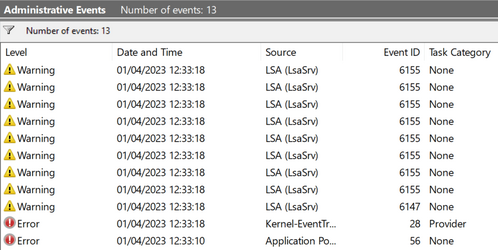
Can somebody help me? Everytime I boot up my new install of Windows 11 Pro I am getting the following errors in event log.
Screenshot 2023-04-01 123454.png

The details are as follows:

Error ID: 6155
LSA package is not signed as expected. This can cause unexpected behaviour with Credential Guard.

PackageName: schannel
PackageName: wdigest
PackageName: cloudap
PackageName: pku2u
PackageName: tspkg
PackageName: msv1_0
PackageName: kerberos
PackageName: negoexts


Error ID: 6147
Credential Guard is configured to run, but is not licensed. Credential Guard was not started.

Error ID: 28
Error setting traits on Provider {77811378-e885-4ac2-a580-bc86e4f1bc93}. Error: 0xC0000005

Error ID: 56
The description for Event ID 56 from source Application Popup cannot be found. Either the component that raises this event is not installed on your local computer or the installation is corrupted. You can install or repair the component on the local computer.

If the event originated on another computer, the display information had to be saved with the event.

The following information was included with the event:

ACPI
2

The message resource is present but the message was not found in the message table

I have never used Credential Guard, I don't even know what it is. I've searched everywhere on the internet and as far as I can see, it is not turned on as Error 6147 says. I don't know if Error 56 and 28 are connected to the LSA errors or not. I am sure I didn't have these errors when the shop built this PC, they seem fairly recent.

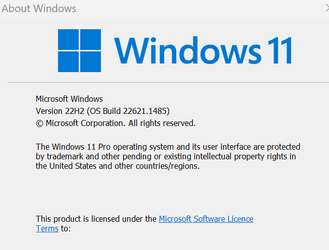
My Windows 11 Pro runs perfectly, no BSD.
Screenshot 2023-04-01 125301.png

I have read other posts about this LSA which as far as I understand shouldn't be running on a home system. I did see a post on these forums with some options 1,2 and 4, but my knowledge is extremely limited and just don't understand what they are saying. Is this the same issue the options refer to? Is it a Microsoft issue and will it get fixed with a Windows Update? Should I carry on just ignoring it or could it potentially be dangerous. I'm so confused with all the different things I've read.
 

My Computer My Computer

At a glance

Windows 11 Pro 25H2 26200.7922Intel Core i9 13900F2 x Kingston Fury 32gb DDR5 5600 BeastGigabyte Eagle (Nvidia) RTX 3060
OS
Windows 11 Pro 25H2 26200.7922
Computer type
PC/Desktop
Manufacturer/Model
Local shop built (KC Computers Ltd)
CPU
Intel Core i9 13900F
Motherboard
Gigabyte Z690 Gaming X (rev. 1.0/1.1) - (BIOS: F32 09 18 2025)
Memory
2 x Kingston Fury 32gb DDR5 5600 Beast
Graphics Card(s)
Gigabyte Eagle (Nvidia) RTX 3060
Sound Card
Chord Async USB 44.1kHz - 384kHz 2Qute DAC
Monitor(s) Displays
Gigabyte AORUS FO32U2 32” OLED Flat Gaming Monitor, 0.03ms, KVM, 250 cd/m2, FreeSync Premium Pro, HDR True Black 400
Screen Resolution
3840 x 2160 (UHD), 240Hz
Hard Drives
1 x KINGSTON NVMe M.2 SSDSKC3000D2048G 2TB
1 x Samsung SSD 870 EVO 250GB
2 x Crucial CT4000MX500SSD1 4TB
2 x Crucial CT2000MX500SSD1 2TB
1 x Crucial CT250MX500SSD1 250.0 GB
PSU
Gigabyte 750w
Case
Fractal Torrent
Cooling
Stock Intel CPU, 2 x Fractal 180mm PWM (front), 3 x Fractal 140mm PWM (bottom)
Keyboard
Logitech MX Mechanical Wireless Illuminated Performance Keyboard
Mouse
Logitech MX Master 3S Wireless Performance Mouse
Internet Speed
900 Mbps/900 Mbps Trooli FTTP
Browser
Firefox
Antivirus
Eset Nod32
Those are warnings, not errors. Event IDs 26 & 56 are.

"If you are seeing LSA warnings for packages negoexts, kerberos, msv1_0, tspkg, pku2u, cloudap, wdigest, schannel, sfapm - it looks like you can ignore those, because they are related to password-based SSO, according to this. These specific warnings (they are not errors in the event viewer!) only indicate that something tried loading one of the affected protocols or it was just the general attempt to load the library. According to MS article, this only blocks SSO, not the whole protocols.

It is clear, that for these particular instances it would warrant Microsoft to write a more appropriate warning text, perhaps also indicating what was calling the library or whether it was a general load of the library during boot-up sequence."

From: Redirecting
 

My Computers My Computers

  • At a glance

    All Branches but StableAMD Ryzen 7 7735HS 3200-4500 Mhz 8 cores x 232 GB DDR5Radeon Graphic / NVIDIA GeForce RTX 4060 8 GB...
    OS
    All Branches but Stable
    Computer type
    Laptop
    Manufacturer/Model
    Acer Nitro ANV15-51
    CPU
    AMD Ryzen 7 7735HS 3200-4500 Mhz 8 cores x 2
    Motherboard
    Sportage_RBH
    Memory
    32 GB DDR5
    Graphics Card(s)
    Radeon Graphic / NVIDIA GeForce RTX 4060 8 GB GDDR6
    Sound Card
    AMD/Realtek(R) Audio
    Monitor(s) Displays
    Integrated Monitor (15.3"vis)
    Screen Resolution
    FHD 1920X1080 16:9 144Hz
    Hard Drives
    KINGSTON OM8SEP4512Q-AA 1TB
    Western Digital 256GB
    PSU
    19V DC 6.32 A 120 W
    Cooling
    Dual Fans
    Mouse
    MS Bluetooth
    Internet Speed
    Fiber 1GB Cox -us & 1GB Orange-fr
    Browser
    Edge Canary- Firefox Nightly-Chrome Dev-Chrome Dev
    Antivirus
    Windows Defender
  • At a glance

    Windows 11 BetaAMD A9-94208 GB of DDR4AMD Radeon R5
    Operating System
    Windows 11 Beta
    Computer type
    Laptop
    Manufacturer/Model
    Asus X751BP
    CPU
    AMD A9-9420
    Memory
    8 GB of DDR4
    Graphics card(s)
    AMD Radeon R5
    Screen Resolution
    1600x900
    Hard Drives
    Seagate 1 TB
Those are warnings, not errors. Event IDs 26 & 56 are.

"If you are seeing LSA warnings for packages negoexts, kerberos, msv1_0, tspkg, pku2u, cloudap, wdigest, schannel, sfapm - it looks like you can ignore those, because they are related to password-based SSO, according to this. These specific warnings (they are not errors in the event viewer!) only indicate that something tried loading one of the affected protocols or it was just the general attempt to load the library. According to MS article, this only blocks SSO, not the whole protocols.

It is clear, that for these particular instances it would warrant Microsoft to write a more appropriate warning text, perhaps also indicating what was calling the library or whether it was a general load of the library during boot-up sequence."

From: Redirecting

Thanks, I'll continue to ignore them then. I'm sure I never had the warnings when the PC was new. I don't know why they have recently started showing. I sometimes wish I had never discovered the event log :giggle:
 

My Computer My Computer

At a glance

Windows 11 Pro 25H2 26200.7922Intel Core i9 13900F2 x Kingston Fury 32gb DDR5 5600 BeastGigabyte Eagle (Nvidia) RTX 3060
OS
Windows 11 Pro 25H2 26200.7922
Computer type
PC/Desktop
Manufacturer/Model
Local shop built (KC Computers Ltd)
CPU
Intel Core i9 13900F
Motherboard
Gigabyte Z690 Gaming X (rev. 1.0/1.1) - (BIOS: F32 09 18 2025)
Memory
2 x Kingston Fury 32gb DDR5 5600 Beast
Graphics Card(s)
Gigabyte Eagle (Nvidia) RTX 3060
Sound Card
Chord Async USB 44.1kHz - 384kHz 2Qute DAC
Monitor(s) Displays
Gigabyte AORUS FO32U2 32” OLED Flat Gaming Monitor, 0.03ms, KVM, 250 cd/m2, FreeSync Premium Pro, HDR True Black 400
Screen Resolution
3840 x 2160 (UHD), 240Hz
Hard Drives
1 x KINGSTON NVMe M.2 SSDSKC3000D2048G 2TB
1 x Samsung SSD 870 EVO 250GB
2 x Crucial CT4000MX500SSD1 4TB
2 x Crucial CT2000MX500SSD1 2TB
1 x Crucial CT250MX500SSD1 250.0 GB
PSU
Gigabyte 750w
Case
Fractal Torrent
Cooling
Stock Intel CPU, 2 x Fractal 180mm PWM (front), 3 x Fractal 140mm PWM (bottom)
Keyboard
Logitech MX Mechanical Wireless Illuminated Performance Keyboard
Mouse
Logitech MX Master 3S Wireless Performance Mouse
Internet Speed
900 Mbps/900 Mbps Trooli FTTP
Browser
Firefox
Antivirus
Eset Nod32
  • Like
Reactions: OAT
Can somebody help me? Everytime I boot up my new install of Windows 11 Pro I am getting the following errors in event log.

View attachment 56885

The details are as follows:

Error ID: 6155
LSA package is not signed as expected. This can cause unexpected behaviour with Credential Guard.

PackageName: schannel
PackageName: wdigest
PackageName: cloudap
PackageName: pku2u
PackageName: tspkg
PackageName: msv1_0
PackageName: kerberos
PackageName: negoexts


Error ID: 6147
Credential Guard is configured to run, but is not licensed. Credential Guard was not started.

Error ID: 28
Error setting traits on Provider {77811378-e885-4ac2-a580-bc86e4f1bc93}. Error: 0xC0000005

Error ID: 56
The description for Event ID 56 from source Application Popup cannot be found. Either the component that raises this event is not installed on your local computer or the installation is corrupted. You can install or repair the component on the local computer.

If the event originated on another computer, the display information had to be saved with the event.

The following information was included with the event:

ACPI
2

The message resource is present but the message was not found in the message table

I have never used Credential Guard, I don't even know what it is. I've searched everywhere on the internet and as far as I can see, it is not turned on as Error 6147 says. I don't know if Error 56 and 28 are connected to the LSA errors or not. I am sure I didn't have these errors when the shop built this PC, they seem fairly recent.

My Windows 11 Pro runs perfectly, no BSD.

View attachment 56886

I have read other posts about this LSA which as far as I understand shouldn't be running on a home system. I did see a post on these forums with some options 1,2 and 4, but my knowledge is extremely limited and just don't understand what they are saying. Is this the same issue the options refer to? Is it a Microsoft issue and will it get fixed with a Windows Update? Should I carry on just ignoring it or could it potentially be dangerous. I'm so confused with all the different things I've read.
I get the same error ID 28 on a new installation for the same Provider 77811378-e885-4ac2-a580-bc86e4f1bc93. That string doesn't appear in the Registry so it's a mystery.
 

My Computer My Computer

At a glance

Windows 11 ProCore i7-13700K64 GB Kingston Fury Beast DDR5Gigabyte GeForce RTX 2060 Super Gaming OC 8G
OS
Windows 11 Pro
Computer type
PC/Desktop
Manufacturer/Model
Self build
CPU
Core i7-13700K
Motherboard
Asus TUF Gaming Plus WiFi Z790
Memory
64 GB Kingston Fury Beast DDR5
Graphics Card(s)
Gigabyte GeForce RTX 2060 Super Gaming OC 8G
Sound Card
Realtek S1200A
Monitor(s) Displays
Viewsonic VP2770 & Dell (secondary)
Screen Resolution
2560 x 1440
Hard Drives
Kingston KC3000 2TB NVME SSD & SATA HDDs & SSD
PSU
EVGA SuperNova G2 850W
Case
Nanoxia Deep Silence 1
Cooling
Noctua NH-D14
Keyboard
Microsoft Digital Media Pro
Mouse
Logitech Wireless
Internet Speed
80 Mb / s
Browser
Chrome
Antivirus
Defender, Malwarebytes Free & AdwCleaner
You can ignore those (as the majority do - without any issue whatsoever) . If it's a home PC - that is. I'd be more concerned with the Errors below the LSA Warnings. Tho, maybe it's just something you did.
 

My Computer My Computer

At a glance

WinDOS 25H2Intel & AMDSO-DIMM SK Hynix 15.8 GB Dual-Channel DDR4-26...nVidia RTX 2060 6GB Mobile GPU (TU106M)
OS
WinDOS 25H2
Computer type
Laptop
CPU
Intel & AMD
Memory
SO-DIMM SK Hynix 15.8 GB Dual-Channel DDR4-2666 (2 x 8 GB) 1329MHz (19-19-19-43)
Graphics Card(s)
nVidia RTX 2060 6GB Mobile GPU (TU106M)
Sound Card
Onbord Realtek ALC1220
Screen Resolution
1920 x 1080
Hard Drives
1x Samsung PM981 NVMe PCIe M.2 512GB / 1x Seagate Expansion ST1000LM035 1TB
If you really want to remove the LSA warnings from event viewer then you can hide them with this reg hack.
 

Attachments

  • Document_20230524_0001.jpg
    Document_20230524_0001.jpg
    247.8 KB · Views: 32

My Computers My Computers

  • At a glance

    Win 11 Pro 26H2Intel Ultra i7 270K PlusKingston Fury Renegrade 2x24 8400 M/tuMSI - GeForce RTX 5070 12 GB GAMING TRIO OC
    OS
    Win 11 Pro 26H2
    Computer type
    PC/Desktop
    Manufacturer/Model
    User Built
    CPU
    Intel Ultra i7 270K Plus
    Motherboard
    Asrock Taichi Z890
    Memory
    Kingston Fury Renegrade 2x24 8400 M/tu
    Graphics Card(s)
    MSI - GeForce RTX 5070 12 GB GAMING TRIO OC
    Sound Card
    Headphone DAC
    Monitor(s) Displays
    AOC QD OLED 4K 32" + Eizo 32" FlexScan 4K
    Screen Resolution
    3840x2160
    Hard Drives
    1x 9100 Pro 2TB Nvme 1x 990 Pro 2TB 1X 1TB 990 Pro 1TB
    PSU
    Be Quiet Pure Power 13 1K Watt ATX 3.1
    Case
    Corsair 5000T Air Flow
    Cooling
    Arctic Freezer 3 360 Pro
    Keyboard
    Cherry G80-3000N
    Mouse
    Corsair
    Internet Speed
    500Mbps
    Browser
    Firefox x64
    Antivirus
    Defender
    Other Info
    Backup software MR ver 10
  • At a glance

    Win 11 Pro 26H2Ultra i7 270K PlusKingston Fury 2x16 7200 M/tuMSI RTX 4070 Super OC 12 GB
    Operating System
    Win 11 Pro 26H2
    Computer type
    PC/Desktop
    Manufacturer/Model
    User Built
    CPU
    Ultra i7 270K Plus
    Motherboard
    Asus Z890 Strix - F
    Memory
    Kingston Fury 2x16 7200 M/tu
    Graphics card(s)
    MSI RTX 4070 Super OC 12 GB
    Sound Card
    Onboard
    Monitor(s) Displays
    KVM switch to AOC 4K 32" QD OLED
    Screen Resolution
    3840x2160
    Hard Drives
    Samsung 990 Pro 4TB+9100 Pro 2TB +990 Pro 1TB
    PSU
    Super Flower Ledex 3 ATX 3.1 850 Watts
    Case
    Corsair 500d
    Cooling
    Noctua D15 Cromax
Code:
Computer\HKEY_LOCAL_MACHINE\SYSTEM\CurrentControlSet\Control\WMI\Autologger\EventLog-System\{199FE037-2B82-40A9-82AC-E1D46C792B99}
Set REG_DWORD Enabled to 0
 

My Computer My Computer

At a glance

Win11i7 1270032 GB DDR5nVidia A2000 12 GB
OS
Win11
Computer type
PC/Desktop
Manufacturer/Model
HP
CPU
i7 12700
Memory
32 GB DDR5
Graphics Card(s)
nVidia A2000 12 GB
Screen Resolution
2560x1440
Back
Top Bottom




