- Local time
- 8:18 AM
- Posts
- 390
- OS
- Windows 11 PRO 25H2 (OS Build 26200.6725)
I am faced with a major problem. For reasons I do not know, I am faced with preforming a Windows Reset. Thanks to an excellent Dell tech support agent, I have a wonderful set of instructions on how to do that, and for that matter a computer that at least works with Eternet.
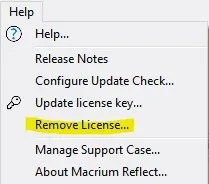
While starting to write this, I may have solved my problem, which is that I cannot create a Macrium Account for reasons I do not understand, and my Macrium license would be there. I have the purchase invoice, which does not have the license on it. However, as I was writing this, I remembered that I had seen that when I first started to access Reflect, but stopped due to to my confusion about this entire episode. I went there again to see what I had seen before, which is that my license has to be transferred from WiFi to Ethernet.
What I also saw was my license in that message, and that has been printed, so at least I have it at last. This leads me to ask a question of the forum experts: After I do the Reset, I will need to first reinstalled Reflect, and I hope (and expect) that I will be asked for my license so that I will not have to pay for a new copy.
Herewith the question engendered by the above text: With the new copy of Reflect in use, when I then go to Reflect to start the re-installation of my data, will I see the same message about transferring my license, will the license information I printed give me access?
I apologize for asking this, but the need to do a Reset is something I have never encountered, much less figured out how to do the re-installation. I am sure some of you are aware that I have very little knowledge of the inner working of Windows nor of a computer for that matter. My knowledge is of the use of these matters, such as finding a document that has a very large number of links to my writings. I started to count how many such entries, but gave up when I was looking at entries starting with `E," and saw that I had already found thirty-three links to my on-line documentation.
Suffice it to say that I am very worried that I might do something during the Reset and recovery process that might leave me with WiFi restored computer which has no data.
While starting to write this, I may have solved my problem, which is that I cannot create a Macrium Account for reasons I do not understand, and my Macrium license would be there. I have the purchase invoice, which does not have the license on it. However, as I was writing this, I remembered that I had seen that when I first started to access Reflect, but stopped due to to my confusion about this entire episode. I went there again to see what I had seen before, which is that my license has to be transferred from WiFi to Ethernet.
What I also saw was my license in that message, and that has been printed, so at least I have it at last. This leads me to ask a question of the forum experts: After I do the Reset, I will need to first reinstalled Reflect, and I hope (and expect) that I will be asked for my license so that I will not have to pay for a new copy.
Herewith the question engendered by the above text: With the new copy of Reflect in use, when I then go to Reflect to start the re-installation of my data, will I see the same message about transferring my license, will the license information I printed give me access?
I apologize for asking this, but the need to do a Reset is something I have never encountered, much less figured out how to do the re-installation. I am sure some of you are aware that I have very little knowledge of the inner working of Windows nor of a computer for that matter. My knowledge is of the use of these matters, such as finding a document that has a very large number of links to my writings. I started to count how many such entries, but gave up when I was looking at entries starting with `E," and saw that I had already found thirty-three links to my on-line documentation.
Suffice it to say that I am very worried that I might do something during the Reset and recovery process that might leave me with WiFi restored computer which has no data.
My Computer
At a glance
Windows 11 PRO 25H2 (OS Build 26200.6725)Intel Core i7-13700 2.10GHz32 GBNVidia GetForce RTX 4060 Ti
- OS
- Windows 11 PRO 25H2 (OS Build 26200.6725)
- Computer type
- PC/Desktop
- Manufacturer/Model
- Dell XPS 8960
- CPU
- Intel Core i7-13700 2.10GHz
- Motherboard
- Dell
- Memory
- 32 GB
- Graphics Card(s)
- NVidia GetForce RTX 4060 Ti
- Sound Card
- Realtec
- Monitor(s) Displays
- Dell U2722D
- Screen Resolution
- 2560 x 1440
- Hard Drives
- 1024GB SSD boot drive; 2TB Internal Mechanical Hard Disc; WD My Passport (1Tb) external; My Passport Ultra (2Tb) external
- Keyboard
- Dell
- Mouse
- MX Master 3
- Internet Speed
- 40Mbps (Bonded DSL)
- Browser
- Firefox (default)
- Antivirus
- Malwarebytes, MS Defender AV