Microsoft Extending the Context Menu and Share Dialog in Windows 11


Windows 11 brings refinement to contextual file operations in the right-click context menu and share dialog. These are extensible by apps, including unpackaged Win32 apps.

The context menu is one of the most popular and useful shell extensions. If you are already in File Explorer or on the Desktop, it significantly reduces the number of steps to complete a file operation compared to opening a separate app.

As useful as the Windows 10 context menu is, there are aspects of its design we sought to improve in Windows 11.
  • The most common commands – cut, copy, paste, delete, and rename – are far from the mouse pointer, touch point, or pen.
  • The menu is exceptionally long. It has grown in an unregulated environment for 20 years, since Windows XP, when IContextMenu was introduced.
  • It includes commands which are rarely used.
  • Commands that should be grouped together – such as Open and Open with – are sometimes far apart.
  • Commands added by apps have no common organizational schema and can interrupt sections of inbox commands.
  • Commands added by apps are not attributable to the app itself.
  • Many commands run in-process in Explorer, which can cause performance and reliability issues.
W10-Context-Menu-with-Contoso-Replacements-and-Defender-Fix-458x1024.png

The Windows 11 context menu addresses these problems in the following ways:
  • Common commands are placed right next to where the menu is invoked.
  • “Open” and “Open with” are grouped together.
  • Apps extend the menu with IExplorerCommand + app identity. Unpackaged Win32 apps can use Sparse Manifests. IExplorerCommand support extends back to Windows 7.
  • App extensions are grouped together below Shell verbs.
  • Cloud Files provider apps are placed next to the Shell commands to hydrate or dehydrate the file.
  • Apps with more than 1 verb are grouped into a flyout with app attribution.
  • “Show more options” loads the Windows 10 context menu as-is for access to low-use Shell verbs and apps still working on porting over. No commands have been removed entirely.
  • Shift-F10 or the keyboard menu key will also load the Windows 10 context menu.
image3.png

The share dialog has also been improved in Windows 11.
  • Nearby sharing is now much easier to use, with easy control over your discoverability setting up top and a link to more settings in the footer of the dialog.
  • If you use the Mail app, the first entry in the contacts list helps you easily send an email to yourself.
  • All apps can now participate in the Share dialog as targets. For unpackaged Win32 apps, this is covered in the same sample as the context menu. PWAs installed through Microsoft Edge are also supported if they implement the Web Share Target API.
image2.png

Context Menu Best Practices​

Regarding File Opening scenarios:

1. When should I register my app for “Open with”? (File Type associations)

The new context menu moves “Open with” to the top of the menu, right next to “Open.”

If your app can open the file to do something more with it, you should always register for any applicable File Type Associations.

“Universal openers,” like technical text editors, should register to handle * so they will always be offered as an “Open with” option. They should also explicitly register for any filetypes they are optimized to handle.

2. When should I add a verb to “Edit with〈app〉”?

It is common for certain file types to be both “viewable/runnable” and “editable,” such as scripts, HTML, images, or text-based document formats.

Because the default action on double-click for these files can be “open/run” or “edit,” one of these two actions will be less convenient.

In these cases, adding a verb for “Edit with〈app name〉” is an acceptable practice.

However, please consider if your non-power-users will be adequately served by “Open with.”

For these users, a default state of not including the verb unless users opt into it will keep the menu tidier in general while offering classic functionality to your power users.

Regarding File Sharing scenarios:

3. When should I add a Context Menu verb to “Share with〈app〉”?

Share actions can originate outside of File Explorer, for example the Photos app or Snip & Sketch. In these cases, the Share dialog is shown to the user.

The best practice is to make sure you are registered as an app target in the Share dialog.

It’s also OK to add a Context Menu verb for “Share with〈app〉”

Because the Share dialog is also easily accessed from the File Explorer ribbon and context menu, an additional “Share with” verb in the context menu can be redundant – consider offering a way for users to opt out of the duplicate context menu verb.


Source: Extending the Context Menu and Share Dialog in Windows 11
 
I wonder when we'll get this..
 

My Computer My Computer

At a glance

Windows 11 Home- RP - 26H2 -26300.9550AMD Ryzen 5 5600GG.SKILL Ripjaws V Series 64GB 4x16Nvidia geforce gtx titan x
OS
Windows 11 Home- RP - 26H2 -26300.9550
Computer type
PC/Desktop
Manufacturer/Model
Banana Junior 5600-G Series
CPU
AMD Ryzen 5 5600G
Motherboard
Asus ROG Strix B550-F
Memory
G.SKILL Ripjaws V Series 64GB 4x16
Graphics Card(s)
Nvidia geforce gtx titan x
Monitor(s) Displays
28" ASUS VP28U 4k
Screen Resolution
4K
Hard Drives
Primary SAMSUNG 970 EVO Plus
PSU
EVGA BQ 700w 80+ Bronze
Case
Zalman i3 NEO
Cooling
ARCTIC Freezer 7 X
Keyboard
Corsair
Mouse
Amazon Generic with Cord
Internet Speed
Download: 295.11 mbps Upload: 65.35 mbps T-Mobile Internet
Browser
Firefox and Edge
Antivirus
MS - Defender
Other Info
Speakers: Klipsch ProMedia 2.1

My Computers My Computers

  • At a glance

    windows 10 & 11AMD Ryzen 7X64GbRadeon RX 480 8Gb
    OS
    windows 10 & 11
    Computer type
    PC/Desktop
    Manufacturer/Model
    iBuyPower (special build)
    CPU
    AMD Ryzen 7X
    Motherboard
    Asus Prime x370 Pro
    Memory
    64Gb
    Graphics Card(s)
    Radeon RX 480 8Gb
    Monitor(s) Displays
    Samsung UHD 27 inch
    Screen Resolution
    UHD
    Hard Drives
    3 Samsung 1 TB SSD each; 1 Samsung PCIe M.2 at 2 TB
  • At a glance

    Windows 11 proAMD 9 5900X32 GbNvidia GeForce RTX 3080 Ti 12 GB GDDR6X
    Operating System
    Windows 11 pro
    Computer type
    PC/Desktop
    Manufacturer/Model
    IBuyPower
    CPU
    AMD 9 5900X
    Motherboard
    Asus x570 ROG Crosshair VIII Dark Hero WI-FI 6E ARGB
    Memory
    32 Gb
    Graphics card(s)
    Nvidia GeForce RTX 3080 Ti 12 GB GDDR6X
    Sound Card
    3D PREMIUM surround sound onboard
    Monitor(s) Displays
    Samsung 32 inch UHD curved monitor
    Screen Resolution
    UHD
    Hard Drives
    Samsung 980 pro 2 tb gen 4 NVMe ssd
    PSU
    850 watt consair RM850X
    Case
    Lian Li LANCOOL ONE tempered glass RGB gaming case
    Cooling
    DEEPCOOL GAMERSTORM RGB 240 mm CASTLE 240EX liquid cooler
    Keyboard
    Ares m.2 gaming keyboard
    Mouse
    Ares m.2 gaming optical mouse
    Internet Speed
    450
    Browser
    Firefox / Edge
    Antivirus
    Windows defender
    Other Info
    With all this gaming rig I am not a gamer!
Thanks Shawn. Mapped my middle mouse button to Shift-F10 since I do not have a menu button :rolleyes:
 

My Computers My Computers

  • At a glance

    Windows 11 ProIntel Core i9 14900K 5800/4500 P/E96GB (2x48) G.skill Ripjaws 6800Asus ROG Strix 4070 Ti OC
    OS
    Windows 11 Pro
    Computer type
    PC/Desktop
    Manufacturer/Model
    DIY Photoshop/Audio/Game/tinker
    CPU
    Intel Core i9 14900K 5800/4500 P/E
    Motherboard
    Asus ROG Maximus Z790 Dark Hero
    Memory
    96GB (2x48) G.skill Ripjaws 6800
    Graphics Card(s)
    Asus ROG Strix 4070 Ti OC
    Sound Card
    B&W 606 S3 speakers; Audiolabs 7000a integrated amp; RSL 10S Mk2 sub
    Monitor(s) Displays
    Eizo CG2730 ColorEdge, ViewSonic VP2768
    Screen Resolution
    2560 x 1440 x 2
    Hard Drives
    nvme: 4TB WDC SN850X, 1TB SN850, 2TB SK-Hynix P41
    Spinners: Sabrent USB-C DS-SC5B 5-bay docking station, 6TB WDC Black, 6TB Ironwolf Pro 2x 2TB WDC Black
    PSU
    850W Seasonic Vertex PX-850
    Case
    FD North XL Mesh, Black Walnut
    Cooling
    EK Nucleus black 360 AIO w/Phanteks T30 fans; 2 Noctua NF-A14 Chromax ; T30 for memory
    Keyboard
    Keychron Q3 Max TKL w/GMK Redsuns Red Samuri keycaps
    Mouse
    Logitech G305 wireless gaming
    Internet Speed
    575 Mb/s down | 25 Mb/s up
    Browser
    Firefox
    Antivirus
    Defender, Macrium Reflect X
    Other Info
    Phangkey Amaterasu V2 Desk Mat
  • At a glance

    Apple M1
    Computer type
    Laptop
    Manufacturer/Model
    💻 Apple 13" Macbook Pro 2020 (m1)

    CPU
    Apple M1
    Screen Resolution
    2560x1600
    Browser
    Firefox
The right click design really is rubbish and a backwards step
 

My Computer My Computer

At a glance

Windows 11 ProCore i7-13700K64 GB Kingston Fury Beast DDR5Gigabyte GeForce RTX 2060 Super Gaming OC 8G
OS
Windows 11 Pro
Computer type
PC/Desktop
Manufacturer/Model
Self build
CPU
Core i7-13700K
Motherboard
Asus TUF Gaming Plus WiFi Z790
Memory
64 GB Kingston Fury Beast DDR5
Graphics Card(s)
Gigabyte GeForce RTX 2060 Super Gaming OC 8G
Sound Card
Realtek S1200A
Monitor(s) Displays
Viewsonic VP2770 & Dell (secondary)
Screen Resolution
2560 x 1440
Hard Drives
Kingston KC3000 2TB NVME SSD & SATA HDDs & SSD
PSU
EVGA SuperNova G2 850W
Case
Nanoxia Deep Silence 1
Cooling
Noctua NH-D14
Keyboard
Microsoft Digital Media Pro
Mouse
Logitech Wireless
Internet Speed
80 Mb / s
Browser
Chrome
Antivirus
Defender, Malwarebytes Free & AdwCleaner
  • Many commands run in-process in Explorer, which can cause performance and reliability issues.

maybe they should focus more on decluttering windows before re-inventing the wheel over and over and applying cosmetic changes just to make it appear pleasing but functionality wise, its... broken.

if Im gonna describe win11, he sure is a handsome, beautiful guy, hands down. unfortunately, his d*ck is broken.
 

My Computer My Computer

At a glance

Windows 11 x64 v23H2 Build 22631.3958
OS
Windows 11 x64 v23H2 Build 22631.3958
Computer type
PC/Desktop
Manufacturer/Model
Acer
The new design is fine, however, the main problem with what they described

******************************
As useful as the Windows 10 context menu is, there are aspects of its design we sought to improve in Windows 11.

  • The most common commands – cut, copy, paste, delete, and rename – are far from the mouse pointer, touch point, or pen.
  • The menu is exceptionally long. It has grown in an unregulated environment for 20 years, since Windows XP, when IContextMenu was introduced.
  • It includes commands which are rarely used.
  • Commands that should be grouped together – such as Open and Open with – are sometimes far apart.
  • Commands added by apps have no common organizational schema and can interrupt sections of inbox commands.
  • Commands added by apps are not attributable to the app itself.
  • Many commands run in-process in Explorer, which can cause performance and reliability issues.
********************************

is lack of customization by user, while giving developers a free hand on modifying the menus as they see fit. Most program installers just put their links where they want to without asking for user consent. And that's what makes "rarely used commands" included in the context menus - every program wants to put their links there regardless of whether I use them or not!

What they should do is to streamline the installer: mandate that users - or at least, administrators - are always asked where to put what.
 

My Computer My Computer

At a glance

Windows 10i5-10600K16 GBGeForce GTX 1650
OS
Windows 10
Computer type
PC/Desktop
CPU
i5-10600K
Motherboard
Asus Rog Strix Z490-A Gaming
Memory
16 GB
Graphics Card(s)
GeForce GTX 1650
Monitor(s) Displays
Samsung U32J59x 32" 4K
Screen Resolution
3840x2160
Or also allow a path for removing them if the links prove useless.
 

My Computer My Computer

At a glance

Windows 11
OS
Windows 11
The right click design really is rubbish and a backwards step


That's a fact.
I love Microsoft's sales pitch though.
It's good for a laugh, if nothing else. :)\


/edit

I notice they've been adding things to the Windows 10 right click menu.
So we might "like" the ridiculous Win 11 menus a bit better.

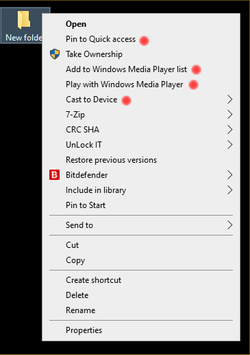
This is the right click menu for a Folder with an empty text file inside (Windows 10)
The things marked with RED dots... didn't used to be there...


Image1.png


Silly me... I never knew I could play a text file in WMP. LOL
 

My Computers My Computers

  • At a glance

    Win 11 Home ♦♦♦26300.9550 ♦♦♦♦♦♦♦26H2AMD Ryzen 7 3700XG.Skill (F4-3200C14D-16GTZKW)EVGA RTX 2070 (08G-P4-2171-KR)
    OS
    Win 11 Home ♦♦♦26300.9550 ♦♦♦♦♦♦♦26H2
    Computer type
    PC/Desktop
    Manufacturer/Model
    Built by Ghot® [May 2020]
    CPU
    AMD Ryzen 7 3700X
    Motherboard
    Asus Pro WS X570-ACE (BIOS 5302)
    Memory
    G.Skill (F4-3200C14D-16GTZKW)
    Graphics Card(s)
    EVGA RTX 2070 (08G-P4-2171-KR)
    Sound Card
    Realtek ALC1220P / ALC S1220A
    Monitor(s) Displays
    Dell U3011 30"
    Screen Resolution
    2560 x 1600
    Hard Drives
    2x Samsung 860 EVO 500GB,
    WD 4TB Black FZBX - SATA III,
    WD 8TB Black FZBX - SATA III,
    DRW-24B1ST CD/DVD Burner
    PSU
    PC Power & Cooling 750W Quad EPS12V
    Case
    Cooler Master ATCS 840 Tower
    Cooling
    CM Hyper 212 EVO (push/pull)
    Keyboard
    Ducky DK9008 Shine II Blue LED
    Mouse
    Logitech Optical M-100
    Internet Speed
    300/300
    Browser
    Firefox (latest)
    Antivirus
    Bitdefender Total Security
    Other Info
    Speakers: Klipsch Pro Media 2.1
  • At a glance

    Windows XP Pro 32bit w/SP3AMD Athlon 64 X2 5000+ (OC'd @ 3.2Ghz)TWIN2X2048-6400C4DHX (2 x 1GB, DDR2 800)EVGA 256-P2-N758-TR GeForce 8600GT SSC
    Operating System
    Windows XP Pro 32bit w/SP3
    Computer type
    PC/Desktop
    Manufacturer/Model
    Built by Ghot® (not in use)
    CPU
    AMD Athlon 64 X2 5000+ (OC'd @ 3.2Ghz)
    Motherboard
    ASUS M2N32-SLI Deluxe Wireless Edition
    Memory
    TWIN2X2048-6400C4DHX (2 x 1GB, DDR2 800)
    Graphics card(s)
    EVGA 256-P2-N758-TR GeForce 8600GT SSC
    Sound Card
    Onboard
    Monitor(s) Displays
    ViewSonic G90FB Black 19" Professional (CRT)
    Screen Resolution
    up to 2048 x 1536
    Hard Drives
    WD 36GB 10,000rpm Raptor SATA
    Seagate 80GB 7200rpm SATA
    Lite-On LTR-52246S CD/RW
    Lite-On LH-18A1P CD/DVD Burner
    PSU
    PC Power & Cooling Silencer 750 Quad EPS12V
    Case
    Generic Beige case, 80mm fans
    Cooling
    ZALMAN 9500A 92mm CPU Cooler
    Keyboard
    Logitech Classic Keybooard 200
    Mouse
    Logitech Optical M-BT96a
    Internet Speed
    300/300
    Browser
    Firefox 3.x ??
    Antivirus
    Symantec (Norton)
    Other Info
    Still assembled, still runs. Haven't turned it on for 15 years?

Latest Support Threads

Back
Top Bottom