Microsoft 365 Insider Blog:
We’ve been working to make Microsoft 365 feel more connected and integrated with Copilot, available as a helpful thought partner, when you need it. We recently updated Word, Excel and PowerPoint with a consolidated, more visible entry point (Dynamic Action Button) at the bottom right of the apps that suggests actions from Copilot based on your document. You may have noticed similar entry points in other apps across Microsoft 365, all with access to the same Copilot.
As we continue to thoughtfully and intentionally shape how Copilot integrates with the tried-and-true workflows within Word, Excel and PowerPoint that you rely on, we’re listening, learning and improving as we go. To that end, we're already making a few updates based on feedback.
Updated entry points for Copilot
While we are seeing increased engagement with Copilot in Office apps with this update, we are also hearing the need for more control over how Copilot appears. While one of our goals is to evolve Copilot to be more adaptive and flexible over time, we are making some adjustments in the short term.Move to ribbon option for the Copilot Dynamic Action Button
For customers who prefer using the ribbon, we’re adding a Move to ribbon option. We are rolling this out next week, and you will see a new option when right-clicking the Dynamic Action Button.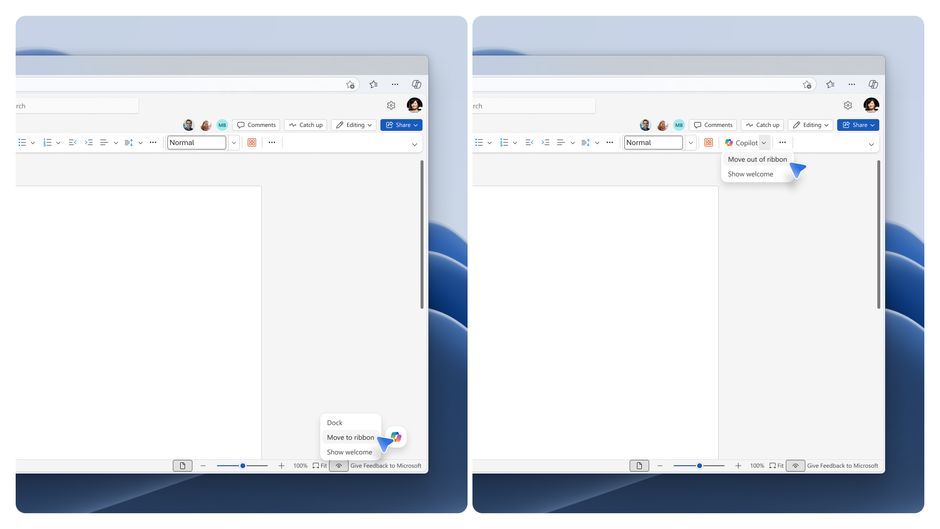
Docking that stays in place while you work
The Dock option will continue to be available as well when you right-click or drag to button the right. You can still move it back onto the canvas whenever it fits your workflow or preference, allowing for flexibility, while still keeping Copilot easy and clear to access. So when you want the entry point close to the canvas but out of the way, you can dock it to the edge of the window. We are making an update so that the button will stay docked throughout your time in the document, instead of returning to its original position every time you engage with Copilot.For more information about Copilot in Word, Excel and PowerPoint and options for end-user and IT admin configuration, see our Support article here.
Looking ahead
These updates will start rolling out in Word, Excel and PowerPoint (on the web, Windows, and Mac platforms) next week and are just a step on our journey toward a vision where Copilot is seamlessly integrated in Office to amplify, guide, and help you do your work, on your terms.Stay tuned for more updates and we'll keep listening and evolving!
Source:
Shaping Copilot across Word, Excel, and PowerPoint for the flow of work
Learn about updates we're making based on your feedback to give you more control over how Copilot appears in your favorite apps.
 techcommunity.microsoft.com