MOK (Machine Owner Key) for Secure Boot


Almighty1

Well-known member
Pro User
VIP
Local time
7:14 AM
Posts
3,637
Location
San Francisco, California USA
OS
WindowsXP/7/8/8.1/10/11,Linux,Android,FreeBSD Unix
Windows Build/Version
Windows 11 23H2 22635.4291 Beta Insiders

My Computer My Computer

At a glance

WindowsXP/7/8/8.1/10/11,Linux,Android,FreeBSD...Intel® Core™ i7-8750H 8th Gen 2.2Ghz up to 4....64GB using 2x32GB CL16 Mushkin redLine modulesIntel UHD 630 & NVIDIA GeForce GTX 1050 Ti wi...
OS
WindowsXP/7/8/8.1/10/11,Linux,Android,FreeBSD Unix
Computer type
Laptop
Manufacturer/Model
Dell XPS 15 9570
CPU
Intel® Core™ i7-8750H 8th Gen 2.2Ghz up to 4.1Ghz
Motherboard
Dell XPS 15 9570
Memory
64GB using 2x32GB CL16 Mushkin redLine modules
Graphics Card(s)
Intel UHD 630 & NVIDIA GeForce GTX 1050 Ti with 4GB DDR5
Sound Card
Realtek ALC3266-CG
Monitor(s) Displays
15.6" 4K Touch UltraHD 3840x2160 made by Sharp
Screen Resolution
3840x2160 4K UltraHD
Hard Drives
Samsung MZ-V9P4T0B/AM 990 PRO 4TB PCIe®4.0 NVMe™ M.2 SSD was Toshiba KXG60ZNV1T02 NVMe 1TB SSD
PSU
Dell XPS 15 9570
Case
Dell XPS 15 9570
Cooling
Stock
Keyboard
Stock
Mouse
SwitftPoint ProPoint
Internet Speed
Comcast/XFinity 1.44Gbps/42.5Mbps
Browser
Microsoft EDGE (Chromium based) & Google Chrome
Antivirus
Windows Defender that came with Windows

My Computers My Computers

  • At a glance

    Windows 11 Home 25H2 26200.8655AMD Ryzen 3 5300G8gbRadeon Graphics 4.00GHZ
    OS
    Windows 11 Home 25H2 26200.8655
    Computer type
    PC/Desktop
    Manufacturer/Model
    HP Pavilion TP01-2xxx
    CPU
    AMD Ryzen 3 5300G
    Memory
    8gb
    Graphics Card(s)
    Radeon Graphics 4.00GHZ
    Monitor(s) Displays
    ViewSonic
    Keyboard
    HP
    Mouse
    wireless Microsoft
    Browser
    FireFox
    Antivirus
    Avira
  • At a glance

    Updated Windows 10 to 11 25H2 26200.8655Intel Core i3 8100 @3.60 GHz8.GBIntel UHD 360 (HP)
    Operating System
    Updated Windows 10 to 11 25H2 26200.8655
    Computer type
    PC/Desktop
    Manufacturer/Model
    HP
    CPU
    Intel Core i3 8100 @3.60 GHz
    Motherboard
    HP 8653 (U3E1)
    Memory
    8.GB
    Graphics card(s)
    Intel UHD 360 (HP)
    Sound Card
    Realtek High Def
    Monitor(s) Displays
    ViewSonic
    Other Info
    #3 System: HP laptop Windows 25H2 11Pro 26200.8524
What is it you’re wanting to do, mate?

Is this for a Linux project?
 

My Computers My Computers

  • At a glance

    Windows 11 Pro 25H2 Build 26200.8655Intel(R) Core(TM) i7-4770K CPU @ 3.50GHz32.0 GB of I forget and the box is in storage.Gigabyte nVidia GeForce GTX 1660 Super OC 6GB
    OS
    Windows 11 Pro 25H2 Build 26200.8655
    Computer type
    PC/Desktop
    Manufacturer/Model
    Sin-built 2013
    CPU
    Intel(R) Core(TM) i7-4770K CPU @ 3.50GHz
    Motherboard
    ASUS ROG Maximus VI Formula
    Memory
    32.0 GB of I forget and the box is in storage.
    Graphics Card(s)
    Gigabyte nVidia GeForce GTX 1660 Super OC 6GB
    Sound Card
    ROG SupremeFX Formula 8-Channel High Definition Audio
    Monitor(s) Displays
    5 x LG 25MS500-B - 1 x 24MK430H-B - 1 x Wacom Pro 22" Touch Screen Tablet
    Screen Resolution
    All over the place
    Hard Drives
    Too many to list. OS on Samsung 1TB 870 QVO SATA
    PSU
    Silverstone 1500
    Case
    NZXT Phantom 820 Full-Tower Case
    Cooling
    Noctua NH-D15 Elite Class Dual Tower CPU Cooler / 6 x EziDIY 120mm / 2 x Corsair 140mm somethings / 1 x 140mm Thermaltake something / 2 x 200mm Corsair.
    Keyboard
    Corsair K95 / Logitech diNovo Edge Wireless
    Mouse
    Logitech: G402 / G502 / Mx Masters / Mx Air Cordless
    Internet Speed
    2000/500Mbps
    Browser
    All sorts
    Antivirus
    Kaspersky Premium
    Other Info
    ㅤㅤㅤㅤㅤㅤㅤㅤㅤㅤㅤㅤㅤㅤㅤㅤㅤㅤㅤㅤㅤㅤㅤㅤㅤㅤㅤㅤㅤㅤㅤㅤㅤㅤㅤㅤㅤㅤㅤㅤ⠀⠀⠀⠀⠀⠀⠀⠀⠀⠀
    TP-Link BE9300 WiFi 7 Bluetooth 5.4 (Archer TBE550E)
    TP-Link TX201 V1 2.5GB Lan

    Grandstream HT812 - VoIP
    ASUS DSL-AX82U - Mesh
    ASUS RT-AC68U - Mesh
    ASUS RT-BE88U Router

    Brother MFC-L2880DW Printer

    I’m on a horse.
  • At a glance

    Windows 11 Pro 25H2 Build 26200.8655 (Wifes)13th Generation Intel® Core™ i5-1340P Process...16GB LPDDR5-52001x Intel® Iris® Xe Graphics
    Operating System
    Windows 11 Pro 25H2 Build 26200.8655 (Wifes)
    Computer type
    Laptop
    Manufacturer/Model
    LENOVO Yoga 7 14IRL8 - Type 82YL
    CPU
    13th Generation Intel® Core™ i5-1340P Processor(Core™ i5-1340P)
    Memory
    16GB LPDDR5-5200
    Graphics card(s)
    1x Intel® Iris® Xe Graphics
    Sound Card
    Optimized with Dolby Atmos®
    Screen Resolution
    QHD 2880 x 1800 OLED
    Hard Drives
    M.2 512 GB SSD PCIe
    Mouse
    Logiteck MX Master 3S
    Internet Speed
    2000/500
    Antivirus
    Defender / Malwarebytes
    Other Info
    …still on a horse.


    Wireless Network: Wi-Fi 6E 2x2 AX; Bluetooth® 5.1 or above
    Ports: 1x 1 Novo button; 2 in 1 Audio Combo jack; Micro SD Card Reader; HDMI 1.4b; 2 x USB Type-C (TBT4)
    USB 3.2 Gen 2 DP 1.4a
    PD 3.0); 1 x USB 3.2 Gen1 Type A
    Camera
    1x 1080P FHD IR/RGB Hybrid with Privacy Shutter and Dual Array Microphone
    Graphics
    1x Intel® Iris® Xe Graphics
    Monitor
    14" WUXGA
    Form Factor
    Convertible Notebook
  • Windows 11 Pro 25H2 Build 26200.8655 (Wifes)

    Yoga 7 2-in-1 14IML9 - Type 83DJ

    Processor: Intel® Core™ Ultra 7 155H Processor(Core™ Ultra 7 155H)

    Memory: 32GB LPD5X-7467

    Hard Drive: 1 TB SSD PCIe

    Wireless Network: 1x Wi-Fi 6E 2x2 AX; Bluetooth® 5.1 or above

    Ports: 1 x HDMI 2.1 TMDS; 1 x Novo Button; 1 x Combo Audio Jack
    2 x USB-C (USB 4.0)
    1 x USB-A 3.2 Gen 1

    Camera: 1080P FHD IR Hybrid with Dual Microphone

    Graphics: Intel® Arc™ Graphics

    Monitor: 14" 2.8K

    ...Where's my horse?
To force activate the Machine Owner Key (MOK) on Dell laptops, especially when dealing with Secure Boot and custom kernels or drivers, follow these steps:
  1. Boot into your operating system and open a terminal.
  2. Generate a MOK key if you haven’t already:
    sudo mokutil --import /path/to/your_public_key.der
    Replace /path/to/your_public_key.der with the actual path to your MOK key file.

  3. Reboot your system. During the boot process, you will be prompted to enroll the MOK.
  4. Enroll the MOK:
    • When the MOK management screen appears, press any key to continue.
    • Select “Enroll MOK” and press Enter.
    • Select “Continue” and press Enter.
    • When prompted, select “Yes” to enroll the key.
    • Finally, select “Reboot” to restart your system.
This process will enroll your custom key, allowing the system to trust and load the unsigned or custom-signed software - As per Jacee’s link
 

My Computers My Computers

  • At a glance

    Windows 11 Pro 25H2 Build 26200.8655Intel(R) Core(TM) i7-4770K CPU @ 3.50GHz32.0 GB of I forget and the box is in storage.Gigabyte nVidia GeForce GTX 1660 Super OC 6GB
    OS
    Windows 11 Pro 25H2 Build 26200.8655
    Computer type
    PC/Desktop
    Manufacturer/Model
    Sin-built 2013
    CPU
    Intel(R) Core(TM) i7-4770K CPU @ 3.50GHz
    Motherboard
    ASUS ROG Maximus VI Formula
    Memory
    32.0 GB of I forget and the box is in storage.
    Graphics Card(s)
    Gigabyte nVidia GeForce GTX 1660 Super OC 6GB
    Sound Card
    ROG SupremeFX Formula 8-Channel High Definition Audio
    Monitor(s) Displays
    5 x LG 25MS500-B - 1 x 24MK430H-B - 1 x Wacom Pro 22" Touch Screen Tablet
    Screen Resolution
    All over the place
    Hard Drives
    Too many to list. OS on Samsung 1TB 870 QVO SATA
    PSU
    Silverstone 1500
    Case
    NZXT Phantom 820 Full-Tower Case
    Cooling
    Noctua NH-D15 Elite Class Dual Tower CPU Cooler / 6 x EziDIY 120mm / 2 x Corsair 140mm somethings / 1 x 140mm Thermaltake something / 2 x 200mm Corsair.
    Keyboard
    Corsair K95 / Logitech diNovo Edge Wireless
    Mouse
    Logitech: G402 / G502 / Mx Masters / Mx Air Cordless
    Internet Speed
    2000/500Mbps
    Browser
    All sorts
    Antivirus
    Kaspersky Premium
    Other Info
    ㅤㅤㅤㅤㅤㅤㅤㅤㅤㅤㅤㅤㅤㅤㅤㅤㅤㅤㅤㅤㅤㅤㅤㅤㅤㅤㅤㅤㅤㅤㅤㅤㅤㅤㅤㅤㅤㅤㅤㅤ⠀⠀⠀⠀⠀⠀⠀⠀⠀⠀
    TP-Link BE9300 WiFi 7 Bluetooth 5.4 (Archer TBE550E)
    TP-Link TX201 V1 2.5GB Lan

    Grandstream HT812 - VoIP
    ASUS DSL-AX82U - Mesh
    ASUS RT-AC68U - Mesh
    ASUS RT-BE88U Router

    Brother MFC-L2880DW Printer

    I’m on a horse.
  • At a glance

    Windows 11 Pro 25H2 Build 26200.8655 (Wifes)13th Generation Intel® Core™ i5-1340P Process...16GB LPDDR5-52001x Intel® Iris® Xe Graphics
    Operating System
    Windows 11 Pro 25H2 Build 26200.8655 (Wifes)
    Computer type
    Laptop
    Manufacturer/Model
    LENOVO Yoga 7 14IRL8 - Type 82YL
    CPU
    13th Generation Intel® Core™ i5-1340P Processor(Core™ i5-1340P)
    Memory
    16GB LPDDR5-5200
    Graphics card(s)
    1x Intel® Iris® Xe Graphics
    Sound Card
    Optimized with Dolby Atmos®
    Screen Resolution
    QHD 2880 x 1800 OLED
    Hard Drives
    M.2 512 GB SSD PCIe
    Mouse
    Logiteck MX Master 3S
    Internet Speed
    2000/500
    Antivirus
    Defender / Malwarebytes
    Other Info
    …still on a horse.


    Wireless Network: Wi-Fi 6E 2x2 AX; Bluetooth® 5.1 or above
    Ports: 1x 1 Novo button; 2 in 1 Audio Combo jack; Micro SD Card Reader; HDMI 1.4b; 2 x USB Type-C (TBT4)
    USB 3.2 Gen 2 DP 1.4a
    PD 3.0); 1 x USB 3.2 Gen1 Type A
    Camera
    1x 1080P FHD IR/RGB Hybrid with Privacy Shutter and Dual Array Microphone
    Graphics
    1x Intel® Iris® Xe Graphics
    Monitor
    14" WUXGA
    Form Factor
    Convertible Notebook
  • Windows 11 Pro 25H2 Build 26200.8655 (Wifes)

    Yoga 7 2-in-1 14IML9 - Type 83DJ

    Processor: Intel® Core™ Ultra 7 155H Processor(Core™ Ultra 7 155H)

    Memory: 32GB LPD5X-7467

    Hard Drive: 1 TB SSD PCIe

    Wireless Network: 1x Wi-Fi 6E 2x2 AX; Bluetooth® 5.1 or above

    Ports: 1 x HDMI 2.1 TMDS; 1 x Novo Button; 1 x Combo Audio Jack
    2 x USB-C (USB 4.0)
    1 x USB-A 3.2 Gen 1

    Camera: 1080P FHD IR Hybrid with Dual Microphone

    Graphics: Intel® Arc™ Graphics

    Monitor: 14" 2.8K

    ...Where's my horse?

My Computers My Computers

  • At a glance

    Windows 11 HomeAMD Athlon Silver 3050U8GBRadeon Graphics
    OS
    Windows 11 Home
    Computer type
    Laptop
    Manufacturer/Model
    Acer Aspire 3 A315-23-R9VY
    CPU
    AMD Athlon Silver 3050U
    Memory
    8GB
    Graphics Card(s)
    Radeon Graphics
    Monitor(s) Displays
    laptop screen
    Screen Resolution
    1366x768 native resolution, up to 2560x1440 with Radeon Virtual Super Resolution
    Hard Drives
    1TB Samsung EVO 870 SSD (from April 2026: 250GB EVO 850)
    Internet Speed
    150 Mbps
    Browser
    Edge, Firefox
    Antivirus
    Defender
    Other Info
    fully 'Windows 11 ready' laptop. Windows 10 C: partition migrated from my old unsupported 'main machine' then upgraded to 11. A test migration ran Insider builds for 2 months. When 11 was released on 5th October 2021 it was re-imaged back to 10 and was offered the upgrade in Windows Update on 20th October. Windows Update offered the 22H2 Feature Update on 20th September 2022. It got the 23H2 Feature Update on 4th November 2023 through Windows Update, 24H2 on 3rd October 2024 through Windows Update by setting the Target Release Version for 24H2, and 25H2 on 30th September 2025 through Windows Update by setting the Target Release Version for 25H2.

    UPDATE - 11 April 2026: due to mechanical deterioration this PC has been retired from active duty. The OS with all software and files has been migrated to my System Seven in 'Other systems' to carry on as my general purpose 'main machine'.
  • At a glance

    Windows 11 ProIntel® Core™ i5-520M8GB(integrated graphics) Intel HD Graphics
    Operating System
    Windows 11 Pro
    Computer type
    Laptop
    Manufacturer/Model
    Dell Latitude E4310
    CPU
    Intel® Core™ i5-520M
    Motherboard
    0T6M8G
    Memory
    8GB
    Graphics card(s)
    (integrated graphics) Intel HD Graphics
    Screen Resolution
    1366x768
    Hard Drives
    500GB Crucial MX500 SSD
    Browser
    Firefox, Edge
    Antivirus
    Defender
    Other Info
    unsupported machine: Legacy bios, MBR, TPM 1.2, upgraded from W10 to W11 using W10/W11 hybrid install media workaround.

    In-place upgrade to 22H2 using ISO and a workaround.
    Feature Update to 23H2 by manually installing the Enablement Package.
    In-place upgrade to 24H2 using hybrid 23H2/24H2 install media.
    Upgraded to 25H2 by Enablement Package.

    Also running Insider Dev, and Canary builds and Windows 10 as native boot .vhdx.
  • My SYSTEM THREE is a Dell Latitude 5410, i7-10610U, 32GB RAM, 512GB NVMe ssd, supported device running Windows 11 Pro.

    My SYSTEM FOUR is a 2-in-1 convertible Lenovo Yoga 11e 20DA, Celeron N2930, 8GB RAM, 256GB ssd. Unsupported device: currently running Win10 Pro, plus Win11 Pro RTM and Insider Dev, Beta, and RP 24H2 as native boot vhdx.

    My SYSTEM FIVE is a Dell Latitude 3190 2-in-1, Pentium Silver N5030, 8GB RAM, 1TB NVMe ssd, supported device running Windows 11 Pro, plus Insider Beta, Dev, and Canary builds (and a few others) as a native boot .vhdx.

    My SYSTEM SIX is a Dell Latitude 5550, Core Ultra 7 165H, 64GB RAM, 1TB NVMe SSD, supported device, Windows 11 Pro 24H2, Hyper-V host machine. Updated to 25H2 on 30th September 2025.

    My SYSTEM SEVEN is a Lenovo Thinkpad T580, Intel Core i7-8650U, 16GB RAM, 512GB NVMe SSD + 2nd 512GB NVMe SSD, a supported device for Windows 11. This is my current general purpose 'main machine'. The installed Windows 11 Home from my System One has been migrated to this machine.
On Dell machines, there does not appear to be a MOK (Machine Owner Key) management and I was reading this which mentions the different UEFI keys:

Would MOK actually be one of those?

In somewhat of an answer to your question:

I ran that guys descriptions through CoPilot:

Yes, the descriptions you provided are related to the UEFI Secure Boot process, which includes the Machine Owner Key (MOK) system. Here’s a brief summary of how they relate:

  1. UEFI Secure Variables: These are used to store keys and other security-related data. MOK keys are stored in these secure variables to ensure that only trusted software is loaded during the boot process.
  2. Authentication Descriptor: This ensures that updates to secure variables are authenticated, preventing unauthorized changes. When you enroll a MOK, it involves creating an authentication descriptor to validate the key.
  3. Setup and User Modes: These modes determine how secure variables can be modified. In Setup Mode, you can enroll MOKs without the usual authentication checks, which is useful when setting up a new system or making significant changes.
  4. Platform Key (PK) and Key Exchange Key (KEK): These keys are part of the Secure Boot infrastructure. The PK controls access to the KEK, and the KEK is used to update the signature database, which includes MOKs.
  5. Forbidden Signatures Database (dbx) and Signature Database (db): These databases store hashes and signatures of trusted and forbidden binaries. MOKs are used to add custom keys to the db, allowing the system to trust additional software.
 

My Computers My Computers

  • At a glance

    Windows 11 Pro 25H2 Build 26200.8655Intel(R) Core(TM) i7-4770K CPU @ 3.50GHz32.0 GB of I forget and the box is in storage.Gigabyte nVidia GeForce GTX 1660 Super OC 6GB
    OS
    Windows 11 Pro 25H2 Build 26200.8655
    Computer type
    PC/Desktop
    Manufacturer/Model
    Sin-built 2013
    CPU
    Intel(R) Core(TM) i7-4770K CPU @ 3.50GHz
    Motherboard
    ASUS ROG Maximus VI Formula
    Memory
    32.0 GB of I forget and the box is in storage.
    Graphics Card(s)
    Gigabyte nVidia GeForce GTX 1660 Super OC 6GB
    Sound Card
    ROG SupremeFX Formula 8-Channel High Definition Audio
    Monitor(s) Displays
    5 x LG 25MS500-B - 1 x 24MK430H-B - 1 x Wacom Pro 22" Touch Screen Tablet
    Screen Resolution
    All over the place
    Hard Drives
    Too many to list. OS on Samsung 1TB 870 QVO SATA
    PSU
    Silverstone 1500
    Case
    NZXT Phantom 820 Full-Tower Case
    Cooling
    Noctua NH-D15 Elite Class Dual Tower CPU Cooler / 6 x EziDIY 120mm / 2 x Corsair 140mm somethings / 1 x 140mm Thermaltake something / 2 x 200mm Corsair.
    Keyboard
    Corsair K95 / Logitech diNovo Edge Wireless
    Mouse
    Logitech: G402 / G502 / Mx Masters / Mx Air Cordless
    Internet Speed
    2000/500Mbps
    Browser
    All sorts
    Antivirus
    Kaspersky Premium
    Other Info
    ㅤㅤㅤㅤㅤㅤㅤㅤㅤㅤㅤㅤㅤㅤㅤㅤㅤㅤㅤㅤㅤㅤㅤㅤㅤㅤㅤㅤㅤㅤㅤㅤㅤㅤㅤㅤㅤㅤㅤㅤ⠀⠀⠀⠀⠀⠀⠀⠀⠀⠀
    TP-Link BE9300 WiFi 7 Bluetooth 5.4 (Archer TBE550E)
    TP-Link TX201 V1 2.5GB Lan

    Grandstream HT812 - VoIP
    ASUS DSL-AX82U - Mesh
    ASUS RT-AC68U - Mesh
    ASUS RT-BE88U Router

    Brother MFC-L2880DW Printer

    I’m on a horse.
  • At a glance

    Windows 11 Pro 25H2 Build 26200.8655 (Wifes)13th Generation Intel® Core™ i5-1340P Process...16GB LPDDR5-52001x Intel® Iris® Xe Graphics
    Operating System
    Windows 11 Pro 25H2 Build 26200.8655 (Wifes)
    Computer type
    Laptop
    Manufacturer/Model
    LENOVO Yoga 7 14IRL8 - Type 82YL
    CPU
    13th Generation Intel® Core™ i5-1340P Processor(Core™ i5-1340P)
    Memory
    16GB LPDDR5-5200
    Graphics card(s)
    1x Intel® Iris® Xe Graphics
    Sound Card
    Optimized with Dolby Atmos®
    Screen Resolution
    QHD 2880 x 1800 OLED
    Hard Drives
    M.2 512 GB SSD PCIe
    Mouse
    Logiteck MX Master 3S
    Internet Speed
    2000/500
    Antivirus
    Defender / Malwarebytes
    Other Info
    …still on a horse.


    Wireless Network: Wi-Fi 6E 2x2 AX; Bluetooth® 5.1 or above
    Ports: 1x 1 Novo button; 2 in 1 Audio Combo jack; Micro SD Card Reader; HDMI 1.4b; 2 x USB Type-C (TBT4)
    USB 3.2 Gen 2 DP 1.4a
    PD 3.0); 1 x USB 3.2 Gen1 Type A
    Camera
    1x 1080P FHD IR/RGB Hybrid with Privacy Shutter and Dual Array Microphone
    Graphics
    1x Intel® Iris® Xe Graphics
    Monitor
    14" WUXGA
    Form Factor
    Convertible Notebook
  • Windows 11 Pro 25H2 Build 26200.8655 (Wifes)

    Yoga 7 2-in-1 14IML9 - Type 83DJ

    Processor: Intel® Core™ Ultra 7 155H Processor(Core™ Ultra 7 155H)

    Memory: 32GB LPD5X-7467

    Hard Drive: 1 TB SSD PCIe

    Wireless Network: 1x Wi-Fi 6E 2x2 AX; Bluetooth® 5.1 or above

    Ports: 1 x HDMI 2.1 TMDS; 1 x Novo Button; 1 x Combo Audio Jack
    2 x USB-C (USB 4.0)
    1 x USB-A 3.2 Gen 1

    Camera: 1080P FHD IR Hybrid with Dual Microphone

    Graphics: Intel® Arc™ Graphics

    Monitor: 14" 2.8K

    ...Where's my horse?
Yes but that's to boot linux. I'm trying to enroll the VenToy USB so it will boot in secure mode as the method here doesn't work:

So @antspants, couldn't do the linux part yet until I get the USB enrolled so it boots in secure mode.
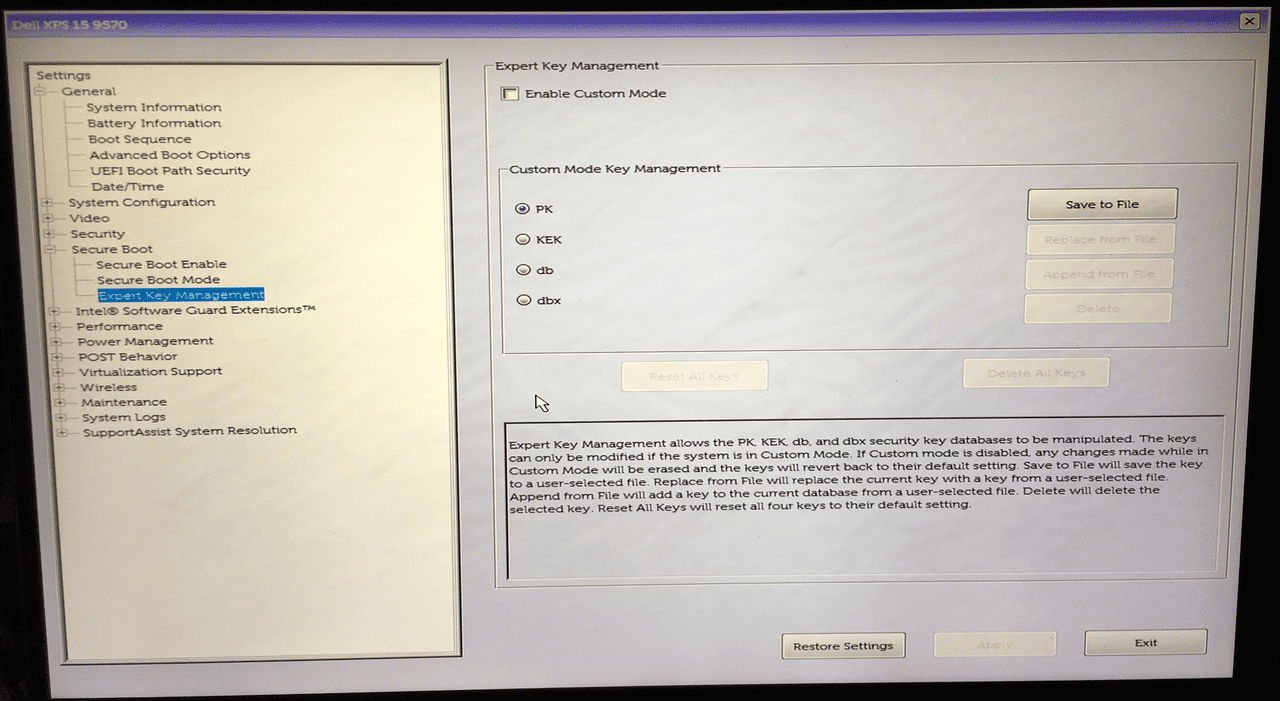
This is what it looks like inside the actual BIOS.
image.png

This thread claims that there is no way to even enroll VenToy anymore:

So if I am understanding it correctly, I basically add the key using db?
 

My Computer My Computer

At a glance

WindowsXP/7/8/8.1/10/11,Linux,Android,FreeBSD...Intel® Core™ i7-8750H 8th Gen 2.2Ghz up to 4....64GB using 2x32GB CL16 Mushkin redLine modulesIntel UHD 630 & NVIDIA GeForce GTX 1050 Ti wi...
OS
WindowsXP/7/8/8.1/10/11,Linux,Android,FreeBSD Unix
Computer type
Laptop
Manufacturer/Model
Dell XPS 15 9570
CPU
Intel® Core™ i7-8750H 8th Gen 2.2Ghz up to 4.1Ghz
Motherboard
Dell XPS 15 9570
Memory
64GB using 2x32GB CL16 Mushkin redLine modules
Graphics Card(s)
Intel UHD 630 & NVIDIA GeForce GTX 1050 Ti with 4GB DDR5
Sound Card
Realtek ALC3266-CG
Monitor(s) Displays
15.6" 4K Touch UltraHD 3840x2160 made by Sharp
Screen Resolution
3840x2160 4K UltraHD
Hard Drives
Samsung MZ-V9P4T0B/AM 990 PRO 4TB PCIe®4.0 NVMe™ M.2 SSD was Toshiba KXG60ZNV1T02 NVMe 1TB SSD
PSU
Dell XPS 15 9570
Case
Dell XPS 15 9570
Cooling
Stock
Keyboard
Stock
Mouse
SwitftPoint ProPoint
Internet Speed
Comcast/XFinity 1.44Gbps/42.5Mbps
Browser
Microsoft EDGE (Chromium based) & Google Chrome
Antivirus
Windows Defender that came with Windows
Well, reading the text at the bottom basically states (to my understanding) that if you screw up, it reverts back to the original key. OR there is a Reset Option.

I’d say play with the different options?

I’d also say wait to see if you can get a definitive answer from someone.
 

My Computers My Computers

  • At a glance

    Windows 11 Pro 25H2 Build 26200.8655Intel(R) Core(TM) i7-4770K CPU @ 3.50GHz32.0 GB of I forget and the box is in storage.Gigabyte nVidia GeForce GTX 1660 Super OC 6GB
    OS
    Windows 11 Pro 25H2 Build 26200.8655
    Computer type
    PC/Desktop
    Manufacturer/Model
    Sin-built 2013
    CPU
    Intel(R) Core(TM) i7-4770K CPU @ 3.50GHz
    Motherboard
    ASUS ROG Maximus VI Formula
    Memory
    32.0 GB of I forget and the box is in storage.
    Graphics Card(s)
    Gigabyte nVidia GeForce GTX 1660 Super OC 6GB
    Sound Card
    ROG SupremeFX Formula 8-Channel High Definition Audio
    Monitor(s) Displays
    5 x LG 25MS500-B - 1 x 24MK430H-B - 1 x Wacom Pro 22" Touch Screen Tablet
    Screen Resolution
    All over the place
    Hard Drives
    Too many to list. OS on Samsung 1TB 870 QVO SATA
    PSU
    Silverstone 1500
    Case
    NZXT Phantom 820 Full-Tower Case
    Cooling
    Noctua NH-D15 Elite Class Dual Tower CPU Cooler / 6 x EziDIY 120mm / 2 x Corsair 140mm somethings / 1 x 140mm Thermaltake something / 2 x 200mm Corsair.
    Keyboard
    Corsair K95 / Logitech diNovo Edge Wireless
    Mouse
    Logitech: G402 / G502 / Mx Masters / Mx Air Cordless
    Internet Speed
    2000/500Mbps
    Browser
    All sorts
    Antivirus
    Kaspersky Premium
    Other Info
    ㅤㅤㅤㅤㅤㅤㅤㅤㅤㅤㅤㅤㅤㅤㅤㅤㅤㅤㅤㅤㅤㅤㅤㅤㅤㅤㅤㅤㅤㅤㅤㅤㅤㅤㅤㅤㅤㅤㅤㅤ⠀⠀⠀⠀⠀⠀⠀⠀⠀⠀
    TP-Link BE9300 WiFi 7 Bluetooth 5.4 (Archer TBE550E)
    TP-Link TX201 V1 2.5GB Lan

    Grandstream HT812 - VoIP
    ASUS DSL-AX82U - Mesh
    ASUS RT-AC68U - Mesh
    ASUS RT-BE88U Router

    Brother MFC-L2880DW Printer

    I’m on a horse.
  • At a glance

    Windows 11 Pro 25H2 Build 26200.8655 (Wifes)13th Generation Intel® Core™ i5-1340P Process...16GB LPDDR5-52001x Intel® Iris® Xe Graphics
    Operating System
    Windows 11 Pro 25H2 Build 26200.8655 (Wifes)
    Computer type
    Laptop
    Manufacturer/Model
    LENOVO Yoga 7 14IRL8 - Type 82YL
    CPU
    13th Generation Intel® Core™ i5-1340P Processor(Core™ i5-1340P)
    Memory
    16GB LPDDR5-5200
    Graphics card(s)
    1x Intel® Iris® Xe Graphics
    Sound Card
    Optimized with Dolby Atmos®
    Screen Resolution
    QHD 2880 x 1800 OLED
    Hard Drives
    M.2 512 GB SSD PCIe
    Mouse
    Logiteck MX Master 3S
    Internet Speed
    2000/500
    Antivirus
    Defender / Malwarebytes
    Other Info
    …still on a horse.


    Wireless Network: Wi-Fi 6E 2x2 AX; Bluetooth® 5.1 or above
    Ports: 1x 1 Novo button; 2 in 1 Audio Combo jack; Micro SD Card Reader; HDMI 1.4b; 2 x USB Type-C (TBT4)
    USB 3.2 Gen 2 DP 1.4a
    PD 3.0); 1 x USB 3.2 Gen1 Type A
    Camera
    1x 1080P FHD IR/RGB Hybrid with Privacy Shutter and Dual Array Microphone
    Graphics
    1x Intel® Iris® Xe Graphics
    Monitor
    14" WUXGA
    Form Factor
    Convertible Notebook
  • Windows 11 Pro 25H2 Build 26200.8655 (Wifes)

    Yoga 7 2-in-1 14IML9 - Type 83DJ

    Processor: Intel® Core™ Ultra 7 155H Processor(Core™ Ultra 7 155H)

    Memory: 32GB LPD5X-7467

    Hard Drive: 1 TB SSD PCIe

    Wireless Network: 1x Wi-Fi 6E 2x2 AX; Bluetooth® 5.1 or above

    Ports: 1 x HDMI 2.1 TMDS; 1 x Novo Button; 1 x Combo Audio Jack
    2 x USB-C (USB 4.0)
    1 x USB-A 3.2 Gen 1

    Camera: 1080P FHD IR Hybrid with Dual Microphone

    Graphics: Intel® Arc™ Graphics

    Monitor: 14" 2.8K

    ...Where's my horse?
...the VenToy USB so it will boot in secure mode....
I don't bother on my Dell. You're going to use the F12 menu to boot from it anyway. Under Other Options you can turn off Secure Boot.

Dell F12 boot menu.jpg
 

My Computers My Computers

  • At a glance

    Windows 11 HomeAMD Athlon Silver 3050U8GBRadeon Graphics
    OS
    Windows 11 Home
    Computer type
    Laptop
    Manufacturer/Model
    Acer Aspire 3 A315-23-R9VY
    CPU
    AMD Athlon Silver 3050U
    Memory
    8GB
    Graphics Card(s)
    Radeon Graphics
    Monitor(s) Displays
    laptop screen
    Screen Resolution
    1366x768 native resolution, up to 2560x1440 with Radeon Virtual Super Resolution
    Hard Drives
    1TB Samsung EVO 870 SSD (from April 2026: 250GB EVO 850)
    Internet Speed
    150 Mbps
    Browser
    Edge, Firefox
    Antivirus
    Defender
    Other Info
    fully 'Windows 11 ready' laptop. Windows 10 C: partition migrated from my old unsupported 'main machine' then upgraded to 11. A test migration ran Insider builds for 2 months. When 11 was released on 5th October 2021 it was re-imaged back to 10 and was offered the upgrade in Windows Update on 20th October. Windows Update offered the 22H2 Feature Update on 20th September 2022. It got the 23H2 Feature Update on 4th November 2023 through Windows Update, 24H2 on 3rd October 2024 through Windows Update by setting the Target Release Version for 24H2, and 25H2 on 30th September 2025 through Windows Update by setting the Target Release Version for 25H2.

    UPDATE - 11 April 2026: due to mechanical deterioration this PC has been retired from active duty. The OS with all software and files has been migrated to my System Seven in 'Other systems' to carry on as my general purpose 'main machine'.
  • At a glance

    Windows 11 ProIntel® Core™ i5-520M8GB(integrated graphics) Intel HD Graphics
    Operating System
    Windows 11 Pro
    Computer type
    Laptop
    Manufacturer/Model
    Dell Latitude E4310
    CPU
    Intel® Core™ i5-520M
    Motherboard
    0T6M8G
    Memory
    8GB
    Graphics card(s)
    (integrated graphics) Intel HD Graphics
    Screen Resolution
    1366x768
    Hard Drives
    500GB Crucial MX500 SSD
    Browser
    Firefox, Edge
    Antivirus
    Defender
    Other Info
    unsupported machine: Legacy bios, MBR, TPM 1.2, upgraded from W10 to W11 using W10/W11 hybrid install media workaround.

    In-place upgrade to 22H2 using ISO and a workaround.
    Feature Update to 23H2 by manually installing the Enablement Package.
    In-place upgrade to 24H2 using hybrid 23H2/24H2 install media.
    Upgraded to 25H2 by Enablement Package.

    Also running Insider Dev, and Canary builds and Windows 10 as native boot .vhdx.
  • My SYSTEM THREE is a Dell Latitude 5410, i7-10610U, 32GB RAM, 512GB NVMe ssd, supported device running Windows 11 Pro.

    My SYSTEM FOUR is a 2-in-1 convertible Lenovo Yoga 11e 20DA, Celeron N2930, 8GB RAM, 256GB ssd. Unsupported device: currently running Win10 Pro, plus Win11 Pro RTM and Insider Dev, Beta, and RP 24H2 as native boot vhdx.

    My SYSTEM FIVE is a Dell Latitude 3190 2-in-1, Pentium Silver N5030, 8GB RAM, 1TB NVMe ssd, supported device running Windows 11 Pro, plus Insider Beta, Dev, and Canary builds (and a few others) as a native boot .vhdx.

    My SYSTEM SIX is a Dell Latitude 5550, Core Ultra 7 165H, 64GB RAM, 1TB NVMe SSD, supported device, Windows 11 Pro 24H2, Hyper-V host machine. Updated to 25H2 on 30th September 2025.

    My SYSTEM SEVEN is a Lenovo Thinkpad T580, Intel Core i7-8650U, 16GB RAM, 512GB NVMe SSD + 2nd 512GB NVMe SSD, a supported device for Windows 11. This is my current general purpose 'main machine'. The installed Windows 11 Home from my System One has been migrated to this machine.
Well, reading the text at the bottom basically states (to my understanding) that if you screw up, it reverts back to the original key. OR there is a Reset Option.

I’d say play with the different options?

I’d also say wait to see if you can get a definitive answer from someone.
I actually tried doing a custom, clear and then reset and then Windows 11 will no longer boot up with Secure Boot Mode enabled...
 

My Computer My Computer

At a glance

WindowsXP/7/8/8.1/10/11,Linux,Android,FreeBSD...Intel® Core™ i7-8750H 8th Gen 2.2Ghz up to 4....64GB using 2x32GB CL16 Mushkin redLine modulesIntel UHD 630 & NVIDIA GeForce GTX 1050 Ti wi...
OS
WindowsXP/7/8/8.1/10/11,Linux,Android,FreeBSD Unix
Computer type
Laptop
Manufacturer/Model
Dell XPS 15 9570
CPU
Intel® Core™ i7-8750H 8th Gen 2.2Ghz up to 4.1Ghz
Motherboard
Dell XPS 15 9570
Memory
64GB using 2x32GB CL16 Mushkin redLine modules
Graphics Card(s)
Intel UHD 630 & NVIDIA GeForce GTX 1050 Ti with 4GB DDR5
Sound Card
Realtek ALC3266-CG
Monitor(s) Displays
15.6" 4K Touch UltraHD 3840x2160 made by Sharp
Screen Resolution
3840x2160 4K UltraHD
Hard Drives
Samsung MZ-V9P4T0B/AM 990 PRO 4TB PCIe®4.0 NVMe™ M.2 SSD was Toshiba KXG60ZNV1T02 NVMe 1TB SSD
PSU
Dell XPS 15 9570
Case
Dell XPS 15 9570
Cooling
Stock
Keyboard
Stock
Mouse
SwitftPoint ProPoint
Internet Speed
Comcast/XFinity 1.44Gbps/42.5Mbps
Browser
Microsoft EDGE (Chromium based) & Google Chrome
Antivirus
Windows Defender that came with Windows
I don't bother on my Dell. You're going to use the F12 menu to boot from it anyway. Under Other Options you can turn off Secure Boot.

View attachment 111500
All that does is basically go back into the BIOS itself, no different than hitting the F2, turn off Secure Mode and then Save Settings which would not be a problem if it was only to change it for that one time but after using the USB Flash Drive, I would have to go back into the BIOS to enable it again before booting Windows or else things like Hyper-V won't work which is basically 10-20 minutes by the time I realize it. I am sure the answer will also benefit others in the future too.
 
Last edited:

My Computer My Computer

At a glance

WindowsXP/7/8/8.1/10/11,Linux,Android,FreeBSD...Intel® Core™ i7-8750H 8th Gen 2.2Ghz up to 4....64GB using 2x32GB CL16 Mushkin redLine modulesIntel UHD 630 & NVIDIA GeForce GTX 1050 Ti wi...
OS
WindowsXP/7/8/8.1/10/11,Linux,Android,FreeBSD Unix
Computer type
Laptop
Manufacturer/Model
Dell XPS 15 9570
CPU
Intel® Core™ i7-8750H 8th Gen 2.2Ghz up to 4.1Ghz
Motherboard
Dell XPS 15 9570
Memory
64GB using 2x32GB CL16 Mushkin redLine modules
Graphics Card(s)
Intel UHD 630 & NVIDIA GeForce GTX 1050 Ti with 4GB DDR5
Sound Card
Realtek ALC3266-CG
Monitor(s) Displays
15.6" 4K Touch UltraHD 3840x2160 made by Sharp
Screen Resolution
3840x2160 4K UltraHD
Hard Drives
Samsung MZ-V9P4T0B/AM 990 PRO 4TB PCIe®4.0 NVMe™ M.2 SSD was Toshiba KXG60ZNV1T02 NVMe 1TB SSD
PSU
Dell XPS 15 9570
Case
Dell XPS 15 9570
Cooling
Stock
Keyboard
Stock
Mouse
SwitftPoint ProPoint
Internet Speed
Comcast/XFinity 1.44Gbps/42.5Mbps
Browser
Microsoft EDGE (Chromium based) & Google Chrome
Antivirus
Windows Defender that came with Windows
Earlier this AM, I had some time to test the Change Boot Mode Settings in the F11 menu as @Bree mentioned and it only does something if one had Secure Boot Enabled and the Secure Boot Mode was on Deployed as all it does is toggle the Secure Boot Enabled between on and off.

It does not work if one had Secured Boot Enabled and Secure Boot Mode set to Audit which already allows everything to boot and Windows will see that Secure Boot is disabled when it's in Audit mode. The Expert Key Management function is there so only devices that are in the database will boot in Secure Boot in Deployed Mode when needed, what's strange is no one has figured out how to use it even from Googling.
 

My Computer My Computer

At a glance

WindowsXP/7/8/8.1/10/11,Linux,Android,FreeBSD...Intel® Core™ i7-8750H 8th Gen 2.2Ghz up to 4....64GB using 2x32GB CL16 Mushkin redLine modulesIntel UHD 630 & NVIDIA GeForce GTX 1050 Ti wi...
OS
WindowsXP/7/8/8.1/10/11,Linux,Android,FreeBSD Unix
Computer type
Laptop
Manufacturer/Model
Dell XPS 15 9570
CPU
Intel® Core™ i7-8750H 8th Gen 2.2Ghz up to 4.1Ghz
Motherboard
Dell XPS 15 9570
Memory
64GB using 2x32GB CL16 Mushkin redLine modules
Graphics Card(s)
Intel UHD 630 & NVIDIA GeForce GTX 1050 Ti with 4GB DDR5
Sound Card
Realtek ALC3266-CG
Monitor(s) Displays
15.6" 4K Touch UltraHD 3840x2160 made by Sharp
Screen Resolution
3840x2160 4K UltraHD
Hard Drives
Samsung MZ-V9P4T0B/AM 990 PRO 4TB PCIe®4.0 NVMe™ M.2 SSD was Toshiba KXG60ZNV1T02 NVMe 1TB SSD
PSU
Dell XPS 15 9570
Case
Dell XPS 15 9570
Cooling
Stock
Keyboard
Stock
Mouse
SwitftPoint ProPoint
Internet Speed
Comcast/XFinity 1.44Gbps/42.5Mbps
Browser
Microsoft EDGE (Chromium based) & Google Chrome
Antivirus
Windows Defender that came with Windows
Latest Support Threads

Back
Top Bottom