faxenoff
New member
- Local time
- 12:03 AM
- Posts
- 1
- OS
- Windows
Hi all, I've been working on a small open-source tool and would like feedback from people here.
This one started out of pure irritation. I usually have half a dozen terminals open plus a few AI-agent sessions, and in the taskbar they all share the same icon with the same label. The only way to find the one I actually wanted was to Alt+Tab through every single one and look. Windows has had hover thumbnails since Vista, but you have to go hunting for them one hover at a time.
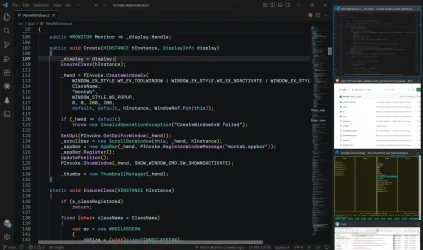
So: montab (short for "monitors tabs") is a sidebar that docks to the left or right edge of every monitor and shows a live preview of every window on that monitor, all the time. No hovering, no cycling. You glance at the panel, and you can see which terminal is the one still chewing through your test suite.
The previews aren't screenshots! They're DWM thumbnails—the compositor already holds every window's rendered frame, so the panel just asks it to draw those frames into a rectangle. No capture, no encoding, and no polling loop. That's why they are genuinely live instead of refreshed on a timer, and why it sits at ~0% CPU when idle. It also reserves the work area through the AppBar API so maximized windows don't slide under it, and it tracks windows with SetWinEventHook instead of polling EnumWindows.
Other bits:
- One panel per monitor, listing only that monitor's windows—drag a window to another screen and its tile follows.
- Minimized windows drop into a second section as compact strips, so nothing vanishes on you.
- Clicking the *active* window's tile shoves it below the others without minimizing.
- Hovering over a preview for ~0.7s gives you a 5x magnifier you can pan with the mouse; Ctrl+wheel provides persistent zoom.
- Drag to reorder, and drag the inner edge to resize.
Pure Win32—no WPF, no WinUI, and definitely no Electron. C# on .NET 11 with NativeAOT and CsWin32 for P/Invoke, ~3k lines, one ~2 MB exe with zero dependencies, and a ~5 MB private working set with a panel on every monitor.
One known wart: Chromium browsers stop rendering frames once their window is fully occluded, so the preview freezes on the last frame while audio keeps playing. That's a browser occlusion policy, not something DWM can work around—the README has the one-line registry fix.
Windows 10 1809+, MIT license, prebuilt exe in Releases. Would love feedback on the interaction model—that's the part I keep second-guessing.
GitHub: GitHub - faxenoff/montab: Taskbar with permanent previews
This one started out of pure irritation. I usually have half a dozen terminals open plus a few AI-agent sessions, and in the taskbar they all share the same icon with the same label. The only way to find the one I actually wanted was to Alt+Tab through every single one and look. Windows has had hover thumbnails since Vista, but you have to go hunting for them one hover at a time.
So: montab (short for "monitors tabs") is a sidebar that docks to the left or right edge of every monitor and shows a live preview of every window on that monitor, all the time. No hovering, no cycling. You glance at the panel, and you can see which terminal is the one still chewing through your test suite.
The previews aren't screenshots! They're DWM thumbnails—the compositor already holds every window's rendered frame, so the panel just asks it to draw those frames into a rectangle. No capture, no encoding, and no polling loop. That's why they are genuinely live instead of refreshed on a timer, and why it sits at ~0% CPU when idle. It also reserves the work area through the AppBar API so maximized windows don't slide under it, and it tracks windows with SetWinEventHook instead of polling EnumWindows.
Other bits:
- One panel per monitor, listing only that monitor's windows—drag a window to another screen and its tile follows.
- Minimized windows drop into a second section as compact strips, so nothing vanishes on you.
- Clicking the *active* window's tile shoves it below the others without minimizing.
- Hovering over a preview for ~0.7s gives you a 5x magnifier you can pan with the mouse; Ctrl+wheel provides persistent zoom.
- Drag to reorder, and drag the inner edge to resize.
Pure Win32—no WPF, no WinUI, and definitely no Electron. C# on .NET 11 with NativeAOT and CsWin32 for P/Invoke, ~3k lines, one ~2 MB exe with zero dependencies, and a ~5 MB private working set with a panel on every monitor.
One known wart: Chromium browsers stop rendering frames once their window is fully occluded, so the preview freezes on the last frame while audio keeps playing. That's a browser occlusion policy, not something DWM can work around—the README has the one-line registry fix.
Windows 10 1809+, MIT license, prebuilt exe in Releases. Would love feedback on the interaction model—that's the part I keep second-guessing.
GitHub: GitHub - faxenoff/montab: Taskbar with permanent previews
Attachments
My Computer
At a glance
Windows
- OS
- Windows
- Computer type
- Laptop