Mp4 transfer problem


Ambitubby

New member
Local time
5:09 AM
Posts
4
OS
windows 11
Hi Everybody, I have a problem that is driving me crazy and I would really appreciate some help. I am trying to move some mp4 files from my laptop to an ssd hard drive to view on my quest 3s but some of the files are corrupted after the transfer. The video and audio specs are missing making the file unreadable. Some of the files transfer and play ok but some don't. I have tried everything that I have discovered online with no success and don't know what to try next. Could this be a windows issue effecting the files during transfer or is it hardware?
 

My Computer

System One

  • OS
    windows 11
    Computer type
    Laptop
    Manufacturer/Model
    HP/Pavilion
Hi,
How are you copying/moving the files?
You state the laptop & the ?? SSD Hard Drive ?? but don't mention how you are transferring them.
 
Last edited:

My Computers

System One System Two

  • OS
    All Branches but Release
    Computer type
    Laptop
    Manufacturer/Model
    Acer Nitro ANV15-51
    CPU
    AMD Ryzen 7 7735HS 3200-4500 Mhz 8 cores x 2
    Motherboard
    Sportage_RBH
    Memory
    32 GB DDR5
    Graphics Card(s)
    Radeon Graphic / NVIDIA GeForce RTX 4060 8 GB GDDR6
    Sound Card
    AMD/Realtek(R) Audio
    Monitor(s) Displays
    Integrated Monitor (15.3"vis)
    Screen Resolution
    FHD 1920X1080 16:9 144Hz
    Hard Drives
    KINGSTON OM8SEP4512Q-AA 1TB
    Western Digital 256GB
    PSU
    19V DC 6.32 A 120 W
    Cooling
    Dual Fans
    Mouse
    MS Bluetooth
    Internet Speed
    Fiber 1GB Cox -us & 1GB Orange-fr
    Browser
    Edge Canary- Firefox Nightly-Chrome Dev-Chrome Dev
    Antivirus
    Windows Defender
  • Operating System
    Windows 11 Beta
    Computer type
    Laptop
    Manufacturer/Model
    Asus X751BP
    CPU
    AMD A9-9420
    Memory
    8 GB of DDR4
    Graphics card(s)
    AMD Radeon R5
    Screen Resolution
    1600x900
    Hard Drives
    Seagate 1 TB
I've tried copy paste, drag and drop and used a few transfer programs. All have the same results.
 

My Computer

System One

  • OS
    windows 11
    Computer type
    Laptop
    Manufacturer/Model
    HP/Pavilion
Maybe try using a flash drive or an external hard drive to move the files?
 

My Computers

System One System Two

  • OS
    Windows 11 Pro Version 25H2 (OS Build 26200.8655)
    Computer type
    PC/Desktop
    Manufacturer/Model
    Dell 8950
    CPU
    i9 12th Generation
    Memory
    64GB
    Graphics Card(s)
    PNY 3060 12GB
    Monitor(s) Displays
    NEC EA27IU
    Screen Resolution
    3840X2160
    Hard Drives
    SSD internal, external drives
    Cooling
    Advanced Air Cooling
    Keyboard
    Microsoft
    Mouse
    Logitech
    Internet Speed
    High-Speed
    Browser
    MS Edge
    Antivirus
    Norton 360
  • Operating System
    Win 11 Pro 25H2 (OS Build 26200.8655)
    Computer type
    PC/Desktop
    Manufacturer/Model
    Dell Tower ECT1250
    CPU
    Intel Ultra 7 265 (20 cores) processor
    Memory
    32GB DDR5 Ram
    Graphics card(s)
    Built-in Intel UHD Graphics
    Sound Card
    Built-in
    Screen Resolution
    1920X1080
    Hard Drives
    2TB internal SSD
    Case
    Tower
What codec are you using? While H265 is the newest codec, not every device is able to read these files, especially older machines. I usually convert to the older H264 codec for compatibility with more devices.
 

My Computers

System One System Two

  • OS
    Windows 11 Pro Version 25H2 (OS Build 26200.8655)
    Computer type
    PC/Desktop
    Manufacturer/Model
    Dell 8950
    CPU
    i9 12th Generation
    Memory
    64GB
    Graphics Card(s)
    PNY 3060 12GB
    Monitor(s) Displays
    NEC EA27IU
    Screen Resolution
    3840X2160
    Hard Drives
    SSD internal, external drives
    Cooling
    Advanced Air Cooling
    Keyboard
    Microsoft
    Mouse
    Logitech
    Internet Speed
    High-Speed
    Browser
    MS Edge
    Antivirus
    Norton 360
  • Operating System
    Win 11 Pro 25H2 (OS Build 26200.8655)
    Computer type
    PC/Desktop
    Manufacturer/Model
    Dell Tower ECT1250
    CPU
    Intel Ultra 7 265 (20 cores) processor
    Memory
    32GB DDR5 Ram
    Graphics card(s)
    Built-in Intel UHD Graphics
    Sound Card
    Built-in
    Screen Resolution
    1920X1080
    Hard Drives
    2TB internal SSD
    Case
    Tower
On what device are you seeing the corrupted files? If it's the Quest 3S, have you tried viewing a corrupted file on the SSD hard drive with your laptop? That would tell you whether or not the file was corrupted in the copy process (to which I am skeptical).
 

My Computer

System One

  • OS
    Windows 11 Professional 25H2
    Computer type
    PC/Desktop
    Manufacturer/Model
    Digital Storm VELOX
    CPU
    Intel Core i9 11900K
    Motherboard
    ASUS PRIME Z590-P
    Memory
    64GB
    Graphics Card(s)
    NVIDIA GeForce GTX 1650
    Sound Card
    Realtek onboard
    Monitor(s) Displays
    Acer R221Q 21.5"
    Screen Resolution
    1920 x 1080
    Hard Drives
    2 x Samsung SSD 990 EVO Plus (1 TB)
    2 x Seagate ST4000NE001 (4 TB)
    PSU
    None
    Case
    VELOX
    Cooling
    Cooler Master
    Keyboard
    Logitech
    Mouse
    Kensington trackball
    Browser
    Firefox, Chrome
    Antivirus
    Windows Defender, Malwarebytes
If I have doubts that the file could be different from the original, I'd compare them with cmd's FC , WinDiff , ... PS: Md5Checker or similar is faster for very large files.
 

My Computer

System One

  • OS
    Windows 11
    Manufacturer/Model
    MeLE Quieter 2Q (fanless miniPC)
    CPU
    Celeron J4125 (10th gen)
    Memory
    8GB DDR4
    Monitor(s) Displays
    Samsung SyncMaster T260
    Screen Resolution
    1920x1200
    Hard Drives
    256GB eMMC (Windows)
    2TB USB3 HDD Toshiba (Data)
You need to check and compare the codecs in files that do work against files that don't. MediaInfo (freeware) is a good option

A video files (mkv, mp4, avi, etc ,, any of them) are simply "containers" for an audio stream and a video stream. Audio/Video stream codecs in one file can be different from the audio/video stream in another file, even though they are the same file type (i.e. both mp4)

Playback devices can treat files in 2 different ways
- simply identify the filetype irrespective of the file audio/video codec - i.e. will play mp4 files, won't play avi files
or
- identify the audio/video codec irrespective of file type/extension - i.e. will play a file with an MPEG video stream but not a file with a AVC video stream (which appears what might be happening with your files)

And there is plenty of free software that will enable the files to be converted to a compatible format
 

My Computers

System One System Two

  • OS
    Windows 11 2xH2 (latest update ... forever anal)
    Computer type
    PC/Desktop
    Manufacturer/Model
    HP Slim S01
    CPU
    Intel i5-12400
    Memory
    8GB
    Graphics Card(s)
    NVIDIA GeForce GT730
    Sound Card
    OOBE
    Monitor(s) Displays
    Acer 32"
    Screen Resolution
    1920x1080
    Hard Drives
    512GB KIOXIA NVMe
    1TB SATA SSD
    PSU
    OOBE
    Case
    OOBE
    Cooling
    OOBE
    Keyboard
    BT
    Mouse
    BT
    Browser
    Brave FFox Chrome Opera
    Antivirus
    KIS
  • Operating System
    Windows 11 Pro 2xH2 (latest update ... 4ever anal)
    Computer type
    Laptop
    Manufacturer/Model
    HP Pavillion 15
    CPU
    i7-1165G7 @ 2.80GHz
    Graphics card(s)
    Intel Iris Xe Graphics
    Hard Drives
    Samsung NVMe 512GB
    + numerous/multiple SSD Type C USB enclosures
    Internet Speed
    NBN FTTN 50
    Browser
    Brave
    Antivirus
    KIS
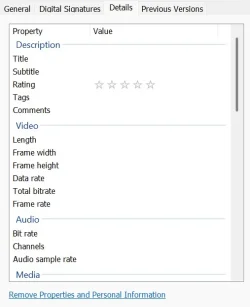
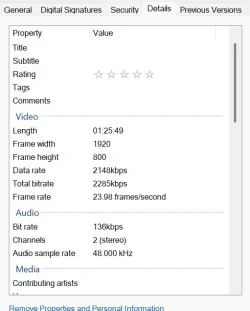
These are the details for the file before and after transfer. All information is missing after transfer to ssd hard drive.
 

Attachments

  • Screenshot 2026-02-16 171240.webp
    Screenshot 2026-02-16 171240.webp
    20 KB · Views: 1
  • Screenshot 2026-02-16 171110.webp
    Screenshot 2026-02-16 171110.webp
    27.1 KB · Views: 1

My Computer

System One

  • OS
    windows 11
    Computer type
    Laptop
    Manufacturer/Model
    HP/Pavilion
I think you should do a physical comparison. See my post #7.
 

My Computer

System One

  • OS
    Windows 11
    Manufacturer/Model
    MeLE Quieter 2Q (fanless miniPC)
    CPU
    Celeron J4125 (10th gen)
    Memory
    8GB DDR4
    Monitor(s) Displays
    Samsung SyncMaster T260
    Screen Resolution
    1920x1200
    Hard Drives
    256GB eMMC (Windows)
    2TB USB3 HDD Toshiba (Data)
Is the other volume formatted as FAT32 or exFAT?

If you copy video files from NTFS to FAT, those File Explorer details don't carry over because they're actually stored as NTFS alternate data. Since that data isn't part of the FAT32 or exFAT standards, it doesn't get preserved. Only copying NTFS to NTFS would keep those details.
 

My Computer

System One

  • OS
    Windows 7
Thank you all for your responses. Garlin your answer was spot on, the reason was that simple. Thank you for the information it has helped a great deal.
The reason that it arose was that Exfat was recommended for stream video in Skybox VR but as it turns out it works fine in NTFS. Again thank you all.
 

My Computer

System One

  • OS
    windows 11
    Computer type
    Laptop
    Manufacturer/Model
    HP/Pavilion
What codec are you using? While H265 is the newest codec, not every device is able to read these files, especially older machines. I usually convert to the older H264 codec for compatibility with more devices.

I've been running into that a lot and have had to do that as well. Simply changing the container to .mkv isn't enough. The whole video has to be re-encoded.
 

My Computers

System One System Two

  • OS
    Windows 11 Pro 25H2 build: (26200.7623)
    Computer type
    Laptop
    Manufacturer/Model
    Microsoft Surface Pro
    Memory
    32GB
  • Operating System
    Microsoft 25H2 Pro
    Computer type
    Laptop
    Manufacturer/Model
    Dell Pro 14 - PC14250
    CPU
    Intel Core Ultra 7
    Memory
    64GB
    Graphics card(s)
    Intel Integrated Graphics
    Hard Drives
    Micron 1TB SSD

Latest Support Threads

Back
Top Bottom