Windows 11 Pro 26200.8328
Microsoft Edge 147.0.3912.98
Local account only
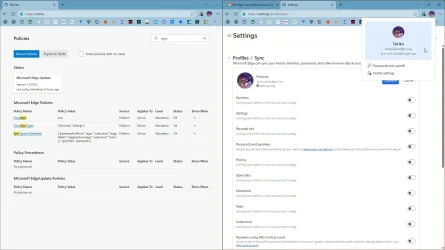
Microsoft Edge updated and somehow automatically logged my Microsoft account in through Microsoft Edge and sync'd all data. When I try to sign out of the Microsoft account in Edge, I can an error (sorry, problem is on our side, try again later).
I then delete the entire MS Edge profile (%LocalAppData%\Microsoft\Edge\User Data). Once I open Microsoft Edge again, the Microsoft account is automatically used again to sync all data. I cannot get this to stop.
I did notice that Google Chrome logged account Gmail account got disconnected (logged out) and all data got removed. Not sure if that relates to this or not, but it is coincidental.
Google Chrome was the default browser, now Microsoft Edge is the default browser. I uninstalled Google Chrome as I was planning on installing Brave instead.
Microsoft Edge keeps opening up when I use Mozilla Firefox 150.0.1. Some time when I open various web sites, it opens in Firefox and then it opens in Microsoft Edge. This is very annoying. I finally just minimized Microsoft Edge, but it still opens when opening various web sites in Firefox. Very annoying.
I have been using MS Edge for a few things, but I kept answering NO to the constant login prompt to sync data.
I wonder if this relates to one of the many Preview Updates with "gradual rollouts" (or gradual annoyances) of features.


Microsoft Edge 147.0.3912.98
Local account only
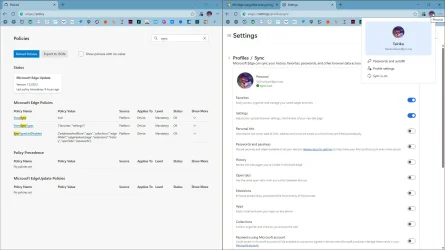
Microsoft Edge updated and somehow automatically logged my Microsoft account in through Microsoft Edge and sync'd all data. When I try to sign out of the Microsoft account in Edge, I can an error (sorry, problem is on our side, try again later).
I then delete the entire MS Edge profile (%LocalAppData%\Microsoft\Edge\User Data). Once I open Microsoft Edge again, the Microsoft account is automatically used again to sync all data. I cannot get this to stop.
I did notice that Google Chrome logged account Gmail account got disconnected (logged out) and all data got removed. Not sure if that relates to this or not, but it is coincidental.
Google Chrome was the default browser, now Microsoft Edge is the default browser. I uninstalled Google Chrome as I was planning on installing Brave instead.
Microsoft Edge keeps opening up when I use Mozilla Firefox 150.0.1. Some time when I open various web sites, it opens in Firefox and then it opens in Microsoft Edge. This is very annoying. I finally just minimized Microsoft Edge, but it still opens when opening various web sites in Firefox. Very annoying.
I have been using MS Edge for a few things, but I kept answering NO to the constant login prompt to sync data.
I wonder if this relates to one of the many Preview Updates with "gradual rollouts" (or gradual annoyances) of features.
- Windows Build/Version
- Windows 11 Pro 26200.8328
My Computers
-
At a glance
Windows 11 ProAMD Ryzen AI 7 350 w/ Radeon 860M 50 TOPS32GB LPDDR5X 7500 MT/sAMD Radeon 860M integrated (shared memory)- OS
- Windows 11 Pro
- Computer type
- Laptop
- Manufacturer/Model
- Dell 16 Plus DB16255
- CPU
- AMD Ryzen AI 7 350 w/ Radeon 860M 50 TOPS
- Motherboard
- Dell 0PKMHG
- Memory
- 32GB LPDDR5X 7500 MT/s
- Graphics Card(s)
- AMD Radeon 860M integrated (shared memory)
- Sound Card
- Stereo speakers (2.5 W x 2 = 5 W total peak)/Realtek SounzReal/Dolby Atmos
- Monitor(s) Displays
- Displays: 16" 1920 x 1200 (Full HD+/WUXGA) 300 nits 60Hz *** Samsung - 27” Odyssey FHD IPS 240Hz G-Sync Gaming Monitor
- Screen Resolution
- 1920x1080 @ 60Hz
- Hard Drives
- EG6 KIOXIA 1TB NVME
- Case
- Ice Blue
- Cooling
- "dual-fan" or "enhanced" air-cooling system
- Mouse
- Logitech M650 Wireless/Bluetooth
- Internet Speed
- 800/600 Fiber
-
- Computer type
- Laptop