New Microsoft Outlook app version for Android, iOS, and MacOS - June 14


Outlook lets you bring all your email accounts and calendars in one convenient spot. Whether it's staying on top of your inbox or scheduling the next big thing, we make it easy to be your most productive, organized, and connected self.


 New Microsoft Outlook app 4.2522.2 version for Android:

What's New:
  • Outlook mail and calendar widgets are now available on Samsung Flip Cover screen.
Source: Microsoft Outlook: Organize Your Email & Calendar - Apps on Google Play

Get_it_on_Google_play.webp


 Outlook app 4.2522.0 version for iOS:

What's New:
  • This update includes performance improvements and bug fixes to make Outlook better for you.
Source: Microsoft Outlook on the App Store

get-on-app-store.webp


 Outlook app 16.98 version for Mac:

What's New:
  • Copilot Command Center: a centralized interface that consolidates Copilot features like summarization, drafts, schedule, etc. into a single, accessible entry point. It dynamically adapts based on account eligibility, ensuring users can access relevant Copilot powered features right when they need them.
  • Mail merge account setting: users can now choose a specific account—such as a shared mailbox or a non-default account—as the sender for Merge to Email in Word for Mac, instead of always using the default account.
  • Copilot Attachment Summaries - Users can now generate Copilot summaries for PDFs, Word, and PowerPoint attachments from the attachment well or from the summarize card. This feature helps users quickly grasp key content without opening the file.
  • Calendar Sharing for On-Premises Mailboxes: Users can now share calendars from Exchange On-Premises accounts.
  • Add-ins for On-Premises Mailboxes: Users can now use add-ins, such as Zoom & Webex, with Exchange On-Premises accounts.
  • Up next in menu bar: Users now have the option to configure the visibility of upcoming meetings & appointments in the menu bar via the My Day settings.
Source: Microsoft Outlook on the Mac App Store

get-on-app-store.webp
 
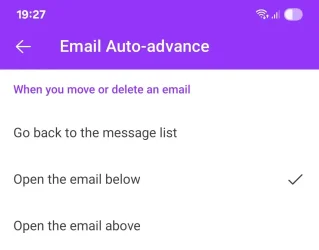
It is still broken though, auto-advanced does not work, for ages. :yawn:

Screenshot_20250614_192702_Outlook.webp
 

My Computer My Computer

At a glance

Home26H2CanAMD Ryzen 5 8600G (07/24)2x32GB Kingston FURY DDR5 5600 MHz CL36 @5200...ASROCK Radeon RX 6600 Challenger D 8G @48FPS ...
OS
Home26H2Can
Computer type
PC/Desktop
CPU
AMD Ryzen 5 8600G (07/24)
Motherboard
ASROCK B650M-HDV/M.2 (07/24) BIOS 4.21 AGESA ComboAM5 1.3.0.1 (04/26)
Memory
2x32GB Kingston FURY DDR5 5600 MHz CL36 @5200 CL36 (07/24)
Graphics Card(s)
ASROCK Radeon RX 6600 Challenger D 8G @48FPS (08/24)
Sound Card
Creative Sound BlasterX AE-5 Plus (05/24)
Monitor(s) Displays
24" Philips 24M1N3200ZS/00 (05/24)
Screen Resolution
1920×1080@165Hz via DP1.4
Hard Drives
Kingston KC3000 NVMe 2TB (05/24)
ADATA XPG GAMMIX S11 Pro 512GB (07/19)
PSU
Seasonic Core GM 550 Gold (04/24)
Case
Fractal Design Define 7 Mini with 3x Noctua NF-P14s/12@555rpm (04/24)
Cooling
Noctua NH-U12S with Noctua NF-P12 (04/24)
Keyboard
HP Pavilion Wired Keyboard 300 (07/24) + Rabalux 76017 Parker (01/24)
Mouse
Logitech M330 Silent Plus (01/26)
Internet Speed
500/100 Mbps via RouterOS (05/21) & TCP Optimizer
Browser
Edge, Brave for YouTube, LibreWolf for FB
Antivirus
NextDNS blocking 1/3 Traffic
Other Info
Phone: Motorola Moto G86 (02/26)
Backup: Hasleo Backup Suite (PreOS)
Headphones: Sennheiser RS170 (09/10)
Chair: Huzaro Force 4.4 Grey Mesh (05/24)
Notifier: Xiaomi Mi Band 9 Milanese (10/24)
FlexCore USB-C 3.2 Gen 1 (M) to LAN (F) (08/25)

Latest Support Threads

Back
Top Bottom