Solved New start menu reverted to old one!


rezpower

Well-known member
Member
VIP
Local time
2:58 PM
Posts
393
OS
Windows
I don't know if this has been mentioned in any other thread (I searched and could not find). few days after the last cumulative updates, one morning my pc's start menu changed to the new one without me doing anything. For many days I had the new menu and suddenly three or four days ago when I turned on my PC I realized that I am back on the old start menu.
I am wondering if anyone else have had the same experience and if anyone know what caused this! If this is bug on MS side it's pretty lame!
 

My Computer

System One

  • OS
    Windows
    Computer type
    Laptop
    Manufacturer/Model
    Lenovo Legion 7i
    CPU
    Intel i7-12800HX
    Memory
    32 GB DDR5 4800 MHz dual-channel
    Graphics Card(s)
    NVIDIA® GeForce RTX™ 3070 Ti
    Sound Card
    Steinberg UR44
    Hard Drives
    1 TB SSD (M.2 NVMe PCIe 4.0 x4
    2 TB SSD Samsung 980 PRO NNMe
    Browser
    Firefox
    Antivirus
    Windows Defender + Malwarebytes
Made a topic about it...

 
Last edited:

My Computers

System One System Two

  • OS
    Win 11 Home ♦♦♦26200.8457 ♦♦♦♦♦♦♦25H2
    Computer type
    PC/Desktop
    Manufacturer/Model
    Built by Ghot® [May 2020]
    CPU
    AMD Ryzen 7 3700X
    Motherboard
    Asus Pro WS X570-ACE (BIOS 5302)
    Memory
    G.Skill (F4-3200C14D-16GTZKW)
    Graphics Card(s)
    EVGA RTX 2070 (08G-P4-2171-KR)
    Sound Card
    Realtek ALC1220P / ALC S1220A
    Monitor(s) Displays
    Dell U3011 30"
    Screen Resolution
    2560 x 1600
    Hard Drives
    2x Samsung 860 EVO 500GB,
    WD 4TB Black FZBX - SATA III,
    WD 8TB Black FZBX - SATA III,
    DRW-24B1ST CD/DVD Burner
    PSU
    PC Power & Cooling 750W Quad EPS12V
    Case
    Cooler Master ATCS 840 Tower
    Cooling
    CM Hyper 212 EVO (push/pull)
    Keyboard
    Ducky DK9008 Shine II Blue LED
    Mouse
    Logitech Optical M-100
    Internet Speed
    300/300
    Browser
    Firefox (latest)
    Antivirus
    Bitdefender Total Security
    Other Info
    Speakers: Klipsch Pro Media 2.1
  • Operating System
    Windows XP Pro 32bit w/SP3
    Computer type
    PC/Desktop
    Manufacturer/Model
    Built by Ghot® (not in use)
    CPU
    AMD Athlon 64 X2 5000+ (OC'd @ 3.2Ghz)
    Motherboard
    ASUS M2N32-SLI Deluxe Wireless Edition
    Memory
    TWIN2X2048-6400C4DHX (2 x 1GB, DDR2 800)
    Graphics card(s)
    EVGA 256-P2-N758-TR GeForce 8600GT SSC
    Sound Card
    Onboard
    Monitor(s) Displays
    ViewSonic G90FB Black 19" Professional (CRT)
    Screen Resolution
    up to 2048 x 1536
    Hard Drives
    WD 36GB 10,000rpm Raptor SATA
    Seagate 80GB 7200rpm SATA
    Lite-On LTR-52246S CD/RW
    Lite-On LH-18A1P CD/DVD Burner
    PSU
    PC Power & Cooling Silencer 750 Quad EPS12V
    Case
    Generic Beige case, 80mm fans
    Cooling
    ZALMAN 9500A 92mm CPU Cooler
    Keyboard
    Logitech Classic Keybooard 200
    Mouse
    Logitech Optical M-BT96a
    Internet Speed
    300/300
    Browser
    Firefox 3.x ??
    Antivirus
    Symantec (Norton)
    Other Info
    Still assembled, still runs. Haven't turned it on for 15 years?
I never use the start menu. I have all my shortcuts I use in the task bar.
 

My Computers

System One System Two

  • OS
    Windows 11 25H2 26200.7705
    Computer type
    PC/Desktop
    Manufacturer/Model
    Dell xps8910
    CPU
    Intel core I7 6700
    Motherboard
    OWPMFG Z170 Skylake
    Memory
    32gbytes DDR4 1066mhz dual
    Graphics Card(s)
    nvidia GT730
    Sound Card
    Nvidia GK 208
    Monitor(s) Displays
    Dell del40e8
    Screen Resolution
    1920X1080
    Hard Drives
    Intel M.2 512G NVME / Samsung SSD 850 250G / Toshiba 1TB / WD 1TB
    PSU
    450W
    Case
    Mid
    Cooling
    Standard
    Keyboard
    Wired Perixx
    Mouse
    Logitech wireless MX Master
    Internet Speed
    150 Mbs Starlink
    Browser
    Firefox and Edge
    Antivirus
    Windows defender
  • Operating System
    Windows 11 Pro 25H2 26200.6584
    Computer type
    Laptop
    Manufacturer/Model
    Asus BR1100CKA
    CPU
    Intel Celeron N4500 @ 1.10 GHz
    Motherboard
    Asustek
    Memory
    4.00 GB
    Graphics card(s)
    On board
    Sound Card
    On board
    Monitor(s) Displays
    standard
    Screen Resolution
    1366x768
    Hard Drives
    Crucial 500Gb NVME M.2 SSD / 58GB Factory SSD
    Case
    Laptop
    Cooling
    Heatsink
    Keyboard
    Builtin
    Mouse
    Touchpad
    Internet Speed
    25mbs/Viasat
    Browser
    Edge/Firefox
    Antivirus
    Windows
Made a topic about it...

Thanks a lot. I know how to enable and disable it. In my case I thought that it was not normal that windows enabled it by itself and switched to the old menu again by itself. Apparently this is a normal behavior!
 

My Computer

System One

  • OS
    Windows
    Computer type
    Laptop
    Manufacturer/Model
    Lenovo Legion 7i
    CPU
    Intel i7-12800HX
    Memory
    32 GB DDR5 4800 MHz dual-channel
    Graphics Card(s)
    NVIDIA® GeForce RTX™ 3070 Ti
    Sound Card
    Steinberg UR44
    Hard Drives
    1 TB SSD (M.2 NVMe PCIe 4.0 x4
    2 TB SSD Samsung 980 PRO NNMe
    Browser
    Firefox
    Antivirus
    Windows Defender + Malwarebytes

My Computer

System One

  • OS
    Windows
    Computer type
    Laptop
    Manufacturer/Model
    Lenovo Legion 7i
    CPU
    Intel i7-12800HX
    Memory
    32 GB DDR5 4800 MHz dual-channel
    Graphics Card(s)
    NVIDIA® GeForce RTX™ 3070 Ti
    Sound Card
    Steinberg UR44
    Hard Drives
    1 TB SSD (M.2 NVMe PCIe 4.0 x4
    2 TB SSD Samsung 980 PRO NNMe
    Browser
    Firefox
    Antivirus
    Windows Defender + Malwarebytes
Can someone please post a screenshot of what the new Start Menu looks like? (I'm using Open-Shell so might never see the new Start Menu 'thingy'.) In what way does the new menu differ from the previous menu?
 

My Computers

System One System Two

  • OS
    Win 11 Pro. 25H2
    Computer type
    PC/Desktop
    Manufacturer/Model
    Customised "Chillblast Apex Intel Core i7 Office PC"
    CPU
    Intel Core i7-14700 (Raptor Lake)
    Motherboard
    ASUS Prime B760M-A WiFi D4
    Memory
    32GB Corsair Vengeance LPX (DDR4)
    Graphics Card(s)
    Intel UHD 770 — onboard standard as supplied by Intel/Asus
    Monitor(s) Displays
    Dell P2421 24 inch WUXGA (1920x1200) 16:10 Monitor
    Screen Resolution
    1920x1200
    Hard Drives
    First (Boot Drive Only): 2TB Samsung SSD 990 Pro.
    Second (Data Drive) 2TB Samsung SSD 990 Pro.
    PSU
    850W Corsair RM850x 80 Plus Gold
    Cooling
    Just standard fans for both the case and CPU.
    Keyboard
    Unicomp Model M (IBM Style keyboard)
    Mouse
    Wired Mouse
    Internet Speed
    1.6 MB/s
    Browser
    Firefox
    Antivirus
    Microsoft's Defender
  • Operating System
    Win 11 Pro. 25H2
    Computer type
    Laptop
    Manufacturer/Model
    Lenovo Legion Pro 7i Gen 9 (16" Intel)
    CPU
    14th Generation Intel® Core™ i9-14900HX
    Memory
    32 GB DDR5-5600MHz
    Graphics card(s)
    NVIDIA® GeForce RTX™ 4080 Laptop GPU 12GB GDDR6
    Monitor(s) Displays
    16" WQXGA (2560 x 1600), IPS, Anti-Glare, Non-Touch, HDR 40
    Screen Resolution
    2560 x 1600
    Hard Drives
    First (Boot): 1 TB SSD M.2 2280 PCIe Gen4 TLC
    Second (Data): 1 TB SSD M.2 2280 PCIe Gen4 TLC
    Keyboard
    Per-Key RGB-Coloured Backlit - English (UK)
    Mouse
    Wired Mouse
    Internet Speed
    1.6 MB/s
    Browser
    Firefox
    Antivirus
    Microsoft's Defender
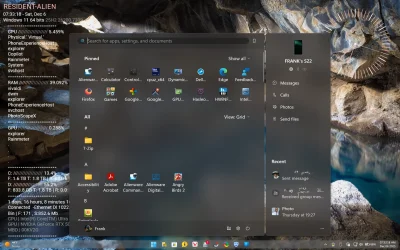
Can someone please post a screenshot of what the new Start Menu looks like? (I'm using Open-Shell so might never see the new Start Menu 'thingy'.) In what way does the new menu differ from the previous menu?
The large 8 column new start menu, it's huge lol. The small version is only 6 columns.

Screenshot (2).webp
 

My Computers

System One System Two

  • OS
    Windows 11 25H2
    Computer type
    Laptop
    Manufacturer/Model
    Alienware 18 Area-51
    CPU
    Intel Core Ultra 9 275HX (24-Core)
    Motherboard
    Alienware
    Memory
    64GB DDR5 6400MT/s
    Graphics Card(s)
    NVIDIA GeForce RTX 5080 and Intel UHD Graphics
    Sound Card
    Onboard, Realtek high-performance Audio chips (ALC3329 & ALC1708))
    Monitor(s) Displays
    300HZ 18-inch QHD 500 nit Comfort View+
    Screen Resolution
    2560 x 1600
    Hard Drives
    2TB NVMe M.2 PCIe Gen 5 SSD
    Case
    Magnesium Alloy
    Cooling
    Advanced Cryo-Tech Quad-Fan Cooling system & large vapor chamber
    Keyboard
    Cherry MX ultra low profile mechanical keyboard with per key AlienFX RGB lighting
    Mouse
    Logitech MX Master 4
    Browser
    Vivaldi (main), Firefox, Chrome, Edge
    Antivirus
    MS Defender and Malwarebytes Free
  • Operating System
    Windows 11 25H2
    Computer type
    Laptop
    Manufacturer/Model
    Microsoft Surface Laptop 7
    CPU
    Qualcomm Snapdragon X Elite (12 Core) ARM based CPU
    Motherboard
    Microsoft Corp.
    Memory
    16GB LPDDR5
    Graphics card(s)
    Qualcomm Adreno X1-85
    Sound Card
    Omnisonic speakers with Dolby Atmos spatial sound
    Monitor(s) Displays
    120 Hz 13.8-inch 600 nit PixelSense Flow touchscreen
    Screen Resolution
    2304x1536
    Hard Drives
    1TB NVMe Gen 4 SSD
    Case
    Anodized Aluminum
    Cooling
    Traditional active cooling fan system
    Keyboard
    Mechanical QWERTY, backlit when in use
    Mouse
    Logitech MX Master 4 and Surface Arc Mouse
    Browser
    Vivaldi (main), Firefox, Chrome, Edge
    Antivirus
    MS Defender and Malwarebytes Free
Back
Top Bottom