Notifications are collapsed by default


Lamberto Vitali

Well-known member
Member
Local time
4:29 PM
Posts
401
OS
Windows 11 Professional (not the cut down rubbish)
Is there any way to have notifications not collapsed? For example, I get a notification saying Powertoys has an update, so I click it thinking it will update, but it dismisses it and then I can't get back to it! It seems I have to spot the tiny little down arrow to expand it to see the update now button.
 

My Computer

System One

  • OS
    Windows 11 Professional (not the cut down rubbish)
    Computer type
    PC/Desktop
    Manufacturer/Model
    Home built, of course
    CPU
    Ryzen 9 3900XT (on this one anyway, I have 8)
    Motherboard
    MSI X470 Gaming Plus Max
    Memory
    72G and 72GB and 64GB and 32GB and 32GB and 8GB and 8GB and 8GB
    Graphics Card(s)
    Fury and 12 Tahitis
    Sound Card
    People still use cards for those?
    Monitor(s) Displays
    7 of them.
    Screen Resolution
    All sorts.
    Hard Drives
    1TB NVME, 4TB rust spinner
    PSU
    Several kW
    Case
    Unimportant
    Cooling
    Big Zalman 6 inch thing
    Keyboard
    Really?
    Mouse
    Yes
    Internet Speed
    32Mbit/7Mbit
    Browser
    Opera
    Antivirus
    AVG
    Other Info
    [Crosses legs] Exactly what info are you looking for?
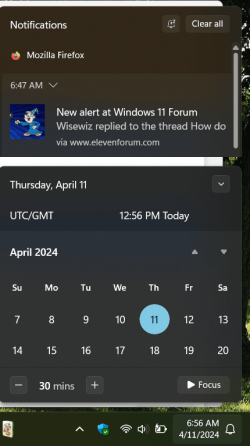
With my computers the Notifications come up atop the calendar so the calendar would have to be done away with to get more of the Notifications showing. The Calendar has a small arrow that can be used to shorten the view and give more room for the Notifications but it only allows for more not bigger.

1712840279326.png
 

My Computers

System One System Two

  • OS
    Win11 Pro RTM Version 24H2 Build 26100.4202
    Computer type
    Laptop
    Manufacturer/Model
    Dell Vostro 3400
    CPU
    Intel Core i5 11th Gen. 2.40GHz
    Memory
    12GB
    Hard Drives
    256GB SSD NVMe M.2
  • Operating System
    Win11 Pro RTM Version 24H2 Build 26100.4202
    Computer type
    PC/Desktop
    Manufacturer/Model
    Dell Vostro 5890
    CPU
    Intel Core i5 10th Gen. 2.90GHz
    Memory
    16GB
    Graphics card(s)
    Onboard, no VGA, using a DisplayPort-to-VGA adapter
    Monitor(s) Displays
    24" Dell
    Hard Drives
    512GB SSD NVMe, 4TB Seagate HDD
    Browser
    Firefox, Edge
    Antivirus
    Windows Defender/Microsoft Security
Here's what I found. But, nothing found to keep it open at all times.


My Computer

System One

  • OS
    Windows 11 Home
    Computer type
    PC/Desktop
    Manufacturer/Model
    DELL XPS 8960
    CPU
    i7-13700k
    Motherboard
    GENUINE DELL XPS 8960 DESKTOP MOTHERBOARD INTEL SOCKET LGA1700 XD433
    Memory
    (2 x 16 GB) 32 GB
    Graphics Card(s)
    NVIDIA FOUNDERS EDITION GEFORCE RTX 4060-Ti
    Sound Card
    ON BOARD 7.1 CHANNEL AUDIO
    Monitor(s) Displays
    DELL 27 MONITOR - P2722H
    Screen Resolution
    FULL HD (1080p) 1920 x 1080 at 60 Hz
    Hard Drives
    512 GB, M.2, PCIe NVMe, SSD (boot) + 1 TB, 7200 RPM, SATA, HDD (storage)
    PSU
    750W
    Case
    DELL
    Cooling
    DELL PERFORMANCE CPU LIQUID COOLING
    Keyboard
    AZIO
    Mouse
    LOGITECH M650
    Internet Speed
    INTERNET SPEED 100 MBPS
    Browser
    MICROSOFT EDGE AND GOOGLE CHROME
    Antivirus
    NORTON 360
    Other Info
    ALTEC LANSING SPEAKERS

Latest Support Threads

Back
Top Bottom