Solved Odd Reaction - no boot


Patsy1011

Well-known member
Member
Local time
4:42 AM
Posts
476
OS
11
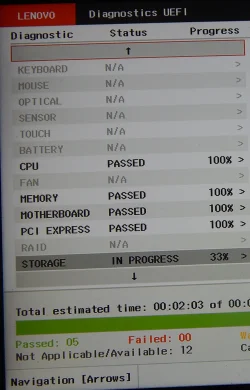
No changes to system -- all working fine as of yesterday. This morning -- no boot. Only got to Lenovo graphic - then nothing. Tried F10 and control. Wrong key! so hit a few other function keys -- and voila! A diagnostic screen came up (pls enlighten me as to which key this enabled) for future. Anyway, it went through a bunch of dx screens -- all passed and system started up as normal. I just went through this no boot scenario a couple of weeks ago. That time I was advised to hit f11 and control and it booted. I did not remember that sequence so tried f10 with failure. I have since written down the proper key. Knowing there are myriad reasons for the no boot start to my day, any input on that? System quite reliable usually - 3 years old -- June. Gee, do I need a new one - all of 3 years old!! Anyway -- thanks for any thoughts.
 
Windows Build/Version
25h2

My Computer

System One

  • OS
    11
    Computer type
    Laptop
    Manufacturer/Model
    Lenovo Ideapad
    CPU
    13th Gen Intel(R) Core(TM) i5-1335U 1.30 GHz
    Memory
    8 gb
    Screen Resolution
    1900x1200
    Hard Drives
    500 gb ssd
Please update the "My Computer" section with the computer model.


1) On a working computer create tools that can be used to test the drive, backup files, and troubleshoot


2) Find several flash drives that you can format (> or = 8 GB)


3) On a working computer create:


a) A bootable Sea Tools flash drive:


b) a new bootable windows 11 Media Creation Tool (MCT) (Windows iso):


4) Boot the problematic computer to the Sea Tools flash drive:


5) Run the Sea Tools Long generic test > take pictures > post images or share links


6) If the Long generic test reports fail then backup files > replace the drive


7) If the Long generic test reports pass then continue with the next steps


8) Boot the problematic computer to the Windows 11 Media Creation Tool (MCT) (Windows iso):


Option #7


9) Search for srttrail.txt > post a share link

c:\windows\system32\logfiles\srt\srttrail.txt

%windir%\system32\logfiles\srt\srttrail.txt


Or:

Open command prompt:

type:

bcdedit
bcdedit | find "osdevice"
diskpart
lis dis
lis vol
sel dis 0
det dis
lis par
sel dis 1
det dis
lis par
exit


type: copy Q:\windows\system32\logfiles\srt\srttrail.txt W:

replace Q: with the partition drive letter displayed in the bcdedit | find "osdevice" result
replace W: with drive letter assigned to USB flash Drive.

Post a share link.


10) If you prefer to perform steps similar to reset save files (drivers and applications need to be reinstalled) then perform a custom install.


11) If you prefer to troubleshoot then:

type: bcdedit /set {default} recoveryenabled No

reboot

Take pictures > post images or share links


An additional option is to run the Lenovo bootable UEFI hardware diagnostics > take pictures > post images or share links displaying the tests performed with results




 

My Computer

System One

  • OS
    Windows 10
    Computer type
    Laptop
    Manufacturer/Model
    HP
    CPU
    Intel(R) Core(TM) i7-4800MQ CPU @ 2.70GHz
    Motherboard
    Product : 190A Version : KBC Version 94.56
    Memory
    16 GB Total: Manufacturer : Samsung MemoryType : DDR3 FormFactor : SODIMM Capacity : 8GB Speed : 1600
    Graphics Card(s)
    NVIDIA Quadro K3100M; Intel(R) HD Graphics 4600
    Sound Card
    IDT High Definition Audio CODEC; PNP Device ID HDAUDIO\FUNC_01&VEN_111D&DEV_76E0
    Hard Drives
    Model Hitachi HTS727575A9E364
    Antivirus
    Microsoft Defender
    Other Info
    Mobile Workstation
If you don't provide boot error message how we are going to help you.
 

My Computer

System One

  • OS
    Windows 11
    Computer type
    PC/Desktop
    Manufacturer/Model
    HP Pavilion
    CPU
    AMD Ryzen 7 5700G
    Motherboard
    Erica6
    Memory
    Micron Technology DDR4-3200 16GB
    Graphics Card(s)
    NVIDIA GeForce RTX 3060
    Sound Card
    Realtek ALC671
    Monitor(s) Displays
    Samsung SyncMaster U28E590
    Screen Resolution
    3840 x 2160
    Hard Drives
    SAMSUNG MZVLQ1T0HALB-000H1
I don't believe I received a boot error msg - it just didn't boot. Here is a jpg of the test mentioned in earlier Z helper post. I had to take a picture of it as saving to my western digital drive didn't work-- everything passed and then it started up. I will save the links recommended should this happen again.
tst.webp
 

My Computer

System One

  • OS
    11
    Computer type
    Laptop
    Manufacturer/Model
    Lenovo Ideapad
    CPU
    13th Gen Intel(R) Core(TM) i5-1335U 1.30 GHz
    Memory
    8 gb
    Screen Resolution
    1900x1200
    Hard Drives
    500 gb ssd
If you open the log file, you’ll be shown details of all the tests performed by Startup Repair, with any errors discovered detailed. We can use this information to help diagnose and get to the root cause of the problem.


To open log file from the Windows Recovery Environment, click and open the Command Prompt. When the Command Prompt is open, type Notepad and press Enter key to open the Notepad application. The Startup Repair log file is located at:


Code:
C:\Windows\System32\Logfiles\Srt\SrtTrail.txt


You will need to navigate to the drive on which you have Windows installed (usually the C: drive) to see the SrtTrail.txt log file.
 

My Computer

System One

  • OS
    Windows 11
    Computer type
    PC/Desktop
    Manufacturer/Model
    HP Pavilion
    CPU
    AMD Ryzen 7 5700G
    Motherboard
    Erica6
    Memory
    Micron Technology DDR4-3200 16GB
    Graphics Card(s)
    NVIDIA GeForce RTX 3060
    Sound Card
    Realtek ALC671
    Monitor(s) Displays
    Samsung SyncMaster U28E590
    Screen Resolution
    3840 x 2160
    Hard Drives
    SAMSUNG MZVLQ1T0HALB-000H1
ok will do - cannot do right now but will get back to it. Thanks --
 

My Computer

System One

  • OS
    11
    Computer type
    Laptop
    Manufacturer/Model
    Lenovo Ideapad
    CPU
    13th Gen Intel(R) Core(TM) i5-1335U 1.30 GHz
    Memory
    8 gb
    Screen Resolution
    1900x1200
    Hard Drives
    500 gb ssd
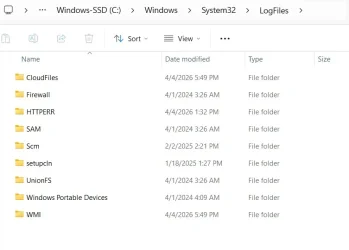
I'm real bad at this level. I got to the C: drive and came up with this:
Screenshot 2026-04-09 150240.webp
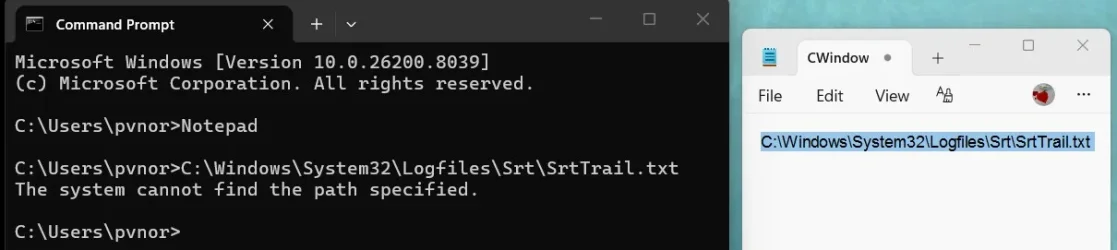
I don't see anything with today's date. I'm probably messing up at the command prompt -- I open it -- type notepad -- and zilch...
 

My Computer

System One

  • OS
    11
    Computer type
    Laptop
    Manufacturer/Model
    Lenovo Ideapad
    CPU
    13th Gen Intel(R) Core(TM) i5-1335U 1.30 GHz
    Memory
    8 gb
    Screen Resolution
    1900x1200
    Hard Drives
    500 gb ssd
The zilch as mentioned last post:
comm.webp
 

My Computer

System One

  • OS
    11
    Computer type
    Laptop
    Manufacturer/Model
    Lenovo Ideapad
    CPU
    13th Gen Intel(R) Core(TM) i5-1335U 1.30 GHz
    Memory
    8 gb
    Screen Resolution
    1900x1200
    Hard Drives
    500 gb ssd
Path: C:\Windows\System32\LogFiles\Srt\SrtTrail.txt

If the Srt folder or SrtTrail.txt file is missing, it means that "Automatic Repair" or a manual "Startup Repair" has never been run on that computer. This file is only created during a repair attempt to log results. For example, I don't have this file on either of my healthy computers.
 

My Computers

System One System Two

  • OS
    Windows 11 Pro
    Computer type
    PC/Desktop
    CPU
    AMD Ryzen 9 9950X3D
    Motherboard
    ASRock B650E Taichi Lite
    Memory
    Kingston FURY Beast 64GB (2x32GB) DDR5 6000MT/s
    Graphics Card(s)
    ASUS TUF Gaming Radeon RX 9070 OC Edition 16GB GDDR6
    Hard Drives
    Solidigm P44 Pro 2TB M.2 NVMe SSD
  • Operating System
    Windows 11 Home
    Computer type
    Laptop
    Manufacturer/Model
    Lenovo Legion Pro 7i Gen 10 16"
    CPU
    Intel Core Ultra 9 275HX
    Memory
    64GB (2x 32GB) DDR5-6400
    Graphics card(s)
    NVIDIA GeForce RTX 5080 16GB GDDR7 Laptop GPU
    Hard Drives
    2x 1TB M.2 NVMe SSD (SK Hynix)
That graphic shows that it is there, doesn't it? This is where I get lost. I see that file - I open the notepad but nothing. I open command prompt but nothing.

I will hope for a good boot tomorrow - everything passed during that UEFI dx --
Sheesh
 

My Computer

System One

  • OS
    11
    Computer type
    Laptop
    Manufacturer/Model
    Lenovo Ideapad
    CPU
    13th Gen Intel(R) Core(TM) i5-1335U 1.30 GHz
    Memory
    8 gb
    Screen Resolution
    1900x1200
    Hard Drives
    500 gb ssd
When the computer boots to the desktop please perform the following steps:


1) Add WMIC

DISM /Online /Add-Capability /CapabilityName:WMIC~~~~


2) Run Tuneup plus > post a share link


3) Enable Regback:


4) Create a new restore point:


5) Run the V2 log collector > post a share link


If there are still problems booting see this link to open Windows RE > Troubleshooting > Command prompt


type:

bcdedit
bcdedit | find "osdevice"
diskpart
lis dis
lis vol
sel dis 0
det dis
lis par
sel par 1
det par
sel par 2
det par
sel par 3
det par
sel par 4
det par
sel dis 1
det dis
lis par
sel par 1
det par
sel par 2
det par
sel par 3
det par
sel par 4
det par
exit


Post a share link.
 
Last edited:

My Computer

System One

  • OS
    Windows 10
    Computer type
    Laptop
    Manufacturer/Model
    HP
    CPU
    Intel(R) Core(TM) i7-4800MQ CPU @ 2.70GHz
    Motherboard
    Product : 190A Version : KBC Version 94.56
    Memory
    16 GB Total: Manufacturer : Samsung MemoryType : DDR3 FormFactor : SODIMM Capacity : 8GB Speed : 1600
    Graphics Card(s)
    NVIDIA Quadro K3100M; Intel(R) HD Graphics 4600
    Sound Card
    IDT High Definition Audio CODEC; PNP Device ID HDAUDIO\FUNC_01&VEN_111D&DEV_76E0
    Hard Drives
    Model Hitachi HTS727575A9E364
    Antivirus
    Microsoft Defender
    Other Info
    Mobile Workstation
It booted fine this morning. To go through ALL the steps as laid out is daunting to me. I will copy each of the Lenovo links provided above and follow up with them for future use. Thanks to all.
 

My Computer

System One

  • OS
    11
    Computer type
    Laptop
    Manufacturer/Model
    Lenovo Ideapad
    CPU
    13th Gen Intel(R) Core(TM) i5-1335U 1.30 GHz
    Memory
    8 gb
    Screen Resolution
    1900x1200
    Hard Drives
    500 gb ssd
All the steps mentioned from the other contributors are wonderful advanced steps for diagnosing your HJDD/SSD and boot problems.

You can do something real simple and download the Free apps Crystal Disk Info and or DiskGenius both in my signature. View the SMART details of all your drives. If it is any less than GOOD, the drive needs to be replaced.
 
Last edited:

My Computer

System One

  • OS
    Windows 11 Pro Insider 64 bit 25H2 26200.5742
    Computer type
    PC/Desktop
    Manufacturer/Model
    Gigabyte Z390 UD
    CPU
    Intel Core i7 9700K 3.60
    Motherboard
    Gigabyte Z390 UD
    Memory
    16 GB
    Graphics Card(s)
    nVidia GEForce RTX 2060 Super
    Sound Card
    onboard
    Monitor(s) Displays
    Two 27" Dell 4K monitors
    Screen Resolution
    3840 x 2160
    Hard Drives
    M.2 NVME SSD, 500 GB; Two 2TB Mechanical HDD's
    PSU
    850w PSU
    Case
    Cyberpower PC
    Cooling
    Water cooled
    Keyboard
    Backlit Cyberpower gaming keyboard
    Mouse
    Backlit Cyberpower gaming mouse
    Internet Speed
    1 GB mbps
    Browser
    Brave
    Antivirus
    Windows Security
No kidding -- advanced. Why I said what I said -- daunting for me. I see that you have a good rep as you are a well known member so I believe I can trust your download suggestions. Will do.. thanks very much.
 

My Computer

System One

  • OS
    11
    Computer type
    Laptop
    Manufacturer/Model
    Lenovo Ideapad
    CPU
    13th Gen Intel(R) Core(TM) i5-1335U 1.30 GHz
    Memory
    8 gb
    Screen Resolution
    1900x1200
    Hard Drives
    500 gb ssd
The V2 log collector may have information about problems Windows encountered.

(post #11) (step #5)

It runs in the background.

Launch by clicking https://www.elevenforum.com/attachments/v2-log-collector1-11-zip.34993/

In the menu bar > click > extract all > after the new window appears > launch the V2 log collector > see the completion pop up

Drop box
Google drive
GoFile.io
 

My Computer

System One

  • OS
    Windows 10
    Computer type
    Laptop
    Manufacturer/Model
    HP
    CPU
    Intel(R) Core(TM) i7-4800MQ CPU @ 2.70GHz
    Motherboard
    Product : 190A Version : KBC Version 94.56
    Memory
    16 GB Total: Manufacturer : Samsung MemoryType : DDR3 FormFactor : SODIMM Capacity : 8GB Speed : 1600
    Graphics Card(s)
    NVIDIA Quadro K3100M; Intel(R) HD Graphics 4600
    Sound Card
    IDT High Definition Audio CODEC; PNP Device ID HDAUDIO\FUNC_01&VEN_111D&DEV_76E0
    Hard Drives
    Model Hitachi HTS727575A9E364
    Antivirus
    Microsoft Defender
    Other Info
    Mobile Workstation
For who knows whatever reason, I have not had the no boot problem for a few days. I am going to go with that until "it" rears its ugly head again. Thanks to all.
 

My Computer

System One

  • OS
    11
    Computer type
    Laptop
    Manufacturer/Model
    Lenovo Ideapad
    CPU
    13th Gen Intel(R) Core(TM) i5-1335U 1.30 GHz
    Memory
    8 gb
    Screen Resolution
    1900x1200
    Hard Drives
    500 gb ssd
It does no harm and will only take a few minutes to Check the SMART Health of your Drives using the 3rd party apps mentioned in post #13 and running them occasionally to keep on top of their health
or running Lenovo Vantage app
 

My Computer

System One

  • OS
    Windows 11 Pro Insider 64 bit 25H2 26200.5742
    Computer type
    PC/Desktop
    Manufacturer/Model
    Gigabyte Z390 UD
    CPU
    Intel Core i7 9700K 3.60
    Motherboard
    Gigabyte Z390 UD
    Memory
    16 GB
    Graphics Card(s)
    nVidia GEForce RTX 2060 Super
    Sound Card
    onboard
    Monitor(s) Displays
    Two 27" Dell 4K monitors
    Screen Resolution
    3840 x 2160
    Hard Drives
    M.2 NVME SSD, 500 GB; Two 2TB Mechanical HDD's
    PSU
    850w PSU
    Case
    Cyberpower PC
    Cooling
    Water cooled
    Keyboard
    Backlit Cyberpower gaming keyboard
    Mouse
    Backlit Cyberpower gaming mouse
    Internet Speed
    1 GB mbps
    Browser
    Brave
    Antivirus
    Windows Security
I went to the Lenovo site and saw a bunch of stuff to run for a diagnostic - this is one of them:
len.webp
I will do that and see what it comes up with ...Thanks very much.
 

My Computer

System One

  • OS
    11
    Computer type
    Laptop
    Manufacturer/Model
    Lenovo Ideapad
    CPU
    13th Gen Intel(R) Core(TM) i5-1335U 1.30 GHz
    Memory
    8 gb
    Screen Resolution
    1900x1200
    Hard Drives
    500 gb ssd
Just ran a scan on all vitals -- Passed on all. So guess everything is good. Thanks again for your thoughts on this. If a problem does come up, I'll contact Lenovo - warranty is done but I'll still try through their site.
 

My Computer

System One

  • OS
    11
    Computer type
    Laptop
    Manufacturer/Model
    Lenovo Ideapad
    CPU
    13th Gen Intel(R) Core(TM) i5-1335U 1.30 GHz
    Memory
    8 gb
    Screen Resolution
    1900x1200
    Hard Drives
    500 gb ssd
In my opinion, there is no need to download "Lenovo Diagnostics UEFI (x64)" because you can use the firmware-embedded hardware test suite. It runs independently of the OS, which is useful for diagnosing hardware issues when Windows 11 won’t boot. UEFI Diagnostics is integrated into the firmware, not the SSD, which is why it remains available even after a completely clean drive wipe.

Tried F10 and control. Wrong key! so hit a few other function keys -- and voila! A diagnostic screen came up (pls enlighten me as to which key this enabled) for future.

If you don’t remember how you accessed the diagnostic screen, here are the key functions on my Lenovo Legion Pro 7i Gen 10. The keys on your Lenovo IdeaPad may be different.

Code:
F9 - Novo Menu - Normal Startup
               - BIOS Setup
               - Boot Menu (also known as a one-time boot menu)
               - System Recovery (Windows Recovery Environment)
               - UEFI Diagnostics

You can also open some options directly:

F2 - BIOS Setup
F12 - Boot Menu
 

My Computers

System One System Two

  • OS
    Windows 11 Pro
    Computer type
    PC/Desktop
    CPU
    AMD Ryzen 9 9950X3D
    Motherboard
    ASRock B650E Taichi Lite
    Memory
    Kingston FURY Beast 64GB (2x32GB) DDR5 6000MT/s
    Graphics Card(s)
    ASUS TUF Gaming Radeon RX 9070 OC Edition 16GB GDDR6
    Hard Drives
    Solidigm P44 Pro 2TB M.2 NVMe SSD
  • Operating System
    Windows 11 Home
    Computer type
    Laptop
    Manufacturer/Model
    Lenovo Legion Pro 7i Gen 10 16"
    CPU
    Intel Core Ultra 9 275HX
    Memory
    64GB (2x 32GB) DDR5-6400
    Graphics card(s)
    NVIDIA GeForce RTX 5080 16GB GDDR7 Laptop GPU
    Hard Drives
    2x 1TB M.2 NVMe SSD (SK Hynix)
Back
Top Bottom