Solved On Windows 11 25H2, powercfg no longer has /setacprofileindex option


Local time
4:25 PM
Posts
5
OS
Windows 11
Windows 11: (P-Core) problems with Intel hybrid CPUs and network drivers suggests using the following:
powercfg /setacprofileindex scheme_current profile_background schedpolicy X
powercfg /setacprofileindex scheme_current profile_background shortschedpolicy X
powercfg /setactive scheme_current

However, on my Windows 11, Windows 11 25H2 OS Build 26200.7840, powercfg doesn't have a /setacprofileindex option. Why is this? And how do I use my powercfg to accomplish the above?

Update: The following post from lexa_a also mentions using

powercfg /setacprofileindex scheme_current profile_background schedpolicy 2
powercfg /setacprofileindex scheme_current profile_background shortschedpolicy 2
powercfg /setdcprofileindex scheme_current profile_background schedpolicy 2
powercfg /setdcprofileindex scheme_current profile_background shortschedpolicy 2
powercfg /setactive scheme_current
 
Windows Build/Version
Windows 11 25H2 OS Build 26200.7840
Last edited:

My Computer

System One

  • OS
    Windows 11
    Computer type
    PC/Desktop
    Manufacturer/Model
    Dell ECT 1250
    CPU
    Intel(R) Core(TM) Ultra 7 265 (2.40 GHz)
    Memory
    32 GB
    Graphics Card(s)
    Intel UHD Graphics
That command works for me. Even if it's not listed in the normal "powercfg /?" help.


Normally /setacprofileindex updates your PC's PPM (power management profile). Check if you installed the Intel PPM Provisioning package from your Dell drivers page. It's basically a factory-issued power plan recommended for your CPU.
 

My Computer

System One

  • OS
    Windows 7
Garlin, here's what I get when I try to run a powercfg /setacprofileindex command:
PS C:\windows\system32> powercfg /setacprofileindex SCHEME_MIN PROFILE_BACKGROUND schedpolicy 0
powercfg : Invalid Parameters -- try "/?" for help
At line:1 char:1
+ powercfg /setacprofileindex SCHEME_MIN PROFILE_BACKGROUND schedpolicy ...
+ ~~~~~~~~~~~~~~~~~~~~~~~~~~~~~~~~~~~~~~~~~~~~~~~~~~~~~~~~~~~~~~~~~~~~~
+ CategoryInfo : NotSpecified: (Invalid Parameters -- try "/?" for help:String) [], RemoteException
+ FullyQualifiedErrorId : NativeCommandError
 

My Computer

System One

  • OS
    Windows 11
    Computer type
    PC/Desktop
    Manufacturer/Model
    Dell ECT 1250
    CPU
    Intel(R) Core(TM) Ultra 7 265 (2.40 GHz)
    Memory
    32 GB
    Graphics Card(s)
    Intel UHD Graphics
I'm also on Windows build 26200.7840.

The default schemes don't support all the profile settings, but you can edit the current (or a custom) scheme which was duplicated from a default scheme.
Code:
PS C:\Windows\System32> powercfg /setacprofileindex SCHEME_MIN PROFILE_BACKGROUND schedpolicy 0
Invalid Parameters -- try "/?" for help

PS C:\Windows\System32> powercfg /setacprofileindex SCHEME_MAX PROFILE_BACKGROUND schedpolicy 0
Invalid Parameters -- try "/?" for help

PS C:\Windows\System32> powercfg /setacprofileindex SCHEME_CURRENT PROFILE_BACKGROUND schedpolicy 0
 

My Computer

System One

  • OS
    Windows 7
powercfg /setacprofileindex SCHEME_CURRENT doesn't work for me:

C:\Windows\System32>powercfg /setacprofileindex SCHEME_CURRENT PROFILE_BACKGROUND schedpolicy 0
Invalid Parameters -- try "/?" for help

I then created a custom profile by duplicating an existing one. powercfg /setacprofileindex still doesn't work:

C:\Windows\System32>powercfg /list

Existing Power Schemes (* Active)
-----------------------------------
Power Scheme GUID: 381b4222-f694-41f0-9685-ff5bb260df2e (Balanced)
Power Scheme GUID: 8c5e7fda-e8bf-4a96-9a85-a6e23a8c635c (High performance) *
Power Scheme GUID: a1841308-3541-4fab-bc81-f71556f20b4a (Power saver)

C:\Windows\System32>powercfg /duplicatescheme 8c5e7fda-e8bf-4a96-9a85-a6e23a8c635c
Power Scheme GUID: 59cb963a-75bd-4bbc-ac99-fe2198bc4701 (High performance)
C:\Windows\System32>powercfg /changename 59cb963a-75bd-4bbc-ac99-fe2198bc4701 "Geoff's high performance"

C:\Windows\System32>powercfg /list

Existing Power Schemes (* Active)
-----------------------------------
Power Scheme GUID: 381b4222-f694-41f0-9685-ff5bb260df2e (Balanced)
Power Scheme GUID: 59cb963a-75bd-4bbc-ac99-fe2198bc4701 (Geoff's high performance)
Power Scheme GUID: 8c5e7fda-e8bf-4a96-9a85-a6e23a8c635c (High performance) *
Power Scheme GUID: a1841308-3541-4fab-bc81-f71556f20b4a (Power saver)

C:\Windows\System32>powercfg /setacprofileindex 59cb963a-75bd-4bbc-ac99-fe2198bc4701 PROFILE_BACKGROUND schedpolicy 0
Invalid Parameters -- try "/?" for help

Any idea what I might be doing wrong?
 

My Computer

System One

  • OS
    Windows 11
    Computer type
    PC/Desktop
    Manufacturer/Model
    Dell ECT 1250
    CPU
    Intel(R) Core(TM) Ultra 7 265 (2.40 GHz)
    Memory
    32 GB
    Graphics Card(s)
    Intel UHD Graphics
Did you check if your Dell has the Intel PPM "software" installed?
 

My Computer

System One

  • OS
    Windows 7
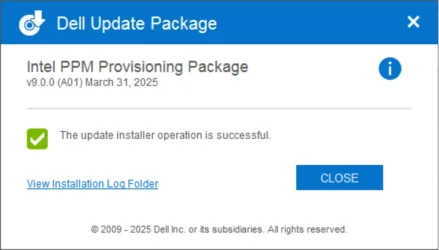
Yes, I installed Intel PPM Provisioning Package v9.0.0 (A01) March 31, 2025, which I downloaded from Dell Support (see the attached screenshot), prior to running the powercfg commands.

Intel PPM Provisioning Package.webp
 

My Computer

System One

  • OS
    Windows 11
    Computer type
    PC/Desktop
    Manufacturer/Model
    Dell ECT 1250
    CPU
    Intel(R) Core(TM) Ultra 7 265 (2.40 GHz)
    Memory
    32 GB
    Graphics Card(s)
    Intel UHD Graphics
I don't believe the actual problem is that /setacprofileindex doesn't exist. Instead it's probably complaining that one of the SUB_ALIASES is invalid, or your plan doesn't support that setting. That's why powercfg is complaining about "Invalid Parameters".

Do you another Windows system to try?
 

My Computer

System One

  • OS
    Windows 7
It seems that my High performance power scheme is corrupt as I was able to use a duplicate of my Balanced power scheme:

C:\Windows\System32>powercfg /list

Existing Power Schemes (* Active)
-----------------------------------
Power Scheme GUID: 381b4222-f694-41f0-9685-ff5bb260df2e (Balanced)
Power Scheme GUID: 8c5e7fda-e8bf-4a96-9a85-a6e23a8c635c (High performance) *
Power Scheme GUID: a1841308-3541-4fab-bc81-f71556f20b4a (Power saver)

C:\Windows\System32>powercfg /duplicatescheme 381b4222-f694-41f0-9685-ff5bb260df2e
Power Scheme GUID: a2788136-42f8-4633-b2e9-88a7d6200209 (Balanced)
C:\Windows\System32>powercfg /list

C:\Windows\System32>powercfg /changename a2788136-42f8-4633-b2e9-88a7d6200209 "Geoff's power scheme"

C:\Windows\System32>powercfg /list

Existing Power Schemes (* Active)
-----------------------------------
Power Scheme GUID: 381b4222-f694-41f0-9685-ff5bb260df2e (Balanced)
Power Scheme GUID: 8c5e7fda-e8bf-4a96-9a85-a6e23a8c635c (High performance) *
Power Scheme GUID: a1841308-3541-4fab-bc81-f71556f20b4a (Power saver)
Power Scheme GUID: a2788136-42f8-4633-b2e9-88a7d6200209 (Geoff's power scheme)

C:\Windows\System32>powercfg /setacprofileindex a2788136-42f8-4633-b2e9-88a7d6200209 PROFILE_BACKGROUND schedpolicy 0

C:\Windows\System32>powercfg /setacprofileindex a2788136-42f8-4633-b2e9-88a7d6200209 PROFILE_BACKGROUND schedpolicy 2

C:\Windows\System32>powercfg /setacprofileindex a2788136-42f8-4633-b2e9-88a7d6200209 PROFILE_BACKGROUND shortschedpolicy 2

C:\Windows\System32>powercfg /setdcprofileindex a2788136-42f8-4633-b2e9-88a7d6200209 PROFILE_BACKGROUND schedpolicy 2

C:\Windows\System32>powercfg /setdcprofileindex a2788136-42f8-4633-b2e9-88a7d6200209 PROFILE_BACKGROUND shortschedpolicy 2

C:\Windows\System32>powercfg /setactive a2788136-42f8-4633-b2e9-88a7d6200209

C:\Windows\System32>powercfg /list

Existing Power Schemes (* Active)
-----------------------------------
Power Scheme GUID: 381b4222-f694-41f0-9685-ff5bb260df2e (Balanced)
Power Scheme GUID: 8c5e7fda-e8bf-4a96-9a85-a6e23a8c635c (High performance)
Power Scheme GUID: a1841308-3541-4fab-bc81-f71556f20b4a (Power saver)
Power Scheme GUID: a2788136-42f8-4633-b2e9-88a7d6200209 (Geoff's power scheme) *

Garlin, much thanks for your help and sticking with me on this.
 

My Computer

System One

  • OS
    Windows 11
    Computer type
    PC/Desktop
    Manufacturer/Model
    Dell ECT 1250
    CPU
    Intel(R) Core(TM) Ultra 7 265 (2.40 GHz)
    Memory
    32 GB
    Graphics Card(s)
    Intel UHD Graphics
Back
Top Bottom