Solved OneDrive - Black Icon in System Tray?


SonicMojo

Well-known member
Member
Local time
10:36 AM
Posts
132
OS
Windows 11 PRO 25H2
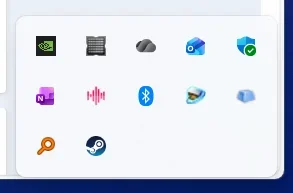
Anyone seen this before? This is 25H2 - just started yesterday...was the "new" normal icon a day or two ago


1761940652287.webp

Have restarted and check for OneDrive updates - but it's a weird one.

S
 

My Computer

System One

  • OS
    Windows 11 PRO 25H2
    Computer type
    PC/Desktop
    Manufacturer/Model
    ASUS
    CPU
    Intel i5-10600K
    Motherboard
    ProArt z490-Creator 10G
    Memory
    Corsair Vengeance LPX 64GB (2x32GB) (CMK64GX5M2B5600C40)
    Graphics Card(s)
    Intel UHD Graphics 630
    Sound Card
    RME ADI-2 FS DAC
    Monitor(s) Displays
    Dell U2415
    Screen Resolution
    1920x1080
    Hard Drives
    Samsung NMVE (990 Pro, 970 EVO)
    PSU
    Seasonic GX750
    Case
    Coolermaster CM-690II
    Cooling
    Noctua
    Keyboard
    Logitech MX Keys
    Mouse
    Logitech M510
    Internet Speed
    1 GBPS+
    Browser
    MS Edge
    Antivirus
    Windows Defender
Anyone seen this before? This is 25H2 - just started yesterday...was the "new" normal icon a day or two ago

I just got this after updating Edge (142).
At first I thought I wasn't logged into OneDrive but apparently they changed the color scheme.
In any case, it's really ugly on a light taskbar... :(
 

My Computer

System One

  • OS
    Windows 11 25H2
    Computer type
    Laptop
    Manufacturer/Model
    DELL VOSTRO 15 3568
    CPU
    Intel Core i5-7200U
    Memory
    8,00 GB
    Graphics Card(s)
    Intel HD Graphics 620, Radeon R5 M420
    Sound Card
    Realtek Audio ALC3246
    Monitor(s) Displays
    BENQ PD3205UA
    Screen Resolution
    1920 X 1080
    Hard Drives
    SK HYNIX SC311 SATA 256 GB, SanDisk Extreme 510 external
    Mouse
    DELL MS700
    Internet Speed
    50/15 MB/s VDSL
    Browser
    Microsoft Edge
    Antivirus
    Microsoft Defender

My Computer

System One

  • OS
    Windows 11
    Computer type
    PC/Desktop
    Manufacturer/Model
    HP Pavilion
    CPU
    AMD Ryzen 7 5700G
    Motherboard
    Erica6
    Memory
    Micron Technology DDR4-3200 16GB
    Graphics Card(s)
    NVIDIA GeForce RTX 3060
    Sound Card
    Realtek ALC671
    Monitor(s) Displays
    Samsung SyncMaster U28E590
    Screen Resolution
    3840 x 2160
    Hard Drives
    SAMSUNG MZVLQ1T0HALB-000H1

My Computer

System One

  • OS
    Windows 11 PRO 25H2
    Computer type
    PC/Desktop
    Manufacturer/Model
    ASUS
    CPU
    Intel i5-10600K
    Motherboard
    ProArt z490-Creator 10G
    Memory
    Corsair Vengeance LPX 64GB (2x32GB) (CMK64GX5M2B5600C40)
    Graphics Card(s)
    Intel UHD Graphics 630
    Sound Card
    RME ADI-2 FS DAC
    Monitor(s) Displays
    Dell U2415
    Screen Resolution
    1920x1080
    Hard Drives
    Samsung NMVE (990 Pro, 970 EVO)
    PSU
    Seasonic GX750
    Case
    Coolermaster CM-690II
    Cooling
    Noctua
    Keyboard
    Logitech MX Keys
    Mouse
    Logitech M510
    Internet Speed
    1 GBPS+
    Browser
    MS Edge
    Antivirus
    Windows Defender
Seeing the same color on my system. Something changed.
 

My Computer

System One

  • OS
    Win 7/10/11
    Computer type
    PC/Desktop
    Other Info
    I'm a computer enthusiast so have quite a few systems that I run. More like an advanced hobby.
I just got this after updating Edge (142).
At first I thought I wasn't logged into OneDrive but apparently they changed the color scheme.
In any case, it's really ugly on a light taskbar... :(

"If hovering shows “Up to date”, OneDrive is functioning normally. The color difference between blue and grey/white icons usually comes down to the type of account:
  • Blue icon: Typically for work or school accounts (Microsoft 365 Business, Enterprise, or Education).
  • White or grey icon: Usually for personal Microsoft accounts (Outlook.com, Hotmail, etc.), and it can look darker depending on your Windows theme.
Overall, if your icon is grey and everything is syncing fine, it likely means you’re signed in with a personal account, not a work/school account. This is by design and not an error."

Grey OneDrive Icon - Microsoft Learn
 

My Computer

System One

  • OS
    Windows 11 25H2
    Computer type
    Laptop
    Manufacturer/Model
    DELL VOSTRO 15 3568
    CPU
    Intel Core i5-7200U
    Memory
    8,00 GB
    Graphics Card(s)
    Intel HD Graphics 620, Radeon R5 M420
    Sound Card
    Realtek Audio ALC3246
    Monitor(s) Displays
    BENQ PD3205UA
    Screen Resolution
    1920 X 1080
    Hard Drives
    SK HYNIX SC311 SATA 256 GB, SanDisk Extreme 510 external
    Mouse
    DELL MS700
    Internet Speed
    50/15 MB/s VDSL
    Browser
    Microsoft Edge
    Antivirus
    Microsoft Defender
OneDrive has recently changed the icon to a subtle triple cloud. Resetting icon cache might help.

capture_11012025_120839.webp


My Computer

System One

  • OS
    Home26H2Can
    Computer type
    PC/Desktop
    CPU
    AMD Ryzen 5 8600G (07/24)
    Motherboard
    ASROCK B650M-HDV/M.2 (07/24) BIOS 4.21 AGESA ComboAM5 1.3.0.1 (04/26)
    Memory
    2x32GB Kingston FURY DDR5 5600 MHz CL36 @5200 CL36 (07/24)
    Graphics Card(s)
    ASROCK Radeon RX 6600 Challenger D 8G @48FPS (08/24)
    Sound Card
    Creative Sound BlasterX AE-5 Plus (05/24)
    Monitor(s) Displays
    24" Philips 24M1N3200ZS/00 (05/24)
    Screen Resolution
    1920×1080@165Hz via DP1.4
    Hard Drives
    Kingston KC3000 NVMe 2TB (05/24)
    ADATA XPG GAMMIX S11 Pro 512GB (07/19)
    PSU
    Seasonic Core GM 550 Gold (04/24)
    Case
    Fractal Design Define 7 Mini with 3x Noctua NF-P14s/12@555rpm (04/24)
    Cooling
    Noctua NH-U12S with Noctua NF-P12 (04/24)
    Keyboard
    HP Pavilion Wired Keyboard 300 (07/24) + Rabalux 76017 Parker (01/24)
    Mouse
    Logitech M330 Silent Plus (01/26)
    Internet Speed
    500/100 Mbps via RouterOS (05/21) & TCP Optimizer
    Browser
    Edge, Brave for YouTube, LibreWolf for FB
    Antivirus
    NextDNS blocking 1/3 Traffic
    Other Info
    Phone: Motorola Moto G86 (02/26)
    Backup: Hasleo Backup Suite (PreOS)
    Headphones: Sennheiser RS170 (09/10)
    Chair: Huzaro Force 4.4 Grey Mesh (05/24)
    Notifier: Xiaomi Mi Band 9 Milanese (10/24)
    FlexCore USB-C 3.2 Gen 1 (M) to LAN (F) (08/25)
OneDrive has recently changed the icon to a subtle triple cloud.


Oh good, I'm not going insane.
I was gonna say... that looks like a weather icon.

But since I don't have or use OneDrive, I decided that maybe MS was short of icons, so they just used a cloud for OneDrive. :D
 

My Computers

System One System Two

  • OS
    Win 11 Home ♦♦♦26200.8457 ♦♦♦♦♦♦♦25H2
    Computer type
    PC/Desktop
    Manufacturer/Model
    Built by Ghot® [May 2020]
    CPU
    AMD Ryzen 7 3700X
    Motherboard
    Asus Pro WS X570-ACE (BIOS 5302)
    Memory
    G.Skill (F4-3200C14D-16GTZKW)
    Graphics Card(s)
    EVGA RTX 2070 (08G-P4-2171-KR)
    Sound Card
    Realtek ALC1220P / ALC S1220A
    Monitor(s) Displays
    Dell U3011 30"
    Screen Resolution
    2560 x 1600
    Hard Drives
    2x Samsung 860 EVO 500GB,
    WD 4TB Black FZBX - SATA III,
    WD 8TB Black FZBX - SATA III,
    DRW-24B1ST CD/DVD Burner
    PSU
    PC Power & Cooling 750W Quad EPS12V
    Case
    Cooler Master ATCS 840 Tower
    Cooling
    CM Hyper 212 EVO (push/pull)
    Keyboard
    Ducky DK9008 Shine II Blue LED
    Mouse
    Logitech Optical M-100
    Internet Speed
    300/300
    Browser
    Firefox (latest)
    Antivirus
    Bitdefender Total Security
    Other Info
    Speakers: Klipsch Pro Media 2.1
  • Operating System
    Windows XP Pro 32bit w/SP3
    Computer type
    PC/Desktop
    Manufacturer/Model
    Built by Ghot® (not in use)
    CPU
    AMD Athlon 64 X2 5000+ (OC'd @ 3.2Ghz)
    Motherboard
    ASUS M2N32-SLI Deluxe Wireless Edition
    Memory
    TWIN2X2048-6400C4DHX (2 x 1GB, DDR2 800)
    Graphics card(s)
    EVGA 256-P2-N758-TR GeForce 8600GT SSC
    Sound Card
    Onboard
    Monitor(s) Displays
    ViewSonic G90FB Black 19" Professional (CRT)
    Screen Resolution
    up to 2048 x 1536
    Hard Drives
    WD 36GB 10,000rpm Raptor SATA
    Seagate 80GB 7200rpm SATA
    Lite-On LTR-52246S CD/RW
    Lite-On LH-18A1P CD/DVD Burner
    PSU
    PC Power & Cooling Silencer 750 Quad EPS12V
    Case
    Generic Beige case, 80mm fans
    Cooling
    ZALMAN 9500A 92mm CPU Cooler
    Keyboard
    Logitech Classic Keybooard 200
    Mouse
    Logitech Optical M-BT96a
    Internet Speed
    300/300
    Browser
    Firefox 3.x ??
    Antivirus
    Symantec (Norton)
    Other Info
    Still assembled, still runs. Haven't turned it on for 15 years?
OneDrive is an integral component of my 3-2-1 Backup Strategy. I've never seen anything other than the standard OneDrive white cloud icon on either my System One or System Two.
 

My Computers

System One System Two

  • OS
    Windows 11 Pro
    Computer type
    Laptop
    Manufacturer/Model
    Dell XPS 16 DA16260
    CPU
    Intel Series 3 Core Ultra X9 388H
    Memory
    64GB LPDDR5x 9600 MT/s
    Graphics Card(s)
    Intel Arc graphics B390 Panther Lake
    Monitor(s) Displays
    16" 3.2K Tandem OLED Infinity Edge
    Screen Resolution
    3200 x 2000 16:10 236 PPI
    Hard Drives
    1 Terabyte M.2 PCIe NVMe SSD
    Case
    Black Anodized Aluminum
    Cooling
    Vapor Chamber Cooling
    Mouse
    None
    Internet Speed
    942 Mbps Netgear Mesh + 2 Satellites
    Browser
    Microsoft Edge (Chromium)
    Antivirus
    Windows Security (Defender)
    Other Info
    NPU delivering 67 TOPS
    Microsoft 365 subscription
    Microsoft OneDrive 1TB Cloud
    Microsoft Visual Studio
    Microsoft Visual Studio Code
    Microsoft Sysinternals Suite
    Microsoft BitLocker
    Microsoft Copilot
    Dell Support Assist
    Dell Command | Update
    Macrium Reflect X subscription
    1Password Password Manager
    Amazon Kindle for PC
    Lightroom/Photoshop subscription
    Interactive Brokers Trader Workstation
  • Operating System
    Windows 11 Pro
    Computer type
    Laptop
    Manufacturer/Model
    Microsoft Surface Laptop 7
    CPU
    Snapdragon® X Elite (12 Core) with Hexagon NPU delivering 45 TOPS
    Memory
    32GB LPDDR5x 8448 MT/s
    Graphics card(s)
    Integrated Adreno GPU
    Sound Card
    Omnisonic speakers with Dolby Atmos spatial sound
    Monitor(s) Displays
    13.8″ PixelSense Flow touchscreen 120 Hz 600 NIT
    Screen Resolution
    2304 × 1536 (201 PPI), 3:2 aspect ratio
    Hard Drives
    1 TB PCIe NVMe Gen 4 SSD
    Case
    Black Anodized Aluminum
    Cooling
    Vapor Chamber Cooling
    Mouse
    None
    Internet Speed
    942 Mbps Netgear Mesh + 2 Satellites
    Browser
    Microsoft Edge (Chromium)
    Antivirus
    Windows Security (Defender)
    Other Info
    Microsoft 365 subscription (Office)
    Microsoft OneDrive 1TB Cloud
    Microsoft Visual Studio 2026
    Microsoft Visual Studio Code
    Interactive Brokers Trader Workstation
    Lightroom/Photoshop subscription
    1Password Password Manager
    Microsoft Sysinternals
    Amazon Kindle for PC
    Microsoft BitLocker
    Microsoft Copilot

My Computers

System One System Two

  • OS
    Windows 11 Pro
    Computer type
    PC/Desktop
    Manufacturer/Model
    ASUS ROG Strix
  • Operating System
    Windows 11 Pro
    Computer type
    Laptop
    Manufacturer/Model
    ASUS VivoBook
OneDrive has recently changed the icon to a subtle triple cloud. Resetting icon cache might help.

I did have the "new" icon for just a very short while. And then it switched.

Oddly the "new" icon continues to be just fine on several Win 10 machines here.

Only the Win 11 25H2 targets have this oddball display.

S
 

My Computer

System One

  • OS
    Windows 11 PRO 25H2
    Computer type
    PC/Desktop
    Manufacturer/Model
    ASUS
    CPU
    Intel i5-10600K
    Motherboard
    ProArt z490-Creator 10G
    Memory
    Corsair Vengeance LPX 64GB (2x32GB) (CMK64GX5M2B5600C40)
    Graphics Card(s)
    Intel UHD Graphics 630
    Sound Card
    RME ADI-2 FS DAC
    Monitor(s) Displays
    Dell U2415
    Screen Resolution
    1920x1080
    Hard Drives
    Samsung NMVE (990 Pro, 970 EVO)
    PSU
    Seasonic GX750
    Case
    Coolermaster CM-690II
    Cooling
    Noctua
    Keyboard
    Logitech MX Keys
    Mouse
    Logitech M510
    Internet Speed
    1 GBPS+
    Browser
    MS Edge
    Antivirus
    Windows Defender
Only the Win 11 25H2 targets have this oddball display.
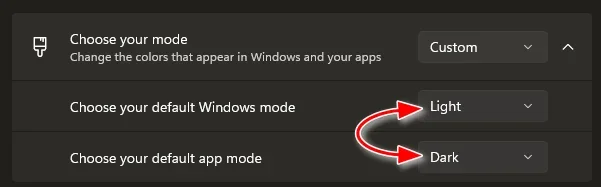
Probably not, but..., could it be a color inversion thing happening in Personalization?
 

My Computers

System One System Two

  • OS
    Windows 11 Pro
    Computer type
    PC/Desktop
    Manufacturer/Model
    ASUS ROG Strix
  • Operating System
    Windows 11 Pro
    Computer type
    Laptop
    Manufacturer/Model
    ASUS VivoBook
Probably not, but..., could it be a color inversion thing happening in Personalization?

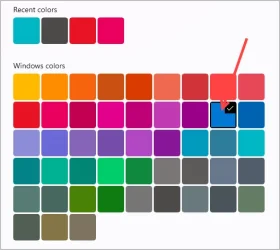
Oddly - that's what it looks like. My color scheme is not crazy tho - and uses standard MS color selections.

S
 

My Computer

System One

  • OS
    Windows 11 PRO 25H2
    Computer type
    PC/Desktop
    Manufacturer/Model
    ASUS
    CPU
    Intel i5-10600K
    Motherboard
    ProArt z490-Creator 10G
    Memory
    Corsair Vengeance LPX 64GB (2x32GB) (CMK64GX5M2B5600C40)
    Graphics Card(s)
    Intel UHD Graphics 630
    Sound Card
    RME ADI-2 FS DAC
    Monitor(s) Displays
    Dell U2415
    Screen Resolution
    1920x1080
    Hard Drives
    Samsung NMVE (990 Pro, 970 EVO)
    PSU
    Seasonic GX750
    Case
    Coolermaster CM-690II
    Cooling
    Noctua
    Keyboard
    Logitech MX Keys
    Mouse
    Logitech M510
    Internet Speed
    1 GBPS+
    Browser
    MS Edge
    Antivirus
    Windows Defender
Oddly - that's what it looks like...
Are you signed in to OneDrive? Have you opened it? What happens if you drag the icon in and out of the system tray?
(Provide screenshots if relevant)
 

My Computers

System One System Two

  • OS
    Windows 11 Pro
    Computer type
    PC/Desktop
    Manufacturer/Model
    ASUS ROG Strix
  • Operating System
    Windows 11 Pro
    Computer type
    Laptop
    Manufacturer/Model
    ASUS VivoBook
uninstall onedrive with revo (to delete leftovers) and go to "%windir%\System32\% and run "OneDriveSetup.exe". after install it will update and fix the icon
 

My Computer

System One

  • OS
    Windows 11 Pro
go to "%windir%\System32\% and run "OneDriveSetup.exe".
If you've deleted that, you'll have to wait for the next Build!!! :zany:
 

My Computers

System One System Two

  • OS
    Windows 11 Pro
    Computer type
    PC/Desktop
    Manufacturer/Model
    ASUS ROG Strix
  • Operating System
    Windows 11 Pro
    Computer type
    Laptop
    Manufacturer/Model
    ASUS VivoBook
Are you signed in to OneDrive? Have you opened it? What happens if you drag the icon in and out of the system tray?
(Provide screenshots if relevant)

Interesting - if I drag it out of the system tray - and hover over a light background - I DO see an off-grey "dual cloud" kinda icon. Hard to screencap tho.

This is looking more and more like just a "color" disagreement with my main taskbar color. Which is this:

1762006559436.webp

S
 

My Computer

System One

  • OS
    Windows 11 PRO 25H2
    Computer type
    PC/Desktop
    Manufacturer/Model
    ASUS
    CPU
    Intel i5-10600K
    Motherboard
    ProArt z490-Creator 10G
    Memory
    Corsair Vengeance LPX 64GB (2x32GB) (CMK64GX5M2B5600C40)
    Graphics Card(s)
    Intel UHD Graphics 630
    Sound Card
    RME ADI-2 FS DAC
    Monitor(s) Displays
    Dell U2415
    Screen Resolution
    1920x1080
    Hard Drives
    Samsung NMVE (990 Pro, 970 EVO)
    PSU
    Seasonic GX750
    Case
    Coolermaster CM-690II
    Cooling
    Noctua
    Keyboard
    Logitech MX Keys
    Mouse
    Logitech M510
    Internet Speed
    1 GBPS+
    Browser
    MS Edge
    Antivirus
    Windows Defender
This is looking more and more like just a "color" disagreement with my main taskbar color.
I thought maybe you had dual color mode going...

0008071.webp

... but then..., that would make all glyph's and fonts dark! 🤷‍♂️

0008072.webp
 

My Computers

System One System Two

  • OS
    Windows 11 Pro
    Computer type
    PC/Desktop
    Manufacturer/Model
    ASUS ROG Strix
  • Operating System
    Windows 11 Pro
    Computer type
    Laptop
    Manufacturer/Model
    ASUS VivoBook
Anyone seen this before? This is 25H2 - just started yesterday...was the "new" normal icon a day or two ago


View attachment 151150

Have restarted and check for OneDrive updates - but it's a weird one.

S
Same here (Onedrive works just fine):

1762029115538.webp

... but I learned a while ago that, for the sake of your sanity, it's sometimes best to just ignore Windows' odd behavior—its quirks tend to resolve themselves on their own after a while 😉
 

My Computer

System One

  • OS
    Windows 11 Home
    Computer type
    Laptop
    Manufacturer/Model
    ASUS ROG SCAR 18
    CPU
    Intel i9-13980HX
    Memory
    32GB DDR5 5600MHz
    Graphics Card(s)
    NVidia GTX 4090 Laptop 256bit 16GB 175W
    Sound Card
    Realtek ALC285 + Dolby Atmos
    Monitor(s) Displays
    G-Sync NE180QDM-NZ2 18" 16:10, FreeSync Premium XiaoMi Mi 34" 21:9
    Screen Resolution
    2560x1600@240Hz (internal), 3440x1440@144Hz (external)
    Hard Drives
    NVMe Lexar NM790 1TB 6GB/s, NVMe Lexar NM790 4TB 6GB/s
    PSU
    330W (laptop PSU)
    Mouse
    ROG Strix Carry Wireless-BT mouse
    Other Info
    4K UHD USB Archgon Star Blu-Ray 4K UHD,
    8BitDo Arcade Stick,
    Vader 4 Pro controller

Latest Support Threads

Back
Top Bottom