Opera is set as default htm browser, but registry shows otherwise


highstream

Active member
Local time
7:48 PM
Posts
163
OS
Windows 11 Pro
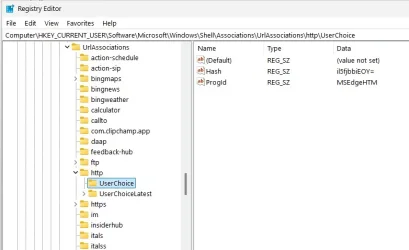
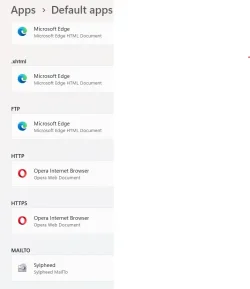
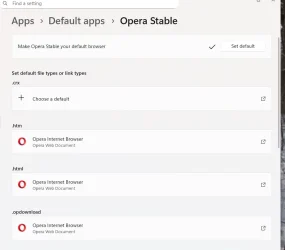
Win 11 Pro 24H2. In settings, Opera is the default browser for htm, html, etc. Yet, in some program URL links, for instance with UCheck, Edge has been opening. When I asked, the developer pointed out that in the registry MSEdge is shown as the default browser for htm links. How could that be? I notice that the value in question cannot be edited. Screenshots below. Thanks,
 

Attachments
  • Desktop browser setting.webp
    Desktop browser setting.webp
    22.8 KB · Views: 1
  • UCheck regedit default browser.webp
    UCheck regedit default browser.webp
    30.4 KB · Views: 1

My Computers

System One System Two

  • OS
    Windows 11 Pro
    Computer type
    PC/Desktop
    CPU
    i5
    Motherboard
    Asus
    Memory
    16.0 GB
    Monitor(s) Displays
    Samsung T45F
    Screen Resolution
    1920x1200
    Hard Drives
    Samsung Evo SSDs and Western HDDs
    Keyboard
    IBM Model M
    Mouse
    Bornd
    Antivirus
    Windows and MBAM Premium
  • Operating System
    Win 11 Pro
    Computer type
    Laptop
    Manufacturer/Model
    Lenovo Thinkpad
Windows distinguishes between shell (file extension) handling (.htm) (.html) etc and protocol handlers http: https: ftp: so you can have different defaults for all of them.

Open Settings > Apps > Default Apps
Scroll way way down and look for 'Choose Defaults by link type'
In the list presented you should see and be able to change HTTP and HTTPS
 

My Computer

System One

  • OS
    Linux Mint
    Computer type
    Laptop
    Manufacturer/Model
    System76 Lemur Pro
I didn't think to post my other screenshot. Those two were already set for Opera. So that deepens the problem. Should I try to delete the MSEdge registry entry, or is there another solution?
 

Attachments

  • desktop browser setting - 2.webp
    desktop browser setting - 2.webp
    18.1 KB · Views: 1

My Computers

System One System Two

  • OS
    Windows 11 Pro
    Computer type
    PC/Desktop
    CPU
    i5
    Motherboard
    Asus
    Memory
    16.0 GB
    Monitor(s) Displays
    Samsung T45F
    Screen Resolution
    1920x1200
    Hard Drives
    Samsung Evo SSDs and Western HDDs
    Keyboard
    IBM Model M
    Mouse
    Bornd
    Antivirus
    Windows and MBAM Premium
  • Operating System
    Win 11 Pro
    Computer type
    Laptop
    Manufacturer/Model
    Lenovo Thinkpad
I don't recommend deleting registry keys/values without a backup
 

My Computer

System One

  • OS
    Linux Mint
    Computer type
    Laptop
    Manufacturer/Model
    System76 Lemur Pro
I don't recommend deleting registry keys/values without a backup

I exported the key, then deleted the MSEdge value. However 1) it didn't stop MSEdge from opening, as before, and 2) import didn't succeed; and 3) I recreated the key, but betting an error message on deleting the original.
 

My Computers

System One System Two

  • OS
    Windows 11 Pro
    Computer type
    PC/Desktop
    CPU
    i5
    Motherboard
    Asus
    Memory
    16.0 GB
    Monitor(s) Displays
    Samsung T45F
    Screen Resolution
    1920x1200
    Hard Drives
    Samsung Evo SSDs and Western HDDs
    Keyboard
    IBM Model M
    Mouse
    Bornd
    Antivirus
    Windows and MBAM Premium
  • Operating System
    Win 11 Pro
    Computer type
    Laptop
    Manufacturer/Model
    Lenovo Thinkpad
I exported the key, then deleted the MSEdge value. However 1) it hasn't stopped MSEdge from opening, as before; 2) import of the key gets an error message; and 3) I recreated the key, but am getting an error message on trying to delete the original.
 

My Computers

System One System Two

  • OS
    Windows 11 Pro
    Computer type
    PC/Desktop
    CPU
    i5
    Motherboard
    Asus
    Memory
    16.0 GB
    Monitor(s) Displays
    Samsung T45F
    Screen Resolution
    1920x1200
    Hard Drives
    Samsung Evo SSDs and Western HDDs
    Keyboard
    IBM Model M
    Mouse
    Bornd
    Antivirus
    Windows and MBAM Premium
  • Operating System
    Win 11 Pro
    Computer type
    Laptop
    Manufacturer/Model
    Lenovo Thinkpad
I don't recommend deleting registry keys/values without a backup

I exported the key, then deleted the MSEdge value. However 1) it didn't stop MSEdge from opening, as before, and 2) import of the key didn't succeed; and 3) I recreated the key with the idea of renaming it, but am getting a message that I cannot delete UserChoice, whether regedit is run as Admin or not.
 

My Computers

System One System Two

  • OS
    Windows 11 Pro
    Computer type
    PC/Desktop
    CPU
    i5
    Motherboard
    Asus
    Memory
    16.0 GB
    Monitor(s) Displays
    Samsung T45F
    Screen Resolution
    1920x1200
    Hard Drives
    Samsung Evo SSDs and Western HDDs
    Keyboard
    IBM Model M
    Mouse
    Bornd
    Antivirus
    Windows and MBAM Premium
  • Operating System
    Win 11 Pro
    Computer type
    Laptop
    Manufacturer/Model
    Lenovo Thinkpad
I've now found a couple of programs that insist on opening links in Edge. The developer of one, UCheck, denies there is anything in his program to cause it, and points to the keys under http and https in the registry that show MSEdge.
 

My Computers

System One System Two

  • OS
    Windows 11 Pro
    Computer type
    PC/Desktop
    CPU
    i5
    Motherboard
    Asus
    Memory
    16.0 GB
    Monitor(s) Displays
    Samsung T45F
    Screen Resolution
    1920x1200
    Hard Drives
    Samsung Evo SSDs and Western HDDs
    Keyboard
    IBM Model M
    Mouse
    Bornd
    Antivirus
    Windows and MBAM Premium
  • Operating System
    Win 11 Pro
    Computer type
    Laptop
    Manufacturer/Model
    Lenovo Thinkpad
Back
Top Bottom