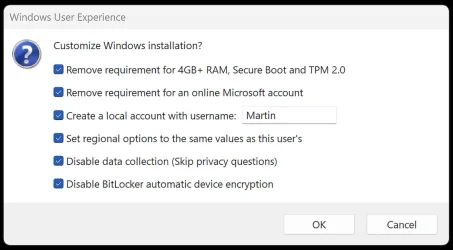
I have read about Windows 11 encrypting your pc automatically when installing and I figure I will opt out afterwards.
This will take hours I suspect due to the size of the hard drive which is a 4TB SSD if I left my files on it.
It would be nice to be able to opt out during the clean install.
I want to upgrade but do not want to risk the encryption going wrong, the account not working or corruption. So I would do a clean install and then opt out if I can then install my software and copy my files over. I suspect Windows 11 will then encrypt and I have to unencrypt taking many hours to do so. I do have external backup of files that Microsoft says won't be encrypted but I have a external drive that was with Bitlocker that I used at work.
Question: I want to opt out and see the directions on how to do so but will this stop Microsoft from encrypting my pc in the future?
_________________________________
What I found on the internet and Microsoft sites:
Windows Device Encryption vs Bitlocker
Are device encryption and BitLocker the same?
Device Encryption is a Windows feature that enables BitLocker encryption automatically for the Operating System drive and fixed drives.
----------------------------------
Device Encryption in Windows - Microsoft Support
Microsoft Support
 tinyurl.com
What is the difference between Windows encrypting File System and BitLocker?
tinyurl.com
What is the difference between Windows encrypting File System and BitLocker?
What's the difference between BitLocker and EFS? While both BitLocker and EFS provide encryption, they serve different purposes. BitLocker encrypts entire drives, adding a layer of protection at the hardware level.
EFS, on the other hand, encrypts individual files or folders.
----------------------------------
Does Windows 11 automatically encrypt files?
Unless you're upgrading from an older Windows version or using a local account, your machine will be automatically encrypted after you install or reinstall the new version of Windows 11. During the setup, Windows will encrypt every drive on your PC and link the encryption keys to your Microsoft account.Aug 15, 2024
-----------------------------------
Device Encryption is a Windows feature that enables BitLocker encryption automatically for the Operating System drive and fixed drives. It’s particularly beneficial for everyday users who want to ensure their personal information is safe without having to manage complex security settings.
When you first sign in or set up a device with a Microsoft account, or work or school account, Device Encryption is turned on and a recovery key is attached to that account. If you're using a local account, Device Encryption isn't turned on automatically.
Unlike BitLocker Drive Encryption, which is available on Windows Pro, Enterprise, or Education editions, Device Encryption is available on a wider range of devices, including those running Windows Home.
This will take hours I suspect due to the size of the hard drive which is a 4TB SSD if I left my files on it.
It would be nice to be able to opt out during the clean install.
I want to upgrade but do not want to risk the encryption going wrong, the account not working or corruption. So I would do a clean install and then opt out if I can then install my software and copy my files over. I suspect Windows 11 will then encrypt and I have to unencrypt taking many hours to do so. I do have external backup of files that Microsoft says won't be encrypted but I have a external drive that was with Bitlocker that I used at work.
Question: I want to opt out and see the directions on how to do so but will this stop Microsoft from encrypting my pc in the future?
_________________________________
What I found on the internet and Microsoft sites:
Windows Device Encryption vs Bitlocker
Are device encryption and BitLocker the same?
Device Encryption is a Windows feature that enables BitLocker encryption automatically for the Operating System drive and fixed drives.
----------------------------------
Device Encryption in Windows - Microsoft Support
Microsoft Support
Device Encryption in Windows - Microsoft Support
Learn about BitLocker Device Encryption in Windows and how to enable it.
tinyurl.com
What's the difference between BitLocker and EFS? While both BitLocker and EFS provide encryption, they serve different purposes. BitLocker encrypts entire drives, adding a layer of protection at the hardware level.
EFS, on the other hand, encrypts individual files or folders.
----------------------------------
Does Windows 11 automatically encrypt files?
Unless you're upgrading from an older Windows version or using a local account, your machine will be automatically encrypted after you install or reinstall the new version of Windows 11. During the setup, Windows will encrypt every drive on your PC and link the encryption keys to your Microsoft account.Aug 15, 2024
-----------------------------------
Device Encryption is a Windows feature that enables BitLocker encryption automatically for the Operating System drive and fixed drives. It’s particularly beneficial for everyday users who want to ensure their personal information is safe without having to manage complex security settings.
When you first sign in or set up a device with a Microsoft account, or work or school account, Device Encryption is turned on and a recovery key is attached to that account. If you're using a local account, Device Encryption isn't turned on automatically.
Unlike BitLocker Drive Encryption, which is available on Windows Pro, Enterprise, or Education editions, Device Encryption is available on a wider range of devices, including those running Windows Home.
My Computer
At a glance
Windows 11 in VirtualBoxIntel Core i5 4690K @ 3.50GHz32GB DDR34095MB NVIDIA GeForce GTX 1650
- OS
- Windows 11 in VirtualBox
- Computer type
- PC/Desktop
- Manufacturer/Model
- Gigabyte
- CPU
- Intel Core i5 4690K @ 3.50GHz
- Motherboard
- Gigabyte Z97X-UD5H
- Memory
- 32GB DDR3
- Graphics Card(s)
- 4095MB NVIDIA GeForce GTX 1650
- Sound Card
- Sound Blaster Z
- Monitor(s) Displays
- Dell G3223Q Monitor - 32-Inch 4K Ultra UHD (3840x2160), 144Hz 1Ms Display
- Screen Resolution
- 3840x2160@144Hz
- Hard Drives
- Samsung SSD 4TB
- Keyboard
- 4Tech
- Mouse
- Jelly Comb
- Internet Speed
- 1GB
- Browser
- Firefox
- Antivirus
- Windows Anti-virus